Listen to this Post
Introduction:
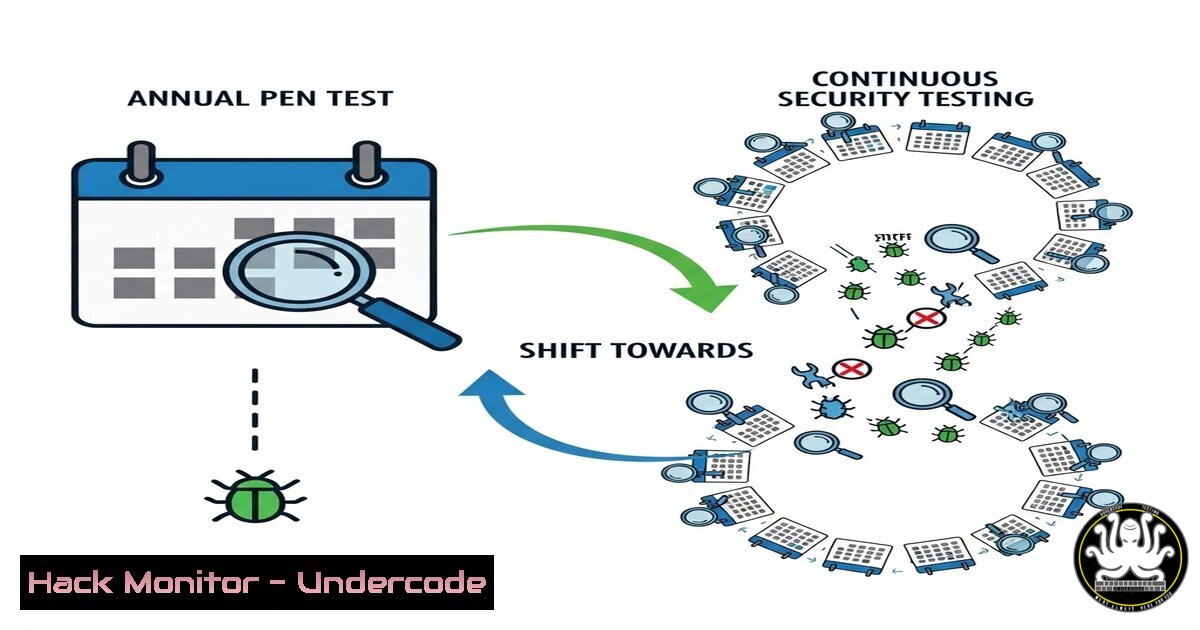
The traditional annual penetration test is becoming obsolete in the face of rapidly evolving cyber threats. The cybersecurity industry is pivoting towards “always-on” continuous security testing, a model championed by platforms like Bugcrowd that leverage global crowdsourced researchers to provide persistent vigilance and deeper risk assessment for modern organizations.
Learning Objectives:
- Understand the limitations of traditional point-in-time penetration testing.
- Learn the core components and benefits of a continuous security testing program.
- Gain practical skills for engaging with bug bounty platforms and conducting ongoing vulnerability assessments.
You Should Know:
1. The Flaw in the Annual Audit Mindset
The concept of a once-a-year security snapshot is fundamentally flawed. Attackers do not operate on an annual schedule; they probe and exploit weaknesses 24/7/365. Traditional audits provide a point-in-time grade that is outdated the moment a new patch is released or a new application feature is deployed.
`nmap -sS -sV -O –script vuln `
Step-by-step guide: This Nmap command conducts a comprehensive vulnerability scan against a target.
1. -sS: Initiates a stealth SYN scan to discover open ports.
2. -sV: Probes open ports to determine service/version information.
3. -O: Enables OS detection based on network stack fingerprints.
4. --script vuln: Executes the Nmap Scripting Engine’s (NSE) `vuln` category, which checks for known vulnerabilities in detected services.
How to use it: Run this weekly or bi-weekly against your external and internal critical assets. Compare results over time to identify new services, unexpected open ports, and newly published vulnerabilities that affect your environment. This transforms a one-off scan into a continuous monitoring process.
2. Engaging with a Bug Bounty Platform
Platforms like Bugcrowd or HackerOne act as intermediaries, managing the process of sourcing security researchers, triaging submitted vulnerabilities, and facilitating payments. Setting up a program involves defining scope, rules of engagement, and reward tiers.
curl -X POST -H "Content-Type: application/json" -d '{"title":"XSS on submit form","description":"...","severity":"medium"}' https://api.bugcrowd.com/submissions`curl
Step-by-step guide: This is a conceptual API call demonstrating how a researcher might programmatically submit a finding to a bug bounty platform's API (authentication headers are required in a real scenario).
<h2 style="color: yellow;">1.: The command-line tool for transferring data.</h2>-X POST
<h2 style="color: yellow;">2.: Specifies the HTTP POST method.</h2>-H “Content-Type: application/json”
3.: Sets the header to indicate JSON data.-d ‘{“title”:”…”]}’`: The data payload containing the vulnerability report details.
4.
How to use it: Researchers use platform-specific APIs or web portals to streamline reporting. For organizations, understanding this flow is key to integrating bounty platform data into your own SIEM or ticketing systems for continuous tracking.
3. Configuring DAST for Continuous Scanning
Dynamic Application Security Testing (DAST) tools are essential for always-on testing, simulating attacks against running web applications to find runtime vulnerabilities.
`docker run -it –rm owasp/zap2docker-stable zap-baseline.py -t https://your-test-app.com -r report.html`
Step-by-step guide: This command runs the OWASP ZAP (Zed Attack Proxy) baseline scan inside a Docker container.
1. docker run: Downloads and executes the official ZAP Docker image.
2. `owasp/zap2docker-stable`: Specifies the stable image version.
3. `zap-baseline.py`: Runs the automated baseline scan script.
-t https://...`: Defines the target URL.-r report.html`: Generates an HTML report output.
<h2 style="color: yellow;">5.How to use it: Integrate this command into a CI/CD pipeline (e.g., Jenkins, GitLab CI) to automatically scan every staging deployment before production release. This provides continuous security feedback to developers.
4. Continuous Cloud Infrastructure Hardening
Cloud environments are highly dynamic. Continuous testing must include checks for misconfigurations in infrastructure-as-code (IaC) and live cloud resources.
`!/bin/bash
Check for public S3 buckets
aws s3api list-buckets –query “Buckets[].Name” | jq -r ‘.[]’ | while read bucket; do
if aws s3api get-bucket-acl –bucket $bucket | grep -q “http://acs.amazonaws.com/groups/global/AllUsers”; then
echo “Bucket $bucket is PUBLIC!”
fi
done`
Step-by-step guide: This Bash script uses the AWS CLI to list all S3 buckets and check if any have a global read permission ACL.
1. `aws s3api list-buckets`: Lists all S3 buckets.
jq -r '.[]': Parses the JSON output to extract bucket names.- The `while` loop checks each bucket’s ACL for the “AllUsers” group, indicating public access.
How to use it: Schedule this script to run daily using `cron` or AWS Lambda. This continuous check ensures a previously private bucket doesn’t accidentally become exposed, a common cloud misconfiguration.
5. Leveraging Threat Intelligence Feeds
Always-on security isn’t just about finding your own bugs; it’s about knowing what attackers are targeting. Continuously integrating threat intelligence allows you to prioritize patching and investigations based on active exploits in the wild.
`sudo apt update && sudo apt install maltrail`
`sudo systemctl start maltrail-sensor`
Step-by-step guide: Installing and running Maltrail, a malicious traffic detection system that uses publicly available threat feeds.
1. `sudo apt update`: Updates the package list.
sudo apt install maltrail: Installs the Maltrail package.sudo systemctl start maltrail-sensor: Starts the sensor service to begin monitoring network traffic for IOCs (Indicators of Compromise).
How to use it: Deploy sensors at key network boundaries. The service continuously checks traffic against updated feeds of malicious domains, IPs, and URL patterns, providing real-time alerts on potential breaches.
6. Implementing Fuzzing for API Security
APIs are a primary attack vector. Continuous fuzzing, which involves injecting invalid or unexpected data into inputs, is critical for uncovering hidden vulnerabilities.
`git clone https://github.com/ffuf/ffuf.git`
`cd ffuf && go get && go build`
`./ffuf -w /path/to/wordlist -u https://target.com/api/FUZZ -mc 200`
Step-by-step guide: Installing and using FFuf, a fast web fuzzer.
1. Clone the FFuf repository from GitHub.
- Use the Go compiler to build the tool from source.
- The `ffuf` command runs a fuzzing attack: `-w` specifies a wordlist of paths, `-u` is the target URL with `FUZZ` as the placeholder, and `-mc 200` tells it to show responses with a 200 OK status code.
How to use it: Automate API fuzzing in your testing pipeline. Create wordlists for API endpoints, parameters, and data values. Regularly fuzz your API endpoints to discover unhandled exceptions, information leaks, or unauthorized access points.
7. The Role of SAST in Continuous Development
Static Application Security Testing (SAST) analyzes source code for vulnerabilities without executing it. Integrating SAST into version control enables continuous code analysis.
`semgrep –config=auto .`
Step-by-step guide: Using Semgrep, a lightweight SAST tool, to scan a codebase for thousands of predefined rules.
1. Install Semgrep via pip: `pip install semgrep`.
- Navigate to the root directory of your code project.
- Run `semgrep –config=auto .` to automatically scan the entire directory using Semgrep’s curated rules for common vulnerabilities (e.g., XSS, SQLi, hardcoded secrets).
How to use it: Configure a pre-commit hook in Git to run Semgrep on changed files, blocking commits that introduce critical vulnerabilities. This shifts security left and makes code review continuous.
What Undercode Say:
- ROI is Measured in Risk Reduction, Not Just Bugs Found. The value of continuous testing isn’t just a higher bug count. It’s the accelerated mean time to detection (MTTD) and remediation (MTTR), which drastically reduces the window of exposure and potential breach impact.
- The Human Element is Irreplaceable. While automation (DAST/SAST) is a pillar of continuous testing, the creativity and intuition of human researchers in a bug bounty program find the complex, business-logic flaws that tools miss. The synergy between automated scanning and human intelligence is what defines a mature always-on program.
The move to always-on testing represents a fundamental cultural shift from compliance-checking to genuine resilience. It acknowledges that security is a continuous process, not a periodic event. Organizations that fail to adopt this model are effectively blind to threats for the vast majority of the year, relying on a snapshot of their security posture that is instantly outdated. The future belongs to those who integrate security seamlessly into the fabric of their development and operations lifecycle.
Prediction:
The traditional penetration testing market will rapidly contract, becoming a niche service primarily for compliance and very specific, isolated assessments. Within five years, the “always-on” model, combining automated pipelines with crowdsourced human expertise, will become the default standard for any organization with a significant digital footprint. This will lead to a higher baseline of security but also create a more aggressive threat environment, as the continuous feedback loop will equally benefit attackers, forcing defenders to innovate at an even faster pace.
🎯Let’s Practice For Free:
IT/Security Reporter URL:
Reported By: Bugcrowd Always – Hackers Feeds
Extra Hub: Undercode MoN
Basic Verification: Pass ✅


