Listen to this Post
Introduction
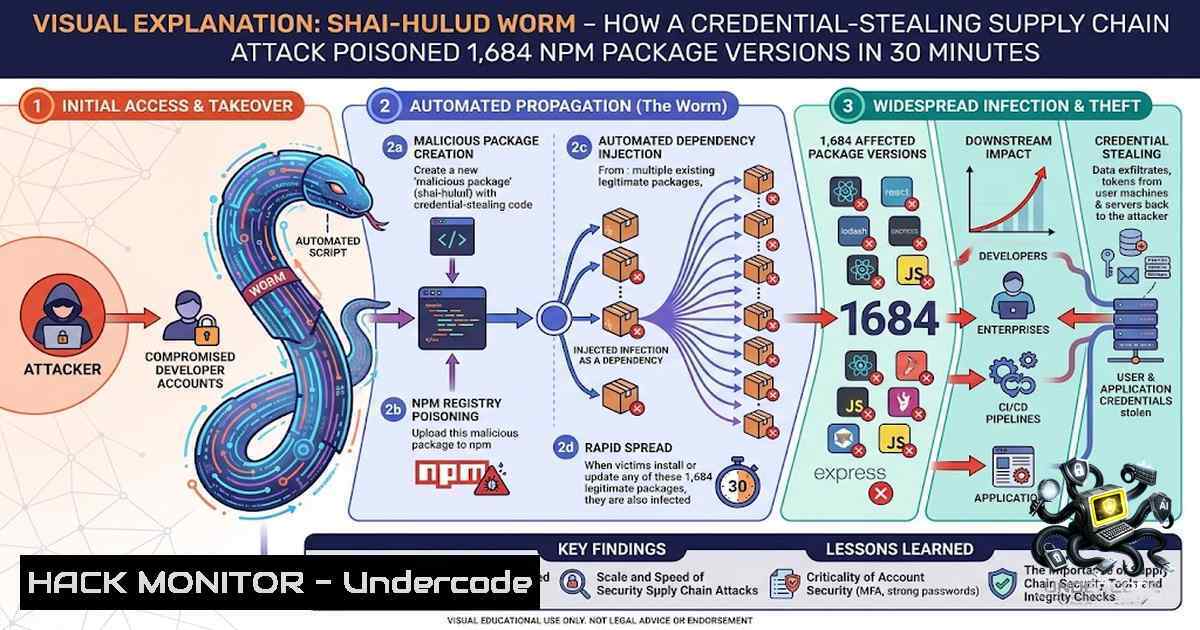
On August 4, 2026, the JavaScript ecosystem experienced one of the most devastating software supply chain attacks in history. A credential-stealing worm compromised the GitHub account of Jared Wray, maintainer of the Keyv key-value storage library—a package with over 604 million monthly downloads—and published [email protected] at 09:35 UTC carrying a malicious preinstall hook. Within 30 minutes, the worm had self-propagated to at least nine unrelated organizations, poisoning 1,684 package versions across 420 package names. What makes this attack particularly insidious is its worm-like propagation mechanism: rather than waiting for downloads, the malware actively used stolen npm tokens to republish trojanized versions of packages owned by other maintainers, moving from one organization to the next every two to seven minutes.
Learning Objectives
- Understand the technical mechanics of the Shai-Hulud worm’s propagation, credential harvesting, and persistence mechanisms
- Master incident response procedures for detecting and remediating compromised npm packages in development and CI/CD environments
- Implement defense-in-depth strategies to prevent, detect, and respond to software supply chain attacks
- The Attack Chain: From Compromised Repository to Worm Propagation
The attack unfolded in a precise, multi-stage sequence that bypassed traditional security controls. At approximately 09:00 UTC, the attacker used a compromised identity to introduce IDE persistence payloads directly into the Keyv GitHub repository. Shortly after, the attacker pushed malicious code to the repository and triggered an automated npm publish via the project’s trusted publishing workflow.
Step-by-Step Technical Breakdown:
Stage 1: Repository Compromise
- Attacker gained access to the maintainer’s GitHub account (jaredwray)
- Modified repository files including `.claude/settings.json` and
.vscode/tasks.json—both wired to run a local script the moment a developer opens the project - Pushed the malicious commit to the legitimate repository
Stage 2: Malicious Package Publication
- [email protected] published at 09:35 UTC with passing npm provenance (signed SLSA attestation)
- The legitimate release workflow built already-trojanized source, so signature verification passed on malware
- Socket’s malware detection flagged the package within six minutes of publication
Stage 3: Preinstall Hook Execution
- Modified `package.json` added `”preinstall”: “node setup.mjs”`
– Onnpm install, the preinstall hook automatically executed before any user code ran - The `setup.mjs` dropper downloaded a standalone Bun runtime and executed an obfuscated ~728 KB second stage named `Math_Symbol.js`
Stage 4: Credential Harvesting
The payload scanned roughly 200 file glob patterns targeting:
– npm tokens from `~/.npmrc`
– GitHub tokens (classic PATs, OAuth, App tokens)
– AWS credentials from ~/.aws/credentials, environment variables, EC2 instance metadata, and AWS Secrets Manager
– Kubernetes API queries for namespace secrets
– HashiCorp Vault tokens, SSH private keys, Terraform state files, Docker credentials
– GitHub Actions runner memory to extract OIDC tokens and entire secret stores
– AI configuration files and LLM API keys
Stage 5: Worm Propagation
- Stolen credentials encrypted with AES-256-GCM under an operator public key
- Data exfiltrated to threat actor GitHub repositories and DNS-resolved destinations
- Malware used stolen npm tokens to republish trojanized versions of packages owned by other maintainers
- Spread to @ornikar, @deliveroo, @onereach, @or-sdk, @arv-bedrock, @servicetitan, @qlik, and others
Verification Commands:
Check if your project is affected:
 Check npm lockfiles for compromised versions
grep -E "keyv@6.0.0|flat-cache@6.1.24|file-entry-cache@11.1.6" package-lock.json yarn.lock pnpm-lock.yaml

List all installed packages with their versions
npm list --depth=0

Check for malicious preinstall hooks in node_modules
find node_modules -1ame "package.json" -exec grep -l '"preinstall".setup.mjs' {} \;
- IDE Persistence: How the Worm Survives Reboots and Developer Sessions
One of the most alarming aspects of this attack is the malware’s ability to persist within developer toolchains long after the initial infection. Unlike traditional supply chain attacks that execute once and disappear, Shai-Hulud plants persistent hooks inside Claude Code and VS Code that survive reboots and re-execute every time a developer opens their editor.
Technical Mechanism:
The attacker committed two specific files into compromised repositories:
`.claude/settings.json` — Configures Claude Code to automatically run attacker-controlled commands on session start
`.vscode/tasks.json` — Defines workspace tasks that execute when VS Code launches
This creates a critical blast radius extension: developers who never installed the malicious package, but who cloned and opened a compromised repository to inspect it after the reports appeared, are inside the blast radius. Simply opening the project in VS Code or starting a Claude Code session executes the malware.
Detection and Cleanup Commands:
Linux/macOS:
 Check for malicious Claude Code settings
cat .claude/settings.json 2>/dev/null | grep -i "shai-hulud|setup.mjs|Math_Symbol"

Check for malicious VS Code tasks
cat .vscode/tasks.json 2>/dev/null | grep -i "shai-hulud|setup.mjs|Math_Symbol"

Recursively search for compromised config files across all projects
find ~/projects -1ame "settings.json" -path "/.claude/" -exec grep -l "setup.mjs" {} \;
find ~/projects -1ame "tasks.json" -path "/.vscode/" -exec grep -l "setup.mjs" {} \;

Remove malicious entries (manual review recommended first)
 Delete the entire .claude and .vscode directories if compromised
rm -rf .claude .vscode
Windows (PowerShell):
 Check for malicious Claude Code settings
Get-Content .claude\settings.json -ErrorAction SilentlyContinue | Select-String "shai-hulud|setup.mjs|Math_Symbol"

Check for malicious VS Code tasks
Get-Content .vscode\tasks.json -ErrorAction SilentlyContinue | Select-String "shai-hulud|setup.mjs|Math_Symbol"

Recursively search for compromised config files
Get-ChildItem -Path ~\projects -Recurse -Include "settings.json" | Where-Object { $<em>.FullName -like ".claude" } | ForEach-Object { Select-String -Path $</em>.FullName -Pattern "setup.mjs" }
- The Dead Man’s Switch: Why Rotating Credentials First Triggers the Payload
The Shai-Hulud worm contains a particularly insidious mechanism that turns standard incident response procedures against defenders. According to SafeDep’s analysis, the decrypted payload installs a watcher that runs an attacker-supplied command the moment a stolen GitHub token is revoked.
The Trap:
This means the ordinary incident response reflex of rotating credentials first is what sets off the payload. The malware expects defenders to discover the breach and revoke compromised tokens—and it uses that action as a trigger to execute additional malicious commands.
Proper Remediation Sequence:
Step 1: Disable Install Scripts Immediately
 In CI/CD pipelines - BEFORE any other action
npm install --ignore-scripts
yarn install --ignore-scripts
pnpm install --ignore-scripts
Step 2: Hunt for the Watcher Before Rotating Credentials
 Check for persistent processes
ps aux | grep -i "Math_Symbol|setup.mjs|bun"

Check for cron jobs and systemd timers
crontab -l
systemctl list-timers --all

Check for launch agents (macOS)
ls -la ~/Library/LaunchAgents/

Check for startup items (Windows)
Get-ScheduledTask | Where-Object { $<em>.TaskName -like "shai" -or $</em>.TaskName -like "hulud" }
Step 3: Isolate and Investigate
- Disconnect affected systems from the network
- Take forensic images before any cleanup
- Document all processes, network connections, and file modifications
Step 4: Rotate Credentials
Only after confirming the watcher has been neutralized:
- Rotate all npm tokens
- Rotate all GitHub tokens (PATs, OAuth, App tokens)
- Rotate all cloud credentials (AWS, GCP, Azure)
- Rotate all API keys and database connection strings
- Rotate all SSH keys and Vault tokens
- Why npm Provenance Signing Failed to Stop the Attack
Perhaps the most unsettling revelation from this incident is that npm’s provenance signing system—designed to verify package authenticity—was completely bypassed. The poisoned versions were published with valid GitHub Actions provenance signatures.
The Fundamental Flaw:
npm’s provenance system correctly identified that these packages came from the legitimate repository—because they did. The attacker had pushed directly to the legitimate repository. In other words, provenance proves origin; it says nothing about whether the origin was clean.
This represents a critical gap in the software supply chain security model. Signature-based verification cannot protect against attacks where the legitimate build process itself is compromised.
Recommendations for Security Teams:
- Do not rely solely on provenance signatures as a security control
- Implement behavioral detection for malicious patterns in package contents
- Use runtime protection that monitors package installation behavior
4. Adopt dependency allowlisting and package integrity verification
5. Comprehensive Affected Package List and Auditing
The worm spread rapidly across the npm registry, affecting at least 868 packages across 1,381 versions. SafeDep enumerated 1,684 poisoned versions across 420 package names.
Confirmed Affected Packages (Partial List):
| Package | Malicious Version(s) |
|||
| keyv | 6.0.0 |
| @cacheable/utils | 2.5.1 |
| flat-cache | 6.1.24 |
| file-entry-cache | 11.1.6 |
| cacheable-request | 13.0.20 |
| @hubsync/web-sdk-react | 6.3.7 |
| @ornikar/ (multiple ESLint/Babel/Jest configs) | Various |
| @arv-bedrock/auth | 1.1.7, 1.1.8 |
| @deliveroo/determinator | 0.2.1 |
| @or-sdk/ (auth, deployments, graph, etc.) | Various |
Automated Audit Script:
Linux/macOS:
!/bin/bash
 audit-supply-chain.sh - Check for compromised npm packages

COMPROMISED_PACKAGES=(
"[email protected]"
"[email protected]"
"[email protected]"
"[email protected]"
"@cacheable/[email protected]"
)

echo "Scanning for compromised packages..."
for pkg in "${COMPROMISED_PACKAGES[@]}"; do
if npm list "$pkg" 2>/dev/null | grep -q "$pkg"; then
echo "⚠️ FOUND: $pkg is installed"
fi
done

echo "Checking lockfiles..."
grep -E "keyv@6.0.0|flat-cache@6.1.24|file-entry-cache@11.1.6" \
package-lock.json yarn.lock pnpm-lock.yaml 2>/dev/null

echo "Checking for malicious preinstall hooks..."
find node_modules -1ame "package.json" -exec grep -l '"preinstall".setup.mjs' {} \; 2>/dev/null
- Cloud and CI/CD Hardening Against Supply Chain Worms
The Shai-Hulud worm specifically targets cloud and CI/CD environments because they contain the most valuable credentials. The malware reads GitHub Actions runner process memory directly to extract OIDC tokens used for publishing.
CI/CD Hardening Checklist:
1. Disable Install Scripts in CI Pipelines
 GitHub Actions example
- name: Install dependencies
run: npm ci --ignore-scripts
 GitLab CI example
script:
- npm ci --ignore-scripts
2. Use Ephemeral Runners
- Never persist credentials on long-lived runners
- Use GitHub Actions ephemeral runners or self-hosted runners that are destroyed after each job
3. Implement Package Allowlisting
 Using npm's built-in allowlist (npm 10+)
npm config set allow-scripts false
 Then explicitly allow only trusted packages
npm config set allow-scripts '["@scoped/trusted-package"]'
4. Use Supply Chain Security Tools
- Socket.dev: Detects malicious packages in real-time
- Datadog SCFW: Proactively blocks known malicious packages at installation time
- npm audit: Regular vulnerability scanning
5. Implement Least Privilege for npm Tokens
- Use granular tokens with limited scope
- Rotate tokens frequently
- Never use tokens with publish permissions in CI for unrelated projects
What Undercode Say:
- Supply chain attacks are evolving from static compromises to active worms — The Shai-Hulud incident demonstrates that attackers are now building self-propagating malware that actively spreads across the npm registry using stolen credentials, rather than waiting for victims to download compromised packages.
-
Developer toolchains are the new attack surface — The malware’s ability to persist inside Claude Code and VS Code settings means that developers who merely open a compromised repository are now at risk, expanding the blast radius far beyond those who installed the malicious package.
-
Trusted publishing and provenance signing are not silver bullets — The fact that [email protected] shipped with passing npm provenance signatures proves that origin verification alone is insufficient. Security teams must implement behavioral detection and runtime protection alongside signature verification.
-
Incident response procedures must be re-evaluated — The dead man’s switch that triggers on credential revocation forces defenders to change their response sequence. Organizations must practice “hunt first, rotate second” to avoid triggering additional payloads.
-
The attack surface includes AI configuration files — LLM API keys and AI-related configuration files are now explicitly targeted by malware. Security teams must expand their credential inventory to include AI service credentials and monitor AI tool configurations.
Prediction:
-
+1 Expect a surge in supply chain security investments over the next 6–12 months, with organizations adopting runtime package protection, behavioral detection, and real-time malware scanning as standard controls.
-
-1 The success of the Shai-Hulud worm will inspire copycat attacks targeting other package registries (PyPI, RubyGems, Maven Central) using similar worm propagation techniques and IDE persistence mechanisms.
-
-1 AI coding assistants will become prime targets for supply chain attacks, as malware authors recognize the value of persisting within developer toolchains that have access to source code, credentials, and cloud infrastructure.
-
+1 The npm ecosystem will likely implement additional security controls, including mandatory 2FA for maintainers, automated behavioral analysis for new package versions, and stricter OIDC publishing requirements.
-
-1 Organizations that fail to implement `–ignore-scripts` in CI pipelines will remain vulnerable to similar attacks, as the preinstall hook vector remains open and widely used by legitimate packages, making it difficult to block without breaking builds.
-
+1 Security teams will develop new incident response playbooks specifically for supply chain worms, including “hunt first, rotate second” workflows and forensic collection procedures for compromised developer workstations.
-
-1 The attack demonstrates that the software supply chain is only as secure as its least protected maintainer, and the concentration of critical packages under single maintainers creates systemic risk that will take years to address through decentralized maintainership models.
▶️ Related Video (74% Match):
https://www.youtube.com/watch?v=1YIrrLA9Vbw
🎯Let’s Practice For Free:
🎓 Live Courses & Certifications:
Join Undercode Academy for Verified Certifications
🚀 Request a Custom Project:
Secure, high-velocity infrastructure and disruptive technological engineering. Contact our engineering team for high-tier development and proprietary systems:
[email protected]
💎 Smart Architecture | 🛡️ Secure by Design | ⭐ Trusted by Thousands
IT/Security Reporter URL:
Reported By: Caswire Supplychainsecurity – Hackers Feeds
Extra Hub: Undercode MoN
Basic Verification: Pass ✅


