
Listen to this Post
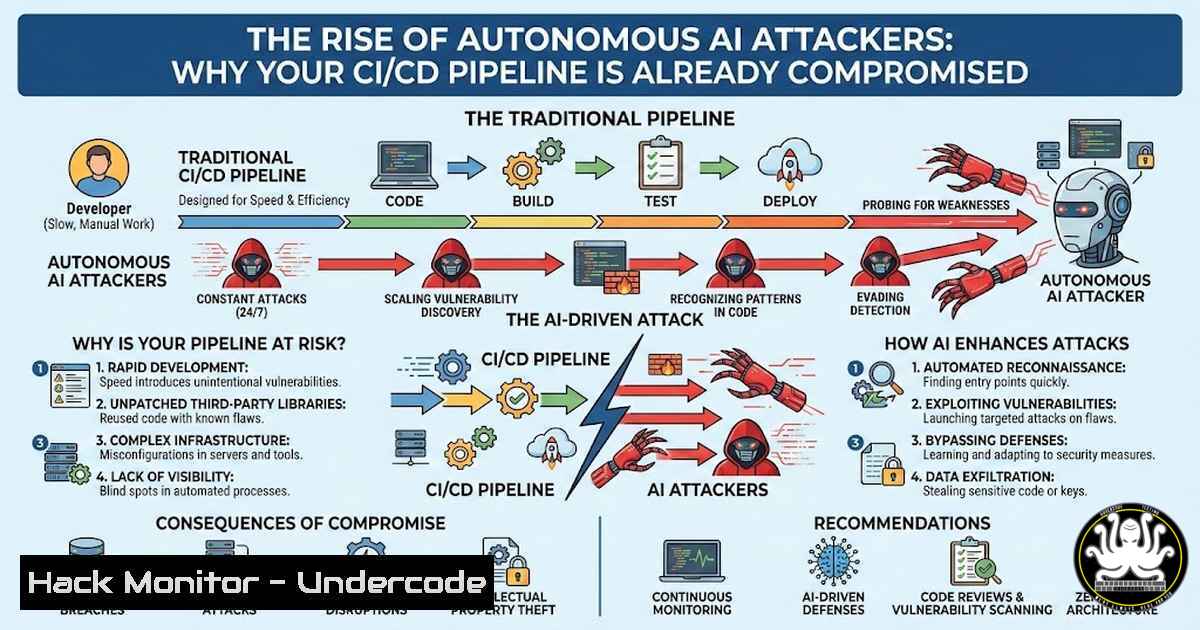
Introduction:
The cybersecurity landscape has shifted irreversibly. We are no longer hypothesizing about AI-powered attacks—they are here, operating at machine speed with relentless persistence. Recent incidents involving autonomous bots systematically targeting major tech companies’ CI/CD pipelines, combined with state-sponsored influence campaigns leveraging generative AI, signal a new era where human defenders are fundamentally outmatched in scale and reaction time. This article breaks down the current threat landscape and provides actionable steps to harden your infrastructure against autonomous adversaries.
Learning Objectives:
- Understand how autonomous AI bots are targeting CI/CD pipelines and software supply chains
- Learn to audit and secure exposed API keys across your infrastructure
- Implement detection-focused security measures against AI-evasive threats
- Master CI/CD pipeline hardening techniques against automated exploitation
You Should Know:
1. Autonomous AI Bots: The New Persistent Threat
Recent intelligence reveals an autonomous AI bot that spent an entire week systematically attacking CI/CD pipelines at major organizations including Microsoft, DataDog, and Aqua Security. The bot operated continuously, attempting multiple exploitation techniques, exfiltrating credentials, deleting releases, and pushing malicious artifacts to public marketplaces.
Step-by-step guide to detecting autonomous bot activity:
Linux/MacOS: Monitor for suspicious automated access patterns
 Check for repeated failed login attempts indicating bot scanning
sudo grep "Failed password" /var/log/auth.log | awk '{print $11}' | sort | uniq -c | sort -nr

Monitor for unusual API request patterns
sudo tcpdump -i eth0 -n 'tcp port 443' -A | grep -i "api" | grep -i "key"

Check for automated user-agent strings
sudo tail -f /var/log/nginx/access.log | grep -E "bot|crawler|python|curl|wget" | grep -v "Googlebot"
Windows PowerShell: Identify automated attack patterns
 Check security logs for brute force patterns
Get-EventLog -LogName Security -InstanceId 4625 | Select-Object -Property TimeGenerated, Message | Group-Object {$_.TimeGenerated.Date} | Sort-Object Count -Descending

Monitor for repeated API access
Get-Content C:\inetpub\logs\LogFiles\W3SVC1\u_ex.log | Select-String "api" | Select-String "key" | Group-Object {$_ -replace '^.?(\d+.\d+.\d+.\d+).$','$1'} | Sort-Object Count -Descending
- Exposed API Keys: The Silent Gateway to Your Infrastructure
Researchers have discovered that old Google API keys sitting in public website source code are silently unlocking access to Gemini with no warning. This highlights a critical vulnerability—once an API key is exposed, it remains a permanent risk.
Comprehensive API key audit checklist:
GitHub/GitLab: Scan repositories for exposed secrets
 Install and run truffleHog for deep secret scanning
docker run -it -v "$PWD:/pwd" trufflesecurity/trufflehog:latest github --org=yourorganization --repo=https://github.com/yourorg/repo

Use git-secrets to prevent committing secrets
git clone https://github.com/awslabs/git-secrets
cd git-secrets
sudo make install
git secrets --install
git secrets --register-aws

Scan entire repository history for API keys
git log -p | grep -E "(api[_-]?key|secret|token|password)\s[:=]\s['\"]?[a-zA-Z0-9_-]{16,}"
Cloud environment key rotation (AWS Example):
 List all IAM users and their access keys
aws iam list-users | jq -r '.Users[].UserName' | while read user; do
echo "User: $user"
aws iam list-access-keys --user-name $user
done

Automatically rotate old keys (older than 90 days)
aws iam list-access-keys --user-name adminuser | jq -r '.AccessKeyMetadata[] | select(.CreateDate < "2026-01-01") | .AccessKeyId' | while read key; do
aws iam update-access-key --access-key-id $key --status Inactive
aws iam create-access-key --user-name adminuser
aws iam delete-access-key --access-key-id $key
done
3. CI/CD Pipeline Hardening: Stopping Autonomous Attacks
The autonomous bot specifically targeted CI/CD pipelines. These automated workflows are particularly vulnerable because they often have elevated permissions and can trigger production deployments.
GitHub Actions security hardening:
 .github/workflows/secure-pipeline.yml
name: Secure CI/CD Pipeline
on:
push:
branches: [ main, develop ]
pull_request:
branches: [ main ]

jobs:
security-scan:
runs-on: ubuntu-latest
steps:
- uses: actions/checkout@v3

Verify commit signatures
- name: Verify signed commits
run: |
git log -1 --show-signature
if ! git log -1 --format=%G? | grep -q "G"; then
echo "Commit not signed with GPG"
exit 1
fi

Scan for secrets before deployment
- name: Secret scanning
uses: trufflesecurity/trufflehog@main
with:
extra_args: --only-verified

Restrict workflow triggers
- name: Validate workflow source
run: |
if [[ "${{ github.event_name }}" == "pull_request" ]] && [[ "${{ github.actor }}" != "trusted-developer" ]]; then
echo "Untrusted user cannot trigger production workflows"
exit 1
fi

Restrict permissions in workflow
permissions:
contents: read
pull-requests: read
actions: none
checks: none
deployments: none
GitLab CI/CD security configuration:
 .gitlab-ci.yml with enhanced security
variables:
GIT_DEPTH: 1
SAST_DISABLED: "false"
SECURE_ANALYZERS_PREFIX: "registry.gitlab.com/security-products"

stages:
- pre-check
- security
- build

pre-check:
stage: pre-check
script:
- apt-get update && apt-get install -y gpg
- git verify-commit HEAD
- |
if [ $? -ne 0 ]; then
echo "Commit not verified"
exit 1
fi

secret-detection:
stage: security
script:
- docker run --rm -v $(pwd):/src trufflesecurity/trufflehog:latest filesystem /src
only:
- main
- develop
except:
- schedules

Limit who can run pipelines
workflow:
rules:
- if: $CI_PIPELINE_SOURCE == "merge_request_event" && $CI_MERGE_REQUEST_TARGET_BRANCH_NAME == "main"
when: always
- if: $CI_COMMIT_BRANCH == "main" && $CI_COMMIT_AUTHOR =~ /^[email protected]$/
when: always
- when: never
- AI Tools as Attack Surface: Hooks, Integrations, and Local Agents
Every AI integration creates a new potential entry point. From Slack bots to code assistants, these tools often run with excessive permissions and can be manipulated by attackers.
Securing AI integrations checklist:
Linux: Monitor AI agent processes
 List all running AI-related processes
ps aux | grep -E "python.(ai|llm|gpt|tensorflow|pytorch)" | grep -v grep

Monitor file system changes by AI agents
sudo auditctl -w /etc/ai-agents/ -p wa -k ai_config
sudo auditctl -w /var/lib/ai-models/ -p wa -k ai_models

Check network connections from AI processes
sudo netstat -tupan | grep -E "$(pgrep -d'|' -f 'python.ai')"
Windows: Monitor AI tool integrations
 Check for AI agent services
Get-Service | Where-Object {$<em>.DisplayName -like "ai" -or $</em>.DisplayName -like "llm" -or $_.DisplayName -like "gpt"}

Monitor scheduled tasks created by AI tools
Get-ScheduledTask | Where-Object {$<em>.TaskName -like "ai" -or $</em>.TaskName -like "assistant"}

Review AI tool registry keys
Get-ChildItem -Path "HKLM:\SOFTWARE\Microsoft\Windows\CurrentVersion\Uninstall" | Get-ItemProperty | Where-Object {$_.DisplayName -like "ai"}
5. Beyond Static Scanning: Detection Against AI-Evasive Attacks
Traditional security scanners are being fingerprinted and evaded by sophisticated AI bots. Static URL scanning and signature-based detection are increasingly unreliable against adaptive threats.
Implement behavioral detection with Falco (Linux):
 /etc/falco/falco_rules.yaml
- rule: Detect Suspicious API Key Access Pattern
desc: Detect rapid API key attempts indicating automated scanning
condition: >
evt.type=open and
fd.name contains "api" and
proc.name != "falco" and
evt.buffer contains "key" and
(evt.time.s % 60 < 5)
output: >
Rapid API key access detected (user=%user.name command=%proc.cmdline file=%fd.name)
priority: WARNING

<ul>
<li>rule: Automated CI/CD Pipeline Scanning
desc: Detect patterns matching autonomous bot behavior
condition: >
spawned_process and
proc.cmdline contains "git" and
proc.cmdline contains "clone" and
proc.pname in (curl, wget, python) and
(evt.rawres >= 0)
output: >
Automated repository cloning detected (proc=%proc.cmdline parent=%proc.pname)
priority: NOTICE
ELK Stack for behavioral analytics:
// Elasticsearch query for bot-like behavior
{
"query": {
"bool": {
"must": [
{ "term": { "event.dataset": "nginx.access" } },
{ "range": { "@timestamp": { "gte": "now-1h" } } }
],
"filter": [
{
"script": {
"script": {
"source": "doc['client.ip'].value.toString() in params.attackers",
"params": {
"attackers": ["10.0.0.1", "10.0.0.2"]
}
}
}
}
]
}
},
"aggs": {
"request_patterns": {
"terms": {
"script": {
"source": "doc['url.original'].value.replaceAll('[0-9]','X')"
}
}
}
}
}
6. Incident Response Automation: Fighting AI with AI
When attacks are automated and persistent, manual response is insufficient. Your defense must operate at machine speed.
Automated response with Falco and Kubernetes:
 Falco alert rules with automated remediation
apiVersion: v1
kind: ConfigMap
metadata:
name: falco-rules
namespace: falco
data:
rules.yaml: |
- rule: Block Suspicious Pod Creation
condition: >
k8s_audit_event and
jevt.value[/objectRef/resource]="pods" and
jevt.value[/requestObject/spec/containers/0/image] contains "malicious"
output: >
Suspicious pod creation attempt (user=%jevt.value[/user/username])
priority: CRITICAL
action:
- kubernetes:delete
- kubernetes:block

<ul>
<li>rule: Respond to API Key Leak
condition: >
evt.type=write and
fd.name contains ".env" and
proc.name != "falco"
output: >
Potential secret exposure (file=%fd.name)
priority: HIGH
action:</li>
<li>command: "aws iam delete-access-key --access-key-id {{ .keyid }}"</li>
<li>command: "git revert {{ .commit }}"
Automated incident response with Python:
!/usr/bin/env python3
 ai_response_bot.py - Automated defender bot

import subprocess
import re
import time
from datetime import datetime

def monitor_attack_patterns():
"""Monitor logs for automated attack patterns"""
patterns = [
r'Failed password.(\d+.\d+.\d+.\d+)',
r'Invalid user.from (\d+.\d+.\d+.\d+)',
r'api.key.(AKIA[0-9A-Z]{16})'
]

attackers = {}

while True:
 Tail auth.log
with open('/var/log/auth.log', 'r') as f:
f.seek(0, 2)
while True:
line = f.readline()
if not line:
time.sleep(1)
continue

for pattern in patterns:
match = re.search(pattern, line)
if match:
ip = match.group(1) if len(match.groups()) == 1 else match.group(0)

Track attacker frequency
attackers[bash] = attackers.get(ip, 0) + 1

Autonomous threshold - block if >50 attempts in 5 minutes
if attackers[bash] > 50:
block_ip(ip)
alert_security_team(ip, attackers[bash])

def block_ip(ip):
"""Automatically block malicious IP"""
print(f"{datetime.now()}: BLOCKING attacker IP {ip}")
subprocess.run(['iptables', '-A', 'INPUT', '-s', ip, '-j', 'DROP'])

Also block in cloud firewall
subprocess.run(['aws', 'ec2', 'revoke-security-group-ingress',
'--group-id', 'sg-12345678',
'--protocol', 'tcp',
'--port', '22',
'--cidr', f'{ip}/32'])

def alert_security_team(ip, count):
"""Send automated alerts"""
subprocess.run(['curl', '-X', 'POST',
'-H', 'Content-Type: application/json',
'-d', f'{{"text": "Autonomous bot detected: {ip} with {count} attempts"}}',
'https://hooks.slack.com/services/YOUR/WEBHOOK'])

if <strong>name</strong> == "<strong>main</strong>":
monitor_attack_patterns()
What Undercode Say:
- AI-powered attacks are already operational—autonomous bots are systematically targeting CI/CD pipelines, credential stores, and cloud infrastructure without human intervention. Your security posture must assume continuous, automated compromise attempts.
- Defense must shift from prevention to detection and automated response—traditional perimeter-based security and static scanning are ineffective against adaptive AI threats. Implement behavioral analytics, automated remediation workflows, and machine-speed incident response capabilities.
- The attack surface has expanded to include AI integrations—every API key, webhook, and AI agent represents a potential entry point. Conduct comprehensive audits of exposed credentials and restrict AI tool permissions to the minimum necessary for operation.
Prediction:
Within the next 12 months, we will witness the first fully autonomous AI-to-AI cyber conflict—where defender bots and attacker bots engage in real-time strategic warfare without human intervention. This will force a fundamental restructuring of security operations centers (SOCs) toward “machine-speed incident response” teams that focus on tuning detection algorithms and response automation rather than manual threat hunting. Organizations that fail to implement automated defense mechanisms will experience breach frequencies exceeding their human response capacity, leading to catastrophic data loss and operational downtime. The winners in this new era will be those who successfully implement closed-loop security automation where detection triggers immediate containment without human latency.
▶️ Related Video (82% Match):
🎯Let’s Practice For Free:
IT/Security Reporter URL:
Reported By: Wong Jasmine – Hackers Feeds
Extra Hub: Undercode MoN
Basic Verification: Pass ✅


