Listen to this Post
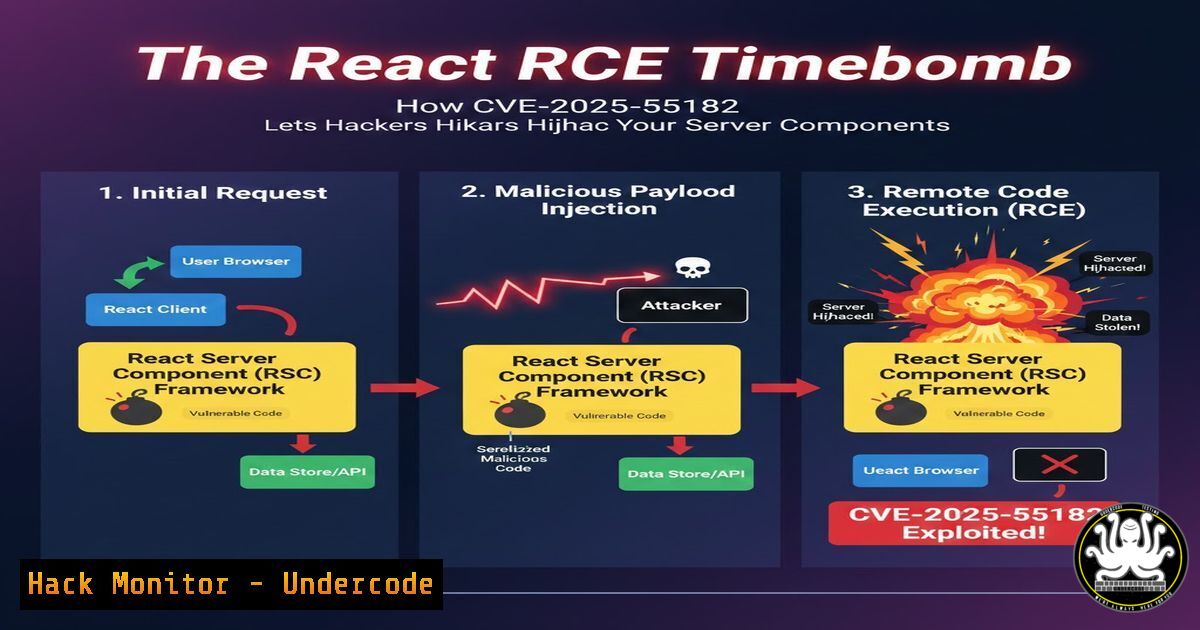
Introduction:
A critical vulnerability in React’s Server Components infrastructure has sent shockwaves through the web development community. Designated CVE-2025-55182, this flaw enables unauthenticated Remote Code Execution (RCE), allowing attackers to run arbitrary code on servers using affected React builds. With React Server Components being foundational to modern Next.js and React frameworks, this vulnerability poses a severe threat to application security across countless deployments.
Learning Objectives:
- Understand the mechanism and impact of CVE-2025-55182 on React Server Components.
- Learn how to immediately verify if your applications are vulnerable and apply the official patches.
- Implement scanning and hardening techniques to detect exploitation attempts and prevent future compromises.
You Should Know:
1. Vulnerability Scope and Immediate Identification
The vulnerability resides in the server-side data serialization/deserialization processes of three key React packages: react-server-dom-webpack, react-server-dom-parcel, and react-server-dom-turbopack. An attacker can craft a malicious payload that, when processed by the server component, bypasses safeguards and executes operating system commands.
Step‑by‑step guide:
First, identify all projects in your portfolio using React Server Components. Check the `package.json` files for the vulnerable packages.
 Linux/macOS: Find all projects with vulnerable package versions (versions prior to patched ones)
find /path/to/your/projects -name "package.json" -type f -exec grep -l "react-server-dom-webpack|react-server-dom-parcel|react-server-dom-turbopack" {} \;

For each project, check the exact version:
cd /path/to/project && npm list react-server-dom-webpack react-server-dom-parcel react-server-dom-turbopack
What this does: The `find` command locates all package.json files mentioning the vulnerable packages. `npm list` then shows the installed versions. You are vulnerable if you have any version less than 19.0.1, 19.1.2, or 19.2.1 for the respective packages.
2. Applying the Official Patches
The React team has released patched versions. Updating is non-negotiable.
Step‑by‑step guide:
Update the packages using npm or yarn. Force a clean install to ensure node_modules is correct.
 Update using npm
npm update react-server-dom-webpack@^19.0.1 react-server-dom-parcel@^19.1.2 react-server-dom-turbopack@^19.2.1

Or using yarn
yarn upgrade react-server-dom-webpack@^19.0.1 react-server-dom-parcel@^19.1.2 react-server-dom-turbopack@^19.2.1

After updating, verify the installed versions
npm list | grep "react-server-dom"
What this does: The update commands fetch the specific patched versions from the npm registry. Always verify the installation to confirm the old, vulnerable code is no longer present.
3. Client-Side Scanning with Dvuln’s Free Tool
The post mentions a free client-side scanner provided by Dvuln to support rapid triage.
Step‑by‑step guide:
- Visit the provided URL: `https://lnkd.in/gQG_xkY2` (Note: As this is a shortened LinkedIn link, ensure you are accessing it from a secure, non-production environment for triage purposes).
- Follow the tool’s instructions, which likely involve inputting your application’s URL or code repository path.
- The scanner will analyze your client-side bundles for indicators that vulnerable server component packages are being used and might flag potential exploit patterns.
What this does: This scanner performs static analysis on your front-end assets to infer the back-end technologies and their versions, helping prioritize investigation without direct server access.
4. Server-Side Log Monitoring for Exploitation Attempts
Attackers will probe for this vulnerability. Your server logs are the first line of detection.
Step‑by‑step guide:
Configure your web server (e.g., Nginx) or application logging to capture abnormal requests to RSC endpoints.
 Example: Monitoring Nginx logs for suspicious POST requests to RSC endpoints
sudo tail -f /var/log/nginx/access.log | grep -E "POST./rsc" --color=auto

Advanced: Use grep to search logs for common exploit pattern indicators (e.g., base64 encoded strings in POST data)
sudo grep -r "\\"action\\".\\"type\\":\\"dangerous\\"" /var/log/your-app-logs/
What this does: The first command tails the live access log, filtering for POST requests to typical React Server Component routes. The second command searches historical logs for JSON structures that might match a known exploit payload pattern.
5. Hardening Your Node.js Environment
Even after patching, implement defense-in-depth measures to limit the impact of any future RCE flaw.
Step‑by‑step guide:
Run your Node.js process with least privilege and in a confined environment.
 1. Create a dedicated, non-root user for your Node.js app
sudo useradd -r -s /bin/false nodeapp

<ol>
<li>Change ownership of your app directory
sudo chown -R nodeapp:nodeapp /path/to/your/app</p></li>
<li><p>Use a process manager like PM2 that can enforce user and resource limits
sudo pm2 start server.js --name "my-app" --user nodeapp</p></li>
<li><p>(Linux) Consider namespaces/seccomp profiles with Docker or systemd
Example systemd service snippet:
[bash]
User=nodeapp
Group=nodeapp
CapabilityBoundingSet=
NoNewPrivileges=yes
What this does: These steps minimize the attack surface. Running as a non-root user ensures that if an RCE occurs, the attacker gains limited system privileges. Containers or strict systemd profiles further isolate the process.
6. Validating Patch Effectiveness with a Smoke Test
After patching, conduct a basic test to ensure the application starts and serves RSCs correctly.
Step‑by‑step guide:
1. Restart your development server.
- Use `curl` to fetch a server component response and check for errors.
Example curl command to test an RSC endpoint
curl -X POST -H "Content-Type: application/json" \
-d '{"id": "test"}' \
http://localhost:3000/rsc \
-I  Use -I to check headers first, avoid executing a malicious payload
What this does: This sends a simple, benign POST request to the RSC endpoint. A successful HTTP response (e.g., 200, 404 for a non-existent ID) indicates the server is running. A critical failure might indicate a patch issue. Never test with real exploit code on production systems.
What Undercode Say:
- Patch Immediately, but Assume You’re Already Behind. The public disclosure of this RCE is a starting pistol for attackers. Automated exploitation scripts are likely already being integrated into botnets and penetration testing toolkits. Your patching window is measured in hours, not days.
- The Scanner is a Triage Tool, Not a Silver Bullet. While the free Dvuln scanner is useful for initial portfolio assessment, it cannot replace deep, authenticated code scanning and dependency analysis. It is a first step to prioritize manual verification and patching efforts.
Analysis: CVE-2025-55182 is a paradigm-shifting vulnerability for the React ecosystem. It moves threats from client-side XSS into the core of the server-side rendering model, a space many teams assumed was safer. The ease of unauthenticated exploitation makes it wormable in targeted environments. This incident underscores a harsh truth in modern DevOps: your supply chain security is only as strong as your most transient dependency. The rapid response from the React team is commendable, but the widespread use of these packages means the internet will be scanned for this vulnerability for years to come.
Prediction:
This vulnerability will accelerate three trends in web security. First, it will fuel a surge in attacks against Next.js and React-based applications in the short term, leading to data breaches and compromised infrastructure. Second, it will force a rigorous re-evaluation of trust boundaries within meta-frameworks, likely leading to more sandboxed execution environments for server components, perhaps leveraging WebAssembly or stricter V8 isolates. Finally, it will become a canonical case study, pushing regulatory and compliance frameworks to explicitly include server-side JavaScript dependencies in software bill of materials (SBOM) and critical vulnerability management requirements, extending pressure beyond traditional operating system and infrastructure layers.
🎯Let’s Practice For Free:
IT/Security Reporter URL:
Reported By: Advance Vision – Hackers Feeds
Extra Hub: Undercode MoN
Basic Verification: Pass ✅


