Listen to this Post
Introduction:
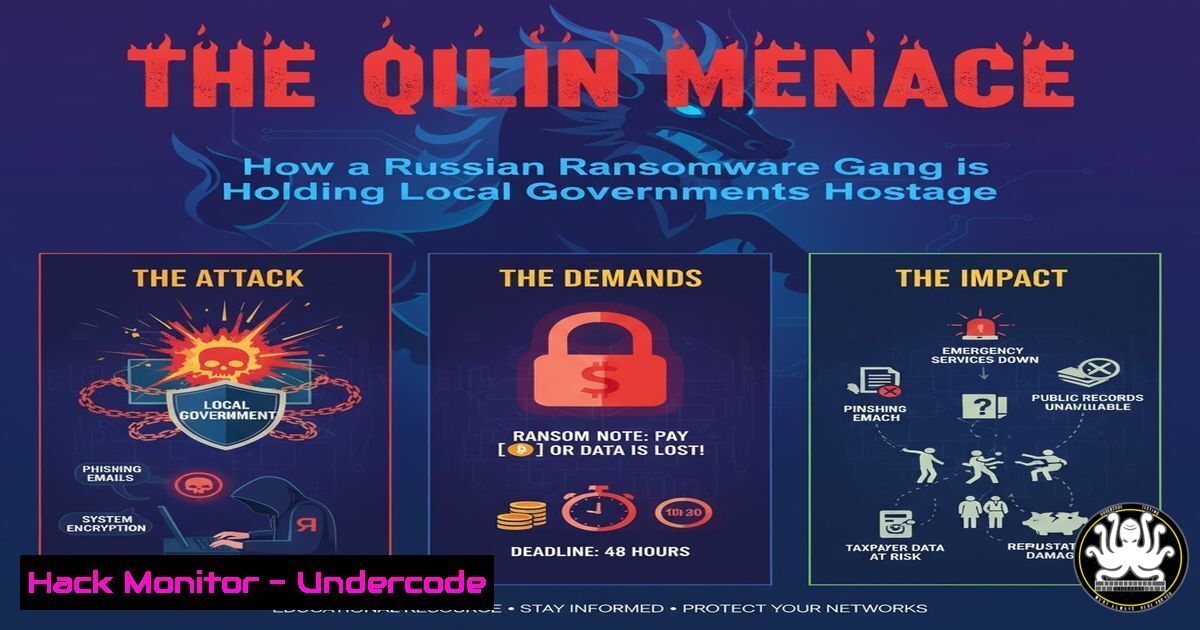
The recent ransomware attack on the city of Elne, France, by the Qilin group is a stark reminder that critical public services are prime targets for cybercriminals. This incident, part of a broader campaign against municipalities and schools, underscores the audacious operational tempo of Russian-speaking ransomware collectives. Understanding their tactics and implementing robust defensive measures is no longer optional for any organization.
Learning Objectives:
- Decrypt the Qilin ransomware group’s attack chain and commonly exploited vulnerabilities.
- Implement immediate hardening techniques for Windows and cloud environments to deter initial access.
- Develop a proactive incident response and data recovery strategy to minimize downtime and ransom pressure.
You Should Know:
1. Initial Access: Patching the Gateways Qilin Exploits
Ransomware groups rarely invent new holes; they exploit known ones. Qilin often gains initial access through unpatched public-facing applications or via compromised credentials from phishing campaigns.
Verified Commands & Tutorials:
Windows – Check for System Info & Patching Status:
`systeminfo | findstr /B /C:”OS Name” /C:”OS Version” /C:”System Boot Time”`
This command provides essential OS details, helping you assess the patch level and system uptime, which can indicate if a critical update requiring a reboot is pending.
PowerShell – Get Last Update History:
`Get-Hotfix | Sort-Object InstalledOn -Descending | Select-Object -First 10`
This PowerShell cmdlet lists the most recently installed updates, allowing for a quick verification of patch deployment against known critical vulnerabilities.
Linux – Audit for Unattended-Upgrades:
`sudo cat /etc/apt/apt.conf.d/20auto-upgrades`
On Debian/Ubuntu systems, this checks if automatic updates are configured. The output should show `APT::Periodic::Unattended-Upgrade “1”;` to confirm it’s enabled.
Nmap – External Vulnerability Assessment:
`nmap -sV –script vuln `
Warning: Only run on your own systems. This Nmap command performs a verbose scan, using the vuln script library to identify known vulnerabilities on open ports of a target machine.
2. Network Segmentation: Containing the Blast Radius
Once inside, ransomware moves laterally. Without proper network segmentation, an infection in one department can spread to critical servers, including backups.
Verified Commands & Tutorials:
Windows – View Network Shares:
`net share`
This simple command lists all shared folders on a Windows machine. Unnecessary shares are common pivot points for ransomware. Disable any that are not essential for business operations.
Windows Firewall – Enable and Log Dropped Packets:
`Set-NetFirewallProfile -Profile Domain,Public,Private -Enabled True`
`Set-NetFirewallProfile -All -LogFileName %SystemRoot%\System32\LogFiles\Firewall\pfirewall.log -LogMaxSizeKilobytes 32767 -LogAllowed True -LogBlocked True`
These PowerShell commands ensure the Windows Firewall is enabled for all profiles and configures extensive logging. Monitoring these logs can reveal lateral movement attempts.
Linux iptables – Isolate a Compromised Segment:
`iptables -A FORWARD -s -j DROP`
In a crisis, this command can be used to block all traffic originating from a potentially compromised subnet, preventing it from communicating with and infecting other network segments.
3. Fortifying Identity and Access Management
Compromised user credentials are a primary attack vector. Enforcing strong authentication and the principle of least privilege is critical.
Verified Commands & Tutorials:
Azure AD / Microsoft 365 – Enable Multi-Factor Authentication (MFA):
`Get-MsolUser -All | Where-Object {$_.StrongAuthenticationMethods -eq $null} | Select-Object DisplayName, UserPrincipalName`
This PowerShell command for MSOnline module helps identify users who do not have MFA configured, allowing you to target your security enforcement efforts.
Windows – Audit Local Administrator Accounts:
`net localgroup Administrators`
Lists all members of the local Administrators group. This should be a severely restricted list. Standard users should not have local admin rights.
Linux – Check for Sudo Privileges:
`sudo grep -r “NOPASSWD” /etc/sudoers`
This command searches for any user or group rules in the sudoers configuration that allow password-less sudo access, a significant privilege escalation risk.
- Immutability: The Last Line of Defense for Your Backups
Qilin’s first mission is to find and encrypt or delete your backups. If your backup storage is writable from your production servers, it is vulnerable.
Verified Commands & Tutorials:
Veeam – Enable Immutable Backup Repository (Linux):
On your Veeam backup repository server (Linux-based), format a filesystem with immutable attributes.
`sudo chattr +i /path/to/backup-folder/`
The `chattr +i` command makes files immutable, meaning they cannot be changed, renamed, or deleted, even by the root user. This is a core feature of a “Hardened Repository”.
AWS S3 – Enable Object Lock:
`aws s3api put-object-lock-configuration –bucket –object-lock-configuration ObjectLockEnabled=Enabled`
This AWS CLI command enables Object Lock (governance or compliance mode) on an S3 bucket, preventing stored backup objects from being deleted for a specified retention period.
Windows – Create a Backup Alert Script:
 PowerShell: Check if backup service is running
$service = Get-Service -Name "VeeamBackupSvc"
if ($service.Status -ne "Running") {
Send-MailMessage -To "[email protected]" -From "[email protected]" -Subject "BACKUP SERVICE DOWN" -Body "The Veeam Backup Service is not running." -SmtpServer "your.smtp.server"
}
A simple script to monitor the state of your backup service and alert you if it stops, which could be a sign of attacker interference.
5. Incident Response: The First 30 Minutes
When you detect a ransomware incident, panic is the enemy. A measured, pre-rehearsed response is crucial.
Verified Commands & Tutorials:
Network – Isolate a Host via CLI:
`Windows: netsh advfirewall firewall add rule name=”QUARANTINE” dir=in action=block enable=yes remoteip=any`
`Linux: iptables -A INPUT -s
These commands instantly isolate a compromised machine by blocking all inbound and outbound network traffic, containing the threat.
Forensics – Preserve Process and Network Evidence:
`Windows: tasklist /v > C:\evidence\processes.txt && netstat -ano > C:\evidence\network_connections.txt`
`Linux: ps aux > /var/evidence/processes.txt && netstat -tunlp > /var/evidence/network_connections.txt`
Quickly capture a snapshot of running processes and network connections before shutting down systems. This data is vital for later analysis.
System Log – Check for Ransomware Activity:
`Get-WinEvent -LogName Security -FilterXPath “[System[EventID=4663]]” | Where-Object { $_.Message -like “.krab” } | Select-Object -First 10`
This PowerShell command searches the Security log for specific file access events (Event ID 4663) related to a known ransomware file extension (e.g., “.krab”), helping to identify the scope of encryption.
6. Threat Hunting: Proactive Search for Qilin IOCs
Instead of waiting for an alert, proactively hunt for Indicators of Compromise (IOCs) associated with Qilin.
Verified Commands & Tutorials:
YARA – Scan for Malware Signatures:
`yara -r /path/to/qilin_rules.yar /scandirectory/`
YARA is a tool for identifying and classifying malware. You can create or download rules specific to Qilin to scan your filesystems for known malicious code patterns.
Sigma – Hunt via SIEM Rules:
Sigma is a generic signature format for SIEM systems. Converting a Sigma rule for Qilin TTPs (Tactics, Techniques, and Procedures) to your SIEM’s query language (e.g., Splunk, Elasticsearch) allows you to search logs for suspicious sequences of activity, like mass file encryption.
Windows – Hunt for Specific Registry Keys:
`reg query HKLM /f “Qilin” /s`
Searches the entire HKLM registry hive for any keys or values containing the string “Qilin”. Attackers often create persistence via registry keys.
7. Post-Incident: Building Cyber Resilience
Recovery is more than data restoration; it’s about learning and improving your security posture to prevent a recurrence.
Verified Commands & Tutorials:
Cloud – Enforce Security Policy with Azure Policy:
`New-AzPolicyDefinition -Name “enforce-mfa” -Policy ‘{ “if”: { “allOf”: [ { “field”: “type”, “equals”: “Microsoft.Resources/subscriptions” } ] }, “then”: { “effect”: “audit” } }’`
This is a simplified example. Using Azure Policy, you can define and enforce organizational standards, such as requiring MFA for all users, ensuring compliance at scale.
Password Policy – Enforce Complexity:
`Windows: net accounts /minpwlen:14`
This command sets the minimum user password length to 14 characters for the local machine, a baseline defense against credential brute-forcing.
Communication – Encrypted Channel for IR:
`gpg –encrypt –recipient [email protected] incident_report.txt`
During an incident, use GPG to encrypt sensitive status reports before sending them via email to prevent eavesdropping by the attackers.
What Undercode Say:
- Geographical Location is Irrelevant. The attack on Elne proves that modern ransomware gangs operate without borders. Their tools are automated, and their targeting is opportunistic, focusing on vulnerability over geography. A small municipality is as likely a target as a large corporation if its defenses are perceived as weak.
- Preparation Trumps Reaction. The difference between a costly multi-week outage and a manageable 48-hour recovery window is a tested, comprehensive backup and disaster recovery plan. Organizations that have invested in immutable backups and practiced their restoration procedures can deny the core leverage of the ransomware business model.
The Qilin attack is not an anomaly but a data point in a persistent trend. The analysis shows that these groups are industrializing their operations, using Ransomware-as-a-Service (RaaS) models to lower the barrier to entry for attackers. Their continued success against public sector targets highlights a systemic gap in cybersecurity funding and expertise at the local government level. The conversation must shift from if an attack will happen to proving you are prepared for when it does.
Prediction:
The success of groups like Qilin against low-hanging fruit such as municipalities will catalyze a two-tiered future. We predict a rise in state-level intervention, mandating minimum cybersecurity standards for all public bodies, funded by central governments. Concurrently, we will see the emergence of “Cyber Warlord” insurance models, where specialized private firms offer pre-breach hardening and guaranteed post-breach response services for a premium, creating a de facto segregated system of cyber resilience where only those who can afford it are truly protected. The economic pressure of repeated attacks will force this market evolution.
🎯Let’s Practice For Free:
IT/Security Reporter URL:
Reported By: Activity 7384460653429825537 – Hackers Feeds
Extra Hub: Undercode MoN
Basic Verification: Pass ✅


