Listen to this Post
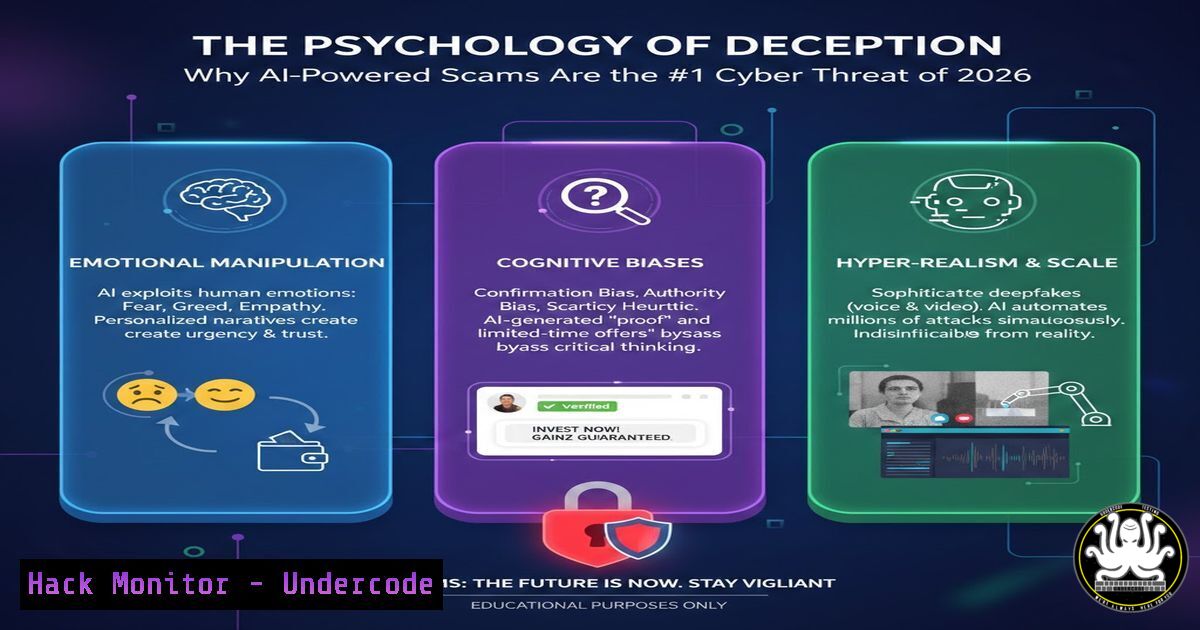
Introduction:
As we move further into 2026, the cybersecurity landscape has shifted dramatically. While malware and ransomware remain persistent dangers, the most significant threat currently exploding in scale is cyber-enabled fraud, specifically sophisticated social engineering attacks amplified by Artificial Intelligence. These attacks bypass traditional technical defenses entirely by targeting the human element—trust, emotion, and authority. Unlike a vulnerability in a firewall that can be patched, the vulnerability in human psychology is being actively weaponized through deepfake technology and high-pressure tactics like “digital arrests,” leading to massive financial and data loss.
Learning Objectives:
- Understand the mechanics of modern AI-driven social engineering and digital arrest scams.
- Learn to identify deepfake content and voice spoofing techniques.
- Implement technical controls and verification protocols to mitigate psychological manipulation attacks.
- Acquire step-by-step command-line techniques to analyze suspicious media files and secure communication channels.
You Should Know:
1. Anatomy of the Digital Arrest Scam
In a digital arrest scam, the attacker impersonates a law enforcement or government official (e.g., a police officer or tax authority). The victim receives a call, often from a spoofed official number, claiming a warrant has been issued for their arrest due to a legal violation, such as money laundering or a missed court date. The scammer uses aggressive language and urgency to pressure the victim into making an immediate cryptocurrency or wire transfer to “avoid arrest.” The attack succeeds because it creates a fight-or-flight response, overriding rational thought.
Step‑by‑step guide: How to verify and block spoofed law enforcement calls
If you receive such a call, do not engage. Hang up immediately. Do not use the callback number the scammer provides. Instead, perform independent verification.
- Linux/macOS (Network Analysis – Identify Spoofed SIP calls): If you have access to server logs or a PBX, you can analyze SIP traffic to identify spoofed sources.
Use tcpdump to capture SIP traffic on port 5060
sudo tcpdump -i eth0 -n -s 0 port 5060 -A | grep -i "From:|To:|Contact:"
Look for mismatched "From" and "Contact" headers which indicate spoofing.
- Windows (Block Spoofed Calls via Firewall): While you cannot stop the call itself on a consumer device, you can block the scammer’s callback number attempts at the network level if they are persistent.
Run PowerShell as Administrator
Add a persistent firewall rule to block a specific IP address used by the scammer (if you have captured it via a network log)
New-NetFirewallRule -DisplayName "BlockScammerIP" -Direction Outbound -LocalPort Any -Protocol Any -Action Block -RemoteAddress 192.0.2.45
Replace 192.0.2.45 with the actual malicious IP
2. Detecting AI Voice Deepfakes
AI voice cloning requires only a few seconds of audio. Scammers use this to impersonate a family member in distress or a CEO authorizing a fraudulent transfer. These attacks are difficult to detect with the human ear alone, but technical analysis can reveal artifacts.
Step‑by‑step guide: Analyzing audio for deepfake artifacts
Tools like `Sonic Visualiser` or command-line utilities like `FFmpeg` and `sox` can help visualize audio anomalies.
– Linux (Install and use FFmpeg for spectral analysis):
 Install FFmpeg if not present
sudo apt update && sudo apt install ffmpeg -y

Generate a spectrogram of the suspicious audio file
ffmpeg -i suspicious_call.wav -lavfi showspectrumpic=s=1280x720:legend=disabled spectrogram.png
 Open the generated spectrogram.png
 Deepfake audio often shows unusual uniformity or a lack of natural micro-fluctuations in the frequency spectrum compared to human speech.
– Windows (Using Python and Librosa for analysis):
 Save this as analyze_audio.py
import librosa
import librosa.display
import matplotlib.pyplot as plt
import numpy as np

Load audio file
audio_path = 'suspicious_call.wav'
y, sr = librosa.load(audio_path)

Extract Mel-frequency cepstral coefficients (MFCCs)
mfccs = librosa.feature.mfcc(y=y, sr=sr, n_mfcc=13)

Visualize MFCCs
plt.figure(figsize=(10, 4))
librosa.display.specshow(mfccs, x_axis='time')
plt.colorbar()
plt.title('MFCCs')
plt.tight_layout()
plt.savefig('mfcc_analysis.png')
 Compare with known genuine samples of the person's voice. AI-generated voices can have unnatural MFCC patterns.
3. Social Media OSINT for Credential Phishing
Attackers scrape social media (LinkedIn, Instagram) to gather personal details—names of family members, job roles, recent purchases—to craft highly personalized spear-phishing emails. They use this information to answer security questions or trick IT support desks into resetting passwords (SIM swapping).
Step‑by‑step guide: Hardening accounts against AI-driven OSINT
- Linux (Check your digital footprint with
holehe):Install holehe (Python tool) pip3 install holehe Check which online platforms are associated with your email holehe [email protected] --only-used This reveals accounts that scammers might target for password reset attempts.
- Windows (Registry tweak to disable LockScreen tips): Windows often displays lock screen images with context, which can reveal location or habits. Disable this.
Run PowerShell as Administrator
Disable lock screen spotlight features that leak metadata
Set-ItemProperty -Path "HKLM:\SOFTWARE\Policies\Microsoft\Windows\Personalization" -Name "NoLockScreen" -Value 1 -Type DWord
This is a small step in preventing location-based social engineering.
- Defending Against Phishing with MFA and Conditional Access
Multi-Factor Authentication (MFA) is the single most effective control against credential theft, even if an AI scam tricks the user into giving up their password. However, attackers now use “MFA fatigue” attacks, sending endless push notifications until the user accepts.
Step‑by‑step guide: Implementing Number Matching in Azure AD
To combat MFA fatigue, enforce number matching, which requires the user to type the number displayed on the screen rather than just clicking “Approve.”
– Azure CLI (Linux/macOS/Windows):
 Login to Azure CLI
az login

Get the Authentication Strengths policy ID (simplified - usually done via portal or Graph API)
 This conceptual command enforces number matching for a specific user group.
 The actual implementation is in the Azure Portal under "Azure Active Directory" > "Security" > "Authentication methods" > "Microsoft Authenticator".
– Conceptual Guide:
1. Go to Azure AD Portal > Security > Authentication methods > Policies.
2. Select “Microsoft Authenticator”.
- Click “Configure” and enable “Target” for your chosen group.
- Under the “Configure” tab, set Authentication mode to “Any” or “Passwordless”.
- Set “Show application name or number in notification?” to “Show application name AND number”.
- Click Save. This makes it much harder for an attacker to trick a user into approving a login they didn’t initiate.
5. The Psychology of Phishing: Analyzing Email Headers
AI can now generate perfect, grammar-error-free phishing emails. The only way to catch them is by analyzing the technical source, not the content.
Step‑by‑step guide: Tracing an email origin with command line
– Linux/macOS (using `swaks` to test and `dig` to verify):
 First, extract the "Received" headers from a suspicious email (usually in .eml format).
 Use dig to check the SPF record of the sending domain.
dig TXT example.com | grep "v=spf1"
 This shows if the sending server IP is authorized by the domain owner. If not, it's likely spoofed.
– Windows (PowerShell to parse email headers):
 Assuming you have the email headers in a variable or file
$headers = Get-Content -Path "suspicious_email.eml"
 Extract the Authentication-Results header
$headers | Select-String "Authentication-Results"
 Look for spf=pass, dkim=pass, dmarc=pass. Any 'fail' or 'softfail' is a red flag.
6. API Security: Preventing Automated Scam Bots
Scammers use bots to scrape data or test stolen credentials against APIs. Rate limiting and API keys are often bypassed.
Step‑by‑step guide: Implementing basic API rate limiting with Nginx
– Linux (Nginx configuration to mitigate bot-driven credential stuffing):
 Edit your nginx config file (e.g., /etc/nginx/sites-available/default)
 Add the following within the http block to define a limit_req zone
http {
limit_req_zone $binary_remote_addr zone=login_limit:10m rate=1r/s;

server {
location /api/login {
 Apply the rate limit. Burst allows up to 5 requests, then they are delayed.
limit_req zone=login_limit burst=5 nodelay;
proxy_pass http://your_backend;
 Add logging for blocked requests
limit_req_log_level warn;
}
}
}
 Test configuration and reload
sudo nginx -t
sudo systemctl reload nginx
What Undercode Say:
- Human-Centric Security: The primary vulnerability is no longer the operating system or the network, but the user’s cognitive biases and trust. Security awareness training must evolve from checking for malicious links to recognizing psychological manipulation tactics like urgency and authority abuse.
- Technical vs. Psychological Controls: While firewalls and antivirus are necessary, they are insufficient against AI-powered social engineering. Organizations must deploy technical controls that enforce a “trust but verify” protocol for all financial transactions and identity verification requests, such as out-of-band confirmation (e.g., calling the person on a known, separate number).
- Digital Hygiene as a Mindset: The proliferation of personal data online has created a goldmine for AI scrapers. The key takeaway is that privacy settings and minimal digital footprints are now critical components of personal cybersecurity, directly starving the AI models that fuel these scams of the data they need to be convincing.
Prediction:
By 2027, we will see the emergence of “Deepfake Detection as a Service” integrated into all major communication platforms. Furthermore, regulatory bodies will likely mandate cryptographic provenance (watermarking) for all AI-generated media to create a chain of custody. However, as detection improves, scams will pivot towards exploiting real-time generative AI vulnerabilities, such as manipulating the large language models (LLMs) that power customer service chatbots to leak sensitive data or perform unauthorized actions, shifting the battlefield from human trust to AI-on-AI deception.
▶️ Related Video (80% Match):
🎯Let’s Practice For Free:
IT/Security Reporter URL:
Reported By: Dhruvisha Parmar – Hackers Feeds
Extra Hub: Undercode MoN
Basic Verification: Pass ✅


