Listen to this Post
Introduction:
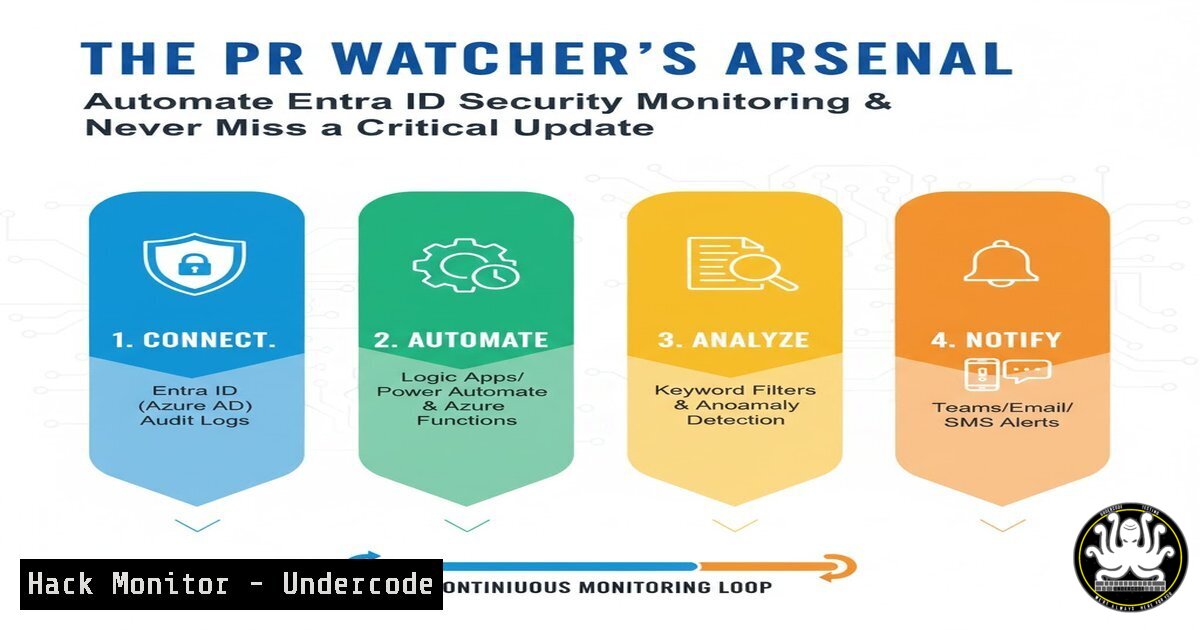
In the rapidly evolving landscape of cloud identity and security, staying ahead of Microsoft Entra ID feature changes and documentation updates is a critical, yet time-consuming, task for security professionals. Manual monitoring is no longer feasible. This article explores the powerful automation techniques and open-source tools that elite “PR tigers” use to gain a strategic advantage, ensuring their identity governance and conditional access policies are always informed by the latest intelligence.
Learning Objectives:
- Understand the core methodology for automating the tracking of Microsoft Learn documentation and GitHub pull requests.
- Learn to deploy and configure specialized tools like EntraDocsTracker and DocsTracker for continuous security monitoring.
- Develop a proactive security posture by integrating change feeds into your existing Security Operations Center (SOC) workflows.
You Should Know:
- The Core Automation Script: GitHub Webhook to Teams Notification
The original solution shared by Jan Bakker involves a PowerShell script that acts as a webhook endpoint. It parses incoming payloads from GitHub whenever a Microsoft Learn documentation pull request is created or updated, then formats and posts a rich notification to a Microsoft Teams channel.
Step-by-step guide:
This script is typically deployed as an Azure Function. The trigger is an HTTP request from a GitHub webhook.
 Example PowerShell snippet for parsing GitHub webhook payload
using namespace System.Net

param($Request, $TriggerMetadata)

Parse the JSON body from the GitHub webhook
$WebhookData = $Request.Body | ConvertFrom-Json

Extract key information from the pull request
$PR_Number = $WebhookData.number
$PR_Title = $WebhookData.pull_request.title
$PR_Url = $WebhookData.pull_request.html_url
$PR_User = $WebhookData.pull_request.user.login

Check if the PR is against a Microsoft Learn repository related to Entra
if ($PR_Url -match "microsoftlearn|AzureAD") {
 Format the card JSON for Microsoft Teams
$TeamsMessage = @{
"@type" = "MessageCard"
"title" = "New Entra Doc Update PR"
"text" = "A new Pull Request has been submitted that may impact Entra ID configuration."
"sections" = @(
@{
"activityTitle" = "PR $PR_Number: $PR_Title"
"activitySubtitle" = "Submitted by: $PR_User"
"facts" = @(
@{
"name" = "Repository:"
"value" = $WebhookData.repository.full_name
},
@{
"name" = "Branch:"
"value" = $WebhookData.pull_request.head.ref
},
@{
"name" = "State:"
"value" = $WebhookData.pull_request.state
}
)
}
)
"potentialAction" = @(
@{
"@type" = "OpenUri"
"name" = "View Pull Request"
"targets" = @(
@{
"os" = "default"
"uri" = $PR_Url
}
)
}
)
} | ConvertTo-Json -Depth 5

Post to Teams webhook connector
$TeamsWebhookUri = $env:TEAMS_WEBHOOK_URI
Invoke-RestMethod -Uri $TeamsWebhookUri -Method Post -Body $TeamsMessage -ContentType 'application/json'
}

Push-OutputBinding -Name Response -Value ([bash]@{
StatusCode = [bash]::OK
Body = "Webhook processed"
})
This script acts as the central nervous system for the monitoring operation. It filters for relevant repositories, extracts critical metadata, and delivers a actionable alert directly to a collaborative SOC environment like Teams, enabling rapid team awareness.
2. Deploying the EntraDocsTracker for Streamlined Monitoring
Daniel Bradley’s EntraDocsTracker is a more refined, dedicated tool for this purpose. It systematically scans Microsoft Learn for changes related to Entra ID and other Microsoft security services.
Step-by-step guide:
The tool can be run locally or in an Azure Container Instance. First, clone the repository and configure it.
 Clone the repository from the provided link (example using a hypothetical public Git URL)
git clone https://github.com/danielbradley/EntraDocsTracker.git
cd EntraDocsTracker

Install required Python packages
pip install -r requirements.txt

Configure the environment variables for the services you want to track
export ENTRA_DOCS_CATEGORIES="Entra,AzureAD,Identity"
export NOTIFICATION_WEBHOOK="https://yourteamswebhook.office.com/webhookb2/..."

Run the tracker. It can be scheduled via a cron job or Azure Logic App.
python tracker.py --scan-all
The tool works by querying the Microsoft Learn documentation API, comparing the current state against a known baseline, and triggering notifications for new or modified content. This provides a continuous, automated audit trail of documentation changes that could signal new features, deprecated functionality, or critical security configuration updates.
3. Leveraging the Community-Powered DocsTracker with RSS
Philip Marsh’s DocsTracker offers an alternative, community-vetted approach and includes a valuable RSS feed feature, allowing for integration into a wider variety of security information and event management (SIEM) systems.
Step-by-step guide:
Access the public interface at `https://docstracker.marshsecurity.org/`. To integrate the RSS feed into your monitoring workflow:
 Use curl to fetch the RSS feed and parse it for specific keywords
curl -s https://docstracker.marshsecurity.org/feed.rss | grep -A 10 -B 5 -i "conditional access"

You can automate this check and send it to a SIEM or log analytics workspace
FEED_CONTENT=$(curl -s https://docstracker.marshsecurity.org/feed.rss)
if [[ $FEED_CONTENT == "Breaking Change" ]]; then
echo "ALERT: Breaking Change detected in Entra Docs" | \
send-syslog -n your.siem.server -p 514
fi
For a more robust solution, you can use an Azure Logic App or PowerShell script scheduled to run every hour to poll the RSS feed, parse the XML, and create incidents in your IT Service Management (ITSM) tool like ServiceNow if high-priority changes are detected.
4. Hardening the Automation: Secure Credential Management
When deploying these scripts and tools, never hardcode secrets. Use Azure Key Vault to securely store and access webhook URLs and other credentials.
Step-by-step guide:
In an Azure Function, use managed identity to access Key Vault.
 In your Azure Function, ensure system-assigned managed identity is enabled
 Then, use this code to retrieve a secret (e.g., your Teams Webhook URI)

Install the Az.KeyVault module in your Function App requirements.psd1
@{
'Az' = '8.'
'Az.KeyVault' = '4.'
}

Code in your run.ps1
Connect-AzAccount -Identity
$TeamsWebhookUri = (Get-AzKeyVaultSecret -VaultName "my-secret-vault" -Name "TeamsWebhookUri").SecretValue
ConvertFrom-SecureString $TeamsWebhookUri -AsPlainText
This practice ensures that your automation remains secure and that sensitive URLs and tokens are not exposed in your source code, mitigating a significant supply chain attack vector.
- Proactive Threat Hunting with KQL and Change Data
Integrate the change data from these trackers into your Azure Sentinel/Microsoft Sentinel workspace. You can create a custom table to log these events and then write Kusto Query Language (KQL) queries to correlate documentation changes with identity-related security incidents.
Step-by-step guide:
Create a Logic App that receives the webhook data and writes it to a custom Log Analytics table.
// Sample KQL query to join doc change events with Azure AD sign-in logs
let DocChanges =
MyCustomDocChanges_CL
| where TimeGenerated > ago(7d)
| where Category_s has "Conditional Access"
| project DocChangeTime = TimeGenerated, Title_s, PR_Number_s;
AzureDiagnostics
| where Category == "SignInLogs"
| where TimeGenerated > ago(1d)
| project SignInTime = TimeGenerated, UserPrincipalName, AppDisplayName, ResultType, IPAddress
| join kind=inner DocChanges on $left.SignInTime >= $right.DocChangeTime and $left.SignInTime < (DocChangeTime + 1h)
| summarize Count=count() by UserPrincipalName, Title_s, IPAddress
| where Count > 5
This advanced query helps identify suspicious sign-in activity that occurs shortly after a change to Conditional Access documentation, potentially indicating an attacker researching new policies to bypass.
What Undercode Say:
- Proactivity is the New Perimeter: The most effective cloud security strategies are shifting from reactive defense to proactive intelligence gathering. Automating the consumption of vendor update streams is a fundamental pillar of this approach.
- Community Intelligence is a Force Multiplier: The existence of multiple, community-driven tools (Bradley’s, Marsh’s) demonstrates a collective understanding of this operational need and provides resilient, vetted options for security teams.
The discussion on LinkedIn reveals a sophisticated subculture of security professionals who have moved beyond manual monitoring. They treat platform documentation not as static reference material, but as a live intelligence feed. The banter about a “PR Watcher” Marvel character underscores how this function is becoming a recognized and critical role within modern SecOps. By leveraging these automation techniques, teams can transform a tedious task into a strategic capability, potentially shaving days off their response time to critical security-relevant changes in their core identity platform. This isn’t just about convenience; it’s about maintaining a hardened security posture in a dynamic environment.
Prediction:
The methodologies showcased here for Entra ID will become the standard operational practice for all major cloud platforms (AWS, GCP, SaaS applications) within the next 18-24 months. We will see the emergence of commercial Security Posture Management tools that bundle this automated change intelligence directly into their core platforms, moving beyond mere configuration assessment to include real-time tracking of vendor-introduced changes. Furthermore, this practice will be cited in post-incident reviews as a critical control that could have alerted teams to emerging attack vectors or feature deprecations that led to security gaps. The “PR Watcher” archetype will evolve into a formal role, perhaps titled “Cloud Intelligence Analyst,” responsible for curating and acting upon these automated feeds.
🎯Let’s Practice For Free:
IT/Security Reporter URL:
Reported By: Jan Bakker – Hackers Feeds
Extra Hub: Undercode MoN
Basic Verification: Pass ✅


