Listen to this Post
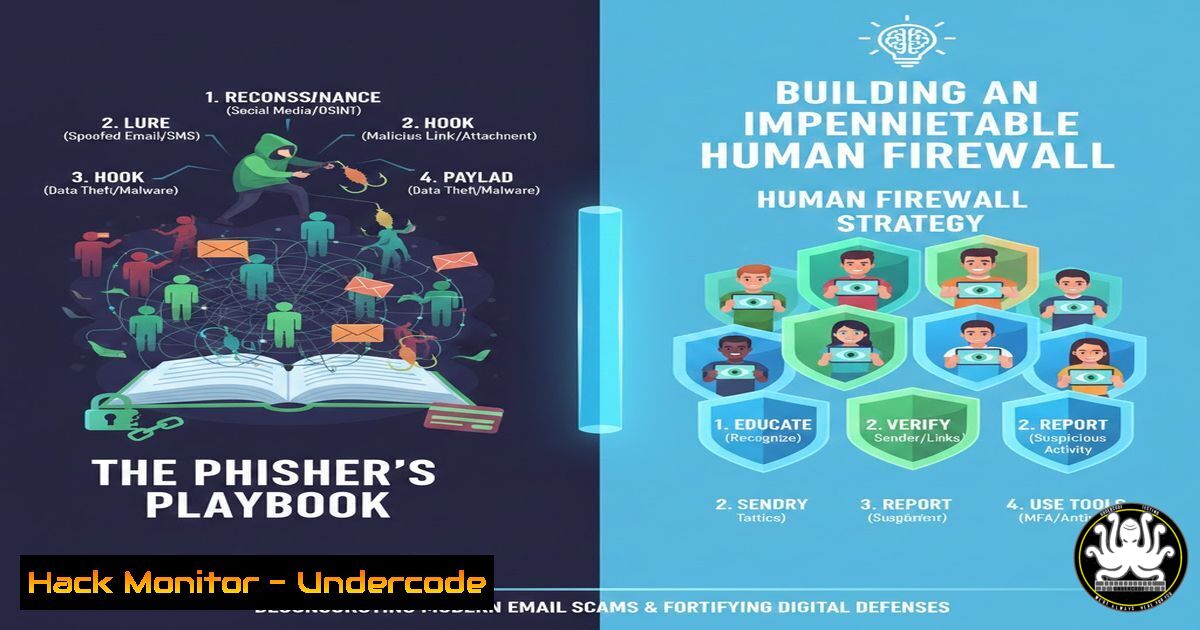
Introduction:
Phishing remains the most pervasive and effective initial attack vector in cybersecurity, accounting for a significant majority of data breaches and ransomware incidents. This social engineering tactic exploits human psychology rather than software vulnerabilities, using deceptive emails to trick individuals into surrendering credentials, downloading malware, or authorizing fraudulent transactions. As AI makes these scams more sophisticated and personalized, understanding the anatomy of a phishing attack and implementing a robust defensive posture is critical for every organization and individual.
Learning Objectives:
- Deconstruct the technical and psychological components of a phishing email.
- Implement practical, step-by-step techniques to verify sender identity and link legitimacy.
- Develop a proactive security protocol for reporting and mitigating suspected phishing attempts.
You Should Know:
1. Sender Spoofing: It’s Easier Than You Think
Attackers commonly spoof the “From” address in emails to appear legitimate. They exploit weaknesses in email protocols like SMTP, which lacks built-in authentication. Modern defenses like SPF, DKIM, and DMARC exist to combat this, but they are not universally enforced.
Step‑by‑step guide explaining what this does and how to use it.
1. Don’t Trust the Display Name: The friendly name (e.g., “IT Support”) is easily forged. Always check the actual email address.
2. Inspect Full Email Headers: This reveals the true path of the email.
In Gmail: Open email > Click three dots > “Show original”.
In Outlook: Open email > File > Properties > “Internet headers”.
3. Analyze Key Header Fields: Look for discrepancies.
`Return-Path:` Should match the domain of the `From:` address.
`Received-SPF:` A `pass` result is a good sign.
`Authentication-Results:` Check for `dkim=pass` and `dmarc=pass`.
- The Art of the Malicious Link: Hovering Is Just the Start
Hovering over a link to preview the destination URL is essential, but savvy attackers use URL shorteners, homograph attacks (using Cyrillic characters that look Latin), or embed malicious links behind legitimate-looking button text.
Step‑by‑step guide explaining what this does and how to use it.
1. Always Hover: Pause your cursor over any link. The true destination URL will typically appear in the bottom-left corner of your browser window.
2. Analyze the URL Structure:
Check for HTTPS: A lack of encryption is a red flag, but its presence doesn’t guarantee legitimacy.
Scrutinize the Domain: Is it the company’s official domain? Watch for subtle misspellings (e.g., micros0ft.com, paypa1-security.com).
3. Use a URL Expander Tool: For shortened URLs (bit.ly, t.co), use a safe expansion service like `checkshorturl.com` to see the final destination without clicking.
4. Command-Line Verification (Advanced): Use `curl` to inspect a link’s header without visiting the site.
curl -I -L "http://suspicious-url.com"
This command (-I for headers, `-L` to follow redirects) can reveal the final redirect location and server details.
3. Beyond Passwords: The Credential Harvesting Payload
The goal is often to steal login credentials via a fake login page. These pages are clones of legitimate services (Office 365, LinkedIn, banks) hosted on attacker-controlled servers.
Step‑by‑step guide explaining what this does and how to use it.
1. Never Enter Credentials from an Email Link: Always navigate to the service directly by typing the known URL into your browser or using a bookmarked link.
2. Enable Multi-Factor Authentication (MFA): This is the most critical mitigation. Even if a phisher steals your password, MFA should block their access.
3. Check for SSL/TLS Certificate Validity: On a login page, click the padlock icon in the address bar. Verify the certificate is issued to the correct organization (e.g., www.microsoft.com, not microsoft-security.zz).
4. Attachment Ambush: Malware Delivery Vehicles
Malicious attachments (PDFs, Word docs, Excel files) often contain macros or exploit code designed to install malware like keyloggers or ransomware.
Step‑by‑step guide explaining what this does and how to use it.
1. Was it Expected? Never open an unsolicited attachment, even from a known contact.
2. Use Sandbox Analysis Tools: Upload suspicious files to online sandboxes like Hybrid Analysis or Any.run to detonate them safely and see their behavior.
3. Disable Macros by Default: In Microsoft Office, set macro execution to “Disable all macros with notification” via Trust Center Settings.
4. Inspect Files on the Command Line:
Linux/Mac: Use `file` and `strings` commands to get basic info.
file suspicious_document.pdf
strings suspicious_document.pdf | head -50
- The Reporting Protocol: Turning a Threat into Intelligence
Reporting a phish is not just about deleting it; it turns an incident into defensive intelligence for your security team.
Step‑by‑step guide explaining what this does and how to use it.
1. Do Not Forward the Email: Forwarding can alter critical headers.
2. Use the “Report Phishing” Button: Most enterprise email clients (Office 365, Gmail) have a built-in reporting function. Use it.
3. For Security Teams: Analyze with MIME Tools:
Use tools like `munpack` or `mimedefang` to safely dissect the email file (.eml).
Extract indicators of compromise (IoCs) like URLs, IPs, and hashes for blocklisting.
munpack malicious_email.eml  Extracts attachments
sha256sum extracted_file.exe  Gets hash for threat intelligence lookup
What Undercode Say:
- The Human Layer is the New Perimeter: Technical controls are essential but insufficient. Continuous, engaging security awareness training that moves beyond annual compliance videos is the single most effective countermeasure.
- Assume Breach, Focus on Resilience: The goal is not to achieve 100% prevention (impossible) but to reduce the success rate and, when a phish succeeds, to limit the blast radius through segmentation, MFA, and rapid detection protocols.
Phishing is an asymmetric war of attrition against human attention. The defender must be right every time; the attacker only needs to succeed once. This reality demands a shift from viewing security awareness as an “HR topic” to treating it as a core, continuous technical defense layer. The future will see AI-driven hyper-personalized phishing (spear-phishing at scale) and deepfake audio/video used in vishing (voice phishing) campaigns. Defense will equally leverage AI for enhanced email filtering, user behavior analytics to detect anomalous actions post-click, and automated phishing simulation platforms that adapt training in real-time based on user susceptibility. The arms race is escalating from the inbox to the very perception of reality.
▶️ Related Video (82% Match):
🎯Let’s Practice For Free:
IT/Security Reporter URL:
Reported By: Radhe Cybersecurity – Hackers Feeds
Extra Hub: Undercode MoN
Basic Verification: Pass ✅


