Listen to this Post
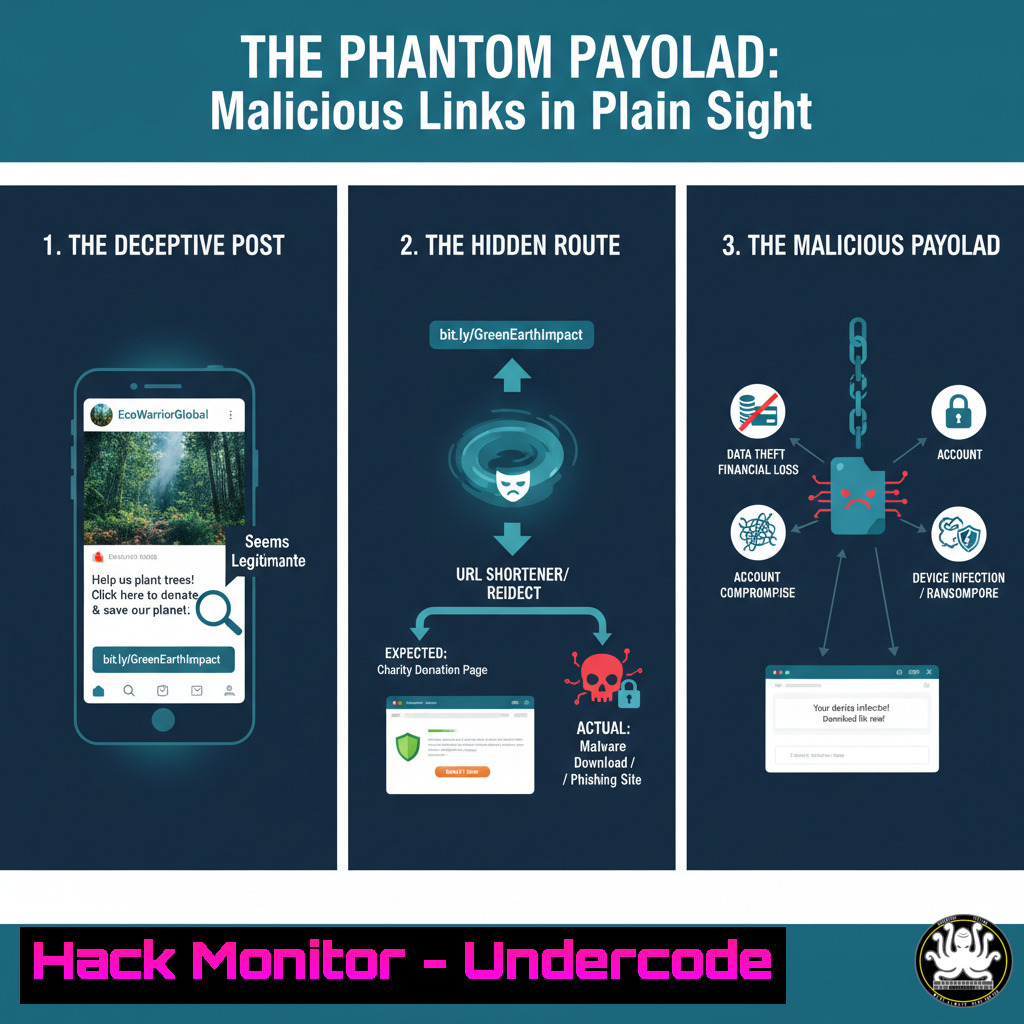
Introduction:
In the digital age, a single click can compromise an entire network. Social media platforms, integral to professional life, have become a primary vector for sophisticated cyber-attacks. This article deconstructs the anatomy of a malicious post, using a simulated LinkedIn example to demonstrate how attackers exploit trust and urgency to deliver payloads.
Learning Objectives:
- Identify the social engineering tactics used to legitimize malicious links in professional contexts.
- Master command-line and security tools to analyze URLs, domains, and potential payloads.
- Implement proactive defenses at the network, endpoint, and user-awareness levels to mitigate this threat.
You Should Know:
1. URL Deconstruction and Reputation Analysis
Before any click, the URL itself holds clues. Attackers often use link shorteners (like lnkd.in) to hide the true destination.
`curl -I “https://lnkd.in/gVxaB5yR”`
`whois sciencemediacentre.org`
Step-by-step guide:
The `curl -I` command fetches only the HTTP headers of the shortened URL. This often reveals the final destination through the `Location` header without risking a full connection to the potentially malicious site. Following this, a `whois` lookup on the destination domain checks its registration date, registrar, and contact information. A recently registered domain posing as a well-known institution is a major red flag.
2. Passive DNS Reconnaissance
Understanding what other domains are associated with the destination IP can reveal attacker infrastructure.
`nslookup sciencemediacentre.org`
`dig sciencemediacentre.org ANY`
Step-by-step guide:
`nslookup` provides the IP address of the domain. Take this IP and use it in a reverse DNS lookup or a service like VirusTotal to see all other domains resolving to the same IP. A single IP hosting hundreds of unrelated domains is a strong indicator of a malicious hosting provider. The `dig ANY` command retrieves all available DNS records (A, AAAA, MX, TXT), which can sometimes expose suspicious configurations.
3. Sandboxed Link Analysis
Safely execute the link in an isolated environment to observe its behavior.
` Using a tool like urlscan.io via API`
`curl -X POST “https://urlscan.io/api/v1/scan/” -H “Content-Type: application/json” -d ‘{“url”: “https://sciencemediacentre.org/example”, “public”: “on”}’`
Step-by-step guide:
This command submits the suspicious URL to urlscan.io, a service that renders the page in a sandboxed browser and provides a detailed report on network connections, files downloaded, and JavaScript behavior. Analyze the report for connections to known malicious IPs, attempts to exploit browser vulnerabilities, or downloads of executable files.
4. Windows PowerShell Log Analysis
If a link is clicked, immediate forensic analysis is critical. Check PowerShell logs for suspicious scripts.
`Get-WinEvent -LogName “Microsoft-Windows-PowerShell/Operational” | Where-Object {$_.TimeCreated -gt (Get-Date).AddMinutes(-10)} | Format-List`
Step-by-step guide:
This PowerShell command retrieves events from the last 10 minutes in the PowerShell operational log. Look for Event ID 4104 (script block logging) which shows the code executed by PowerShell. Malicious payloads often use PowerShell to download and run further attacks. An unexpected Base64-encoded command or a web request to an unknown domain is a critical indicator of compromise (IoC).
5. Linux Process and Network Monitoring
On a Linux endpoint, monitor for child processes spawned by the browser.
`ps aux –forest | grep -A5 -B5 firefox`
`netstat -tunlp | grep :443`
Step-by-step guide:
The `ps aux –forest` command displays running processes in a tree format, allowing you to see if the browser process (e.g., firefox) spawned any unexpected child processes like `bash` or sh. The `netstat -tunlp` command lists all listening ports and the associated processes, helping you identify unauthorized outgoing connections on port 443 (HTTPS) that may indicate a reverse shell or data exfiltration.
6. Network Intrusion Detection with Suricata
Deploy network-level detection to catch malicious patterns from any endpoint.
`sudo suricata -c /etc/suricata/suricata.yaml -i eth0 -l /var/log/suricata/`
Step-by-step guide:
This command starts the Suricata Intrusion Detection System (IDS) on interface eth0. Suricata analyzes network traffic in real-time, using rulesets to detect known malware communication patterns, exploit kit activity, and protocol anomalies. Regularly update the rules and monitor the `eve.json` log file for alerts related to domains or IPs identified during your analysis.
7. Cloud Security Group Hardening
An attacker may use a compromised machine to pivot to cloud assets. Restrict unnecessary egress traffic.
`aws ec2 describe-security-groups –group-ids sg-xxxxxxxxx`
`aws ec2 revoke-security-group-egress –group-id sg-xxxxxxxxx –ip-permissions ‘IpProtocol=tcp,FromPort=0,ToPort=65535,IpRanges=[{CidrIp=0.0.0.0/0}]’`
Step-by-step guide:
The first command lists the rules for a specified security group. The second, highly restrictive command revokes a rule that allows all outbound TCP traffic. Instead, create rules that only allow egress traffic to specific, required ports (e.g., 443 for HTTPS to trusted update servers). This prevents a compromised host from easily “phoning home” to an attacker’s command-and-control server.
What Undercode Say:
- The Illusion of Trust is the Primary Vulnerability. The attack succeeds not on technical sophistication alone, but by leveraging the trusted context of a professional network like LinkedIn. The verification badge and corporate titles are weaponized to lower the target’s guard.
- Pre-Click Intelligence is Non-Negotiable. The crucial phase of defense happens before the click. Automated technical checks (URL analysis, reputation scoring) must be paired with user training to recognize subtle social engineering cues, such as urgency (“breaking news”) and relevance to current events.
The convergence of social engineering and technical obfuscation makes this a persistent threat. Defenders must shift from a purely technical perimeter defense to a holistic strategy that includes continuous security awareness training. The endpoint is only as strong as the user’s ability to question content, no matter the source. Relying on built-in platform security is insufficient; organizations need layered defenses that assume malicious links will eventually be clicked.
Prediction:
The future of these attacks lies in hyper-personalization powered by AI. Threat actors will use AI to scrape professional profiles and craft perfectly tailored malicious posts, referencing real projects, colleagues, and industry trends. The malicious links will lead to dynamically generated landing pages that mirror legitimate corporate login portals or news sites with terrifying accuracy. The next evolution won’t be a broad phishing net but a series of highly targeted “spear-phishing” campaigns where the only red flag may be a slight anomaly in the URL or sender address, making technical pre-screening and user vigilance the absolute last line of defense.
🎯Let’s Practice For Free:
IT/Security Reporter URL:
Reported By: Derekhill Expert – Hackers Feeds
Extra Hub: Undercode MoN
Basic Verification: Pass ✅


