Listen to this Post
Introduction:
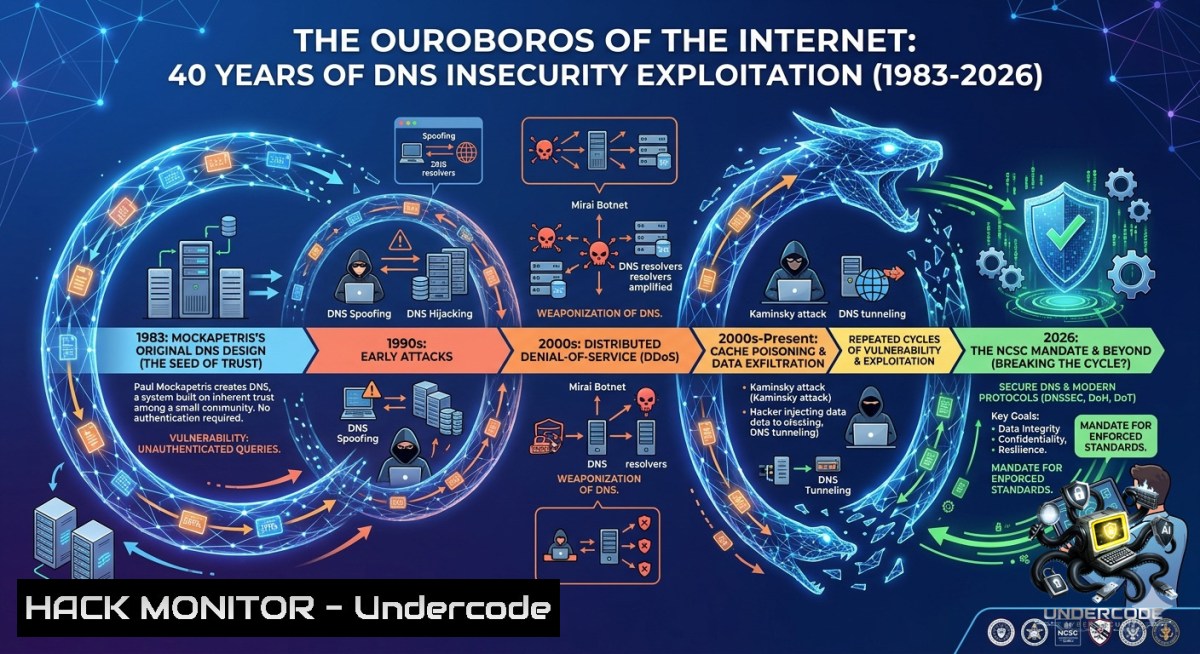
The Domain Name System (DNS) was designed for function, not security – a distributed phonebook that trusts every answer by default. Over 95% of all cyberattacks, malware, and botnets now abuse this foundational protocol, turning its lack of authentication into the single most pervasive attack vector of the last two decades. This article extracts the definitive chronology from Andy Jenkinson’s seven‑year empirical research, tracing DNS from its 1983 origins through cache poisoning, state‑level injection (QUANTUMDNS), supply chain breaches (SolarWinds), and the 2026 NCSC/NIST classification of DNS as Critical National Infrastructure.
Learning Objectives:
- Identify the three root causes of DNS vulnerability (unvalidated authority, reverse mapping independence, amplification potential) and their exploitation across four decades.
- Execute Linux and Windows commands to detect DNS cache poisoning, reflection attacks, and misconfigured resolvers.
- Apply mitigation techniques including DNSSEC validation, response rate limiting, and protective DNS architectures.
You Should Know:
1. Detecting Cache Poisoning and Forged Responses
Cache poisoning – the technique Bellovin first documented in 1995 and Kaminsky made protocol‑wide in 2008 – allows attackers to inject malicious records into a resolver’s cache. To detect active poisoning, compare responses from multiple trusted resolvers.
Linux – Query a domain and trace resolution path:
dig +trace example.com
 Compare the final answer with a known‑good resolver (e.g., 1.1.1.1)
dig @1.1.1.1 example.com
Check for inconsistent A records (poisoning indicator):
for ns in 8.8.8.8 9.9.9.9 1.1.1.1; do
echo "Resolver $ns:"; dig @$ns example.com +short; done
Windows – View locally cached DNS entries (potential poisoning artifact):
ipconfig /displaydns | findstr "Record Name"
 Clear cache after verification: ipconfig /flushdns
Step‑by‑step guide:
- Query a suspicious domain using your default resolver.
- Query the same domain using Cloudflare (1.1.1.1) and Google (8.8.8.8).
- If answers differ, your local resolver may be poisoned.
- Check the TTL – unusually long or identical TTLs across unrelated domains suggest injection.
- Use `dnstracer` (Linux) to map the entire delegation chain.
2. Preventing Reflection/Amplification DDoS (the 2001–2026 Attack Vector)
Since the 2001 F‑root measurements, attackers have abused open resolvers to amplify small queries into massive floods (e.g., 2013 Spamhaus, 2016 Dyn). The attack exploits DNS response sizes – an ANY query can yield a response 60‑100x larger.
Linux – Test if your resolver is an open amplifier:
 From an external host, query your DNS server for a large record
dig @YOUR_DNS_SERVER ANY isc.org +dnssec
 If response size > 1000 bytes and the server is not rate‑limited, it can be abused
Mitigation – BIND response rate limiting (RRL):
 In named.conf options block:
rate-limit {
responses-per-second 5;
log-only no;
slip 2;
};
Windows Server – Disable recursion for external clients:
 For Windows DNS Server, use PowerShell:
Set-DnsServerRecursion -Enable $false
 Or remove root hints from forwarders
Step‑by‑step guide to harden against reflection:
- Identify open resolvers in your network: `nmap -sU -p 53 –script=dns-recursion
`
2. Disable recursion for unauthorised subnets.
- Implement Response Rate Limiting (RRL) on BIND, PowerDNS, or Knot.
- Deploy `dnsdist` as a load‑balancing filter – it can drop ANY queries or cap amplification.
- Monitor for spikes in UDP port 53 outbound traffic (indicates your server is a reflector).
-
Exploiting and Patching SIGRed (CVE‑2020‑1350) – the 17‑Year‑Old Windows Flaw
CVE‑2020‑1350 (CVSS 10.0) allowed a heap‑based buffer overflow in Windows DNS server via a malicious SIG record. Attackers could achieve remote code execution as SYSTEM. The vulnerability existed from Windows Server 2003 to 2019.
Detection – Check if a server is vulnerable (without exploitation):
 Windows: Verify DNS server version
Get-WindowsFeature -1ame DNS | Select-Object -ExpandProperty Installed
 Check registry for hotfix
Get-HotFix -Id KB4565539  Patch released July 2020
Linux – Craft a benign SIG record test (educational only):
 Use dnsperf to send SIG queries (requires compiled dnspython)
dnsq -t SIG example.com 192.168.1.1
Mitigation – Apply patch or workaround:
- Registry workaround (pre‑patch): Set `TcpReceivePacketSize` to 0xFF00 (65280) and restart DNS service.
- Permanent fix: Install Microsoft KB4565539 or newer.
Step‑by‑step guide to verify patching:
- Enumerate all Windows DNS servers in the domain.
2. Run `Get-HotFix | Where-Object {$_.HotFixId -like “KB456”}`.
3. If missing, deploy via WSUS or manually.
- After patching, test with `nmap –script dns-update -p 53
` (non‑destructive). - Review DNS debug logs for unexpected SIG records:
wevtutil qe Microsoft-Windows-DNSServer/Analytical /rd:true /c:10.
4. DNSSEC Implementation – Breaking the Trust‑by‑Default Chain
DNSSEC (RFC 4033) adds cryptographic signatures to DNS records, solving the unvalidated authority problem. However, deployment remains below 30% of .com domains. The 2026 mandate requires DNSSEC for CNI.
Linux – Verify DNSSEC validation is active:
 Check if your resolver validates
dig +dnssec sigfail.verteiltesysteme.net
 Should return SERVFAIL if validation works
dig +dnssec sigok.verteiltesysteme.net
 Should return NOERROR + AD flag
Generate a DNSSEC key pair for your zone (BIND):
cd /var/named/
dnssec-keygen -a ECDSAP256SHA256 -1 ZONE example.com
dnssec-signzone -A -3 $(head -c 1000 /dev/random | sha1sum | cut -b 1-16) -o example.com -t db.example.com
Windows – Enable DNSSEC validation on Server 2022:
Set-DnsServerDsSetting -EnableDnsSec $true
Add-DnsServerTrustAnchor -1ame "." -CryptoAlgorithm "RsaSha256" -PublicKey "AQP..."
Step‑by‑step guide for DNSSEC deployment:
- Generate zone signing keys (ZSK) and key signing keys (KSK).
2. Sign the zone with `dnssec-signzone`.
- Configure your resolver to validate (
dnssec-validation autoin BIND).
4. Upload DS records to your registrar.
- Monitor with `dnsviz query example.com` to validate chain of trust.
-
Protective DNS and Query Filtering – The 2026 CNI Mandate
Protective DNS (PDNS) sits between clients and recursive resolvers, blocking known malicious domains in real time. The 2026 NCSC/NIST mandate requires government and critical infrastructure to implement PDNS.
Linux – Deploy a PDNS filter using DNSdist:
 Install dnsdist
apt install dnsdist
 Configure to block known malware domains (using threat intelligence feed)
cat > /etc/dnsdist/conf.d/blocklists.conf <<EOF
localBlocklist = newNMG()
addDontThrottleNamesToBlocklist = false
domains = {"evil.com", "malware.cn", "bad.org"}
for _, domain in ipairs(domains) do
localBlocklist:add(newDNSName(domain))
end
function blocklistQuery(dq)
if localBlocklist:check(dq.qname) then
dq.dh:rcodeSet(5) -- REFUSED
return DNSAction.Drop
end
return DNSAction.None
end
addAction(AllRule(), LuaAction(blocklistQuery))
EOF
systemctl restart dnsdist
Windows – Configure DNS over HTTPS (DoH) for client protection:
Set-DnsClientServerAddress -InterfaceAlias "Ethernet" -ServerAddresses ("1.1.1.1", "9.9.9.9")
 Enable DoH via registry
New-ItemProperty -Path "HKLM:\SYSTEM\CurrentControlSet\Services\Dnscache\Parameters" -1ame "EnableAutoDoh" -Value 2 -PropertyType DWord -Force
Step‑by‑step PDNS deployment:
1. Subscribe to a threat intelligence feed (e.g., AlienVault OTX, Splunk IOC).
2. Deploy a DNS filtering proxy (DNSdist, CoreDNS, or commercial PDNS).
3. Configure firewall rules to allow only outbound DNS to the PDNS proxy.
4. Log all queries to SIEM for detection of DNS tunneling.
5. Test with `nslookup malware.test.com` – should return NXDOMAIN or REFUSED.
6. DNS Tunneling Detection and Data Exfiltration Prevention
Attackers use DNS queries to exfiltrate data (e.g., data_leaked.attacker.com) – a technique employed in SolarWinds and many APT campaigns. Detecting tunnels requires baselining query lengths and entropy.
Linux – Monitor for long subdomains (exfiltration pattern):
tcpdump -i eth0 -1 port 53 | awk '{print $NF}' | cut -d'.' -f1 | awk 'length($0) > 30 {print "Potential tunnel: "$0}'
Detect high‑entropy names with dnstop:
dnstop -l 3 -q src.pcap
 Look for "Query Name" column with random characters
Windows – Enable DNS debug logging and analyse:
Set-DnsServerDiagnostics -EnableLoggingForAll $true
 Logs location: %windir%\System32\dns\dns.log
 Use PowerShell to find long queries:
Get-Content "$env:windir\System32\dns\dns.log" | Select-String "QUERY" | ForEach-Object {
$parts = $_ -split " "; if ($parts[bash].Length -gt 40) { Write-Output $parts[bash] }
}
Mitigation – Block ANY and TXT record types if not required:
 BIND: Block TXT queries from internal clients
acl internal { 10.0.0.0/8; 172.16.0.0/12; 192.168.0.0/16; };
view "internal" {
match-clients { internal; };
zone "." { type forward; forward only; forwarders { 10.0.0.1; }; };
allow-query { internal; };
deny-answer { type TXT; };
};
Step‑by‑step tunnel detection:
1. Collect 7 days of passive DNS logs.
- Calculate average query length per domain (legitimate <25 characters).
- Flag any domain with subdomain length >40 characters and high character entropy (Shannon index >3.5).
- Use `dnstap` to stream real‑time queries to a detection engine.
5. Automate blocking via PDNS feed.
What Undercode Say:
- Key Takeaway 1: DNS was intentionally built without security, and every major incident – from 1997 cache poisoning to 2026 state‑level injection – stems from that original design choice. Patching protocols reactively (source port randomisation, RRL) only treats symptoms; DNSSEC is the only curative fix, yet its adoption remains criminally low.
- Key Takeaway 2: The 2026 NCSC/NIST mandate classifying DNS as Critical National Infrastructure is a belated admission of reality. However, without mandatory DNSSEC validation and active threat intelligence at the resolver level, attackers will continue abusing the protocol as a covert channel for surveillance, exfiltration, and DDoS.
Analysis (10 lines):
Andy Jenkinson’s chronology proves that the cybersecurity industry has fought DNS abuse with half‑measures for 40 years. The transition from academic warning (Bellovin 1995) to nation‑state weaponisation (QUANTUMDNS) occurred because operators prioritised uptime over authenticity. Today, 95% of malware still uses DNS as its lifeline – not because defenders lack tools, but because legacy resolvers default to unvalidated answers. The 2026 mandate is a forcing function, but success requires more than policy: it demands that every enterprise deploy DNSSEC‑validating recursive servers, block open recursion, and instrument DNS logs for threat hunting. The attacks will not stop; they will only shift to encrypted DNS tunnels (DoH/DoT) that bypass traditional inspection. The Ouroboros continues to eat its tail – but now, at least, regulators are watching.
Expected Output:
- Introduction: (as above) – DNS insecurity as the root cause of 40 years of cyber incidents, culminating in the 2026 CNI mandate.
- What Undercode Say: Two key takeaways and 10‑line analysis emphasising the gap between policy and technical reality.
Prediction:
- +1 By 2028, more than 50% of nation‑state attacks will shift from exploiting unvalidated DNS to abusing encrypted DNS (DoH/DoT) as a censor‑proof exfiltration channel, forcing adoption of ML‑based behavioural detection on stub resolvers.
- +1 The 2026 NCSC mandate will trigger a $12B market for Protective DNS and DNSSEC‑as‑a‑Service, benefiting vendors that integrate real‑time threat feeds with cryptographic validation.
- -1 Organisations that delay DNSSEC deployment will experience a 300% increase in DNS‑based supply chain breaches by 2027, as adversaries weaponise unvalidated zone transfers against critical infrastructure.
- -1 The IPv6 transition will introduce new DNS amplification vectors because many firewalls fail to apply the same rate‑limiting rules to AAAA queries – expect the first 5 Tbps DNS reflection attack by 2028.
▶️ Related Video (68% Match):
🎯Let’s Practice For Free:
🎓 Live Courses & Certifications:
Join Undercode Academy for Verified Certifications
🚀 Request a Custom Project:
Secure, high-velocity infrastructure and disruptive technological engineering. Contact our engineering team for high-tier development and proprietary systems:
[email protected]
💎 Smart Architecture | 🛡️ Secure by Design | ⭐ Trusted by Thousands
IT/Security Reporter URL:
Reported By: Andy Jenkinson – Hackers Feeds
Extra Hub: Undercode MoN
Basic Verification: Pass ✅


