Listen to this Post
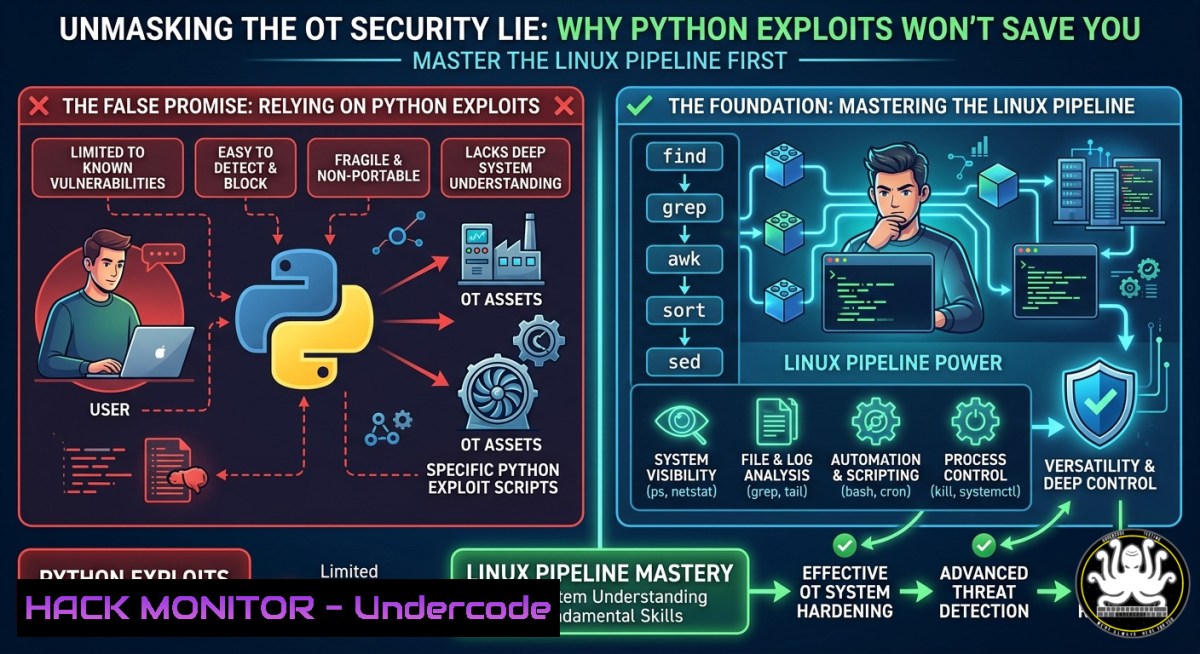
Introduction:
Penetration testing in operational technology environments is often mistakenly portrayed as writing sophisticated exploit code and manipulating memory addresses. In reality, real‑world OT security work is a battle against data: logs, files, network output, and system telemetry. AI can generate scripts in seconds, but it cannot replace the fundamental skill of navigating, filtering, and manipulating data at the command line—the true foundation of any practical security workflow.
Learning Objectives:
- Understand why Linux command‑line fundamentals, not AI‑generated scripts, form the backbone of real‑world OT penetration testing.
- Learn to build powerful detection pipelines using bash operators (
|,>,grep,awk,sed) for log analysis, incident response, and threat hunting. - Apply practical command‑line techniques to OT/ICS environments, including log parsing, protocol analysis, and automation of security tasks.
You Should Know:
- The Input → Process → Output Flow: Linux as a Data‑Control System
At its core, Linux follows a simple but powerful paradigm: input → process → output. This is not just an operating system design principle; it is the mental model every OT security professional must adopt. Bash controls this flow by connecting small, specialised tools into powerful data‑processing pipelines. Instead of writing monolithic scripts, you chain commands using:
| Operator | Purpose |
|-||
| `|` (pipe) | Connects the output of one command to the input of another |
| `>` | Redirects output to a file (overwrites) |
| `>>` | Appends output to a file |
| `<` | Reads input from a file |
| `grep` | Filters lines matching a pattern |
| `awk` | Structures and extracts fields from data |
| `sed` | Transforms text (find/replace, insert, delete) |
This is not a collection of isolated commands—it is system thinking. When you view Linux as a flow engine, you stop memorising syntax and start designing detection workflows.
2. Building a Detection Pipeline: Beyond Single Commands
Consider this simple pipeline:
cat logs | grep "login" | cut -d" " -f1 | sort | uniq
This is not “just a command”—it is a detection pipeline. It takes raw log data, extracts login events, isolates the first field (typically an IP address or username), sorts the results, and removes duplicates. In an OT context, this same pattern can be applied to SCADA logs, PLC event records, or firewall session data.
Step‑by‑step guide to building your first threat‑hunting pipeline:
- Collect raw data: Use
cat,tail -f, or `journalctl` to read logs. - Filter noise: Apply `grep` with regular expressions to isolate relevant events.
- Extract fields: Use `cut` or `awk` to pull specific columns.
- Analyse patterns: Pipe to `sort | uniq -c` to count occurrences.
- Store results: Redirect with `>` or `>>` for later correlation.
This approach scales from a single log file to multi‑gigabyte datasets, all without leaving the terminal.
- Why AI Cannot Replace Linux Fundamentals in OT Security
AI agents can generate exploit code and vulnerability reports, but they fail in four critical areas:
- Heterogeneous environments: AI models struggle with the unique, often legacy, systems found in OT networks (Proprietary PLCs, older SCADA versions, custom protocols).
- Contextual validation: AI may flag anomalies, but it cannot distinguish a genuine threat from normal industrial process noise without deep domain knowledge.
- Safety considerations: In OT, a wrong command can halt production or damage equipment. AI lacks the safety‑aware judgement required.
- Real‑time adaptability: During an incident, you need to adapt commands on the fly. AI cannot match the speed and intuition of an experienced analyst chaining tools.
As one expert noted, “AI can accelerate vulnerability discovery, but without proper validation and human analysis, it quickly becomes noise instead of value”.
4. Essential Linux Commands for OT Security Workflows
Log Analysis and Threat Hunting
| Task | Command Example |
||-|
| Monitor SSH authentication attempts | `journalctl -u ssh.service -f` |
| Extract failed login attempts by source IP | `grep “Failed password” /var/log/auth.log \| awk ‘{print $11}’ \| sort \| uniq -c \| sort -nr` |
| Count occurrences of a specific Modbus function code | `grep “Modbus” network.log \| awk ‘/Function Code: [0-9]+/’ \| sort \| uniq -c` |
| Filter out noisy debug entries | `grep -v “DEBUG” huge.log \| grep “ERROR\|WARN”` |
Network and Protocol Analysis
| Task | Command Example |
||-|
| Extract unique source IPs from a PCAP (via tshark) | `tshark -r capture.pcap -T fields -e ip.src \| sort \| uniq` |
| Count packets per protocol | `tshark -r capture.pcap -T fields -e frame.protocols \| sort \| uniq -c` |
| Find connections to a specific port | `netstat -tunapl \| grep “:502″` (Modbus default port) |
Automation and Incident Response
 Example: Monitor a log file in real‑time and alert on anomalies
tail -f /var/log/plc.log | while read line; do
if echo "$line" | grep -q "unauthorized|access denied|failed"; then
echo "[bash] $line" | tee -a incident.log
fi
done
5. OT‑Specific Forensics: Log Analysis on Industrial Systems
OT environments often produce logs in non‑standard formats. Windows event logs (.evtx) are common on SCADA servers, while Linux‑based PLCs may output plain‑text logs. Here are practical commands for both:
Windows Event Log Analysis (using PowerShell from Linux)
 Remotely query Windows Event Log for security events
powershell -Command "Get-WinEvent -LogName Security | Where-Object { $<em>.Id -eq 4624 -and $</em>.TimeCreated -gt (Get-Date).AddHours(-24) } | Format-List"
Event ID 4624 indicates a successful logon, while 4688 tracks process creation. These are critical for detecting lateral movement inside an OT network.
Linux System Log Triage
 Check for unauthorised sudo attempts
grep "sudo.COMMAND" /var/log/auth.log

Examine recent kernel messages for hardware or driver issues
dmesg | tail -50

List all listening ports and associated processes
ss -tulnp
A useful triage script from GitHub combines these commands into a single automation, covering detection, analysis, containment, eradication, and documentation phases of incident response.
6. Building a Pipeline Library: Reusable Detection Patterns
Store your most effective pipelines as shell functions or aliases for rapid reuse:
 Add to ~/.bashrc
alias count_failed_ssh='grep "Failed password" /var/log/auth.log | awk "{print $11}" | sort | uniq -c | sort -nr'
alias live_log_monitor='tail -f /var/log/syslog | grep -E "error|fail|unauthorized"'

Function to analyse Modbus traffic
modbus_scan() {
tshark -r "$1" -Y "modbus" -T fields -e modbus.func_code | sort | uniq -c
}
This approach transforms the command line from a collection of one‑offs into a detection framework. It also mirrors the philosophy of tools like Labshock, an open‑source OT/ICS security lab that teaches “real systems, real data, real thinking” through hands‑on command‑line practice.
7. Incident Response Workflow: From Detection to Eradication
A typical OT security incident might follow this command‑line driven workflow:
| Phase | Action | Command Example |
|-|–|-|
| Detect | Monitor logs for anomalies | `tail -f /var/log/plc.log \| grep “unexpected shutdown”` |
| Analyse | Extract affected IPs and timestamps | `grep “shutdown” plc.log \| awk ‘{print $1, $3}’` |
| Contain | Block suspicious IP at firewall | `iptables -A INPUT -s 192.168.1.100 -j DROP` |
| Eradicate | Kill malicious processes | `ps aux \| grep -i “malware” \| awk ‘{print $2}’ \| xargs kill -9` |
| Recover | Restore clean configuration from backup | `cp /backup/plc_config.cfg /etc/plc/config.cfg` |
| Document | Save evidence for reporting | `journalctl –since “2 hours ago” > evidence.log` |
This workflow is not “advanced hacking”—it is system control over data, exactly as Zakhar Bernhardt emphasises.
What Zakhar Bernhardt Says:
- Pentesting is not a coding job; it is system control over data. Bash is the base skill; everything else builds on it. Start with Linux flow, not tools or frameworks.
- AI can write scripts, but it cannot replace Linux basics. If you cannot navigate files, filter output, or build pipes, you cannot work real penetration testing or OT security.
- Real workflows are detection pipelines, not single commands. Understanding how to chain
grep,awk,cut,sort, and `uniq` turns raw logs into actionable intelligence.
Analysis: Zakhar’s perspective cuts through the hype surrounding AI in cybersecurity. While AI accelerates certain tasks, the fundamental ability to manipulate data streams at the command line remains a uniquely human skill. The most sophisticated SIEM is useless if you cannot verify its alerts with a quick pipeline. Labshock’s hands‑on, pipeline‑first training methodology directly addresses this gap by forcing learners to interact with real industrial data, not just theoretical concepts.
Expected Output:
Prediction: As OT/ICS environments become more digitised and connected, the demand for professionals who can navigate legacy systems without heavy automation will surge. AI will increasingly handle routine vulnerability scanning and report generation, but the “last mile” of incident response—adapting to novel threats, understanding industrial context, and safely executing commands—will remain the domain of human analysts. Consequently, training platforms like Labshock that prioritise command‑line fluency over tool‑specific knowledge will become essential for workforce development. Those who treat Linux pipelines as a “nice‑to‑have” will find themselves outpaced by defenders who master the input‑process‑output flow.
Note: For a full hands‑on environment, visit the official Labshock platform at labshocksecurity.com, a controlled OT security laboratory where you can practice detection pipelines on simulated industrial networks.
▶️ Related Video (76% Match):
🎯Let’s Practice For Free:
IT/Security Reporter URL:
Reported By: Zakharb Labshock – Hackers Feeds
Extra Hub: Undercode MoN
Basic Verification: Pass ✅


