Listen to this Post
Introduction:
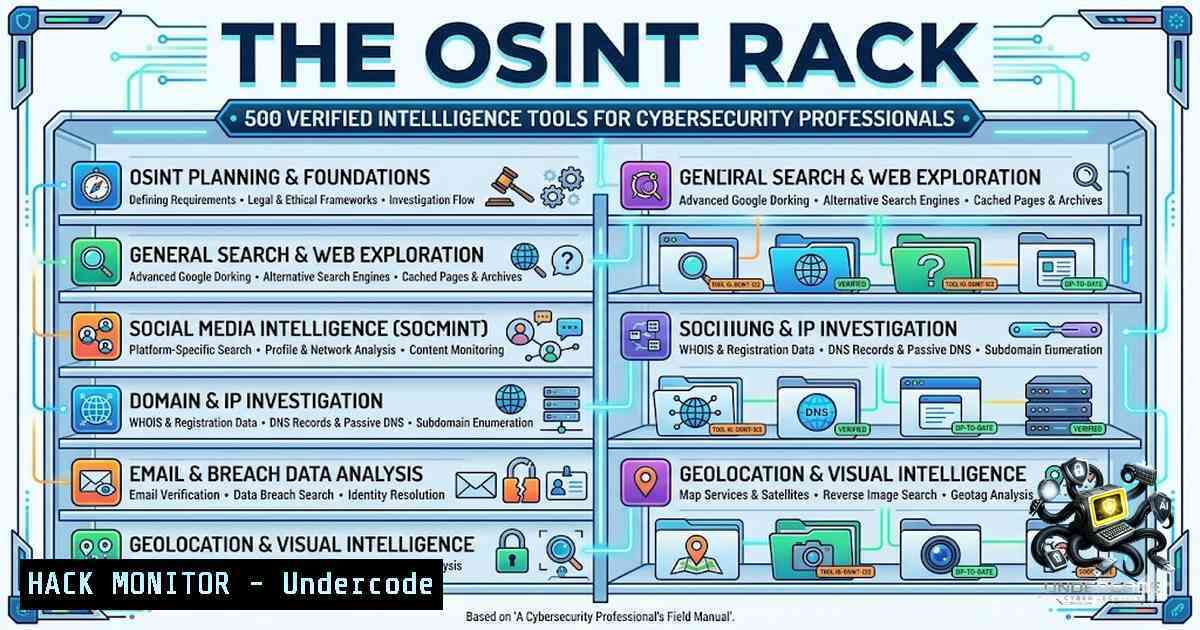
The open-source intelligence (OSINT) landscape is notoriously cluttered with dead links, abandoned repositories, and unverified tools that waste more time than they save. Mario Santella’s THE OSINT RACK just crossed the 500-tool milestone, offering a rigorously curated directory where every entry is manually tested for functionality, relevance, and real-world applicability. Unlike the AI-generated listicles that flood search results, this resource emphasizes quality over quantity—a philosophy that resonates deeply with intelligence professionals who cannot afford to gamble on broken or obsolete tools during time-sensitive investigations.
Learning Objectives:
- Master the OSINT Rack ecosystem – Navigate and leverage 500+ verified tools across email, domain, social media, and infrastructure intelligence.
- Deploy enterprise-grade OSINT workflows – Integrate SpiderFoot, Maltego, and Shodan with command-line automation for scalable reconnaissance.
- Apply niche OSINT tools effectively – Utilize specialized platforms like behindtheemail.com and WebVetted for identity verification and fraud detection.
- Harden OSINT operations – Implement API security, proxy rotation, and ethical usage guidelines to maintain operational security (OPSEC).
You Should Know:
- SpiderFoot – The Automation Workhorse for Threat Intelligence
SpiderFoot is an open-source OSINT automation platform that integrates with over 309 data sources to gather intelligence on IP addresses, domains, email addresses, usernames, Bitcoin addresses, and more. It is the backbone of many enterprise threat intelligence pipelines, capable of running hundreds of modules concurrently.
Step‑by‑step guide to installing and running SpiderFoot on Kali Linux:
 Clone the repository and install dependencies
git clone https://github.com/smicallef/spiderfoot.git
cd spiderfoot
pip3 install -r requirements.txt

Launch the web interface (listens on localhost:5001)
python3 sf.py -l 127.0.0.1:5001
Once the web UI is accessible, navigate to `http://127.0.0.1:5001`, create a new scan, and specify your target (domain, IP, or email). SpiderFoot will begin enumerating DNS records, WHOIS data, subdomains, and even breach database mentions.
For headless (CLI) operation:
 Run a scan against a target domain and output results to JSON
python3 sf.py -s example.com -m all -o json > scan_results.json

List all available modules
python3 sf.py -T
Pro Tip: Many modules require API keys (e.g., Shodan, VirusTotal, HaveIBeenPwned). Identify these by the lock icon in the UI and configure them under the Settings tab before running scans.
- Maltego – Visual Link Analysis for Entity Correlation
Maltego remains the gold standard for visualizing relationships between people, organizations, domains, and digital infrastructure. Its transform-based architecture allows investigators to pivot from a single email address to a sprawling graph of social accounts, DNS records, and netblocks.
Step‑by‑step guide to setting up Maltego Graph Community Edition (CE):
- Create a Maltego ID account – This is required to access transforms and cloud services.
2. Install Maltego CE on Kali Linux:
sudo apt update && sudo apt install maltego -y
Alternatively, download the `.run` installer from the official website.
3. Launch Maltego and log in with your Maltego ID.
4. Start a new graph and drag a Domain entity onto the canvas. Right-click and select Run Transform → To DNS Name to resolve subdomains, or To Email Address to discover associated contacts.
Windows Installation:
 Download the Windows installer from maltego.com
 Run the .exe and follow the wizard
 After installation, launch Maltego and authenticate with your Maltego ID
Advanced Workflow: Combine Maltego with stealer log data to map credential exposures against corporate domains. The platform’s Monitor and Evidence modules enable continuous tracking of digital footprints.
- Shodan – The Internet’s Connected Device Search Engine
Shodan indexes billions of internet-connected devices, from webcams to industrial control systems. Its CLI and REST API are indispensable for attack surface mapping and vulnerability discovery.
Setting up the Shodan CLI on Linux/macOS:
 Install via pip
pip3 install shodan

Initialize with your API key (obtain from shodan.io after registration)
shodan init YOUR_API_KEY

Basic search – find all devices running Apache in the US
shodan search "Apache" --countries US --limit 10

Download raw results for offline analysis
shodan download apache_results "Apache" --limit 100

Parse downloaded data to JSON
shodan parse --fields ip_str,port,org,hostnames apache_results.json.gz
On Windows (PowerShell):
 Install Shodan CLI
pip install shodan

Set API key
shodan init YOUR_API_KEY

Launch an on-demand scan of a specific IP range
shodan scan submit 192.168.1.0/24
Streaming API for real‑time monitoring:
 Stream all alert-triggering events
shodan stream --alert=all
This is particularly useful for SOC analysts monitoring exposed databases or unpatched services. Always ensure your Shodan usage complies with the target organization’s terms of service and local cybersecurity laws.
- behindtheemail.com – Identity Intelligence from a Single Email
This niche OSINT platform transforms an email address into a detailed digital profile by correlating public records, social accounts, professional history, and breach exposure data. It is a prime example of the lesser-known tools that THE OSINT Rack champions.
Step‑by‑step guide to using behindtheemail.com effectively:
- Navigate to behindtheemail.com and enter the target email address.
2. Review the aggregated results, which typically include:
- Associated social media profiles (LinkedIn, Twitter, GitHub)
- Data breach appearances (via HaveIBeenPwned integration)
- Professional history extracted from public resumes and directories
- Potential fraudulent indicators (e.g., disposable domain, mismatched metadata)
- Cross-validate findings with complementary tools like Holehe (CLI-based email enumeration) or Epieos for phone-1umber correlation.
CLI alternative using Holehe:
 Install Holehe
pip3 install holehe

Check email across 120+ platforms
holehe [email protected]
This approach is invaluable for fraud prevention, KYC verification, and social engineering risk assessments.
5. WebVetted – Passive Identity Security Review
WebVetted performs passive OSINT by querying cached data, public registries, and historical breach archives without ever interacting with the target’s devices or sending notifications. It is designed for discreet, non-intrusive background checks.
How to conduct a WebVetted security review:
- Access the WebVetted platform (webvetted.com) and initiate a Security Review.
2. Input the target’s email, domain, or username.
3. Analyze the generated report, which includes:
- Exposed credentials from past breaches
- Publicly visible digital footprints
- Risk scores based on historical data leaks
- Act on findings – If the tool returns nothing, it indicates a low passive exposure profile; however, always supplement with active reconnaissance if legally permitted.
Integration with corporate workflows: Use WebVetted as a pre-employment screening layer or as part of a vendor risk assessment program. Its passive nature ensures no alert is triggered on the target’s side, maintaining operational secrecy.
6. Building a Modular OSINT Pipeline with Python
For analysts who prefer programmatic control, combining multiple OSINT APIs into a single Python script enables repeatable, automated investigations.
Example Python script using Shodan, SpiderFoot (via REST), and HaveIBeenPwned:
import requests
import json

Shodan lookup
SHODAN_API_KEY = "your_key_here"
target_ip = "8.8.8.8"
shodan_url = f"https://api.shodan.io/shodan/host/{target_ip}?key={SHODAN_API_KEY}"
response = requests.get(shodan_url)
print(json.dumps(response.json(), indent=2))

HaveIBeenPwned breach check
email = "[email protected]"
hibp_url = f"https://haveibeenpwned.com/api/v3/breachedaccount/{email}"
headers = {"hibp-api-key": "your_hibp_key"}
breaches = requests.get(hibp_url, headers=headers)
print(breaches.json())
API Security Considerations:
- Store API keys as environment variables (
export SHODAN_API_KEY=...) rather than hardcoding. - Implement rate limiting (e.g.,
time.sleep(1)) to avoid throttling. - Use proxy rotation (
requests.get(url, proxies={"http": proxy})) to distribute requests and avoid IP-based bans.
7. Cloud Hardening for OSINT Operations
When running OSINT tools in the cloud (AWS, Azure, GCP), harden your instances to prevent exposure of your investigative infrastructure:
- Restrict inbound traffic – Use security groups to allow only your IP address.
- Enable VPC flow logs – Monitor for anomalous outbound connections.
- Rotate credentials regularly – Use IAM roles with least-privilege permissions.
- Employ bastion hosts – Route all OSINT traffic through a hardened jump box.
Linux hardening commands:
 Block all incoming ports except SSH (port 22) and your custom web UI port
sudo ufw default deny incoming
sudo ufw allow 22/tcp
sudo ufw allow 5001/tcp  SpiderFoot web UI
sudo ufw enable

Install fail2ban to prevent brute-force SSH attacks
sudo apt install fail2ban -y
sudo systemctl enable fail2ban
Windows hardening (PowerShell):
 Block all inbound traffic except RDP and specific ports
New-1etFirewallRule -DisplayName "Block All Inbound" -Direction Inbound -Action Block
New-1etFirewallRule -DisplayName "Allow RDP" -Direction Inbound -LocalPort 3389 -Protocol TCP -Action Allow
New-1etFirewallRule -DisplayName "Allow SpiderFoot" -Direction Inbound -LocalPort 5001 -Protocol TCP -Action Allow
What Undercode Say:
- Key Takeaway 1: The OSINT Rack’s 500-tool milestone underscores a fundamental shift in the intelligence community—away from bloated, unverified directories and toward curated, battle-tested resources. This is not merely a list; it is a quality filter that saves analysts countless hours of dead-end testing.
-
Key Takeaway 2: Niche tools like behindtheemail.com and WebVetted demonstrate that OSINT is not exclusively about the heavyweights (Maltego, Shodan, SpiderFoot). Specialized platforms often yield higher-fidelity intelligence for specific use cases such as fraud detection, identity verification, and discreet background screening.
Analysis: The manual verification process behind THE OSINT Rack addresses a critical pain point in cybersecurity: tool fatigue. With thousands of OSINT tools proliferating annually, professionals struggle to separate signal from noise. By enforcing a “does it work?” gatekeeper, Santella has created a de facto standard for tool credibility. Furthermore, the global diversity of users—spanning every continent—highlights that OSINT requirements are not monolithic; regional preferences, language barriers, and legal frameworks all influence tool selection. The Rack’s success lies in its adaptability and commitment to real-world utility over academic completeness.
Prediction:
- +1 The OSINT Rack will evolve into a community-driven validation platform, incorporating user ratings, usage analytics, and real-time uptime monitoring—transforming from a static directory into a dynamic intelligence ecosystem.
-
+1 As AI-generated content continues to flood the OSINT space, manually curated resources like THE OSINT Rack will gain premium status, becoming essential subscriptions for enterprises and government agencies alike.
-
-1 The sheer volume of 500+ tools may overwhelm novice analysts, leading to analysis paralysis and potential misuse of powerful reconnaissance capabilities without proper ethical guardrails.
-
-1 Adversaries will increasingly scrape directories like THE OSINT Rack to identify which tools defenders are using, potentially crafting countermeasures or honeypots specifically targeting popular modules.
-
+1 The emphasis on lesser-known tools will spur innovation, as developers of niche platforms receive increased visibility and community feedback, accelerating the maturation of the entire OSINT tooling landscape.
▶️ Related Video (76% Match):
https://www.youtube.com/watch?v=aD-U2kP0vNk
🎯Let’s Practice For Free:
🎓 Live Courses & Certifications:
Join Undercode Academy for Verified Certifications
🚀 Request a Custom Project:
Secure, high-velocity infrastructure and disruptive technological engineering. Contact our engineering team for high-tier development and proprietary systems:
[email protected]
💎 Smart Architecture | 🛡️ Secure by Design | ⭐ Trusted by Thousands
IT/Security Reporter URL:
Reported By: Mariosantella Osint – Hackers Feeds
Extra Hub: Undercode MoN
Basic Verification: Pass ✅


