Listen to this Post
Introduction:
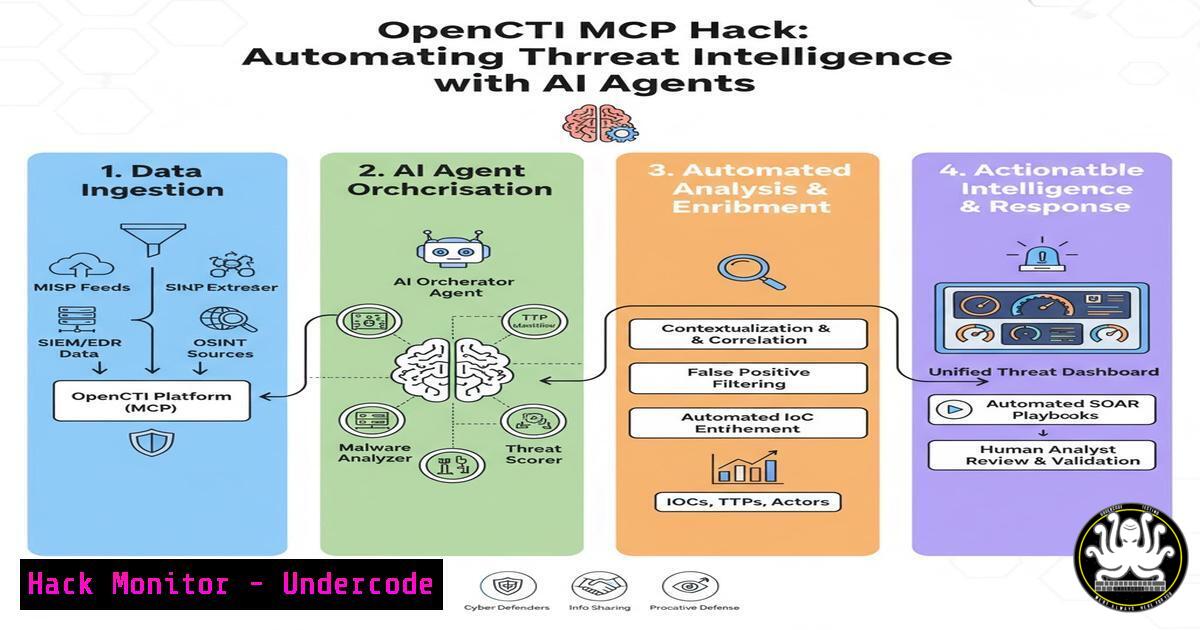
The fusion of Threat Intelligence Platforms (TIPs) with AI agents is revolutionizing cybersecurity operations. By building a Model Context Protocol (MCP) server for OpenCTI, security professionals can now grant AI assistants direct, structured access to a rich corpus of threat data, transforming passive intelligence into an active, queryable knowledge base. This integration moves beyond simple data retrieval, enabling AI to perform complex analysis, generate contextual reports, and provide reasoned security recommendations directly within collaborative environments like Slack or Microsoft Teams.
Learning Objectives:
- Understand the fundamental architecture and purpose of the Model Context Protocol (MCP) in bridging AI and security tools.
- Learn how to build and deploy a custom MCP server to connect an AI agent to the OpenCTI threat intelligence platform.
- Master the commands and techniques for querying OpenCTI data, analyzing threats, and generating actionable intelligence reports through an AI interface.
You Should Know:
1. Demystifying the Model Context Protocol (MCP)
The Model Context Protocol is an open standard developed by Anthropic to create a unified bridge between AI models and external tools and data sources. Think of it as a universal adapter that allows an AI agent to interact with specialized systems, like OpenCTI, in a secure and standardized way. Instead of the AI having inherent, hard-coded knowledge of every API, the MCP server acts as a translator, exposing specific “tools” or “resources” that the AI can call upon. For cybersecurity, this means an AI can now “learn” the intricate details of your threat intelligence data without being retrained on that specific dataset, enabling it to answer complex questions about threat actors, malware campaigns, and indicators of compromise in real-time.
Step-by-step guide explaining what this does and how to use it.
Conceptualize the Flow: The interaction follows a clear sequence. A user asks a question in a chat interface (e.g., “What recent campaigns is APT29 associated with?”). The AI agent, aware of the available MCP tools, sends a request to the OpenCTI MCP server. The server, in turn, uses the OpenCTI GraphQL API to query the database. The returned data is formatted and sent back to the AI agent, which then synthesizes a natural language response for the user.
Core MCP Components: An MCP implementation consists of two main parts. The MCP Server (your custom Python script for OpenCTI) defines the available tools and handles the communication with the external system. The MCP Client is the application (like an AI-powered chat platform) that connects to the server and makes the tools available to the AI model. This separation of concerns ensures security and modularity.
- Building Your OpenCTI MCP Server: A Technical Deep Dive
Building the server involves creating a Python application that leverages the `mcp` library and the OpenCTI Python client. This server defines the specific functions—”tools” in MCP parlance—that the AI can execute. The foundational tool is the `query_opencti` function, which provides a flexible gateway for the AI to run any valid GraphQL query against your OpenCTI instance. This is the engine of your integration, allowing for both broad and highly specific intelligence gathering.
Step-by-step guide explaining what this does and how to use it.
Prerequisites Setup:
 Create a virtual environment
python -m venv opencti-mcp-venv
source opencti-mcp-venv/bin/activate  On Windows: `opencti-mcp-venv\Scripts\activate`

 Install required libraries
pip install mcp opencti-client
Server Code Foundation (server.py):
import mcp
from opencti import OpenCTIApiClient

Initialize the OpenCTI client (config from environment variables is recommended)
opencti_client = OpenCTIApiClient(
url="https://your-opencti-instance.com",
token="your-api-token"
)

Create a new MCP server
server = mcp.Server("opencti-mcp-server")

Define the primary query tool
@server.list_tools()
async def query_opencti(query: str) -> str:
"""
Execute a GraphQL query against the OpenCTI platform and return the results.

Args:
query (str): A valid GraphQL query string for OpenCTI.
"""
try:
 Use the OpenCTI client's raw_query method
result = opencti_client.query(query)
return str(result)
except Exception as e:
return f"An error occurred: {str(e)}"

Run the server (this uses stdio for communication)
if <strong>name</strong> == "<strong>main</strong>":
mcp.run(server.transport())
Running the Server:
python server.py
This starts the server and waits for connections from an MCP client.
3. Crafting Specialized Tools for Proactive Threat Analysis
While a general `query_opencti` tool is powerful, creating specialized tools makes the AI agent more efficient and user-friendly. These tools wrap complex GraphQL queries into simple, descriptive functions. For instance, a tool called `search_indicator` is far more intuitive for an analyst than having to construct a full GraphQL query from scratch. This layer of abstraction is key to operationalizing the integration.
Step-by-step guide explaining what this does and how to use it.
Adding a Specialized Tool (server.py):
@server.list_tools()
async def search_indicators(value: str) -> str:
"""
Search for indicators of compromise (IoCs) by value (e.g., IP, domain, hash).

Args:
value (str): The value of the indicator to search for.
"""
graphql_query = """
query SearchIndicators($value: String) {
indicators(filters: { mode: and, filters: [{ key: "value", values: [$value] }], filterGroups: [] }) {
edges {
node {
id
value
type
created
modified
objectLabel { name }
}
}
}
}
"""
try:
result = opencti_client.query(graphql_query, {"value": value})
return str(result)
except Exception as e:
return f"An error occurred while searching for indicators: {str(e)}"
Example AI Interaction:
User: “Check if the IP address 185.153.196.133 is in our OpenCTI platform.”
AI Agent: (Internally calls `search_indicators(“185.153.196.133”)`)
Response: “According to OpenCTI, the IP 185.153.196.133 is associated with the ‘Cobalt Gang’ and is tagged as a malicious indicator, first seen on 2023-11-15.”
4. Operationalizing Intelligence: From Data to Actionable Reporting
The true power of this integration is realized when the AI is tasked with synthesizing information and generating actionable outputs. By chaining MCP tool calls, the AI can gather data on a threat actor, correlate it with recent incidents, and automatically draft a summary report for a security briefing. This transforms raw data into a strategic asset without manual intervention.
Step-by-step guide explaining what this does and how to use it.
Creating a Report Generation Tool (server.py):
@server.list_tools()
async def get_campaigns_by_threat_actor(actor_name: str) -> str:
"""
Retrieve all campaigns associated with a specific threat actor.

Args:
actor_name (str): The name of the threat actor (e.g., 'APT29').
"""
graphql_query = """
query GetCampaignsByThreatActor($name: String) {
threatActors(filters: { mode: and, filters: [{ key: "name", values: [$name] }], filterGroups: [] }) {
edges {
node {
name
campaigns {
edges {
node {
name
description
first_seen
last_seen
}
}
}
}
}
}
}
"""
try:
result = opencti_client.query(graphql_query, {"name": actor_name})
return str(result)
except Exception as e:
return f"An error occurred while fetching campaigns: {str(e)}"
Workflow in Action: An analyst can ask, “Summarize the latest campaigns by Lazarus Group and list their primary IOCs.” The AI will use the `get_campaigns_by_threat_actor` tool, then potentially the `search_indicators` tool linked to those campaigns, and finally compose a consolidated, human-readable report.
5. Hardening the MCP Server for Production Security
Deploying an MCP server that connects to a critical system like OpenCTI requires stringent security measures. The server must be protected against unauthorized access and the AI’s access must be scoped precisely to follow the principle of least privilege. This involves secure configuration, network isolation, and robust input validation.
Step-by-step guide explaining what this does and how to use it.
Secure Credential Management: Never hardcode API tokens. Use environment variables or a secrets manager.
 In your shell profile or deployment script
export OPENCTI_URL="https://your-instance.com"
export OPENCTI_TOKEN="your-secure-api-token"
Then, in your Python code:
import os
opencti_client = OpenCTIApiClient(
url=os.environ.get("OPENCTI_URL"),
token=os.environ.get("OPENCTI_TOKEN")
)
Input Sanitization: Add checks to your tool functions to prevent injection or malformed queries.
async def search_indicators(value: str) -> str:
 Basic input validation
if not value or len(value) < 3:
return "Error: Indicator value must be at least 3 characters long."
 ... rest of the function code
Network Security: Run the MCP server and client on the same host or within a secure, isolated network segment. Use firewall rules to restrict inbound connections to the server’s port (if using a socket transport instead of stdio).
What Undercode Say:
- Democratization of Threat Intelligence: This integration significantly lowers the barrier to entry for leveraging complex threat intelligence. Junior analysts and professionals outside the SOC can now “converse” with the data, asking natural questions without needing expertise in GraphQL or the internal schema of OpenCTI.
- The Shift from Reactive to Proactive AI: This isn’t just a fancy query interface. It’s a foundational step towards proactive AI-driven security. The next evolution will see AI agents not just answering questions but autonomously monitoring OpenCTI feeds, correlating them with internal telemetry, and proactively alerting teams to relevant threats, effectively acting as a 24/7 intelligence synthesis engine.
Analysis: The OpenCTI MCP project exemplifies the critical trend of composable security architecture. Instead of monolithic platforms, we are building ecosystems of specialized tools connected by intelligent automation. The MCP acts as the “nervous system” linking the “brain” (AI) to the “memory” (OpenCTI). The primary challenge will be managing the “reasoning” scope of the AI to prevent hallucinations in its analysis and ensuring robust audit trails for all AI-generated queries and actions. This technology promises to close the gap between the vast amount of collected intelligence and the human capacity to analyze it, but it must be deployed with careful governance.
Prediction:
The successful integration of MCP with OpenCTI is a harbinger of a broader transformation in security operations. Within two years, we predict that MCP and similar protocols will become the standard method for AI agents to interface with core security infrastructure, including SIEMs, EDRs, and cloud security posture management tools. This will give rise to the “Autonomous SOC Analyst” — an AI agent that can not only answer questions but also execute controlled, pre-authorized response actions, such as quarantining an indicator in the firewall or escalating a high-fidelity finding to a human analyst. The focus of security teams will shift from manual data retrieval to managing, training, and overseeing these AI agents, making prompt engineering and AI tooling design critical skills in the cybersecurity workforce.
🎯Let’s Practice For Free:
IT/Security Reporter URL:
Reported By: Matthew Hopkins – Hackers Feeds
Extra Hub: Undercode MoN
Basic Verification: Pass ✅


