Listen to this Post
Introduction:
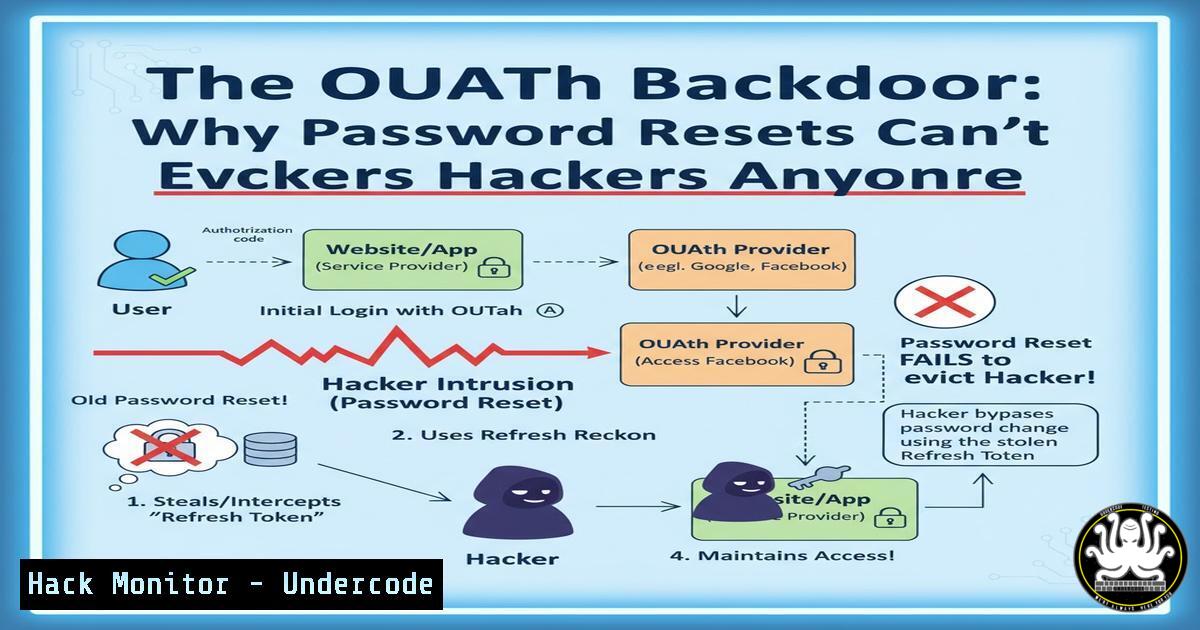
A sophisticated attack vector is enabling threat actors to maintain persistent access to victim accounts long after traditional defensive measures, like password resets and multi-factor authentication (MFA), have been deployed. By abusing OAuth tokens granted to malicious third-party applications, attackers can create a stealthy backdoor that remains operational, allowing continued access to email and other critical services. This persistence mechanism represents a significant shift in the cyber threat landscape, moving beyond credential theft to the exploitation of trusted application authorization frameworks.
Learning Objectives:
- Understand the technical mechanism of OAuth token-based persistence attacks.
- Learn how to identify and investigate malicious OAuth applications in an enterprise environment.
- Master the commands and procedures to revoke OAuth tokens and secure identity infrastructure.
You Should Know:
- Investigating Registered OAuth Applications in Microsoft Entra ID
For organizations using Microsoft Entra ID (formerly Azure AD), identifying which applications have been granted permissions is a critical first step.
PowerShell Command (Microsoft Graph PowerShell):
Get-MgServicePrincipal -Filter "DisplayName eq 'SuspiciousApp'" | Select-Object DisplayName, Id, AppId, ServicePrincipalType
Step-by-step guide:
This command queries Microsoft Graph to retrieve details about a specific application principal. `Get-MgServicePrincipal` fetches the service principal object, which represents an application instance in your directory. The `-Filter` parameter allows you to search by the application’s display name. The output displays the app’s name, its unique object ID (Id), the application ID (AppId), and its type. Look for applications with suspicious names, recently created timestamps, or application types that are not ‘ManagedIdentity’ or other known, trusted types.
2. Listing All User-Consented OAuth Applications
Attackers often rely on users granting consent to malicious apps. You can audit these consents.
PowerShell Command:
Get-MgOauth2PermissionGrant | Where-Object { $_.ConsentType -eq "Principal" } | Format-List ClientId, Scope, PrincipalId
Step-by-step guide:
This command lists all OAuth 2.0 permission grants where the consent was given by a specific user (Principal), as opposed to an administrator. `Get-MgOauth2PermissionGrant` retrieves all grants. The `Where-Object` clause filters for user-led consents. The output shows the `ClientId` (the application), the `PrincipalId` (the user who consented), and the `Scope` (permissions granted). Regularly review this list for applications with excessive or unusual permissions granted by users.
3. Revoking a Specific OAuth Application’s Access
Upon identifying a malicious application, immediate revocation is required.
PowerShell Command:
Remove-MgOauth2PermissionGrant -OAuth2PermissionGrantId <GrantId>
Step-by-step guide:
This command is the definitive action to sever the attacker’s access. First, use the `Get-MgOauth2PermissionGrant` command to find the specific `OAuth2PermissionGrantId` associated with the malicious application. Then, substitute the actual grant ID into the `Remove-MgOauth2PermissionGrant` command. Executing this will instantly invalidate all OAuth tokens issued to that application for your tenant, effectively locking the attacker out. This is more surgical than a mass password reset.
4. Auditing Sign-In Activity for a Specific Application
To investigate if a suspicious app has been actively used, audit its sign-in logs.
Kusto Query (Azure Log Analytics / Microsoft Sentinel):
SigninLogs
| where AppDisplayName contains "SuspiciousApp"
| project TimeGenerated, UserPrincipalName, AppDisplayName, IPAddress, ResultType, Location
| sort by TimeGenerated desc
Step-by-step guide:
This Kusto Query Language (KQL) query searches the Azure AD Sign-in Logs for all authentication attempts involving an application named “SuspiciousApp”. It projects (displays) key columns like the timestamp, user, application name, source IP address, result (success/failure), and geographic location. Sorting by `TimeGenerated desc` shows the most recent activity first. This data is crucial for incident response to determine the scope of access and identify compromised user accounts.
- Configuring Conditional Access Policies to Block Unapproved Apps
Proactively prevent users from granting consent to unapproved applications.
Azure Portal Navigation & Policy Snippet:
Navigate to Microsoft Entra Admin Center > Security > Conditional Access > Create new policy.
Under Cloud apps or actions, select All cloud apps.
Under Conditions, set Client apps to Browser and Mobile apps and desktop clients.
Under Grant, select Block access.
Step-by-step guide:
This policy, when applied to all users and all cloud apps, is a broad-brush approach. A more refined strategy involves using Custom controls or Session controls to only allow access from applications that are marked as Compliant or Hybrid Azure AD joined. This effectively creates a whitelist. While powerful, this must be paired with a process for users to request new business application approvals to avoid disrupting productivity.
- Leveraging Cloud App Security (MCAS) for OAuth App Discovery
Microsoft Defender for Cloud Apps provides deep visibility into sanctioned and unsanctioned OAuth apps.
MCAS Investigation Path:
Investigate > OAuth apps > Sort by “Permission level” (High) or “Number of users”.
Step-by-step guide:
Within the MCAS portal, the OAuth apps tab provides a centralized view of all applications that have been granted permissions. You can sort this list by the “Permission level” (e.g., High) to quickly identify apps with the most powerful access, such as `mail.readwrite` or full_access. Reviewing apps with a high number of users can also reveal shadow IT or potentially widespread phishing campaigns. From here, you can directly sanction or unsanction applications.
7. Implementing Stricter Token Lifetime Policies
Reduce the attacker’s window of operation by shortening token lifespans.
PowerShell Command (Azure AD PowerShell):
New-AzureADPolicy -Definition @('{"TokenLifetimePolicy":{"Version":1,"AccessTokenLifetime":"01:00:00"}}') -DisplayName "ShortTokenPolicy" -IsOrganizationDefault $true
Step-by-step guide:
This legacy Azure AD PowerShell command creates a new policy that sets the access token lifetime to one hour (01:00:00). While modern configuration should be done in the Entra ID portal under “Token lifetime” settings, this script demonstrates the concept. Shorter token lifetimes mean that even if a token is stolen, it is useful for a shorter period. However, this must be balanced against user experience, as more frequent re-authentication may be required.
What Undercode Say:
- The fundamental trust model of OAuth is being weaponized. The very feature that allows seamless integration—delegated access—is now a critical persistence vulnerability.
- Incident response playbooks are obsolete if they do not include “Revoke OAuth Grants” as a step co-equal to “Reset Passwords” and “Require MFA”.
The emergence of OAuth token persistence attacks signifies a maturation of the adversary’s approach to identity compromise. They are no longer just stealing keys; they are duplicating them and finding ways to make them permanent. This attack renders some of the most fundamental and trusted response actions ineffective, creating a false sense of security after a password reset. Defenders must pivot their strategy from purely credential-centric protection to a holistic identity and application governance model. This involves continuous monitoring of application consents, enforcing strict conditional access policies, and automating the detection of anomalous OAuth token usage. The identity perimeter has officially expanded to include every third-party application with a grant.
Prediction:
The abuse of OAuth for persistence will rapidly evolve from a targeted attack technique to a mainstream method used by ransomware groups and state-sponsored actors. We will see the rise of automated toolkits that streamline the creation of malicious OAuth apps and the social engineering required for user consent. In response, a new market segment for OAuth-specific security tools will emerge, focusing on behavioral analytics to detect anomalous token usage. Furthermore, major identity providers will be forced to change default settings, such as drastically reducing the maximum configurable token lifetime and providing more granular admin controls for user consent, fundamentally reshaping the default security posture of cloud identity platforms.
🎯Let’s Practice For Free:
IT/Security Reporter URL:
Reported By: Michael Tchuindjang – Hackers Feeds
Extra Hub: Undercode MoN
Basic Verification: Pass ✅


