Listen to this Post
Introduction
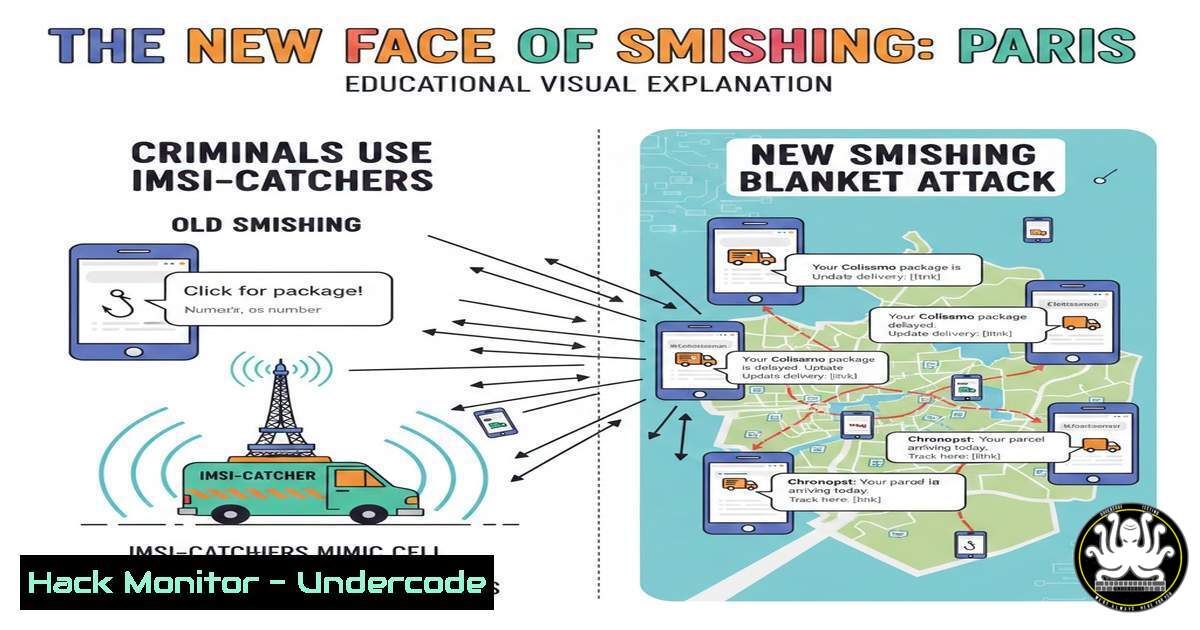
In a concerning escalation of mobile fraud, cybercriminals in Paris are now weaponizing IMSI-catchers—surveillance devices historically reserved for intelligence agencies—to broadcast fake Chronopost delivery SMS to every phone in a targeted neighborhood. This attack circumvents traditional cybersecurity defenses entirely; it does not require a data leak, nor does it need the victim’s phone number. By exploiting the fundamental architecture of cellular networks, attackers combine physical proximity with digital deception to execute geolocated, mass-scale smishing campaigns, proving that the barrier to entry for high-tech fraud is lower than ever.
Learning Objectives
- Understand the operational mechanics of an IMSI-catcher and how it forces devices onto insecure network bands.
- Analyze the convergence of physical-layer attacks (rogue towers) with social engineering (smishing).
- Identify configuration changes and user behaviors that mitigate the risk of SMS-based interception and fraud.
- Understanding the IMSI-Catcher: The Rogue Cell Tower in the Trunk
An IMSI-catcher, also known as a StingRay or fake base station, masquerades as a legitimate cell tower. Mobile phones are designed to connect to the strongest available signal. When a criminal drives a vehicle equipped with this device through a Parisian street, every phone in the vicinity attempts to register with it.
What this does:
The device forces connected phones to downgrade their connection to older, less secure protocols like 2G (GSM) or 3G. These protocols have known vulnerabilities that allow the attacker to intercept SMS traffic and sometimes voice calls. Crucially, the attacker does not need the victim’s phone number beforehand; they simply capture the traffic of devices within the broadcast radius and inject malicious messages directly into the stream.
How to verify your network environment (Linux – using a Software Defined Radio):
While building an IMSI-catcher is illegal without authorization, security researchers can analyze cellular environments using tools like `grgsm` (part of the GNU Radio ecosystem) and a compatible SDR (like RTL-SDR or HackRF).
 Example: Scanning for GSM broadcast channels (for educational purposes only)
 Install dependencies (on Kali Linux or Ubuntu with SDR support)
sudo apt-get update
sudo apt-get install gr-gsm

List available GSM frequencies and look for anomalies
 This command attempts to find nearby base stations
grgsm_livemon -f 935M  Replace with appropriate frequency band for your region
Note: Actual interception of traffic is illegal. The command above is strictly for identifying legitimate towers versus potential rogue signals based on signal strength anomalies.
Windows Equivalent:
Standard Windows laptops lack the hardware to analyze cellular bands natively. However, mobile device management (MDM) logs can sometimes show “tower dumps” or connection anomalies if the enterprise has mobile threat defense (MTD) software installed.
- Disabling Legacy Protocols: The First Line of Defense
The effectiveness of an IMSI-catcher relies on the phone accepting a downgrade to 2G. Modern devices allow users to disable this vulnerability.
Step-by-step guide: Disabling 2G on Android
This setting prevents your phone from connecting to insecure GSM networks, rendering IMSI-catchers useless if they cannot force a downgrade.
1. Open the Settings app.
2. Navigate to Network & Internet > SIMs.
3. Tap on your active SIM card.
- Look for “Allow 2G” or “Allow 2G service” and toggle it OFF.
– Note: If you do not see this option, your device may be running an older version of Android (pre-12) or the manufacturer has removed the toggle. Keep your OS updated.
Step-by-step guide: Disabling 3G/2G Fallback on iPhone
Apple removed the specific “Voice & Data” settings in recent iOS versions to automatically prefer LTE/5G, but ensuring “VoLTE” is active is key.
1. Go to Settings > Cellular > Cellular Data Options.
2. Tap Voice & Data.
- Ensure 5G Auto or LTE is selected. If you select “3G” or “2G” (if available), you become vulnerable. Keeping it on the highest generation prevents downgrade attacks.
3. Analyzing SMS Traffic and Suspicious Links (Linux/Windows)
Once the victim receives the fake “Chronopost” SMS, the next stage is a classic phishing link. While you should never click a link in a suspicious SMS, security analysts can inspect them safely.
Using `curl` and `whois` to dissect a phishing URL (Linux):
Assume the SMS contains a link like `http://chronopost-update[.]com`.
 1. Do NOT open it in a browser. Use curl to check the headers and server.
curl -I http://chronopost-update[.]com
 This reveals the server type (e.g., Apache, Nginx) and sometimes the IP address.

<ol>
<li>Use whois to check domain registration.
whois chronopost-update[.]com
Look for: Creation date (if recent, it's suspicious), Registrar, and Registrant country.</p></li>
<li><p>Use nslookup to find the IP and verify hosting location.
nslookup chronopost-update[.]com
Windows (PowerShell):
 Check HTTP headers
Invoke-WebRequest -Uri "http://chronopost-update[.]com" -Method Head

DNS lookup
Resolve-DnsName chronopost-update[.]com
4. Enterprise Mitigation: MDM Policies and S/MIME
For companies, the comments in the original post highlight a critical gap: security awareness focused only on email, not SMS.
Configuration: Blocking 2G via MDM (Microsoft Intune)
Admins can enforce the “Disable 2G” setting across the organization’s Android devices.
1. Sign in to the Microsoft Intune admin center.
2. Go to Devices > Configuration profiles > Create profile.
3. Select Android Enterprise and Fully Managed.
- Under Connectivity, find “Disable 2G” (the exact wording varies by OEM and Android version).
5. Set it to Block or Require.
6. Assign the profile to device groups.
5. User Behavior: The “Official App” Protocol
The post emphasizes: “On ne clique pas sur le lien : on ouvre l’app officielle.” This is the most effective control.
Step-by-step verification protocol:
- Do not engage: If you receive a delivery SMS, do not tap any link.
- Open official source: Manually open the browser and type `chronopost.fr` (or the specific carrier’s URL). Alternatively, open the official mobile app downloaded from the App Store or Play Store.
- Use tracking numbers: Legitimate delivery notices contain a valid tracking number. Copy the number provided in the SMS and paste it into the official website’s tracking tool. If it doesn’t exist, it is a scam.
6. Monitoring for Rogue Towers (Advanced/Detection)
While individuals cannot easily detect IMSI-catchers, anomalies exist.
Potential indicators for the public:
- Sudden signal drop: Your phone shows full bars but data stops working, or it switches from 4G/LTE to “E” (EDGE) or “GPRS” while you are stationary in a city center.
- Abnormal “Emergency Calls Only” mode: This can sometimes indicate the phone is trying to register with a fake tower that is misconfigured.
- Android Protected Confirmation: Android 14+ introduced features that alert users if cellular encryption is downgraded.
What Undercode Say:
- Physical proximity is the new vector: The attack surface has expanded from the digital world (your inbox) to the physical world (your street). Security awareness must now include the concept of “cellular hygiene” just as much as email hygiene.
- The user is the last line of defense, but also the easiest target: No amount of network encryption matters if the user voluntarily types their credit card into a fake website. The psychological manipulation via a trusted channel (SMS) bypasses technical controls. Organizations must integrate smishing simulations into their training programs, specifically using delivery-themed scenarios.
- Regulation is lagging: The fact that IMSI-catchers, originally surveillance tools, are available on the gray market to criminals highlights a failure in technology export controls and law enforcement prioritization. While disabling 2G helps, the real solution lies in nationwide adoption of 5G Standalone (5G SA) with stronger mutual authentication, which prevents these downgrade attacks.
Prediction:
In the next 12-18 months, we will see a proliferation of “drive-by smishing” in major European capitals. As detection for vehicle-mounted IMSI-catchers remains difficult for civilians, attackers will pivot to using drones (UAVs) carrying compact IMSI-catchers to target specific high-value buildings (corporate HQs, financial districts) from the air, making the attack even harder to trace. This will force regulators to mandate the deprecation of 2G and 3G networks entirely, rather than just suggesting users disable them.
▶️ Related Video (74% Match):
🎯Let’s Practice For Free:
IT/Security Reporter URL:
Reported By: Davidlegeay Cybersecurite – Hackers Feeds
Extra Hub: Undercode MoN
Basic Verification: Pass ✅


