Listen to this Post
Introduction:
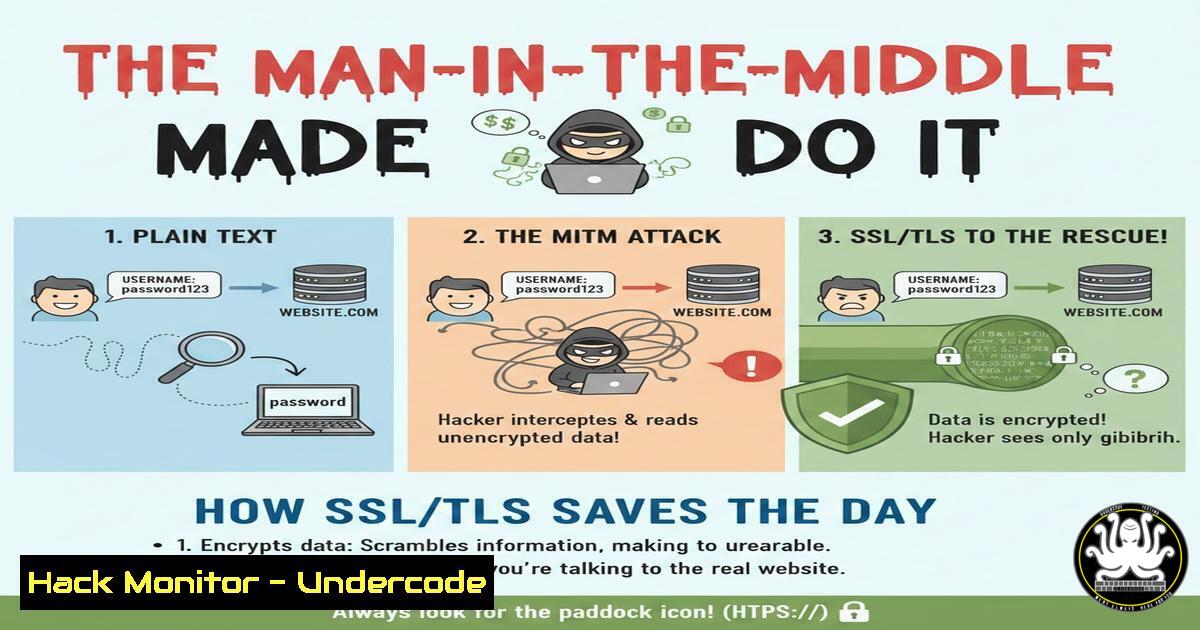
In the digital age, communication security is not a luxury but a necessity. A recent educational workshop demonstrated this critical principle by contrasting unencrypted and encrypted network traffic in a custom chat application. This hands-on exercise serves as a stark reminder of the vulnerabilities inherent in plain-text data transmission and the non-negotiable role of encryption protocols like SSL/TLS in safeguarding sensitive information from eavesdropping attacks.
Learning Objectives:
- Understand the fundamental risk of transmitting data in plain text over a network.
- Learn how to capture and analyze network traffic using tools like Wireshark.
- Comprehend the basic function and configuration of SSL/TLS encryption to secure communication channels.
You Should Know:
- The Peril of Plain Text: Sniffing Chat Messages with Wireshark
Before encryption is applied, any data sent over a network is exposed. Attackers on the same network segment (like a public Wi-Fi) can intercept this data with minimal effort using packet sniffers.
Step-by-step guide explaining what this does and how to use it.
Concept: A packet sniffer like Wireshark captures all data packets flowing through a network interface. Without encryption, application-layer data (like chat messages) remains human-readable.
Action (Linux/Windows):
- Install Wireshark from the official website or via package manager (
sudo apt install wiresharkon Debian/Ubuntu). - Launch Wireshark and select the active network interface (e.g.,
eth0,wlan0). - Start a packet capture. Reproduce the activity by sending a message in an unsecured application.
- Apply a display filter for HTTP traffic (as plain-text apps may use it):
http. Look for `POST` requests or `GET` requests containing query parameters. - Follow the TCP stream (Right-click packet > Follow > TCP Stream) to reconstruct the entire conversation. The messages will be clearly visible.
-
The Foundation of Trust: Public Key Infrastructure (PKI) and Certificates
SSL/TLS doesn’t just encrypt; it authenticates. It relies on PKI, where a trusted Certificate Authority (CA) issues digital certificates. These certificates bind a public key to a server’s identity, allowing clients to verify they are connecting to the legitimate server and not an imposter.
Step-by-step guide explaining what this does and how to use it.
Concept: The TLS handshake begins with the server presenting its certificate. The client checks if it’s signed by a trusted CA and is valid for the server’s hostname.
Action (Command Line Verification):
- To inspect a website’s certificate from Linux terminal: `openssl s_client -connect example.com:443 -servername example.com 2>/dev/null | openssl x509 -text -noout`
2. This command connects to the server and outputs certificate details like Issuer (CA), Validity dates, and Subject (who it’s issued to). -
The Handshake That Secures: Inside the TLS 1.3 Protocol
The TLS handshake is the process where the client and server agree on encryption keys without ever transmitting those keys in the clear. Modern TLS 1.3 is faster and more secure than its predecessors.
Step-by-step guide explaining what this does and how to use it.
Concept: The handshake involves “Client Hello,” “Server Hello,” key exchange (using algorithms like ECDHE), and finalization. Once completed, a symmetric session key is established for efficient encryption of all subsequent data.
Action (Seeing the Handshake):
- In Wireshark, while capturing traffic to an HTTPS site, apply the filter
tls.handshake. - You will see the sequence of handshake packets. While the exchanged keys are encrypted, you can observe the protocol version, supported cipher suites, and the change to encrypted traffic after the handshake.
-
From Theory to Practice: Implementing TLS in Your Application
The workshop’s transition from plain-text to encrypted chat involves integrating TLS at the socket level. This typically means using libraries that handle the complex cryptography.
Step-by-step guide explaining what this does and how to use it.
Concept: Instead of using raw sockets, developers use wrappers like OpenSSL in C/C++, the `ssl` module in Python, or `TlsStream` in .NET/C.
Action (Simple Python Server/Client Example):
 Server (server.py)
import socket, ssl
context = ssl.SSLContext(ssl.PROTOCOL_TLS_SERVER)
context.load_cert_chain('server_cert.pem', 'server_key.pem')
with socket.socket(socket.AF_INET, socket.SOCK_STREAM, 0) as sock:
sock.bind(('0.0.0.0', 8443))
sock.listen(5)
with context.wrap_socket(sock, server_side=True) as ssock:
conn, addr = ssock.accept()
 ... handle encrypted connection

Client (client.py)
import socket, ssl
context = ssl.create_default_context()
with socket.create_connection(('localhost', 8443)) as sock:
with context.wrap_socket(sock, server_hostname='localhost') as ssock:
ssock.send(b"Encrypted message!")
5. Beyond the Basics: Hardening Your TLS Configuration
Not all TLS configurations are equally secure. Outdated protocols (SSLv3, TLS 1.0), weak cipher suites (RC4, DES), and misconfigured certificates can introduce vulnerabilities.
Step-by-step guide explaining what this does and how to use it.
Concept: Hardening involves enforcing modern protocols, prioritizing strong ciphers, and ensuring certificates use strong cryptographic signatures (SHA-256, RSA 2048+ or ECC).
Action (Testing Configuration with Nmap & OpenSSL):
- Scan your server for supported protocols and ciphers: `nmap –script ssl-enum-ciphers -p 443 yourserver.com`
2. Test for specific vulnerabilities like Heartbleed: `nmap -p 443 –script ssl-heartbleed yourserver.com`
3. Check certificate details and connection strength: `openssl s_client -connect yourserver.com:443 -tls1_3` (Force a protocol version to test support). -
The Attacker’s Pivot: When TLS Can Be Bypassed
Encryption only protects data in transit. Endpoints (client and server) remain targets. Techniques like SSL stripping (downgrading HTTPS to HTTP), exploiting vulnerable certificate validation in clients, or planting malicious certificates can undermine TLS.
Step-by-step guide explaining what this does and how to use it.
Concept: Attackers may use tools like `sslstrip` in a Man-in-the-Middle (MitM) position to intercept and modify unencrypted traffic before it’s upgraded to HTTPS.
Mitigation Action (HSTS):
- Servers must implement HTTP Strict Transport Security (HSTS). This HTTP header tells browsers to only connect via HTTPS.
- Configure your web server (e.g., Apache) to include the header:
Header always set Strict-Transport-Security "max-age=31536000; includeSubDomains". - Preload your domain into browser HSTS lists for maximum protection.
7. Automating Vigilance: Continuous TLS/SSL Monitoring
Security is not a one-time setup. Certificates expire, new vulnerabilities are discovered, and configurations drift. Continuous monitoring is essential.
Step-by-step guide explaining what this does and how to use it.
Concept: Use automated tools to monitor certificate expiration, protocol support, and vulnerability status.
Action (Using `testssl.sh` for Audits):
- Download the open-source tool:
git clone https://github.com/drwetter/testssl.sh.git`./testssl.sh yourdomain.com:443`
<h2 style="color: yellow;">2. Run a comprehensive audit: - The tool provides a detailed, color-coded report on certificate validity, protocol support, cipher strengths, and known vulnerabilities (e.g., ROBOT, CCS Injection).
What Undercode Say:
- Seeing is Believing, Hacking is Understanding: Abstract security concepts become indelible only when witnessed firsthand, as demonstrated by the visceral impact of watching a private message appear in a packet sniffer.
- Encryption is a Layer, Not a Forcefield: TLS secures the communication channel, but the security of the endpoints, the strength of the certificate validation, and the correctness of the implementation are equally critical parts of the defense-in-depth model.
The workshop’s simplicity is its power. It cuts through theoretical complexity to show the raw, unfiltered vulnerability of unencrypted data. In an enterprise context, this translates to mandating encryption for all data in transit, not just “sensitive” data, as classification can fail. The evolution of threats like QUIC-encrypted malware traffic also shows that while TLS is a defender’s tool, it can also be co-opted by attackers to hide command-and-control channels, making traffic analysis more challenging. Therefore, the lesson extends beyond “use TLS” to “understand TLS, monitor its implementation, and assume all other traffic is already compromised.”
Prediction:
The demonstrated principle will fuel two opposing trends. Defensively, the drive towards encryption-by-default will accelerate, with protocols like DNS-over-HTTPS (DoH) and pervasive end-to-end encryption becoming standard, making passive eavesdropping largely obsolete. However, offensively, this will push adversaries “up the stack,” focusing more on endpoint compromise, social engineering, and exploiting flaws in certificate validation or in post-decryption data handling. The future battleground will shift from intercepting data in transit to compromising the systems that encrypt, decrypt, and process that data, making application security and robust identity management the new critical frontiers.
▶️ Related Video (70% Match):
🎯Let’s Practice For Free:
IT/Security Reporter URL:
Reported By: Muhammad Umar – Hackers Feeds
Extra Hub: Undercode MoN
Basic Verification: Pass ✅


