Listen to this Post
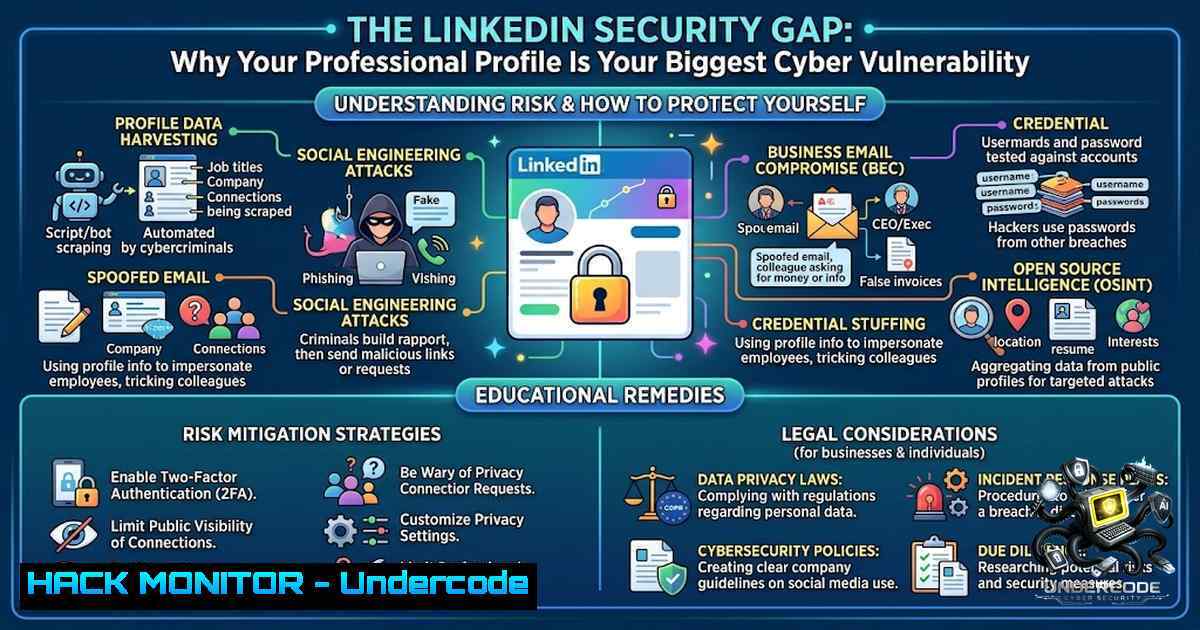
Introduction
Your LinkedIn profile is not just a digital resume—it’s a critical attack surface that cybercriminals actively exploit for social engineering, corporate espionage, and targeted phishing campaigns. While professionals obsess over optimizing their profiles for recruiters, they inadvertently expose sensitive organizational data, project details, and professional relationships that malicious actors weaponize against entire enterprises.
Learning Objectives
- Master advanced LinkedIn profile hardening techniques that protect against OSINT reconnaissance
- Implement keyword optimization strategies that balance recruiter visibility with information security
- Develop a professional presence framework that communicates value without compromising organizational security
You Should Know
1. Hardening Your Digital Identity Against OSINT Threats
Open Source Intelligence (OSINT) gathering has evolved from simple Google searches to sophisticated automated profiling tools that scrape LinkedIn data at scale. Recruiters aren’t the only ones searching for your profile—cybercriminals use the same keywords to identify high-value targets for spear-phishing campaigns. Security researchers have documented how attackers use LinkedIn’s search functionality to map organizational structures, identify IT personnel, and pinpoint individuals with access to sensitive systems.
To implement basic OSINT hardening, start by reviewing your public profile visibility settings. Navigate to Settings & Privacy > Visibility > Edit your public profile. Toggle off features like “Show your connections” and “Show your activity feed” to prevent attackers from mapping your professional network. More critically, consider whether your current job title reveals privileged access—terms like “Systems Administrator,” “DevOps Engineer,” or “Security Architect” are red flags for attackers.
Linux Command for OSINT Self-Assessment:
 Perform a basic OSINT scan on your own profile
whois yourdomain.com
dig yourdomain.com any
 Use theHarvester for email enumeration
theHarvester -d yourdomain.com -l 500 -b linkedin
Windows Command for Digital Footprint Analysis:
 Check for exposed LinkedIn data in search engines
Invoke-WebRequest -Uri "https://api.linkedin.com/v2/people?q=yourname" -Method Get
 Use PowerShell to analyze your digital footprint
Get-DnsClientCache | Select-Object Entry,Data
2. Implementing Security-Focused Keyword Optimization
The same keyword optimization that helps recruiters find you also aids attackers. When you list every skill, tool, and technology you’ve touched, you’re essentially providing a detailed attack surface map. This section covers how to implement security-conscious keyword strategies that maintain recruiter visibility while minimizing intelligence value to attackers.
Instead of displaying your entire technical stack, focus on role-relevant keywords that showcase seniority and strategic thinking rather than specific tool expertise. For example, replace “Kubernetes, Docker, AWS ECS” with “Container Orchestration Strategy” or “Cloud Infrastructure Leadership.” This subtle shift maintains recruiter appeal while obscuring exactly which technologies your organization uses.
Python Script for Keyword Risk Assessment:
!/usr/bin/env python3
import re
import json

List of high-risk keywords to avoid
HIGH_RISK_KEYWORDS = [
'admin','credentials','password','secret','vpn','firewall','siem',
'soc','penetration','compliance','audit','incident','response'
]

def scan_profile_section(text):
findings = []
for keyword in HIGH_RISK_KEYWORDS:
if re.search(keyword.lower(), text.lower()):
findings.append(keyword)
return findings

Example usage
profile_text = "Experienced security administrator managing SIEM and incident response"
print(json.dumps(scan_profile_section(profile_text), indent=2))
3. The “About” Section: Strategic Information Security
The About section is where most professionals overshare critical details. When you list specific projects, technologies, and methodologies, you’re providing attackers with a comprehensive understanding of your organization’s infrastructure. This section should focus on business outcomes and leadership principles rather than technical implementation details.
Implement the “Granularity Control” principle: provide just enough detail to demonstrate expertise without revealing specific technical implementations. Instead of “Implemented a zero-trust architecture using Zscaler and Cisco Firepower,” consider “Led organizational zero-trust transformation initiatives resulting in 40% reduced security incidents.” This approach communicates value while maintaining operational security.
Firewall Rule Example for Network Segmentation:
! Protect your sensitive data zones
access-list 101 deny ip any host 192.168.1.10 log
access-list 101 permit ip any any
4. Achievement Quantification Without Exposing Infrastructure
Listing measurable achievements is essential for recruiter visibility, but specific metrics often reveal infrastructure scale, team sizes, and operational capabilities. Attackers use this information to gauge the potential impact of a successful compromise. This section covers how to quantify achievements without exposing sensitive operational details.
Instead of specific numbers, use ranges or percentages that demonstrate impact without revealing exact scales. For example, “Reduced incident response time by 30-40%” is more secure than “Reduced incident response time from 45 minutes to 27 minutes.” The former communicates capability without providing precise operational metrics.
Security Hardening Commands for Windows Workstations:
 Enable Advanced Threat Protection
Set-MpPreference -EnableNetworkProtection Enabled
 Configure Windows Defender Firewall
New-1etFirewallRule -DisplayName "Block LinkedIn Social Engineering" -Direction Inbound -Action Block -Protocol TCP -LocalPort 443 -RemoteAddress "LinkedIn IP Ranges"
5. Activity Tracking and Digital Behavior Profiling
Your LinkedIn activity creates a behavioral signature that attackers can analyze to determine your availability, interests, and potential weaknesses. Posting about specific security technologies, attending conferences, or engaging with certain content provides valuable intelligence about your professional focus and potential vulnerabilities.
Maintain a balanced activity schedule that doesn’t reveal patterns of behavior. Avoid posting about work hours, travel schedules, or specific project deadlines. Consider using scheduled posts to maintain consistent presence without revealing real-time availability.
Linux Command for Monitoring Your Digital Footprint:
 Monitor who is looking at your profile (basic)
curl -X GET "https://api.linkedin.com/v2/people/(id{person-id})" -H "Authorization: Bearer {access-token}"
 Use stealth techniques for digital presence
torify curl https://linkedin.com/in/yourprofile
6. Advanced Professional Network Hardening
Your connections are your weakest link. Attackers often compromise a peripheral connection and use that access to gain intelligence about you and your organization. This section covers how to vet connections and segment your professional network to minimize exposure.
Implement the “Three-Connection Rule”: only connect with individuals who have at least three mutual connections or verifiable professional history. Regularly audit your connection list and remove suspicious or irrelevant connections. Consider using LinkedIn’s reporting features to flag suspicious activity.
Windows Registry Hardening for Corporate Devices:
Windows Registry Editor Version 5.00

[HKEY_LOCAL_MACHINE\SOFTWARE\Policies\Microsoft\Windows\NetworkProvider]
"HardenedPaths"=hex(7):5c,5c,2a,2e,6c,69,6e,6b,65,64,69,6e,2e,63,6f,6d,00,00
What Undercode Say:
- Key Takeaway 1: Your LinkedIn profile is a critical attack surface that requires the same security discipline as any corporate asset. Information that seems innocuous to you is gold to an attacker conducting reconnaissance.
-
Key Takeaway 2: Professional visibility and information security are not mutually exclusive. Strategic keyword optimization and granularity control allow you to maintain recruiter appeal while hardening your digital identity against OSINT threats.
Analysis: The modern professional faces a dual challenge: maintaining visibility in a competitive job market while preventing their digital presence from becoming a liability. Organizations must extend their security awareness programs to include professional social media usage as a critical vector for social engineering and corporate espionage. The intersection of personal branding and corporate security demands a nuanced approach that balances professional advancement with operational security.
Prediction:
- +1 Organizations will increasingly implement policies requiring security reviews of executive and IT staff LinkedIn profiles, recognizing them as critical attack surfaces.
- +1 Professional security certification programs will incorporate social media hardening modules as standard curriculum requirements.
- -1 The trend toward increased professional transparency will directly contribute to more sophisticated and successful social engineering attacks targeting corporate infrastructure.
- +1 Advanced AI-powered LinkedIn scraping tools will force platforms to implement stronger privacy controls and enhanced user education initiatives.
- -1 Attackers will evolve their reconnaissance techniques to exploit professional networking patterns, leading to more targeted and successful supply chain attacks.
▶️ Related Video (82% Match):
🎯Let’s Practice For Free:
🎓 Live Courses & Certifications:
Join Undercode Academy for Verified Certifications
🚀 Request a Custom Project:
Secure, high-velocity infrastructure and disruptive technological engineering. Contact our engineering team for high-tier development and proprietary systems:
[email protected]
💎 Smart Architecture | 🛡️ Secure by Design | ⭐ Trusted by Thousands
IT/Security Reporter URL:
Reported By: Aysha Rasool – Hackers Feeds
Extra Hub: Undercode MoN
Basic Verification: Pass ✅


