
Listen to this Post
Introduction:
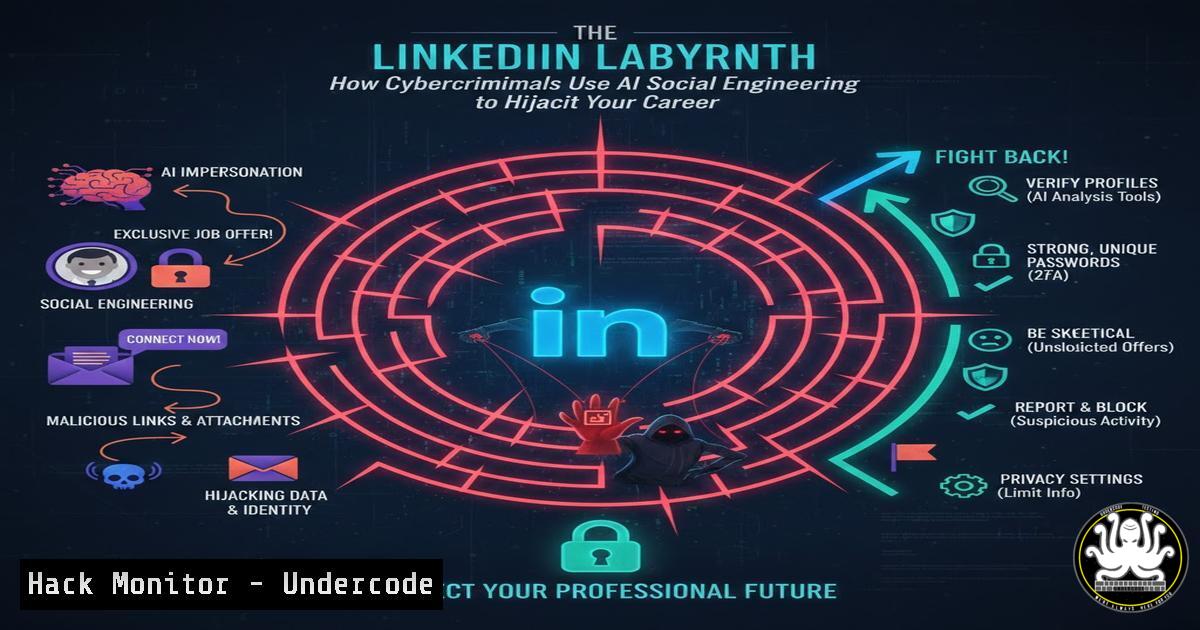
LinkedIn, the world’s premier professional network, has become a fertile hunting ground for sophisticated cybercriminals. Exploiting the platform’s inherent trust and career-focused ethos, threat actors deploy AI-enhanced social engineering, fake profiles, and complex scam chains targeting professionals. This article dissects the technical mechanics behind these scams and provides actionable, platform-agnostic defense strategies for individuals and security teams.
Learning Objectives:
- Identify the technical and behavioral hallmarks of the six most prevalent LinkedIn scam archetypes.
- Employ OSINT (Open-Source Intelligence) and command-line tools to investigate suspicious profiles and communications.
- Implement technical controls and security awareness procedures to mitigate the risk of credential theft, financial fraud, and malware infection originating from social media.
You Should Know:
- The Anatomy of a Fake Profile & Job Scam
The foundation of most LinkedIn scams is a falsified digital identity. These profiles are often built using AI-generated images (e.g., from platforms like This Person Does Not Exist), stolen photos, and fabricated employment histories scraped from real profiles.
Step-by-step guide:
Step 1: Reverse Image Search. Never take a profile picture at face value. Right-click the image and “Search image with Google.” For more thoroughness, use the command line with a tool like hydrarecon:
 Install hydrarecon (requires Python3 and git)
git clone https://github.com/ahmedkhlief/Hydra-Recon.git
cd Hydra-Recon
pip3 install -r requirements.txt

Download the profile picture and run a search
python3 hydrarecon.py --image path/to/profile_pic.jpg --reverse-image
Step 2: Profile Inconsistency Analysis. Use LinkedIn’s own URL structure and simple `whois` lookups to check company legitimacy. A recruiter from “TechGlobal Inc.” should have a matching corporate domain.
whois techglobal-inc.com Check domain registration date, owner. New domains (<6 months) are a red flag.
Step 3: The Pivot to Encrypted Apps. As noted in the source post, a major red flag is the immediate push to move conversations to WhatsApp or Telegram. This migrates the conversation off a platform that may have reporting and logging capabilities to one with greater anonymity for the scammer.
2. Deconstructing Phishing Lures and Malicious Documents
Scammers use fake job descriptions to deliver phishing links or “interview questions” attached as malicious documents. These often contain macros or exploits.
Step-by-step guide:
Step 1: Sandbox All Attachments. Never open a document from an unverified source directly. Use a sandboxed environment.
Windows (PowerShell): You can use tools like `peframe` for static analysis or simply submit the file to a service like VirusTotal via its API. First, get your VT API key.
 Example using curl to submit a file to VirusTotal (requires API key)
$vtApiKey = "YOUR_VT_API_KEY"
$filePath = "C:\Users\Public\Downloads\questionnaire.doc"
curl --request POST --url "https://www.virustotal.com/api/v3/files" --header "x-apikey: $vtApiKey" --form "file=@$filePath"
Linux: Use `cd` (change directory) and `file` command to inspect file type.
file ./interview_questions.pdf  Might reveal 'PDF document, executable' which is a critical warning.
strings ./interview_questions.doc | grep -i "http|https|powershell"  Extract potential URLs or PowerShell commands embedded.
Step 2: Analyze URLs Safely. Hover over links to preview the true destination. Use URL expanders and scanners.
 Using curl to see the final redirect location without visiting
curl -s -L -I "https://bit.ly/suspicious-link" | grep -i "location|host"
- API Security & The “Consulting Fee” Scam Angle
Advanced fee scams often involve fake invoices or requests for payment to “secure software licenses” or “consulting fees.” For organizations, securing financial APIs (like those from banking or payment platforms) is crucial to prevent authorized push payment fraud initiated by these social engineering attacks.
Step-by-step guide:
Step 1: Implement API Transaction Monitoring. Ensure your financial systems have APIs that log and can be monitored for unusual patterns (e.g., new beneficiary added, high-value transaction).
Step 2: Multi-Factor Authentication (MFA) for All Financial Systems. This should be non-negotiable. An attacker with stolen credentials from a LinkedIn phishing campaign cannot approve a transaction without the second factor.
Step 3: Employee Training on Invoice Verification. Create a technical verification step: all new vendor payments require a verified phone call back to the company using a previously known number, not a number provided in the email or LinkedIn message.
4. Cryptocurrency & Investment Scam Infrastructure
These scams often direct victims to fake trading platforms. Technically, these are fraudulent web applications designed to look legitimate and may even show fake profits to encourage more “investment.”
Step-by-step guide:
Step 1: Investigate Platform Domains.
whois cryptotrade-premium.com
 Look for: recent creation, privacy protection, mismatched registrant country.
Step 2: Check for Known Malware or Phishing Associations. Use tools like `abuseipdb` or `urlscan.io` from the command line.
 Query URLScan.io's API for a scan report
curl -X GET "https://urlscan.io/api/v1/search/?q=domain:cryptotrade-premium.com"
Step 3: Network Traffic Analysis (For the Advanced User). If you must interact (in a controlled VM), use `tcpdump` or Wireshark to see where data is truly being sent.
sudo tcpdump -i any -w traffic.pcap host suspicious-platform.com
- Proactive Defense: Hardening Your LinkedIn and Email Environment
Step 1: Audit Your LinkedIn Privacy Settings. Limit visibility of your connections and profile. Disable “Share profile updates with your network” when looking for jobs to avoid signaling your status to scammers.
Step 2: Configure Email Security Headers (For Organizations). Implement DMARC, DKIM, and SPF to make it harder for scammers to spoof your corporate domain in follow-up emails. A simple SPF record check:dig TXT example.com | grep spf
Step 3: Use a Segmented Email Address. Consider using a unique email alias (offered by many email providers) solely for public LinkedIn profiles to make tracking phishing attempts easier.
What Undercode Say:
- The Attack Surface Has Permanently Expanded. LinkedIn is no longer a “safe” social network; it is a primary initial access vector for Business Email Compromise (BEC), credential harvesting, and targeted attacks. Security awareness training must explicitly include this platform.
- AI is the Force Multiplier. The use of AI to generate flawless business language, create fake but coherent project descriptions, and manage scaling of these scams marks a significant evolution. Human intuition is no longer sufficient; technical verification is mandatory.
Prediction:
The convergence of generative AI and automated scam infrastructure will lead to hyper-personalized, multi-platform attack chains. A single interaction on LinkedIn could trigger a synchronized wave of phishing emails, SMS (smishing), and even voice clones (vishing) referencing the same fake opportunity, creating an illusion of legitimacy that is incredibly difficult to discern. Defense will require a combination of AI-powered detection on the platform side and widespread adoption of digital identity verification standards (like verifiable credentials) to restore trust in professional interactions online. The arms race between AI-driven social engineering and AI-driven security detection will define the next era of cyber crime.
▶️ Related Video (70% Match):
🎯Let’s Practice For Free:
IT/Security Reporter URL:
Reported By: Bobcarver Cybersecurity – Hackers Feeds
Extra Hub: Undercode MoN
Basic Verification: Pass ✅


