Listen to this Post
Introduction:
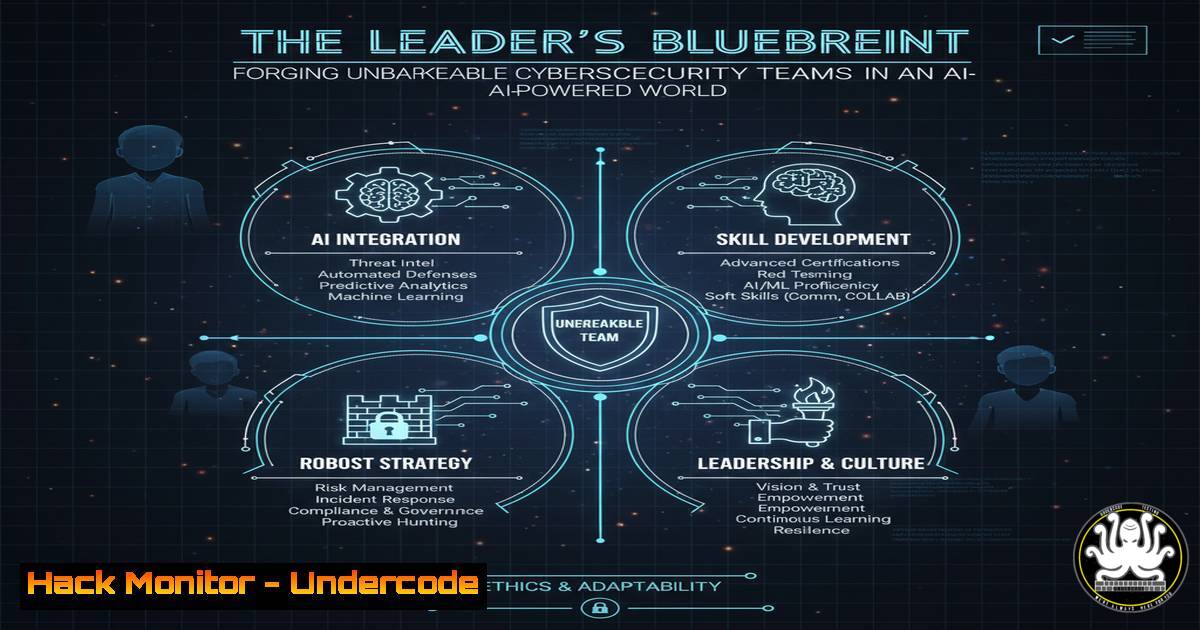
Modern cybersecurity leadership has evolved beyond technical oversight into the strategic cultivation of resilient, adaptive, and empowered teams. In an era defined by AI-driven threats and cloud-centric infrastructures, the strength of a security posture is directly proportional to the strength of its human element. This article provides the technical and leadership blueprint for building a team capable of defending against tomorrow’s threats today.
Learning Objectives:
- Implement technical command and control frameworks that enhance team autonomy and security.
- Deploy advanced logging, monitoring, and AI-assisted threat detection scripts.
- Harden cloud and API configurations through automated, repeatable processes.
You Should Know:
1. Centralized Logging with the ELK Stack
A centralized logging system is the cornerstone of visibility, allowing your team to detect and respond to incidents from a single pane of glass.
Step-by-Step Guide:
First, deploy the Elasticsearch, Logstash, and Kibana (ELK) stack using Docker for rapid setup.
 docker-compose.yml for a basic ELK stack
version: '3.7'
services:
elasticsearch:
image: docker.elastic.co/elasticsearch/elasticsearch:8.9.0
environment:
- discovery.type=single-node
- xpack.security.enrollment.enabled=false
- "ES_JAVA_OPTS=-Xms512m -Xmx512m"
ports:
- "9200:9200"

logstash:
image: docker.elastic.co/logstash/logstash:8.9.0
command: logstash -f /etc/logstash/conf.d/logstash.conf
volumes:
- ./logstash.conf:/etc/logstash/conf.d/logstash.conf
depends_on:
- elasticsearch

kibana:
image: docker.elastic.co/kibana/kibana:8.9.0
ports:
- "5601:5601"
depends_on:
- elasticsearch
 Sample logstash.conf to parse syslog
input {
tcp {
port => 5000
type => syslog
}
}
filter {
grok {
match => { "message" => "%{SYSLOGTIMESTAMP:timestamp} %{SYSLOGHOST:hostname} %{DATA:program}(?:[%{POSINT:pid}])?: %{GREEDYDATA:message}" }
}
}
output {
elasticsearch {
hosts => ["elasticsearch:9200"]
}
}
This setup ingests syslog data, parses it with Grok filters, and indexes it into Elasticsearch. Your team can then use Kibana to create dashboards for failed login attempts, firewall block events, and unusual API traffic, transforming raw data into actionable intelligence.
2. Windows Advanced Audit Policy for Threat Hunting
Granular Windows auditing is non-negotiable for detecting lateral movement and privilege escalation.
Step-by-Step Guide:
Use PowerShell to implement an Advanced Audit Policy that far exceeds the basic settings.
 PowerShell script to configure advanced audit policy for critical events
AuditPol /set /subcategory:"Process Creation" /success:enable /failure:enable
AuditPol /set /subcategory:"Token Right Adjusted" /success:enable
AuditPol /set /subcategory:"PSP Execution" /success:enable /failure:enable
AuditPol /set /subcategory:"RPC Events" /success:enable /failure:enable
AuditPol /set /subcategory:"Logoff" /success:enable
AuditPol /set /subcategory:"Logon" /success:enable /failure:enable
AuditPol /set /subcategory:"Other Logon/Logoff Events" /success:enable /failure:enable

Query for process creation events (Event ID 4688) to hunt for suspicious binaries
Get-WinEvent -FilterHashtable @{LogName='Security'; ID=4688} | Where-Object {$_.Properties[bash].Value -like "malware.exe"} | Format-List
This configuration logs detailed process creation, privilege changes, and logon activity. By scripting the collection and analysis of Event ID 4688 (process creation), your team can proactively hunt for the execution of known malicious binaries or suspicious child processes from legitimate applications.
3. Linux System Hardening with CIS Benchmarks
Automate compliance with the Center for Internet Security (CIS) benchmarks to eliminate common misconfigurations.
Step-by-Step Guide:
Implement a bash script to apply key CIS-recommended controls.
!/bin/bash
 CIS Hardening Script Snippet for Ubuntu 20.04

1.1.1.1 Ensure mounting of cramfs filesystems is disabled (Scored)
echo "install cramfs /bin/true" >> /etc/modprobe.d/CIS.conf

1.1.1.2 Ensure mounting of freevxfs filesystems is disabled (Scored)
echo "install freevxfs /bin/true" >> /etc/modprobe.d/CIS.conf

1.5.1 Ensure core dumps are restricted (Scored)
echo " hard core 0" >> /etc/security/limits.conf
sysctl -w fs.suid_dumpable=0

3.1.2 Ensure packet redirect sending is disabled (Scored)
sysctl -w net.ipv4.conf.all.send_redirects=0
sysctl -w net.ipv4.conf.default.send_redirects=0

5.2.1 Ensure permissions on /etc/ssh/sshd_config are configured (Scored)
chown root:root /etc/ssh/sshd_config
chmod og-rwx /etc/ssh/sshd_config

5.2.16 Ensure SSH MaxAuthTries is set to 4 or less (Scored)
echo "MaxAuthTries 4" >> /etc/ssh/sshd_config
systemctl reload ssh
This script disables unnecessary filesystems, restricts core dumps, hardens network parameters, and secures the SSH configuration. Automating these checks and remediations ensures a consistent, secure baseline across all your Linux assets, freeing your team from manual configuration drift.
4. Cloud Infrastructure Hardening with Terraform
Codify your cloud security posture using Infrastructure as Code (IaC) to ensure repeatable, version-controlled deployments.
Step-by-Step Guide:
Use this Terraform configuration for a secure AWS S3 bucket and a restrictive Security Group.
 main.tf - Secure AWS Infrastructure
resource "aws_s3_bucket" "secure_logs_bucket" {
bucket = "my-company-secure-logs"

<ol>
<li>Enable versioning to recover from accidental deletion or ransomware
versioning {
enabled = true
}</p></li>
<li><p>Enable default server-side encryption
server_side_encryption_configuration {
rule {
apply_server_side_encryption_by_default {
sse_algorithm = "AES256"
}
}
}</p></li>
<li><p>Block ALL public access
tags = {
Environment = "Production"
Sensitivity = "High"
}
}</p></li>
</ol>

<p>resource "aws_security_group" "restrictive_web_sg" {
name = "restrictive_web_sg"
description = "Allow HTTPS only from the load balancer"

ingress {
description = "HTTPS from ALB"
from_port = 443
to_port = 443
protocol = "tcp"
security_groups = [aws_security_group.alb_sg.id]  Reference to ALB's SG
}

egress {
from_port = 0
to_port = 0
protocol = "-1"
cidr_blocks = ["0.0.0.0/0"]
}
}
This code enforces critical security controls by default: it prevents public access to S3, enables encryption, and creates a security group that only allows traffic from an Application Load Balancer, effectively mitigating direct internet-based attacks on the EC2 instances.
5. API Security Testing with OWASP ZAP
Automate dynamic API security testing to catch vulnerabilities before they reach production.
Step-by-Step Guide:
Integrate OWASP ZAP into your CI/CD pipeline using its command-line interface.
 Basic ZAP baseline scan using Docker
docker run -v $(pwd):/zap/wrk/:rw -t owasp/zap2docker-stable zap-baseline.py \
-t https://api.mycompany.com/v1/users \
-g gen.conf \
-r testreport.html

Full Active Scan with API context definition
docker run -v $(pwd):/zap/wrk/:rw -t owasp/zap2docker-stable zap-full-scan.py \
-t https://api.mycompany.com/v1/ \
-c zap-api-config.conf \
-U "Admin" \
-r active-scan-report.html

Sample gen.conf file to exclude noise from known non-vulnerable paths
 gen.conf
alert.rule.names = -"X-Content-Type-Options Header Missing"
alert.rule.names = -"Server Leaks Information via \"X-Powered-By\" HTTP Response Header"
The baseline scan performs passive reconnaissance, while the full active scan aggressively tests for SQLi, XSS, and broken authentication. By providing an API context configuration, you focus ZAP’s testing power on your critical endpoints, reducing false positives and providing your developers with a clear, actionable report.
6. AI-Assisted Threat Detection with Python and Scikit-learn
Empower your team to build custom detection logic for novel attack patterns using machine learning.
Step-by-Step Guide:
This Python script demonstrates an anomaly detector for network traffic.
import pandas as pd
from sklearn.ensemble import IsolationForest
from sklearn.preprocessing import StandardScaler

Sample dataset: features = ['packet_size_mean', 'packets_per_second', 'dest_port_entropy']
data = pd.read_csv('network_traffic.csv')
features = data[['packet_size_mean', 'packets_per_second', 'dest_port_entropy']]

Preprocess the data
scaler = StandardScaler()
scaled_features = scaler.fit_transform(features)

Train an Isolation Forest model for anomaly detection
model = IsolationForest(contamination=0.01, random_state=42)  Assume 1% anomaly
model.fit(scaled_features)

Predict anomalies on new data
new_connections = pd.read_csv('new_traffic_batch.csv')
scaled_new = scaler.transform(new_connections[features.columns])
predictions = model.predict(scaled_new)

-1 indicates an anomaly
anomalies = new_connections[predictions == -1]
print(f"Detected {len(anomalies)} anomalous connections:")
print(anomalies)
This script trains a model on normal network traffic patterns. It then flags connections that deviate significantly from this baseline, such as those generated by a DDoS botnet or data exfiltration tool. By integrating this into a SIEM or a data pipeline, your team can detect threats that bypass traditional signature-based tools.
7. Container Security and Runtime Defense with Falco
Deploy runtime security for your Kubernetes clusters to detect malicious activity inside containers.
Step-by-Step Guide:
Install and configure Falco, the de facto Kubernetes runtime security tool.
 Install Falco using Helm
helm repo add falcosecurity https://falcosecurity.github.io/charts
helm repo update
helm install falco falcosecurity/falco --namespace falco --create-namespace

Custom Falco rule to detect crypto miners
 Save as crypto_miner_rule.yaml
- rule: Detect Crypto Miner
desc: "A shell was spawned inside a container and a process with 'miner' in its name was executed."
condition: >
container.id != host and
spawned_process and
proc.name in (minerd, cpuminer, xmrig, ccminer)
output: >
"Crypto miner detected (user=%user.name container_id=%container.id container_name=%container.name image=%container.image.repository proc=%proc.cmdline)"
priority: CRITICAL
tags: [container, crypto, mining]

Load the custom rule
kubectl create configmap crypto-miner-rules --from-file=crypto_miner_rule.yaml -n falco
kubectl patch daemonset falco -n falco -p '{"spec":{"template":{"spec":{"volumes":[{"name":"crypto-miner-rules","configMap":{"name":"crypto-miner-rules"}}]}}}}'
Falco acts as a security camera inside your cluster. This custom rule specifically detects the execution of known cryptocurrency miners, a common consequence of container compromises. By empowering your team to write custom rules, you can adapt your defenses to your unique application behavior and threat landscape.
What Undercode Say:
- Empowerment Through Automation is the New Command and Control. The most effective leaders are not those who micromanage, but those who provide their teams with automated, self-service security tools and clear guardrails. This shifts the team’s focus from manual, repetitive tasks to strategic analysis and response.
- The Fusion of AI and Human Expertise Creates an Unbreachable Wall. AI tools are force multipliers, not replacements. A leader’s role is to foster a culture where data scientists, threat hunters, and SOC analysts collaborate to train, tune, and interpret AI models, creating a defensive system that is both intelligent and intuitive.
The paradigm of cybersecurity leadership is irrevocably shifting. The old model of top-down control crumbles under the weight of cloud complexity and AI-driven attacks. The new model is that of an architect and a mentor, building systems that empower and tools that enable. The technical commands and scripts provided are not just configuration lines; they are the building blocks of a resilient, autonomous, and highly capable security team. The leader who masters the art of deploying these technical enablers, while fostering a culture of continuous learning and shared responsibility, will not just defend their organization—they will define its future security.
Prediction:
The convergence of AI-powered offense and defense will create a “Hyper-Automation Arms Race.” In the next 3-5 years, we will see the first fully autonomous, AI-driven penetration tests launched and mitigated without human intervention. This will force cybersecurity leadership to evolve from managing people and processes to curating AI models and data streams. The most sought-after leaders will be those who can architect and ethically govern these self-healing, AI-augmented cyber defense systems, fundamentally changing the role from a tactical commander to a strategic orchestrator of human-machine teaming.
🎯Let’s Practice For Free:
IT/Security Reporter URL:
Reported By: Nadeemahmad1 Leadership – Hackers Feeds
Extra Hub: Undercode MoN
Basic Verification: Pass ✅


