Listen to this Post
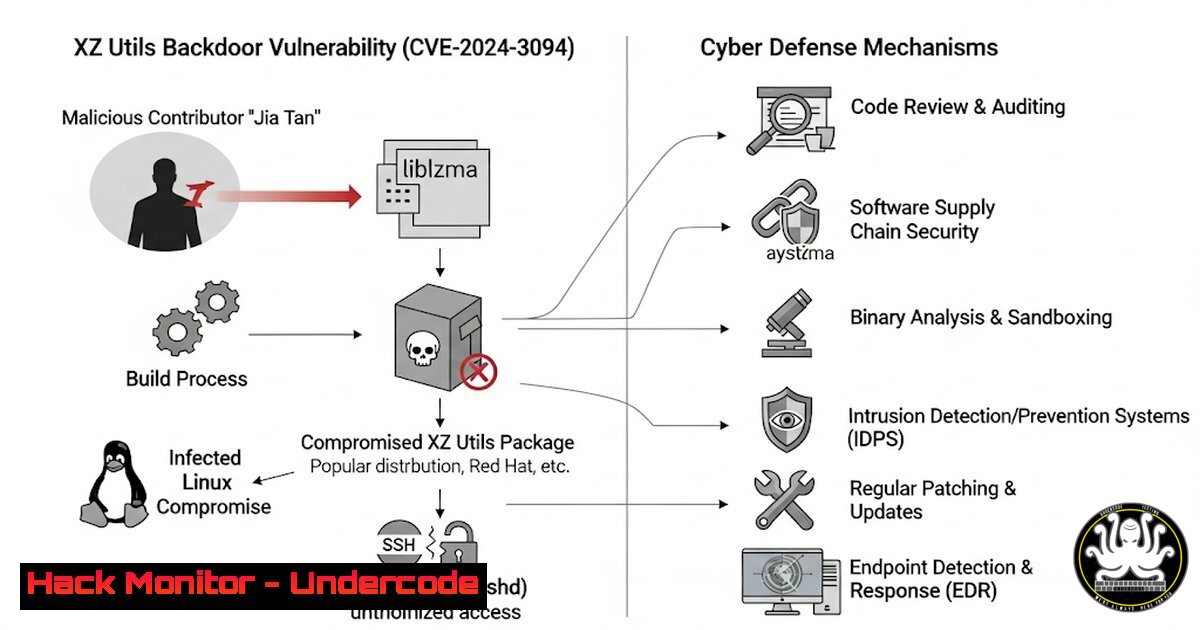
Introduction:
The recent discovery of a sophisticated backdoor in the widely used XZ Utils open-source library sent shockwaves through the cybersecurity community. This near-miss supply chain attack, attributed to a state-sponsored threat actor, demonstrates a chilling evolution in offensive tactics, targeting the very tools security professionals rely on. This article provides a technical deep dive into the exploit and delivers actionable commands to harden your environment.
Learning Objectives:
- Understand the technical mechanics of the XZ Utils backdoor and its SSH authentication bypass.
- Learn immediate detection and mitigation strategies to identify compromised systems.
- Implement advanced system hardening and monitoring techniques to prevent future supply chain attacks.
You Should Know:
1. Detecting a Compromised liblzma Library
The first step is to check the installed version of XZ Utils. The malicious code was present in versions 5.6.0 and 5.6.1.
` Check installed XZ Utils version on Linux`
`xz –version`
` For RPM-based systems (RedHat, CentOS, Fedora)`
`rpm -qa | grep xz`
` For Debian-based systems (Ubuntu, Debian)`
`dpkg -l | grep xz`
Step-by-step guide: These commands query your system’s package manager to list the installed version of the XZ Utils libraries. Any system showing version 5.6.0 or 5.6.1 is potentially compromised and must be downgraded immediately to a known-good version (e.g., 5.4.6). This is the critical first step in containment.
2. Identifying Malicious Process Injection via sshd
The backdoor worked by hijacking the SSH authentication process. You can check which shared libraries your `sshd` process is using.
` Check the shared libraries loaded by the SSH daemon`
`lsof -p $(pgrep -o sshd) | grep -E “liblzma|ssh”`
` Alternatively, use the dynamic linker to list dependencies`
`ldd $(which sshd) | grep lzma`
Step-by-step guide: The `lsof` (List Open Files) command, when targeted at the SSH daemon’s process ID (found with pgrep), will show all files and libraries it has loaded. Grepping for “liblzma” will confirm if the compromised library is actively in use by SSH, indicating a critical finding.
3. Forensic Analysis with Strings Command
The malicious code was obfuscated within the library. The `strings` command can help find anomalous function names that shouldn’t be present in a legitimate liblzma file.
` Dump all human-readable strings from the liblzma library and search for suspicious function names`
`strings /usr/lib/x86_64-linux-gnu/liblzma.so.5 | grep -E ‘(rsa_public_key|get_cpuid)’`
`strings /usr/lib/x86_64-linux-gnu/liblzma.so.5 | grep -i ‘lazy’`
Step-by-step guide: This command extracts all printable strings from the library file. The backdoor used functions like `rsa_public_key` and `get_cpuid` (a known function name used in the exploit) that are not part of the standard liblzma codebase. Finding these is a strong indicator of compromise.
4. Network Anomaly Detection with Tcpdump
The backdoor allowed remote code execution by sending a specially crafted SSH certificate. Monitoring for unusual SSH handshakes is key.
` Capture the first 150 bytes of SSH traffic to look for large, anomalous certificates`
`sudo tcpdump -i any -s 0 -A ‘tcp port 22’ | grep -E ‘(ssh-rsa|ecdsa-sha2-nistp256)’ -m 10 -A 150 -B 5`
Step-by-step guide: This `tcpdump` command listens on all interfaces for traffic on port 22 (SSH) and outputs the ASCII content (-A). It then greps for common SSH key types but captures a large byte window around them (-A 150 -B 5) to inspect the size and structure of the key exchange. An abnormally large key payload could be a trigger for investigation.
5. Windows Equivalents: Hunting Library Tampering
While primarily a Linux exploit, the principles apply universally. On Windows, you can use PowerShell to verify the integrity of system files.
` Use PowerShell to get the digital signature status of all files in a directory (e.g., OpenSSH install dir)`
`Get-ChildItem -Path “C:\Program Files\OpenSSH\.dll” | Get-FileHash -Algorithm SHA256 | Format-List`
`Get-AuthenticodeSignature -FilePath “C:\Program Files\OpenSSH\libcrypto.dll” | Format-List`
Step-by-step guide: These PowerShell commands calculate the SHA256 hash of critical DLLs and check their Authenticode signatures. By comparing these hashes against known-good baselines from a pristine install, you can detect unauthorized modifications, a hallmark of supply chain compromises.
6. Building a Canary to Detect Code Injection
A proactive defense is to deploy canary files—files that should never be touched—and monitor them.
` Create a canary library and set an immutable attribute flag (Linux)`
`sudo touch /usr/lib/canary_library.so`
`sudo chattr +i /usr/lib/canary_library.so`
` Monitor the canary file with auditd`
`sudo auditctl -w /usr/lib/canary_library.so -p war -k canary_tamper`
Step-by-step guide: The `chattr +i` command makes the file immutable, preventing even root from deleting or modifying it. The `auditctl` command sets up auditing to watch (-w) the canary file for any write, attribute change, or rename (-p war) and logs any such event with the key canary_tamper. Any alert from this canary indicates a severe system breach.
7. Mitigation: Immediate Downgrade and Patching
The definitive mitigation is to remove the poisoned package and replace it.
` RPM-based Downgrade (example)`
`sudo rpm -Uvh –oldpackage xz-5.4.6-1.fc38.x86_64.rpm`
` Debian-based Downgrade (example)`
`sudo apt install xz-utils=5.4.5-0.2`
Step-by-step guide: These commands force the package manager to install an older, verified version of the package over the new, malicious one. You must first source a known-good package from your distribution’s repositories. This action severs the attacker’s foothold immediately.
What Undercode Say:
- The Software Supply Chain is the New Front Line. This attack wasn’t a loud, noisy breach but a silent, patient infiltration of a trust-based ecosystem. It signals a strategic pivot by advanced actors.
- Obfuscation is Standard Practice. The use of code obfuscation and the injection within a critical, yet overlooked, library demonstrates a level of sophistication that will be mimicked by lower-tier actors.
The XZ Utils incident is not an anomaly; it is a blueprint. It proves that long-term social engineering campaigns against open-source maintainers can yield devastating results. The security community’s response was swift, but the success hinged on a single researcher noticing anomalous CPU usage. This underscores a critical vulnerability in our digital infrastructure: its dependence on unpaid volunteers and the fragility of inherited trust. The paradigm must shift from reactive patching to proactive, zero-trust validation of all code, regardless of its source.
Prediction:
The XZ Utils hack will catalyze a five-year transformation in software development and security. We will see the rapid, mandatory adoption of software bills of materials (SBOMs) for all critical software, providing transparency into dependencies. “Memory-safe” languages like Rust will see accelerated adoption to prevent entire classes of vulnerabilities. Finally, a new market will emerge for AI-powered code audit tools that can detect obfuscated malicious commits and behavioral anomalies in build processes, moving supply chain security from a manual review process to an automated, continuous assurance model.
🎯Let’s Practice For Free:
IT/Security Reporter URL:
Reported By: Daniel Scheidt – Hackers Feeds
Extra Hub: Undercode MoN
Basic Verification: Pass ✅


