Listen to this Post
Introduction:
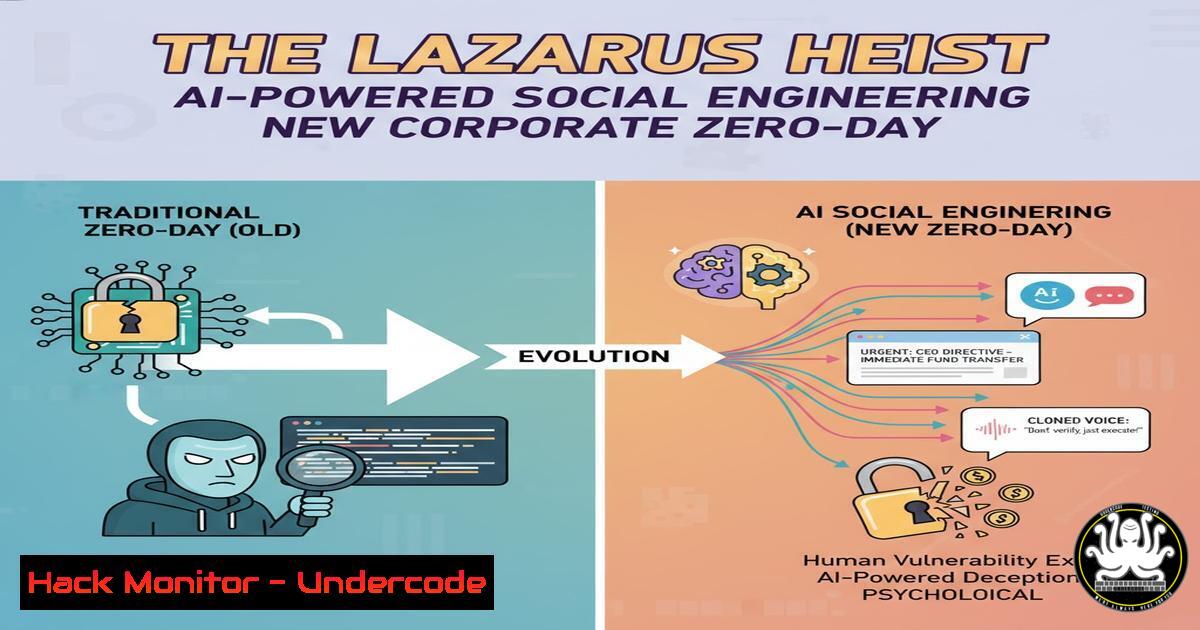
The recent BlueHat Asia 2025 disclosure by Microsoft’s Security Response Center (MSRC) has cast a stark light on the evolving tactics of state-sponsored actors like the Lazarus Group. No longer relying solely on complex software exploits, these advanced persistent threats (APTs) are increasingly weaponizing Artificial Intelligence to craft hyper-personalized social engineering campaigns, making the human element the primary attack vector. This shift necessitates a fundamental reevaluation of corporate cybersecurity defenses, moving beyond traditional perimeter security to a holistic human-centric defense strategy.
Learning Objectives:
- Understand the technical mechanics of AI-powered phishing, including deepfake audio/video synthesis and LLM-generated content.
- Implement advanced technical controls and monitoring to detect and mitigate credential harvesting and post-exploitation activity.
- Develop and enforce security policies that address the unique challenges posed by AI-generated social engineering.
You Should Know:
- Deconstructing the AI-Phishing Lure: From Generic to Generative
The core of the new Lazarus strategy lies in using Large Language Models (LLMs) to create impeccably written, context-aware phishing emails. Unlike the poorly written scams of the past, these emails are grammatically perfect, mimic internal communication styles, and reference real company events or personnel. They often contain QR codes leading to sophisticated credential-harvesting pages that are visually identical to legitimate corporate login portals (e.g., Microsoft 365, VPN access).
Linux/Windows/Cybersecurity command or code snippet related to article
Step‑by‑step guide: To analyze a suspicious email header for signs of spoofing, you can use the `munpack` tool in Linux to extract components and then inspect the headers.
 Save the raw .eml file and use munpack to extract attachments
munpack suspicious_email.eml

Analyze the 'Received' headers to trace the email path
grep -i 'received:|from:|by:|with:' suspicious_email.eml
This process helps identify inconsistencies in the originating IP addresses, mail server relays, and SPF/DKIM alignment, which are often manipulated in sophisticated phishing attempts.
- The Deepfake Threat: Weaponized Audio and Video for Vishing
Lazarus has been documented using AI-generated voice clones and deepfake video in vishing (voice phishing) attacks. An attacker might use a short audio sample of a CEO from a public earnings call to clone their voice, then call a finance employee with an urgent, legitimate-sounding request to transfer funds.
Linux/Windows/Cybersecurity command or code snippet related to article
Step‑by‑step guide: While deepfake detection is complex, you can use Python with libraries like `deepface` or `opencv` to perform basic analysis on a suspected video file.
 Example using deepface for basic analysis (requires model download)
from deepface import DeepFace
import cv2

Analyze a frame for potential deepfake artifacts
analysis = DeepFace.analyze(img_path="frame.jpg", actions=['emotion', 'age', 'gender'], enforce_detection=False)
print(analysis)

Use OpenCV to check for inconsistent frame rates or lighting
cap = cv2.VideoCapture('suspect_video.mp4')
fps = cap.get(cv2.CAP_PROP_FPS)
print(f"Video FPS: {fps}")
This is a rudimentary check; professional-grade detection tools are recommended for serious analysis.
3. Hardening M365 Against Credential Harvesting
Since the end goal is often corporate credentials, hardening your Microsoft 365 tenant is critical. This involves moving beyond basic MFA to implementing Conditional Access policies and disabling legacy authentication protocols.
Linux/Windows/Cybersecurity command or code snippet related to article
Step‑by‑step guide: Use PowerShell with the MSOnline module to audit and disable legacy authentication.
 Connect to MSOnline service
Connect-MsolService

Check for accounts using legacy auth (this requires Azure AD Sign-in Logs analysis in reality, but this checks settings)
Get-MsolUser -All | Where-Object {$_.StrongAuthenticationRequirements.State -ne "Enabled"}

A more practical step is to create a Conditional Access Policy in Azure AD to block legacy auth.
 This is done in the Azure Portal, but you can check its status with:
Get-MsolDirSyncFeatures
 Ensure 'BlockLegacyAuthentication' is enabled.
4. Network Monitoring for C2 Beaconing
After a successful compromise, Lazarus implants will call back to a Command and Control (C2) server. Detecting this beaconing activity is key to identifying a breached host.
Linux/Windows/Cybersecurity command or code snippet related to article
Step‑by‑step guide: Use a combination of `tcpdump` and scripting on a Linux-based security monitor to look for periodic outbound connections.
 Capture DNS queries to look for beaconing to suspicious domains
sudo tcpdump -i any -n 'udp port 53' | grep -i 'query'

A more advanced method is to use Zeek (formerly Bro) to log all connections and then analyze for periodic patterns.
 Start a basic Zeek instance
zeek -i eth0

The `conn.log` file will contain all connection data for analysis.
This helps in identifying calls to newly registered domains (NRDs) or domains with low reputation scores.
- API Security: The Next Frontier for Data Exfiltration
Modern attackers don’t just sit on a workstation; they steal API keys and tokens from compromised devices to access cloud services directly, bypassing network controls.
Linux/Windows/Cybersecurity command or code snippet related to article
Step‑by‑step guide: Use `curl` to audit your own API endpoints for misconfigurations, such as excessive permissions.
 Test an API endpoint without authentication (should return 401/403)
curl -X GET https://api.yourcompany.com/v1/sensitive_data

Test with a stolen token (simulated). Check if the token is valid and what scopes it has.
curl -H "Authorization: Bearer <ACCESS_TOKEN>" https://api.yourcompany.com/v1/user/profile

Use jq to parse the response and look for excessive data exposure.
curl -H "Authorization: Bearer <TOKEN>" https://api.yourcompany.com/v1/users | jq '.[] | {id, name, email, permissions}'
This demonstrates how an attacker would probe and use a compromised token.
6. Windows Process Injection & Mitigation
Lazarus is known for using process injection techniques (e.g., DLL injection, Process Hollowing) to run malicious code within the context of a legitimate process like `explorer.exe` or svchost.exe.
Linux/Windows/Cybersecurity command or code snippet related to article
Step‑by‑step guide: Use Windows PowerShell to query for processes with anomalous memory attributes or loaded DLLs.
 Get processes with their modules (DLLs) and look for unsigned or anomalous paths
Get-Process | Select-Object ProcessName, Id, @{Name="Modules";Expression={$_.Modules.FileName}} | Format-List

Use Sysinternals Process Explorer for a more robust GUI-based analysis.
 From command line, you can use Sigcheck to verify digital signatures.
sigcheck -m C:\Windows\System32\notepad.exe
Enabling Attack Surface Reduction (ASR) rules in Defender, specifically the “Block process creations originating from PSExec and WMI commands” rule, can mitigate many common injection techniques.
7. Incident Response: Triaging a Compromised Host
If you suspect a host is compromised, a rapid and systematic triage is essential to contain the threat.
Linux/Windows/Cybersecurity command or code snippet related to article
Step‑by‑step guide: A quick Linux triage script to collect crucial artifacts.
!/bin/bash
 Quick IR Triage Script
HOSTNAME=$(hostname)
OUTPUT_DIR="/tmp/ir_$HOSTNAME_$(date +%Y%m%d_%H%M%S)"
mkdir -p $OUTPUT_DIR

Collect network connections
netstat -tunap > $OUTPUT_DIR/netstat.txt

Collect process tree
ps auxef > $OUTPUT_DIR/ps_auxef.txt

Collect history of current users
for user in /home/; do
if [ -f "$user/.bash_history" ]; then
cp "$user/.bash_history" "$OUTPUT_DIR/$(basename $user)_bash_history"
fi
done

Collect cron jobs
crontab -l > $OUTPUT_DIR/crontab_root.txt 2>/dev/null
for user in $(getent passwd | cut -f1 -d:); do crontab -u $user -l > $OUTPUT_DIR/crontab_$user.txt 2>/dev/null; done

echo "Triage data collected in: $OUTPUT_DIR"
This script creates a timestamped archive of network, process, and user activity for offline analysis.
What Undercode Say:
- The Perimeter is Now Psychological: The most robust firewall is useless against a convincingly spoofed executive command delivered via a deepfake video call. Security awareness training must evolve to include practical drills on verifying unusual requests through secondary, out-of-band channels.
- Identity is the New Endpoint: The focus of defense must shift from just securing the device to securing the user’s identity. This means universal enforcement of phishing-resistant MFA (like FIDO2 keys), strict Conditional Access policies, and continuous monitoring of identity threat detection and response (ITDR).
The Lazarus disclosure is not a novel threat but the maturation of a trend. It signifies that AI-powered social engineering is now a standardized tool in the APT playbook, accessible even to less-resourced groups. Defending against this requires a paradigm shift from a purely technical defense to a socio-technical one. Investments in AI-driven security monitoring that can analyze email content, detect behavioral anomalies in user activity, and identify deepfakes are no longer futuristic concepts but immediate necessities. The cost of inaction is no longer just data loss, but potentially catastrophic financial and reputational damage.
Prediction:
The techniques showcased by Lazarus at BlueHat Asia 2025 will rapidly commoditize, leading to a surge in Business Email Compromise (BEC) and targeted ransomware attacks against mid-market companies within the next 18-24 months. The underground market will begin offering “AI-Phishing as a Service” kits, lowering the barrier to entry for cybercriminals. This will force a widespread adoption of behavioral biometrics, AI-based content verification tools integrated directly into communication platforms (e.g., “Verified Caller” tags for corporate numbers), and mandatory, simulation-based security training for all employees, fundamentally changing corporate security culture.
🎯Let’s Practice For Free:
IT/Security Reporter URL:
Reported By: Basavanagoud S – Hackers Feeds
Extra Hub: Undercode MoN
Basic Verification: Pass ✅


