Listen to this Post
Introduction:
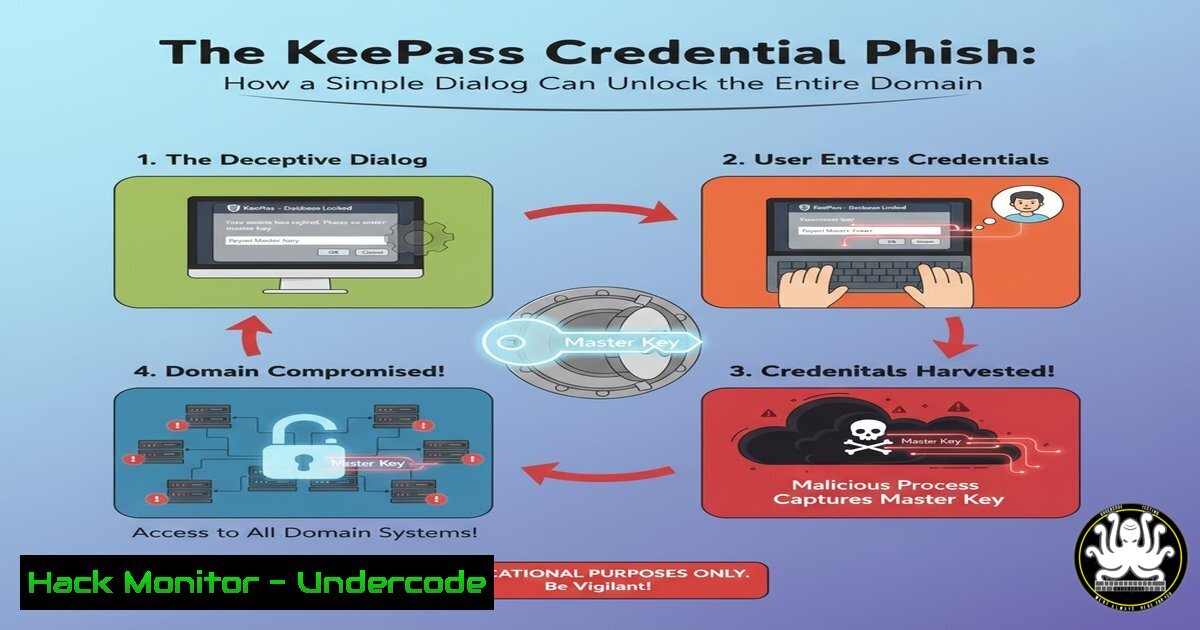
A common penetration testing roadblock occurs after obtaining local administrator access on servers but before achieving full domain compromise. This article explores a sophisticated social engineering attack targeting KeePass password managers, a tool ubiquitous among IT administrators. By replicating a corrupted database prompt, attackers can harvest master passwords and escalate privileges across the network.
Learning Objectives:
- Understand the attack methodology for credential harvesting from KeePass users
- Implement detection mechanisms for fake authentication prompts
- Develop mitigation strategies against password manager phishing attacks
You Should Know:
1. Detecting KeePass Processes in a Windows Environment
Get-Process -Name "KeePass" -ErrorAction SilentlyContinue
tasklist /FI "IMAGENAME eq KeePass.exe"
wmic process where "name='KeePass.exe'" get ProcessId,CommandLine
Step-by-step guide: These commands help identify running KeePass instances on compromised systems. The PowerShell command quickly checks for active KeePass processes, while the WMIC query provides additional details about the execution context. During engagements, this reconnaissance helps target users with active password manager sessions.
2. Creating a Convincing Fake KeePass Dialog
 PowerShell code to create Windows Forms dialog
Add-Type -AssemblyName System.Windows.Forms
$form = New-Object System.Windows.Forms.Form
$form.Text = "KeePass Database Recovery"
$form.Size = New-Object System.Drawing.Size(400,250)
$label = New-Object System.Windows.Forms.Label
$label.Text = "Database corruption detected. Enter master password for recovery:"
$textBox = New-Object System.Windows.Forms.TextBox
$button = New-Object System.Windows.Forms.Button
$button.Text = "Recover"
Step-by-step guide: This PowerShell script creates a basic fake KeePass dialog. Attackers typically enhance this with proper icons, window styling, and error handling to mimic the legitimate application. The form captures credentials when users attempt to “recover” their supposedly corrupted database.
3. Network Traffic Monitoring for Exfiltrated Credentials
tcpdump -i any -A 'host <attacker_ip> and port 80'
tshark -i eth0 -Y "http.request" -T fields -e http.host -e http.request.uri
netsh trace start provider=Microsoft-Windows-Kernel-Network capture=yes
Step-by-step guide: These commands help security teams detect credential exfiltration. TCPdump and Wireshark monitor network traffic for data sent to attacker-controlled systems, while Windows network tracing captures packet-level details. Monitoring for unexpected HTTP requests containing base64-encoded credentials is crucial.
4. Windows Event Log Analysis for Process Creation
Get-WinEvent -FilterHashtable @{LogName='Security'; ID=4688} | Where-Object {$_.Message -like "KeePass"}
wevtutil qe Security /q:"[System[(EventID=4688)]]" /f:text | findstr "KeePass"
Step-by-step guide: These commands audit process creation events related to KeePass. Security teams should baseline normal KeePass execution patterns and alert on unusual parent processes or execution times. The Windows Event Log provides detailed process creation context including user context and command-line arguments.
5. Application Whitelisting Configuration
Get-AppLockerPolicy -Effective | Select -ExpandProperty RuleCollections
New-AppLockerPolicy -RuleType Publisher,Path -User Everyone -Xml | Set-AppLockerPolicy -Merge
Set-AppLockerPolicy -XmlPolicy C:\Policy.xml
Step-by-step guide: AppLocker policies prevent unauthorized executables, including fake KeePass binaries. These PowerShell commands help implement application whitelisting that restricts execution to signed KeePass binaries from verified publishers, blocking social engineering payloads.
6. Memory Analysis for KeePass Master Keys
volatility -f memory.dump --profile=Win10x64_18362 pslist | grep -i keepass
volatility -f memory.dump --profile=Win10x64_18362 mimikatz
strings memory.dump | grep -i "keepass" -A 5 -B 5
Step-by-step guide: During forensic investigations, these Volatility Framework commands help identify KeePass processes in memory dumps and extract potential credentials. The strings command searches for plaintext references to KeePass and associated passwords in memory captures.
7. KeePass Plugin Security Hardening
 Check for suspicious plugins in KeePass configuration
Get-ChildItem "C:\Program Files\KeePass Password Safe 2\Plugins"
Get-ItemProperty "HKCU:\Software\KeePass Password Safe 2" -Name "Plugins"
Step-by-step guide: These commands audit KeePass plugin directories and registry settings for unauthorized modifications. Attackers often deploy malicious plugins to harvest credentials. Organizations should maintain a whitelist of approved plugins and regularly verify their integrity.
8. Windows Defender Attack Surface Reduction Rules
Set-MpPreference -AttackSurfaceReductionRules_Ids D1E49AAC-8F56-4280-B9BA-993A6D -AttackSurfaceReductionRules_Actions Enabled
Add-MpPreference -AttackSurfaceReductionOnlyExclusions "C:\Program Files\KeePass Password Safe 2\KeePass.exe"
Step-by-step guide: These PowerShell commands configure Windows Defender to block executable content from email clients and webmail, preventing the initial payload delivery. The exclusion ensures legitimate KeePass functionality while blocking unauthorized executables.
9. PowerShell Logging and Transcription
Register-PSSessionConfiguration -Name "Logging" -FilePath "C:\PSLogging\logging.pssc" -Force
Start-Transcript -Path "C:\PSLogging\transcript.txt" -Append
Get-WinEvent -LogName "Microsoft-Windows-PowerShell/Operational" | Where-Object {$_.Id -eq 4104}
Step-by-step guide: These commands enable comprehensive PowerShell logging to detect malicious scripts. PowerShell transcription captures command input and output, while operational logs provide detailed script block logging crucial for identifying credential harvesting attempts.
10. Network Segmentation for Administrative Access
netsh advfirewall firewall add rule name="Block KeePass Network" dir=out program="C:\Program Files\KeePass Password Safe 2\KeePass.exe" action=block
Get-NetFirewallRule -DisplayName "Block KeePass Network" | Get-NetFirewallApplicationFilter
Step-by-step guide: These Windows firewall commands prevent KeePass from making network connections, reducing the risk of credential exfiltration. Organizations should implement network segmentation that restricts password management tools from initiating outbound connections.
What Undercode Say:
- Social engineering remains the most effective bypass for technical security controls
- Password managers create single points of failure that attackers eagerly target
- The line between legitimate troubleshooting and malicious activity is increasingly blurred
The KeePass credential phishing technique demonstrates how attackers are shifting focus from technical exploitation to human factors. While organizations invest heavily in perimeter defenses and privilege management, a single convincing dialog can bypass millions in security investments. This attack pattern highlights the critical need for user awareness training that specifically addresses application-specific social engineering, not just generic phishing emails. The technical sophistication required is minimal compared to traditional exploitation, making this accessible to a wider range of threat actors. Defenders must assume that local administrator access will be compromised and implement application control, behavioral monitoring, and credential segmentation as compensating controls.
Prediction:
As password managers become more entrenched in enterprise environments, we’ll see an explosion of specialized phishing kits targeting KeePass, LastPass, 1Password, and other password management solutions. These attacks will evolve beyond simple dialog replication to include browser extension manipulation, cloud synchronization interception, and mobile application spoofing. Within two years, password manager compromises will account for over 30% of significant enterprise breaches as attackers recognize the high ROI of harvesting consolidated credential vaults rather than individual passwords.
🎯Let’s Practice For Free:
IT/Security Reporter URL:
Reported By: Eddiemora I – Hackers Feeds
Extra Hub: Undercode MoN
Basic Verification: Pass ✅


