Listen to this Post
Introduction:
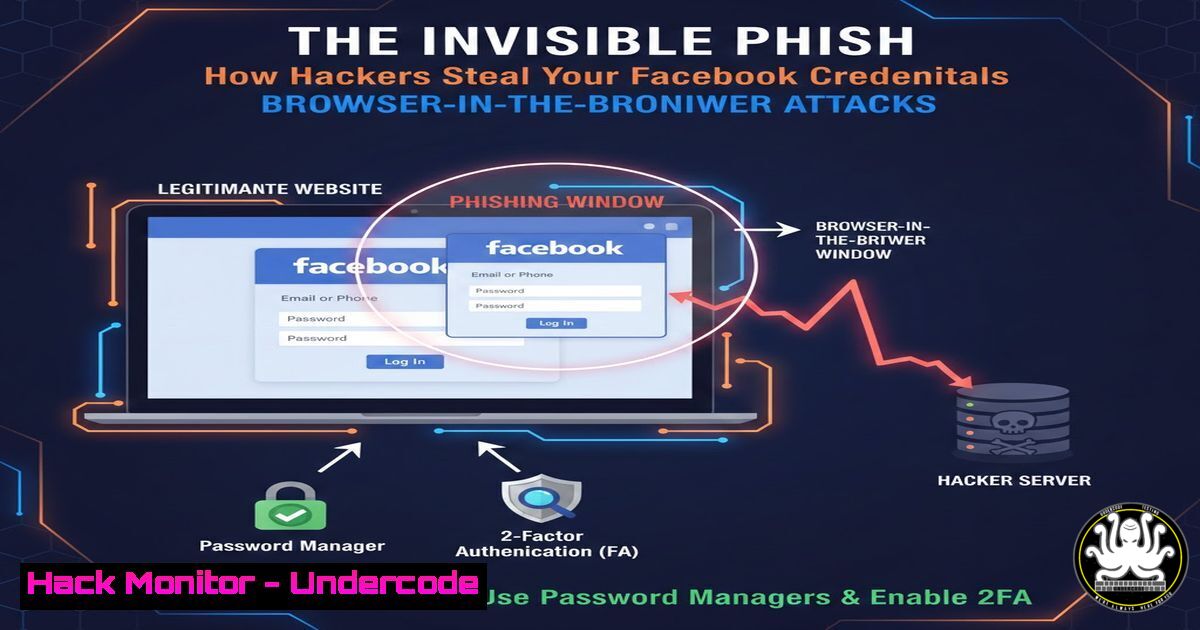
A sophisticated new phishing technique, known as “Browser-in-the-Browser” (BitB), is evading traditional security awareness by creating perfectly forged login pop-ups that are rendered directly within the browser window. Unlike classic phishing that redirects to a fake URL, this attack embeds a malicious but convincing browser frame—complete with padlock icons and fake addresses—within a legitimate webpage, making it nearly indistinguishable from a real authentication prompt. This method specifically targets social media and SaaS platform credentials, posing a severe threat to both personal data and corporate accounts.
Learning Objectives:
- Understand the technical mechanics of the Browser-in-the-Browser (BitB) phishing attack.
- Learn to identify visual and behavioral telltale signs of a fraudulent browser window.
- Implement proactive technical defenses and user training to mitigate the risk of credential theft.
You Should Know:
1. Deconstructing the Browser-in-the-Browser Attack
The BitB attack is a client-side social engineering exploit. It doesn’t require complex malware; instead, it uses JavaScript and CSS to create a deceptive pop-up window that is actually just HTML elements styled to look like a native browser dialog (e.g., a Facebook OAuth login). The hacker crafts a legitimate-looking website, often using stolen or cloned content. When a user clicks a trigger link, JavaScript generates the fake window within the browser tab. The address bar still shows the legitimate, often HTTPS-secured, domain of the initial site, bypassing the primary red-flag check users are taught.
Step-by-step guide explaining what this does and how to use it:
1. The Lure: An attacker sends a phishing email or message with a link to a seemingly interesting article, video, or document.
2. The Trap Page: The user clicks and lands on a professionally crafted page hosted on a compromised or lookalike domain (e.g., news-update[.]online).
3. The Trigger: JavaScript executes on page load or after a user action (e.g., “Click to view”), generating a `div` element that mimics a browser window. This “window” has a fake address bar showing `https://www.facebook.com`, a padlock icon, and a content area loading a cloned Facebook login form.
4. Data Harvesting: Credentials entered into this fake form are captured by the attacker’s backend script in real-time, often followed by a redirect to the real service to avoid immediate suspicion.
2. Technical Red Flags: Inspecting the Illusion
While visually convincing, BitB attacks have inherent technical flaws that can be detected. The fake window is not a separate browser process; it’s a cage within the page.
Step-by-step guide explaining what this does and how to use it:
Try to Drag the Window: A real browser pop-up can be dragged outside the boundaries of the main browser window. A BitB window cannot; it is constrained within the original tab.
Use the Task Manager (Windows) or Activity Monitor (macOS): A genuine login pop-up will appear as a separate process (e.g., `chrome.exe` / Google Chrome Helper). A BitB window will not.
Keyboard Shortcut Test: Press `Alt+Tab` (Windows) or `Cmd+Tab` (macOS). A real browser window will appear in the application switcher. The BitB frame will not.
Inspect the Element (For Advanced Users): Right-click anywhere on the title bar of the suspicious pop-up. If a browser context menu appears (e.g., “Inspect”), it’s a BitB attack. On a real window, right-clicking on the title bar does nothing.
3. Hardening Your Browser Against Client-Side Attacks
Configuring your browser is the first line of technical defense to limit the effectiveness of such attacks.
Step-by-step guide explaining what this does and how to use it:
Enable Click-to-Play for Flash/JavaScript (Legacy): While less relevant now, aggressive blocking can break some attacks.
Use Dedicated Password Managers: Tools like Bitwarden or KeePass will not auto-fill credentials into a fake form that doesn’t match the saved domain. This is a critical failsafe.
Install Anti-Phishing Extensions: Use browser extensions like Netcraft Extension or uBlock Origin in advanced mode. These can block known phishing domains and suspicious inline frames.
Leverage Built-in Site Isolation (Chrome/Edge): Ensure site isolation is on. This security feature creates a separate process for each site, making it harder for malicious sites to interact with others.
In Chrome/Edge, navigate to `chrome://flags/site-isolation-trial-opt-out` and ensure it’s set to Disabled.
4. Administrative & Enterprise Mitigations (For IT Security)
Organizations must adopt a layered security approach to protect their users.
Step-by-step guide explaining what this does and how to use it:
1. Implement DNS Filtering: Deploy a secure DNS resolver (like Cisco Umbrella, Cloudflare Gateway) that blocks access to newly registered domains, known phishing sites, and malware-hosting domains.
2. Enforce Multi-Factor Authentication (MFA): Mandate MFA on all critical services (O365, GWorkspace, SSO). Stolen credentials alone are insufficient if a second, time-based factor is required.
3. Configure Web Proxies & SSL Inspection: Use next-gen firewalls or secure web gateways to inspect encrypted traffic (SSL/TLS decryption) for phishing patterns and block malicious JavaScript payloads.
4. User Simulation Training: Move beyond videos. Use platforms like KnowBe4 or Cofense that simulate BitB-style attacks to train users in a safe environment and identify vulnerable individuals.
5. Forensic Detection: Hunting for BitB Artifacts
Security analysts can hunt for indicators of these attacks in logs and network traffic.
Step-by-step guide explaining what this does and how to use it:
Analyze Web Server Logs: Look for POST requests with login parameters (e.g., email, pass) sent to domains other than the legitimate service.
Example log entry to flag: `”POST /capture.php HTTP/1.1″ 200 – “https://legitimate-looking-site.com” “user= [email protected]&pass=PlainTextPassword”`
Network Traffic Analysis: Use Wireshark or Zeek to detect anomalous outbound connections from corporate workstations.
Zeek Logs (http.log): Look for connections where the `uri` path looks like a login endpoint but the `host` header is a non-standard or newly seen domain.
Endpoint Detection (Windows Command Line): Script a search for processes making unusual network calls.
 PowerShell example to find Chrome processes making network connections to suspicious IPs
Get-NetTCPConnection -OwningProcess (Get-Process chrome).Id -State Established | Where-Object { $_.RemoteAddress -notmatch "^(10.|192.168.|172.(1[6-9]|2[0-9]|3[0-1]))" } | Select-Object OwningProcess, RemoteAddress, RemotePort
What Undercode Say:
- The Illusion is Perfect, But the Environment Isn’t: The ultimate weakness of the BitB attack is that it simulates a window, not a secure system process. User training must shift from “check the URL” to “test the environment”—attempting to drag, tab away, or use credential manager auto-fill are now essential habits.
- This is an Arms Race in Client-Side Deception: BitB represents a shift from domain spoofing to UI/UX spoofing. Future iterations will likely attempt to mimic MFA prompts and operating system dialogs, making technical controls like application allow-listing and advanced EDR solutions even more critical.
Prediction:
The Browser-in-the-Browser technique will rapidly evolve and become modularized within phishing-as-a-service (PhaaS) platforms, making it accessible to low-skilled attackers. We will see its adaptation beyond login pop-ups to fake software update prompts, ransomware warnings, and cryptocurrency payment windows. The next frontier will be “Desktop-in-the-Browser” attacks that mimic entire OS interfaces. Combating this will require a fusion of behavioral analytics (detecting unusual user interactions post-click) and browser vendors potentially implementing new security APIs to allow websites to explicitly declare and trigger genuine, authenticated system dialogs, creating a trusted pathway that client-side code cannot replicate.
▶️ Related Video (70% Match):
🎯Let’s Practice For Free:
IT/Security Reporter URL:
Reported By: %F0%9F%8E%AFclaudie G – Hackers Feeds
Extra Hub: Undercode MoN
Basic Verification: Pass ✅


