Listen to this Post
Introduction:
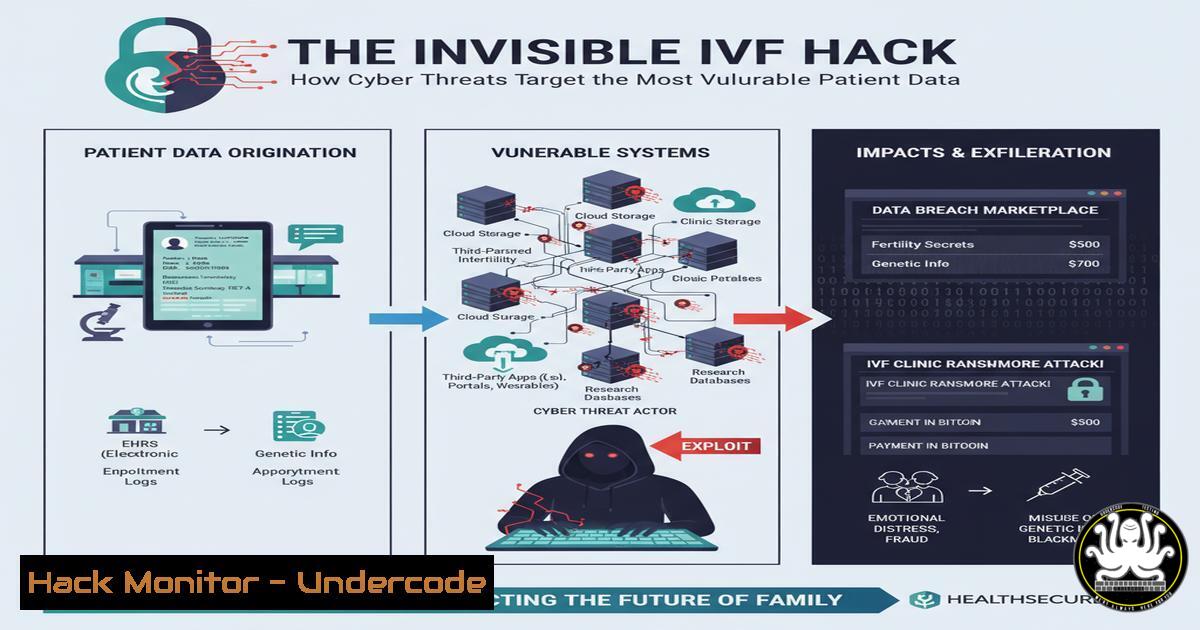
The deeply personal journey of In Vitro Fertilization (IVF) relies on a complex digital ecosystem, from electronic health records (EHR) to lab equipment controllers. This convergence of highly sensitive data and critical systems presents a lucrative target for cybercriminals, threatening not just privacy but the very integrity of the scientific process. This article dissects the technical vulnerabilities within a modern fertility clinic and provides actionable commands for hardening these environments against devastating breaches.
Learning Objectives:
- Identify critical attack surfaces in medical IoT (IoMT) and EHR systems specific to fertility clinics.
- Implement hardening techniques for Windows-based clinical workstations and Linux-based laboratory servers.
- Develop incident response playbooks for ransomware and data exfiltration scenarios targeting Protected Health Information (PHI).
You Should Know:
1. Hardening Clinical Workstations with Windows Group Policy
Clinical workstations are the primary access point to EHR systems. Securing them is paramount to prevent initial compromise.
Verified Commands & Configurations:
 Enable Windows Defender Application Guard for Office (isolates untrusted documents)
Set-ItemProperty -Path "HKLM:\SOFTWARE\Policies\Microsoft\AppHVSI" -Name "AllowWindowsDefenderApplicationGuard" -Value 1

Disable SMBv1 to prevent wormable attacks like WannaCry
Disable-WindowsOptionalFeature -Online -FeatureName SMB1Protocol

Configure BitLocker encryption via GPO (Critical for stolen devices)
Manage-bde -on C: -RecoveryPassword -UsedSpaceOnly

Audit PowerShell script block logging to detect malicious activity
Set-ItemProperty -Path "HKLM:\SOFTWARE\Policies\Microsoft\Windows\PowerShell\ScriptBlockLogging" -Name "EnableScriptBlockLogging" -Value 1
Step-by-Step Guide:
Create a new Group Policy Object (GPO) in Active Directory and link it to the “Clinical Workstations” Organizational Unit. Using the Group Policy Management Editor, navigate to `Computer Configuration -> Policies -> Administrative Templates -> Windows Components` to configure the above settings. Enforcing these policies ensures a baseline security posture that mitigates common initial access vectors.
2. Securing Linux-Based Laboratory and Database Servers
The servers storing patient records, embryo viability data, and genetic information are high-value targets. Hardening these Linux systems is non-negotiable.
Verified Commands & Configurations:
 Check for and apply security updates automatically
sudo apt update && sudo apt upgrade -y  Debian/Ubuntu
sudo dnf update --security -y  RHEL/CentOS

Audit user accounts for weak passwords or inactive accounts
sudo awk -F: '($2 == "" ) { print $1 }' /etc/shadow
sudo chage -l <username>  Check password expiry

Configure and enable the Uncomplicated Firewall (UFW)
sudo ufw default deny incoming
sudo ufw default allow outgoing
sudo ufw allow ssh
sudo ufw allow from 10.0.0.0/8 to any port 5432  Allow DB access only from internal network
sudo ufw enable

Install and configure AIDE (Advanced Intrusion Detection Environment) for file integrity monitoring
sudo apt install aide -y
sudo aideinit
sudo cp /var/lib/aide/aide.db.new /var/lib/aide/aide.db
Step-by-Step Guide:
After a fresh OS installation, run the update commands. Create a dedicated, non-root user for database access. Configure UFW to only allow necessary traffic, explicitly denying all else. Install AIDE to create a baseline of critical system files (/etc, /bin, /sbin). Schedule a daily cron job to run `aide –check` and email the results to the security team for analysis.
3. Vulnerability Scanning for Medical IoT (IoMT) Devices
Lab incubators, imaging systems, and other networked medical devices often run on legacy, unpatched operating systems, making them easy entry points.
Verified Commands & Configurations:
 Use Nmap to discover and fingerprint devices on the clinical network
nmap -sS -O -sV 10.10.1.0/24

Scan for specific vulnerabilities (e.g., SMBGhost)
nmap --script smb-protocols -p445 10.10.1.50

Check for weak TLS/SSL configurations on web interfaces of devices
nmap --script ssl-enum-ciphers -p 443 10.10.1.100
Step-by-Step Guide:
First, obtain explicit authorization to scan the clinical network. Use the `nmap -sS` command for a quick SYN scan to discover all active devices. Then, target specific IP ranges with version detection (-sV) to identify operating systems and services. Correlate the findings with known vulnerabilities in the National Vulnerability Database (NVD). Isolate any critical devices that cannot be patched on a separate, tightly controlled VLAN.
- API Security for Patient Portal and Data Exchange
Fertility clinics often use APIs to share data with partners, labs, and patient mobile apps. Insecure APIs are a leading cause of data breaches.
Verified Commands & Configurations:
 Use curl to test for common API vulnerabilities
 Test for Broken Object Level Authorization (BOLA)
curl -H "Authorization: Bearer <USER_TOKEN>" https://api.clinic.com/patients/123/records
curl -H "Authorization: Bearer <USER_TOKEN>" https://api.clinic.com/patients/456/records  Can User A access User B's data?

Test for excessive data exposure
curl -H "Authorization: Bearer <USER_TOKEN>" https://api.clinic.com/me | jq .  Check if the response returns more data than needed

Use OWASP ZAP for automated API scanning
zap-cli quick-scan --self-contained --start-options '-config api.disablekey=true' https://api.clinic.com/v1/
Step-by-Step Guide:
During development and testing, use the `curl` commands to manually probe your API endpoints. The BOLA test is critical: authenticate as one user and attempt to access another user’s resource by changing the ID in the URL. Implement strict input validation and use API security tools like OWASP ZAP or Burp Suite to automate vulnerability discovery. Enforce rate limiting to prevent brute-force attacks.
5. Ransomware Incident Response Playbook
If a workstation is infected with ransomware, a pre-defined response is crucial to prevent lateral movement to data servers.
Verified Commands & Configurations:
 On a Windows endpoint, isolate the machine by disabling the network adapter
Get-NetAdapter | Where-Object {$_.Status -eq 'Up'} | Disable-NetAdapter -Confirm:$false

On a network switch, shut down the port via CLI (Cisco Example)
switch configure terminal
switch(config) interface gigabitethernet1/0/10
switch(config-if) shutdown

On a Linux server, check for suspicious processes and network connections
ps aux | grep -i crypto
netstat -tulpn | grep :445
lsof -i :3389

Take a forensic image of the affected system for later analysis
ftkimager -e 01 \.\PhysicalDrive0 E:\Evidence\C\ case1 --frag 2G
Step-by-Step Guide:
Upon detection, the first step is containment. Disconnect the infected machine from the network immediately, either locally or via network access control. Identify the ransomware variant to understand its capabilities. Check critical servers for signs of infection using the `ps aux` and `netstat` commands. If backups are available and clean, begin the recovery process on an isolated network segment to ensure the malware is eradicated before reconnecting to the production environment.
What Undercode Say:
- The Human Element is the Weakest Link. A single phishing email opened by a staff member can bypass millions of dollars in technical controls. Continuous security awareness training focused on recognizing medical-themed phishing lures is as important as any firewall rule.
- Data Integrity is as Critical as Confidentiality. An attack that subtly alters embryo genetic data or patient records could have catastrophic, undetected consequences. Security strategies must evolve from merely protecting confidentiality to ensuring the immutable integrity of scientific and medical data.
The convergence of IT, IoT, and biology in fertility treatment creates a threat landscape where a breach is more than a data leak; it’s a potential violation of the human spirit. Clinics are often mid-sized businesses with limited IT security budgets, making them perceived as “soft targets.” The sensitivity of the data—genetic information, patient backgrounds—makes it incredibly valuable on darknet markets, leading to extortion demands that clinics may be forced to pay. A proactive, defense-in-depth strategy that layers network segmentation, strict access controls, and continuous monitoring is no longer optional; it is a fundamental component of patient care.
Prediction:
The future will see a rise in targeted, extortion-based attacks specifically aimed at fertility clinics and genetic research facilities. Ransomware groups will shift from indiscriminate attacks to highly researched campaigns, threatening to publicly release sensitive genetic and patient data unless exorbitant ransoms are paid. Furthermore, we predict the first known case of “bio-sabotage” within the next five years, where threat actors will not just encrypt data but subtly manipulate lab environment controls or genetic data, potentially compromising the success of IVF cycles and eroding trust in reproductive medicine at a fundamental level.
🎯Let’s Practice For Free:
IT/Security Reporter URL:
Reported By: Dr Nasrin – Hackers Feeds
Extra Hub: Undercode MoN
Basic Verification: Pass ✅


