Listen to this Post
Introduction:
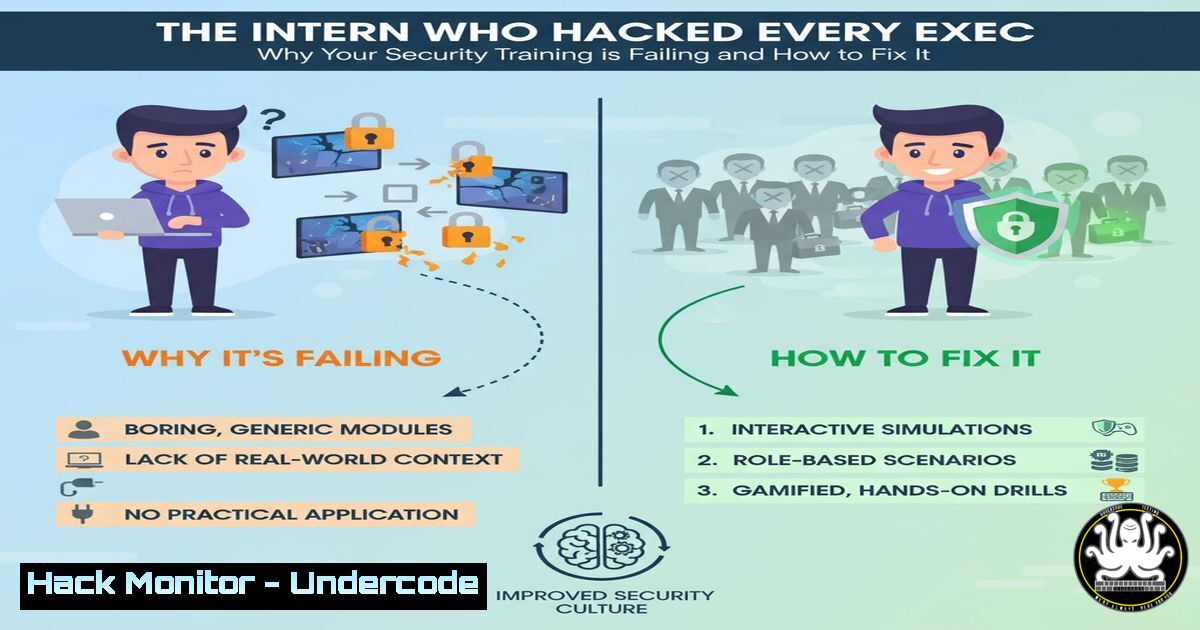
A single intern, disillusioned by traditional “PowerPoint cosplay” security training, demonstrated a devastatingly simple breach by using AI to clone a CEO’s writing style and spoof an internal domain. This incident underscores a critical shift in the threat landscape, where generative AI and social engineering have democratized advanced attack techniques, rendering conventional defensive training obsolete. Organizations must now adopt an adversarial mindset, moving from theoretical awareness to practical, simulation-based resilience.
Learning Objectives:
- Understand how to leverage generative AI for realistic social engineering simulations to test organizational resilience.
- Implement technical controls to detect and prevent domain spoofing and malicious email campaigns.
- Develop a continuous, hands-on security training program that moves beyond PowerPoint.
You Should Know:
1. Cloning Executive Communication with AI
The core of the modern phishing attack is hyper-personalization. Attackers no longer need to spend weeks researching a target; AI can now emulate writing style, tone, and content in minutes.
`Example GPT Prompt for Style Emulation:`
"You are an AI tasked with analyzing the writing style of the following email text. Your goal is to learn the patterns and then generate a new, convincing email about a 'Q4 Performance Review.'

[Paste 3-5 examples of the target's authentic emails here]

Instructions for the new email:
- Maintain a [e.g., formal/casual] tone.
- Use their signature phrases like '[Insert specific phrase]'.
- Keep paragraphs [e.g., short/long] and sentences [e.g., direct/verbose].
- End with a call-to-action to click a link for a 'mandatory review document.'"
Step-by-step guide:
- Gather Data: Collect 3-5 publicly available or internal communications from the target executive (LinkedIn posts, company-wide emails).
- Craft the Use a detailed prompt, like the one above, to instruct the AI model. The more specific the instructions, the more convincing the output.
- Refine and Generate: Generate multiple drafts. Manually review and tweak them to remove any unnatural AI-generated language.
- Weaponize: Place the final text into a professionally designed email template.
2. Technical Execution: Domain Spoofing and Email Fabrication
To bypass basic spam filters, attackers use domain names visually similar to the target’s legitimate domain. This technique, called typo-squatting or homograph attack, relies on human error.
`Linux Command to Check for Domain Availability:`
whois lookalikedomain.com | grep -E "Registrar|Creation Date|Updated Date|Registrant"
`PowerShell Command to Analyze Email Headers:`
Get-MessageTrace -SenderAddress "[email protected]" -StartDate (Get-Date).AddDays(-1) -EndDate (Get-Date) | Select-Object Received, Subject, FromIP, Status | Format-Table -AutoSize
Step-by-step guide:
- Identify a Lookalike Domain: Use `whois` to find unregistered domains that resemble your target (e.g., `your-company.com` vs.
yourcompany.com). - Procure the Domain: Register the domain through any public registrar.
- Configure Email Services: Set up a mail service (e.g., SendGrid, Mailgun) on the new domain to send emails that appear legitimate.
- Dispatch the Phishing Email: Send the AI-crafted email from the spoofed domain to the target list.
3. Defensive Control: Implementing DMARC, DKIM, and SPF
The primary technical defense against domain spoofing is a robust email authentication policy. DMARC (Domain-based Message Authentication, Reporting & Conformance) tells receiving mail servers what to do with emails that fail SPF (Sender Policy Framework) or DKIM (DomainKeys Identified Mail) checks.
`DNS TXT Record for a Reject Policy DMARC:`
"v=DMARC1; p=reject; rua=mailto:[email protected]; ruf=mailto:[email protected]; pct=100"
`Command to Check Your DMARC Record:`
dig +short TXT _dmarc.yourcompany.com
Step-by-step guide:
- Implement SPF: Create a DNS TXT record listing all authorized sending IPs for your domain. `”v=spf1 ip4:192.0.2.0/24 include:spf.protection.outlook.com -all”`
2. Implement DKIM: Generate a public-private key pair. Your email provider (e.g., Office 365, Google Workspace) will provide the public key to place in a DNS TXT record, while it signs outgoing emails with the private key. - Enforce DMARC: Start with a `p=none` policy to monitor reports, then move to
p=quarantine, and finally to `p=reject` to block unauthenticated emails. -
Detecting the Breach: SIEM Queries for Phishing Campaigns
A Security Operations Center (SOC) must be able to quickly detect a coordinated phishing campaign. Writing precise queries for your Security Information and Event Management (SIEM) system is critical.`Example Splunk Query for Login Spike from New IP:`
index=auth action=success | stats dc(src_ip) as unique_ips count by user | where unique_ips > 3 AND count > 10
`Example Sentinel KQL Query for Suspicious Email Rule:`
EmailEvents
| where Subject contains "Performance Review"
| where SenderFromDomain == "your-company.com" // Note the hyphen in the domain
| project Timestamp, Subject, SenderFromAddress, RecipientEmailAddress, URLCount
Step-by-step guide:
- Identify the Campaign Signature: Determine a unique indicator from the phishing email, such as the specific subject line, sender domain, or a linked URL.
- Craft the Query: Use your SIEM’s query language (e.g., SPL, KQL) to search logs for that indicator across email and network data.
- Automate the Alert: Convert this query into a scheduled search that triggers an alert to the SOC when a threshold (e.g., 10 emails received) is met.
5. Incident Response: Credential Reset and Containment
When a phishing campaign is successful, a rapid and systematic response is required to contain the damage and prevent credential misuse.
`PowerShell Command for Mass Password Reset (Azure AD):`
Get-AzureADUser -All $true | Where-Object {$_.Department -eq "Executive"} | Set-AzureADUserPassword -Password (ConvertTo-SecureString -String "NewTempPassword123!" -AsPlainText -Force) -EnforceChangePasswordPolicy $true
`Linux Command to Audit SSH Connections from a Compromised IP:`
sudo grep "Failed password" /var/log/auth.log | grep "192.168.1.100" | wc -l
Step-by-step guide:
- Triage: Confirm the scope of the incident. How many users clicked? Were credentials entered?
- Contain: Immediately force a password reset for all affected users, prioritizing high-privilege accounts like executives.
- Investigate: Audit logs for any successful logins using the stolen credentials from unusual IP addresses.
- Eradicate & Recover: Block the malicious domain at the firewall and email gateway. Ensure all compromised accounts have been secured.
6. Building a Human Firewall: Continuous Simulation Training
Static training fails. Security awareness must be a continuous process of testing and reinforcing behavior through controlled, realistic simulations.
`Command to Launch a Simple Phishing Simulation with GoPhish (Linux):`
cd /opt/gophish/
sudo ./gophish
`Using the Microsoft Attack Simulation Training API (PowerShell):`
Connect-ExchangeOnline
New-AttackSimulationAutomation -Name "CEO Impersonation Drill" -PayloadName "Performance Review Lure" -TargetUsersIncluded @("[email protected]", "[email protected]")
Step-by-step guide:
- Choose a Tool: Select a phishing simulation platform like GoPhish (open-source) or use built-in tools like those in Microsoft 365 Defender.
- Design the Campaign: Replicate real-world attack vectors, like the AI-cloned CEO email.
- Execute in Batches: Send the simulation to small, targeted groups to avoid widespread panic.
- Provide Immediate Feedback: When a user clicks, redirect them to a micro-training module explaining what they missed and how to spot it next time.
7. The Future: AI-Powered Defense and Automated Hardening
The same AI used by attackers must be harnessed for defense. AI can analyze user behavior, detect subtle phishing attempts, and automatically harden systems.
`Example Concept for an AI-Driven Detection Rule (Pseudocode):`
IF (email.sender_domain.is_suspicious_similar(company_domain) AND
email.body.sentiment_analysis.matches_ceo_pattern AND
email.body.is_ai_generated_confidence > 0.8) THEN
alert_level = CRITICAL
quarantine_email()
`Terraform Snippet for Auto-Scaling Secure Workstation Group:`
resource "aws_autoscaling_group" "secure_workstations" {
launch_template {
id = aws_launch_template.hardened_win11.id
}
tag {
key = "SecurityLevel"
value = "High"
propagate_at_launch = true
}
}
Step-by-step guide:
- Integrate AI Email Security: Deploy advanced email security solutions that use machine learning to analyze writing style and detect impersonation, even from new domains.
- Automate Hardening: Use Infrastructure as Code (IaC) tools like Terraform or Ansible to ensure all new deployments, from cloud instances to workstations, are built to a secure, immutable baseline.
- Adopt Zero Trust: Implement principles where access is never implicitly trusted, and verification is required from everyone, both inside and outside the network.
What Undercode Say:
- The Death of Theoretical Training. The era of passive, compliance-driven security awareness is over. The “intern’s hack” proves that only active, experiential learning that forces employees to engage with real-world tactics creates lasting behavioral change.
- AI is the New Phishing Kit. Generative AI has dramatically lowered the barrier to entry for sophisticated social engineering. Defenders can no longer rely on the tell-tale signs of poorly written emails; the threats are now semantically perfect and context-aware.
The central analysis from this incident is that the asymmetry between attacker and defender has been reset. For years, defenders have been at a disadvantage. Now, the same tools that empower attackers—AI, automation, cloud infrastructure—are equally available to the defense. The winning organization will be the one that abandons a static, fear-based training model and embraces a culture of continuous, simulated offense. By routinely stress-testing their human and technical layers with the very same techniques used by real adversaries, they build a dynamic and resilient defense that evolves as fast as the threat landscape does. The intern didn’t just find a flaw; they highlighted the only viable path forward.
Prediction:
The “intern-level” AI-powered hack will become the dominant initial access vector for cybercrime and state-sponsored actors throughout 2024-2025, leading to a 300% increase in highly targeted, low-cost Business Email Compromise (BEC) attacks. This will force a mass extinction of traditional security training vendors and catalyze a multi-billion dollar market shift towards AI-driven defensive platforms and continuous simulation environments. Organizations that fail to adapt will face not just increased breach risks, but also regulatory penalties for inadequate security awareness programs, making proactive, adversarial training a matter of legal and financial necessity.
🎯Let’s Practice For Free:
IT/Security Reporter URL:
Reported By: Harleysugarman A – Hackers Feeds
Extra Hub: Undercode MoN
Basic Verification: Pass ✅


