Listen to this Post
Introduction:
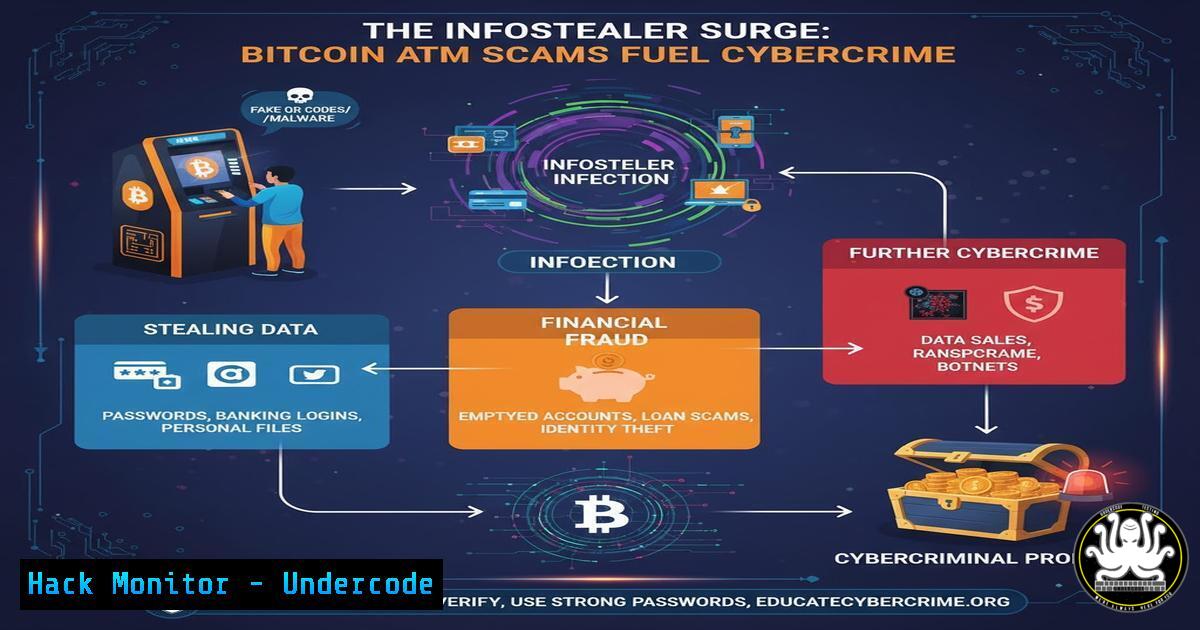
The convergence of social engineering, infostealer malware, and cryptocurrency cash-out points is creating a perfect storm for financial fraud. As highlighted by recent lawsuits, Bitcoin ATMs have become the linchpin in sophisticated scams that drain victims’ bank accounts, with one provider allegedly having 93% of its deposits linked to fraudulent activity. This article deconstructs the technical lifecycle of these scams, from the initial infostealer infection to the final money-laundering transaction.
Learning Objectives:
- Understand the technical mechanisms of infostealer malware and how it facilitates credential theft.
- Learn to identify and defend against social engineering tactics used in tech support scams.
- Master the command-line and forensic techniques to detect infostealer infections and harden systems against them.
You Should Know:
- The Infostealer Infection Vector: Credential Harvesting at Scale
Infostealers like RedLine, Vidar, and Raccoon are typically delivered via phishing emails, malicious advertisements, or fake software cracks. Once executed, they perform a comprehensive scrape of the victim’s system, targeting browsers, cryptocurrency wallets, FTP clients, and stored session cookies.
Verified Command to Check for Suspicious Processes (Windows):
wmic process get name,processid,commandline /format:table | findstr /i "powershell.exe cmd.exe wscript.exe cscript.exe"
Step-by-step guide:
This Windows Management Instrumentation Command (WMIC) query lists all running processes and their command-line arguments, formatted in a table. Piping it to `findstr` searches for common scripting engines that infostealers often abuse. Look for processes with suspicious arguments, such as long, obfuscated strings or connections to unknown IP addresses. Regularly running this command can help identify malicious activity that may bypass traditional task manager views.
2. Extracting Browser Credentials: The Infostealer’s Payload
Infostealers target browser databases like `Login Data` (Chrome/Edge) and `key4.db` (Firefox). They use SQL queries to decrypt passwords stored by the browser’s built-in credential manager, often by leveraging the inherent decryption key available to the user’s session.
Verified Command to Locate Browser Password Databases (Linux/Mac):
find /home /Users -name "Login Data" -o -name "key4.db" -o -name "WebCacheV01.dat" 2>/dev/null
Step-by-step guide:
This `find` command scans user home directories for the primary files where browsers store passwords and cached session data. The `2>/dev/null` suppresses permission-denied errors, cleaning up the output. In a forensic investigation, these files are critical artifacts. For defenders, ensuring these files are protected with strong filesystem permissions and not stored on network shares is a key mitigation step.
- The Social Engineering Hook: From Data to Deception
With the harvested data, attackers personalize their scams. A common tactic is the “tech support” scam, where the victim receives a pop-up or call claiming their computer is hacked. The attacker, armed with personal details from the infostealer, sounds credible and creates a sense of urgency.
Verified PowerShell Command to Audit Windows Event Logs for RDP/Login Events:
Get-EventLog -LogName Security -InstanceId 4624,4625 -After (Get-Date).AddDays(-1) | Select-Object TimeGenerated, @{Name="Account";Expression={$<em>.ReplacementStrings[bash]}}, @{Name="Source IP";Expression={$</em>.ReplacementStrings[bash]}} | Format-Table -AutoSize
Step-by-step guide:
This PowerShell command queries the Security event log for successful (4624) and failed (4625) logon events from the last 24 hours. It extracts the timestamp, account name, and source IP address. A sudden login from an unfamiliar geographic location could indicate that an attacker is using stolen credentials. Regular auditing of these logs is crucial for early detection of account compromise.
- The Bitcoin ATM Cash-Out: Obscuring the Money Trail
The scam culminates with the victim being directed to a Bitcoin ATM. These kiosks, often charging exorbitant fees, allow for near-instantaneous conversion of cash into cryptocurrency, which is sent directly to the scammer’s wallet. The pseudo-anonymous nature of these transactions makes tracing and recovery exceptionally difficult.
Verified Blockchain Analysis Command (Using `curl` and Blockchain.com API):
curl -s "https://blockchain.info/rawaddr/SCAMMER_BITCOIN_ADDRESS_HERE" | jq '.n_tx, .total_received, .total_sent'
Step-by-step guide:
This command uses `curl` to fetch the transaction data for a specific Bitcoin address from the Blockchain.com API. The `jq` utility then parses the JSON output to display the number of transactions (n_tx), total Bitcoin received, and total Bitcoin sent. While you cannot identify the owner, analyzing transaction volume and flow can help investigators understand the scale of the operation. Replacing the address in a public lawsuit with this command would reveal the wallet’s activity.
5. Hardening Systems Against Infostealers: Application Whitelisting
A powerful defense against infostealers is to prevent unauthorized executables from running in the first place. Windows AppLocker or similar application whitelisting technologies can restrict execution to a pre-approved list.
Verified PowerShell Command to Create a Default Deny AppLocker Policy:
New-AppLockerPolicy -RuleType Path -User Everyone -Action Deny -Path "C:\Users\AppData\Local\Temp\" -Name "Deny Temp Executables" -Xml | Set-AppLockerPolicy -Merge
Step-by-step guide:
This command creates a new AppLocker policy that denies execution of any file within the user’s Temp directory for all users. The `-Merge` parameter integrates this new rule with any existing policies. The Temp folder is a common location for infostealers to drop their payloads. Deploying this policy significantly reduces the attack surface, but it must be tested thoroughly in your environment to avoid breaking legitimate applications.
6. Network Monitoring for C2 Beaconing
Infostealers must communicate with a Command and Control (C2) server to exfiltrate data. Detecting this beaconing activity is a key detection method.
Verified Command to Monitor for DNS Queries (Linux with tcpdump):
sudo tcpdump -i any -n 'port 53 and (udp[bash] & 0x80 = 0)' | awk '{print $NF}' | sort | uniq -c | sort -nr | head -20
Step-by-step guide:
This `tcpdump` command captures DNS traffic on any interface, filtering for UDP packets on port 53. The awk and sort commands process the output to show the top 20 most frequently queried domains. A high volume of queries to a new, random-looking domain (e.g., x7j9a3p1.cloudfront-proxy.net) is a strong indicator of C2 beaconing. This is a critical technique for Security Operations Centers (SOCs) to identify compromised hosts.
7. Multi-Factor Authentication (MFA) as a Critical Control
Infostealers harvest passwords, but they cannot easily bypass well-implemented MFA. Enforcing MFA on all possible accounts, especially email and financial services, is the single most effective way to neutralize the value of stolen credentials.
Verified PowerShell Command to Check Azure AD MFA Registration Status:
Get-MgUser -All | Select-Object DisplayName, UserPrincipalName, @{Name="MFA Registered"; Expression={($_.StrongAuthenticationMethods.MethodType).Count -gt 0}}
Step-by-step guide:
This PowerShell command (using the Microsoft Graph module) iterates through all users in Azure AD and checks if they have registered any MFA methods. The output displays the user’s name, UPN, and a boolean indicating MFA registration status. This is an essential audit command for administrators to ensure compliance with security policies and identify users who are vulnerable to credential-based attacks.
What Undercode Say:
- The technical simplicity of infostealers combined with high-profit, low-risk cash-out methods like Bitcoin ATMs has created a scalable business model for cybercriminals.
- Regulatory action targeting the financial intermediaries in these scams, as seen with the lawsuit against Athena Bitcoin, is a necessary but reactive measure. The core vulnerability remains the endpoint and the user.
The analysis suggests a fundamental shift in the cybercrime economy. We are moving beyond targeted ransomware attacks towards a broader, more diffuse threat from credential-centric fraud. The technical barrier to entry is low, with infostealers available as cheap Malware-as-a-Service, while the financial return is high and immediate. The lawsuits against Bitcoin ATM operators are a critical step, but they are treating a symptom. The disease is the pervasive lack of endpoint security hygiene and the over-reliance on single-factor authentication. Until organizations and individuals universally adopt application control, rigorous monitoring, and MFA, the infostealer scourge will continue to fuel this multi-billion dollar fraud industry.
Prediction:
The regulatory pressure on Bitcoin ATMs will force a short-term migration of cash-out operations to more complex, privacy-focused cryptocurrencies and decentralized exchanges (DEXs). In the medium term, we will see infostealer malware evolve to specifically target MFA bypass techniques, such as stealing session cookies or exploiting “MFA fatigue” attacks. The long-term impact will be the accelerated adoption of passwordless authentication technologies (e.g., FIDO2 security keys) as the only reliable way to break the attack chain that currently makes infostealers so devastatingly effective.
🎯Let’s Practice For Free:
IT/Security Reporter URL:
Reported By: Hwalkerphishing I – Hackers Feeds
Extra Hub: Undercode MoN
Basic Verification: Pass ✅


