Listen to this Post
Introduction:
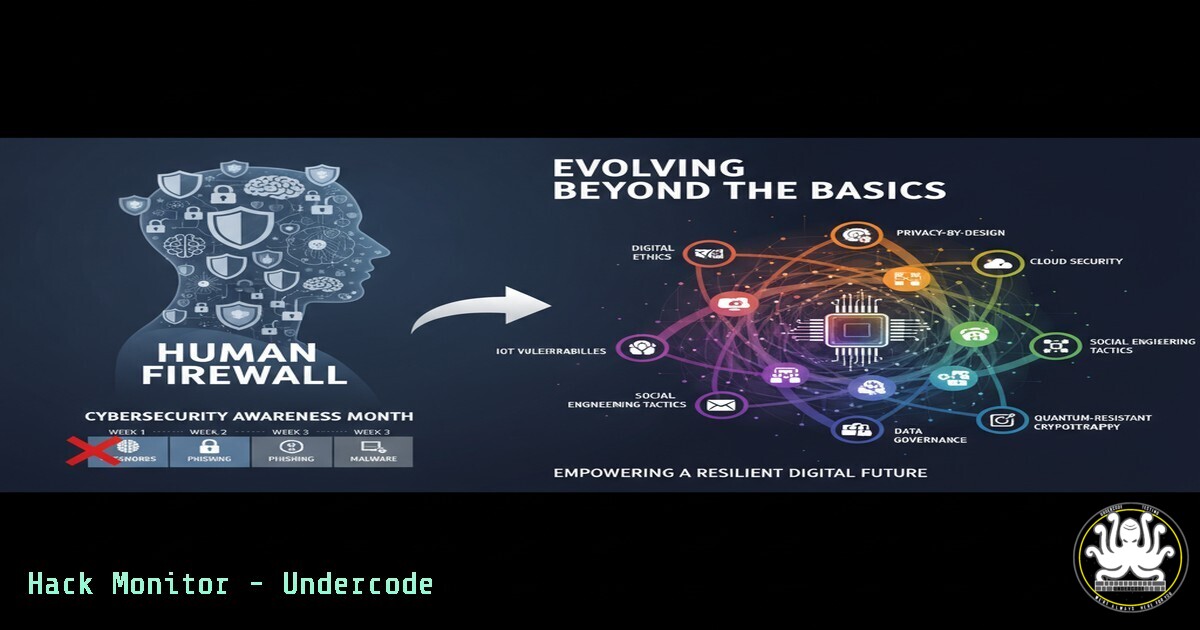
Cybersecurity Awareness Month, observed every October, has become an industry echo chamber, failing to resonate with the very individuals it aims to protect. The paradigm must shift from tired platitudes to actionable, technical education that empowers non-technical users to become the first line of defense. This article provides the essential commands, tools, and knowledge to transform any user into a proactive guardian of their digital assets.
Learning Objectives:
- Understand and execute fundamental command-line tools for system and network reconnaissance.
- Implement basic security hardening on Windows and Linux operating systems.
- Identify and mitigate common web application and network vulnerabilities.
You Should Know:
1. Network Reconnaissance with Nmap
Nmap is the premier network discovery and security auditing tool. Understanding what is on your network is the first step to securing it.
 Basic network scan
nmap -sn 192.168.1.0/24

Service version detection scan
nmap -sV -sC target-ip.com

Aggressive scan with OS detection
nmap -A -T4 target-ip.com
Step-by-step guide: The `-sn` flag performs a ping sweep to discover live hosts. The `-sV` probe attempts to determine the version of services running on open ports, while `-sC` runs a default set of Nmap scripts. The `-A` flag enables OS detection, version detection, script scanning, and traceroute.
2. System Hardening: Windows Firewall with Advanced Security
The Windows Firewall is a critical, yet often overlooked, native defense tool. Proper configuration can block a significant number of attacks.
 View current firewall rules via PowerShell
Get-NetFirewallRule | Where-Object {$_.Enabled -eq 'True'} | Format-Table Name, DisplayName, Action, Direction

Create a new rule to block an application
New-NetFirewallRule -DisplayName "Block App" -Program "C:\Path\To\App.exe" -Direction Outbound -Action Block

Enable logging for dropped packets
Set-NetFirewallProfile -Profile Domain,Public,Private -LogFileName %systemroot%\system32\LogFiles\Firewall\pfirewall.log -LogMaxSizeKilobytes 4096 -LogBlocked True
Step-by-step guide: Use the `Get-NetFirewallRule` cmdlet to audit existing rules. The `New-NetFirewallRule` command allows for granular control over application traffic. Enabling logging is crucial for forensic analysis after a suspected incident.
3. Linux File Integrity Monitoring with AIDE
The Advanced Intrusion Detection Environment (AIDE) creates a database of file hashes and attributes, alerting you to unauthorized changes.
 Install AIDE on Debian/Ubuntu
sudo apt update && sudo apt install aide -y

Initialize the AIDE database
sudo aideinit

Copy the new database to be the active database
sudo cp /var/lib/aide/aide.db.new /var/lib/aide/aide.db

Run a manual check
sudo aide.wrapper --check
Step-by-step guide: After installation, `aideinit` creates a baseline snapshot of your critical system files. Regularly run the `–check` command to compare the current state against this baseline. Any output indicates a potential compromise or unauthorized change.
4. Web Vulnerability Scanning with OWASP ZAP
The OWASP Zed Attack Proxy (ZAP) is an open-source web application scanner essential for finding vulnerabilities like SQL injection and XSS.
 Basic ZAP command-line scan
zap-baseline.py -t https://your-test-site.com

Run an active scan with a custom context
zap-full-scan.py -t https://your-test-site.com -n context.file

Generate an HTML report
zap-baseline.py -t https://your-test-site.com -r report.html
Step-by-step guide: The baseline scan (zap-baseline.py) is a passive, quick check. The full scan (zap-full-scan.py) actively attacks the application to find more vulnerabilities. Always run these tools only against applications you own or have explicit permission to test.
5. Cloud Security: Auditing AWS S3 Buckets
Misconfigured cloud storage buckets are a leading cause of data breaches. These AWS CLI commands help audit your S3 security posture.
 List all S3 buckets
aws s3 ls

Check the ACL of a specific bucket
aws s3api get-bucket-acl --bucket my-bucket-name

Check the bucket policy
aws s3api get-bucket-policy --bucket my-bucket-name

Check public access block configuration (critical for preventing public exposure)
aws s3api get-public-access-block --bucket my-bucket-name
Step-by-step guide: Regularly list all buckets to maintain an inventory. The `get-bucket-acl` and `get-bucket-policy` commands reveal who has access to your data. The `get-public-access-block` command checks if settings are in place to prevent accidental public exposure.
6. Detecting Lateral Movement with Windows Event Logs
Attackers moving laterally through a network leave traces in the Windows Event Log. Filtering for specific event IDs is key to detection.
 PowerShell command to query failed logon attempts (Event ID 4625)
Get-WinEvent -FilterHashtable @{LogName='Security'; ID=4625} -MaxEvents 10

Query for successful logon events to sensitive accounts (Event ID 4624)
Get-WinEvent -FilterHashtable @{LogName='Security'; ID=4624} | Where-Object {$_.Message -like "Administrator"}

Query for PsExec execution (often used for lateral movement - Event ID 4688)
Get-WinEvent -FilterHashtable @{LogName='Security'; ID=4688} | Where-Object {$_.Message -like "PsExec"}
Step-by-step guide: A high volume of failed logons (4625) can indicate a brute-force attack. Successful logons (4624) to administrative accounts outside of maintenance windows warrant investigation. The execution of tools like PsExec (4688) is a major red flag for lateral movement.
7. Container Security: Scanning Docker Images with Trivy
Container images often contain known vulnerabilities. Scanning them before deployment is a non-negotiable step in a DevSecOps pipeline.
 Scan a local Docker image
trivy image your-application-image:latest

Scan for only CRITICAL vulnerabilities
trivy image --severity CRITICAL your-application-image:latest

Scan and output results to a JSON file for automated processing
trivy image -f json -o results.json your-application-image:latest
Step-by-step guide: Simply point the `trivy image` command at a locally built or pulled image. It will cross-reference all packaged software against vulnerability databases. Integrate the JSON output into CI/CD pipelines to automatically fail builds that contain critical vulnerabilities.
What Undercode Say:
- The “Human Firewall” is a Technical Architecture, Not a Slogan. Empowering people requires giving them technical tools, not just pamphlets. The commands and steps outlined above provide a concrete foundation for this architecture, moving beyond awareness to capability.
- The Perimeter is Everywhere. Modern defense requires competency across endpoints, networks, cloud configurations, and code. A holistic approach that integrates simple, automated checks (like Trivy scans and AIDE) is the only effective strategy.
The traditional “Cybersecurity Awareness Month” model is obsolete. The future of organizational defense lies in democratizing technical skills, enabling every user to understand and action fundamental security controls. This requires a permanent cultural shift towards continuous, integrated learning, making security a byproduct of daily operations rather than an annual reminder.
Prediction:
The escalating sophistication of social engineering and AI-powered attacks will render purely technical defenses insufficient. The organizations that thrive will be those that successfully implement continuous, role-specific technical training, effectively turning their entire workforce into a sensor network capable of identifying and responding to threats. The concept of “awareness” will be absorbed into a broader framework of “operational readiness,” where every employee possesses a baseline of actionable cybersecurity skills, fundamentally changing the security landscape from a centralized IT function to a distributed human-intelligence capability.
🎯Let’s Practice For Free:
IT/Security Reporter URL:
Reported By: https://lnkd.in/p/duJdJz6i – Hackers Feeds
Extra Hub: Undercode MoN
Basic Verification: Pass ✅


