Listen to this Post
Introduction:
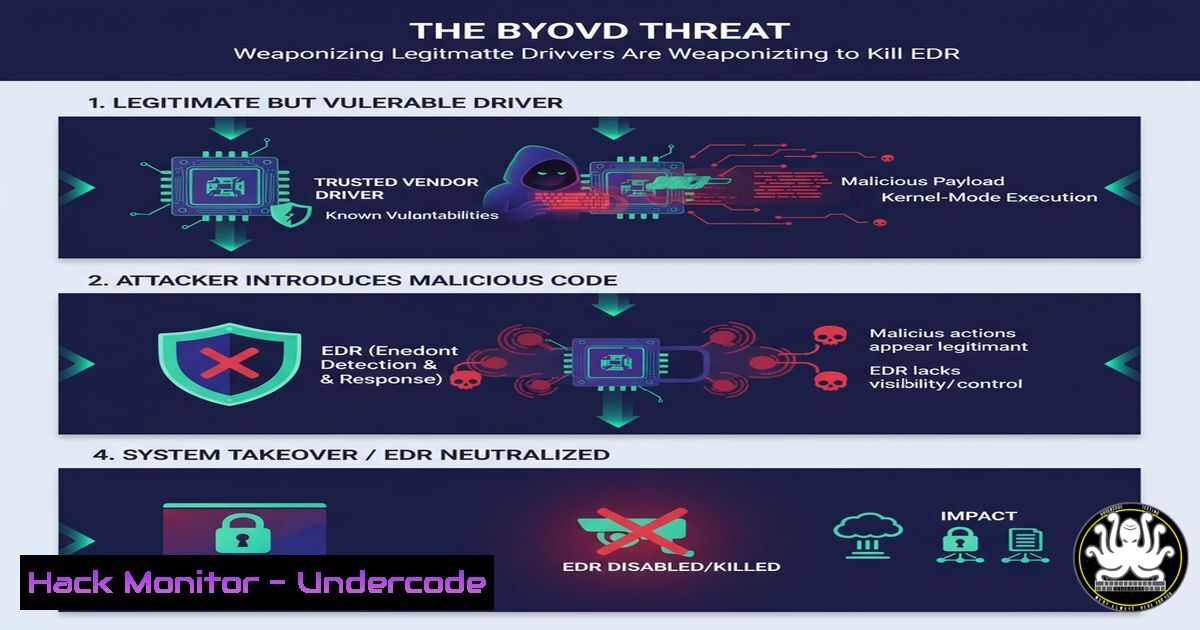
Bring Your Own Vulnerable Driver (BYOVD) attacks represent a critical escalation in the cyber arms race, allowing threat actors to subvert endpoint security by leveraging signed, but vulnerable, kernel-mode drivers. This technique, demonstrated by security researchers like William W., involves loading a high-privilege driver to disable or kill Endpoint Detection and Response (EDR) agents, rendering enterprises blind to subsequent malicious activity.
Learning Objectives:
- Understand the core mechanics and criticality of BYOVD attacks against modern security stacks.
- Learn the step-by-step commands and procedures used to discover, exploit, and mitigate these vulnerabilities.
- Gain actionable knowledge for hardening systems against driver-based privilege escalation and EDR subversion.
You Should Know:
1. Enumerating Loaded Drivers for Reconnaissance
Before exploitation, attackers inventory all loaded kernel drivers to identify potential vulnerable candidates, such as those from security or hardware vendors.
` Windows – List all loaded kernel drivers`
`driverquery /v /fo table | findstr /i “kernel”`
` PowerShell – Alternative method using WMI`
`Get-WmiObject Win32_SystemDriver | Where-Object {$_.State -eq “Running”} | Select-Object Name, DisplayName, PathName | Format-Table -AutoSize`
This command provides a detailed table of all currently running kernel-mode drivers, including their file paths. Red teams use this to pinpoint third-party drivers that are not part of the core Windows operating system and may contain vulnerabilities. Blue teams should regularly audit this list to identify and remove unnecessary or outdated drivers that expand the attack surface.
2. Exploiting Driver Vulnerabilities with C++ Loaders
The core of a BYOVD attack is a custom loader application that writes a malicious driver to disk and uses the Windows Service Control Manager to load it.
`// C++ code snippet to create a service and load a driver`
`SC_HANDLE scHandle = OpenSCManager(NULL, NULL, SC_MANAGER_ALL_ACCESS);`
`SC_HANDLE service = CreateService(scHandle, “VulnDrv”, “VulnDrv”, SERVICE_ALL_ACCESS, SERVICE_KERNEL_DRIVER, SERVICE_DEMAND_START, SERVICE_ERROR_NORMAL, “C:\\temp\\malicious.sys”, NULL, NULL, NULL, NULL, NULL);`
`StartService(service, 0, NULL);`
This code acquires high-level access to the SCM, creates a new service of type `SERVICE_KERNEL_DRIVER` pointing to a driver file dropped on disk, and then starts the service, loading the driver into the kernel. The malicious driver must be digitally signed, which is often achieved by exploiting an already signed but vulnerable driver.
3. The EDR Killer Payload: Disabling Callbacks
Once a malicious driver is loaded with `SYSTEM` privileges, it can directly manipulate kernel memory to disable EDR protections.
`// Kernel-mode function to locate and remove EDR process callbacks`
`NTSTATUS status = PsSetCreateProcessNotifyRoutineEx(RemoveEDRCallback, TRUE);`
This kernel function is used to remove a specific callback routine that an EDR agent previously registered. EDRs use these callbacks (PsSetCreateProcessNotifyRoutineEx) to be notified by the OS when a new process starts. By removing this callback, the EDR is blinded and can no longer monitor for malicious process creation, allowing execution of payloads like Cobalt Strike beacons undetected.
4. Linux Equivalent: Auditing Kernel Modules
While BYOVD is predominantly a Windows technique, the principle of auditing loaded kernel modules is critical for Linux security.
` List all currently loaded Linux kernel modules`
`lsmod`
` Get detailed information about a specific module (e.g., one for antivirus)`
`modinfo avast`
The `lsmod` command is the first step in understanding what code is running in the privileged kernel space. Security teams should baseline expected modules and alert on the loading of any new or unauthorized modules, which could indicate a rootkit or a similar kernel-level threat.
5. Mitigation 1: Enforcing Driver Block Rules
The most effective mitigation is to use Windows Defender Application Control (WDAC) to create a deny-list or, preferably, an allow-list of authorized drivers.
` PowerShell – Deploy a WDAC policy that allows only Microsoft and WHQL-signed drivers`
`$PolicyPath = “C:\Windows\schemas\CodeIntegrity\ExamplePolicies\AllowMicrosoft.xml”`
`ConvertFrom-CIPolicy -XmlFilePath $PolicyPath -BinaryFilePath “SiPolicy.p7b”`
`ciTool –update-policy “SiPolicy.p7b”`
This process converts an XML policy that defines allowed signers into a compiled binary policy file (SiPolicy.p7b) and deploys it. This ensures that only drivers signed by Microsoft or other explicitly trusted publishers can be loaded, effectively blocking all known vulnerable third-party drivers used in BYOVD attacks.
6. Mitigation 2: Enabling Memory Integrity (HVCI)
Hypervisor-Protected Code Integrity (HVCI), part of Core Isolation, uses hardware virtualization to protect kernel memory from unauthorized writes, which is crucial for blocking the “EDR killer” payload.
` Check HVCI (Memory Integrity) status on a system`
`Confirm-SecureBootUEFI`
`Get-CimInstance -ClassName Win32_DeviceGuard -Namespace root\Microsoft\Windows\DeviceGuard`
A system must have UEFI Secure Boot enabled to use HVCI. The second command checks the Device Guard virtualization-based security settings, indicating if HVCI is active. When enabled, it prevents a malicious driver from modifying kernel memory, neutralizing the part of the attack that disables EDR callbacks, even if the driver loads.
7. Incident Response: Hunting for Driver Loads
Blue teams must hunt for anomalous driver load events, which are recorded in Windows logs with specific IDs.
` PowerShell query for recent driver load events (Event ID 6006)`
`Get-WinEvent -FilterHashtable @{LogName=’System’; ID=6006} | Where-Object {$_.Message -like “\
Event ID 6006 indicates a driver was loaded. This command filters the System log for these events and then further filters the message for a specific driver name. Security operations centers (SOCs) should create alerts for the loading of drivers known to be exploited in BYOVD campaigns or drivers that are not part of a pre-approved list.
What Undercode Say:
- The Cat-and-Mouse Game Escalates: BYOVD is no longer a theoretical threat but a mainstream technique in the red team and adversary toolkit, directly challenging the foundational security model of trusting signed code.
- Mitigation Requires Depth: No single setting can fully defend against BYOVD; a defense-in-depth approach combining strict driver allow-listing (WDAC), hardware-enforced kernel protection (HVCI), and vigilant auditing is mandatory for resilience.
The emergence of publicly available “EDR killer” PoCs, even those that combine existing techniques, signals a maturation of the offensive tradecraft. The barrier to entry for disabling multi-million dollar security suites is lowering, moving from advanced persistent threats to more common cybercriminal activity. This forces a industry-wide shift from simple signature-based detection to a model of zero-trust at the kernel level, where the provenance and behavior of every driver are continuously validated.
Prediction:
The accessibility of proof-of-concepts combining driver exploits with EDR evasion code will lead to a rapid commoditization of these techniques. Within 12-18 months, we predict a significant rise in BYOVD being leveraged by ransomware-as-a-service (RaaS) groups and initial access brokers to disable security controls silently before deployment. This will force EDR vendors to innovate beyond userland hooks and into deeper, hardware-isolated introspection mechanisms, fundamentally changing how endpoint security products are architected.
🎯Let’s Practice For Free:
IT/Security Reporter URL:
Reported By: https://lnkd.in/p/dNVkGNkt – Hackers Feeds
Extra Hub: Undercode MoN
Basic Verification: Pass ✅


