Listen to this Post
Introduction:
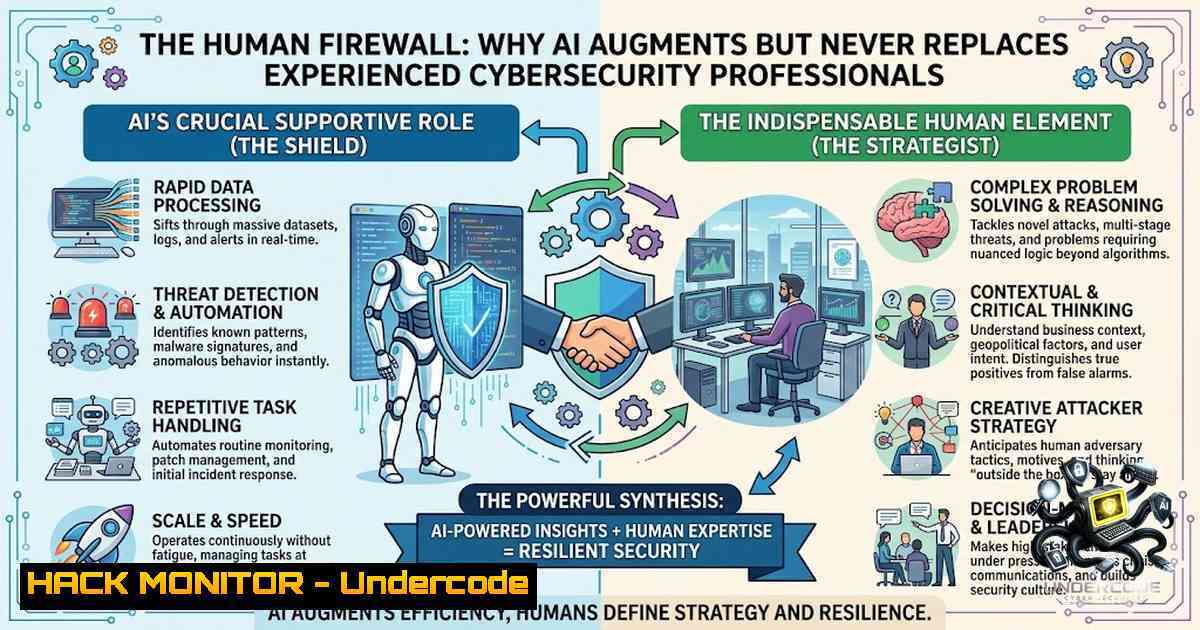
The cybersecurity industry stands at a critical crossroads where artificial intelligence promises unprecedented automation, yet the human element remains the cornerstone of effective defense. As threat actors leverage AI to accelerate and scale their attacks, organizations are discovering that experienced security professionals are not being replaced—they are being empowered. The reality is stark: AI helps the few professionals who are drowning in an ever-growing sea of threats, but it cannot substitute the contextual judgment, strategic thinking, and institutional knowledge that only human experts possess.
Learning Objectives:
- Understand the symbiotic relationship between AI automation and human expertise in modern cybersecurity operations
- Master essential incident response commands for both Linux and Windows environments to conduct effective threat triage
- Learn how NIS2 and DORA regulatory frameworks mandate human oversight and experienced leadership in security governance
- Develop practical skills for integrating AI tools into Security Operations Centers (SOCs) while maintaining human-in-the-loop decision-making
- Identify key attack surfaces and implement preventive controls that leverage both automated and human-driven security measures
You Should Know:
- The AI-Augmented SOC: Automation That Empowers, Not Replaces
The modern Security Operations Center (SOC) is evolving toward semi-autonomous architectures where AI handles alert triage, threat intelligence processing, and initial investigation workflows. AI-powered systems can now detect threats with over 99% accuracy in milliseconds and map incidents to the MITRE ATT&CK framework automatically. However, the hardest problem in a SOC is not catching threats—it is separating the alerts that need an analyst from those that do not.
Step-by-Step Guide: Implementing AI-Human Hybrid SOC Workflows
- Deploy AI-Powered Alert Triage: Implement an AI-based asynchronous alert enrichment framework that treats enrichment as a policy-governed autonomous decision process. This reduces alert fatigue by filtering out false positives before they reach human analysts.
-
Establish Human-in-the-Loop Governance: Configure your AI systems to require human approval for critical actions such as network isolation, privilege escalation, or data exfiltration prevention. This structural requirement is essential for effective security and compliance.
-
Implement Continuous Training: Ensure that security analysts evolve their technical skills to audit machine logic, reason under uncertainty, and translate security risk into business language. The future belongs to analysts who can interrogate AI outputs rather than passively accept them.
-
Integrate Threat Intelligence Feeds: Combine automated threat intelligence processing with human-led threat hunting. AI can process vast amounts of data, but human analysts provide the contextual understanding needed to identify novel attack patterns.
-
Measure and Optimize: Track key metrics such as mean time to detect (MTTD) and mean time to respond (MTTR) to evaluate the effectiveness of your hybrid SOC model. Organizations that systematically incorporate risk management around human behavior and AI achieve superior security outcomes.
-
Linux Incident Response: Essential Commands for the First 30 Minutes
The first 30 minutes after discovering a compromised Linux server are critical. Experienced professionals rely on a core set of commands to create snapshots of system state, identify malicious processes, and preserve evidence for further analysis.
Step-by-Step Guide: Linux Triage and Evidence Collection
- Establish System State: Begin by documenting who is logged in and what processes are running:
Check currently logged-in users
w
who
last -a

View recent login history
lastlog
cat /var/log/lastlog
These commands create a baseline of user activity.
-
Capture Running Processes: Create comprehensive snapshots of all active processes:
Full process list with details
ps auxf > /root/processes.txt
pstree -p > /root/pstree.txt

Real-time process monitoring
top -b -1 1 > /root/top_snapshot.txt
These commands help identify suspicious or unauthorized processes.
-
Analyze Network Connections: Examine all active network connections to identify potential command-and-control (C2) communications:
List all listening ports and established connections
ss -plant
lsof -i -P -1
netstat -tulpn
-
Collect System Logs: Preserve system logs for forensic analysis:
Collect all journal entries
journalctl > /root/journalctl.txt

Filter for authentication failures
journalctl _SYSTEMD_UNIT=sshd.service | grep "Failed password"
System logs often contain the earliest indicators of compromise.
-
Isolate the System if Necessary: If active compromise is confirmed, use iptables to air-gap the machine:
Block all incoming and outgoing traffic
iptables -P INPUT DROP
iptables -P OUTPUT DROP
iptables -P FORWARD DROP
This isolation script prevents further attacker activity while preserving evidence.
-
Check for Persistence Mechanisms: Examine cron jobs and startup scripts that attackers use to maintain access:
List all cron jobs
crontab -l
cat /etc/crontab

Check systemd services
systemctl list-unit-files --state=enabled
-
Windows Incident Response: PowerShell Commands for Rapid Triage
Windows environments require a different set of tools, with PowerShell providing powerful capabilities for incident response and forensic collection. Experienced professionals leverage these commands to gather forensic artifacts efficiently.
Step-by-Step Guide: Windows Forensic Collection and Analysis
- Collect Security Event Logs: Extract critical security events using PowerShell:
Get the last 100 security events
Get-WinEvent -LogName Security -MaxEvents 100

Filter for specific event IDs (4624 = successful logon, 4625 = failed logon)
Get-WinEvent -LogName Security | Where-Object { $<em>.Id -eq 4624 -or $</em>.Id -eq 4625 }
Security event logs provide a detailed record of authentication attempts and user activity.
-
Query Logon Events with wevtutil: For more granular control, use the wevtutil command-line tool:
Query failed logon events
wevtutil qe Security /q:"[System[(EventID=4625)]]"
This command extracts specific event types for detailed analysis.
3. Investigate Running Processes: Identify potentially malicious processes:
 List all running processes with details
Get-Process | Format-Table -AutoSize

Find processes with network connections
Get-1etTCPConnection | Where-Object { $_.State -eq 'Established' }
- Check for Persistence Mechanisms: Examine startup items and scheduled tasks:
List scheduled tasks
Get-ScheduledTask | Where-Object { $_.State -1e 'Disabled' }

Check startup folder contents
Get-ChildItem "C:\ProgramData\Microsoft\Windows\Start Menu\Programs\StartUp"
5. Collect System Information: Gather comprehensive system data:
 System information
Get-ComputerInfo

Installed applications
Get-WmiObject -Class Win32_Product | Select-Object Name, Version
6. Network Investigation: Analyze network configuration and connections:
 Display network configuration
ipconfig /all

Show active connections with process IDs
netstat -ano

DNS cache investigation
ipconfig /displaydns
- NIS2 and DORA: Regulatory Frameworks Demanding Human Expertise
The European Union’s NIS2 Directive and the Digital Operational Resilience Act (DORA) represent a significant shift in cybersecurity governance, mandating that organizations employ qualified professionals to manage ICT risk. These frameworks explicitly require human oversight, experienced leadership, and demonstrable control over security operations.
Step-by-Step Guide: Compliance Implementation
- Understand Reporting Obligations: NIS2 requires organizations to report significant incidents within strict timelines—24 hours for early warning, 72 hours for a follow-up report, and within one month for a final report. This demands experienced incident response teams capable of rapid assessment and accurate reporting.
-
Implement Risk Management and Prevention: Identify key attack surfaces including email, domains, DNS, and infrastructure. Implement preventive controls rather than relying solely on incident response. This proactive approach requires security professionals who understand both technical vulnerabilities and business risk.
-
Conduct Advanced Penetration Testing: DORA requires advanced penetration tests every three years and specific ICT reports. Organizations must engage experienced penetration testers who can simulate sophisticated attacks and provide actionable recommendations.
-
Manage ICT Supply Chain Risks: Both NIS2 and DORA require in-depth supplier knowledge and enforcement of strict cyber requirements. This involves continuous monitoring and assessment of third-party vendors—a task that demands human judgment and expertise.
-
Develop Incident Detection and Response Capabilities: Establish robust incident detection, reporting, and evidence collection procedures. This includes implementing security information and event management (SIEM) systems, but also ensuring that experienced analysts are available to interpret alerts and coordinate response efforts.
-
Board-Level Cyber Compliance: Ensure that organizational leadership understands and takes ownership of cybersecurity risk. NIS2 holds management accountable for security failures, making experienced cybersecurity professionals essential advisors to the board.
5. AI and Human Collaboration: The Winning Combination
Recent research demonstrates that paired AI and human expertise have the potential to be a truly winning combination in cybersecurity. AI is reshaping cybersecurity roles, workflows, and decision-making while simultaneously increasing the importance of human judgment. Security teams are increasingly moving away from AI-only penetration testing, recognizing the value of keeping humans in the loop.
Step-by-Step Guide: Optimizing AI-Human Collaboration
- Audit Machine Logic: Train analysts to interrogate AI-generated findings. The analysts best positioned for an AI-augmented future will evolve their technical skills to understand how AI models reach their conclusions.
-
Translate Security Risk into Business Language: Cybersecurity professionals must articulate security risks in terms that business leaders understand. This bridges the gap between technical findings and strategic decision-making.
-
Maintain Human Oversight in Automated Systems: Configure AI-driven security tools to require human approval for high-impact actions such as network segmentation, account disabling, or data exfiltration prevention. This ensures that automated systems do not make catastrophic errors.
-
Combine AI-Driven MDR with Human Expertise: AI-driven managed detection and response (MDR) capabilities improve accuracy and outcome reporting, but they must be combined with human expertise to deliver evidence that boards understand and insurers trust.
-
Implement Continuous Learning Programs: Security professionals must stay current with both evolving threats and advancing AI capabilities. Organizations should invest in ongoing training that covers both technical skills and AI literacy.
6. Essential Security Tools and Configurations
Linux Security Hardening Commands:
 Audit system for vulnerabilities
sudo lynis audit system

Check for open ports and services
nmap -sV localhost

Review firewall rules
sudo iptables -L -1 -v

Check for rootkits
sudo rkhunter --check

Verify file integrity
sudo aide --check
Windows Security Hardening Commands:
 Check Windows Defender status
Get-MpComputerStatus

Run a quick scan
Start-MpScan -ScanType QuickScan

Review Windows Firewall rules
Get-1etFirewallRule | Where-Object { $_.Enabled -eq 'True' }

Check for unnecessary services
Get-Service | Where-Object { $<em>.StartType -eq 'Automatic' -and $</em>.Status -eq 'Running' }

Audit user privileges
Get-LocalUser | Where-Object { $_.Enabled -eq 'True' }
SIEM Integration Commands (Generic):
 Forward logs to SIEM (Linux)
sudo tail -f /var/log/syslog | nc -u siem-server 514

Collect and forward Windows Event Logs (PowerShell)
Get-WinEvent -LogName Security -MaxEvents 1000 | ConvertTo-Json | Out-File -FilePath C:\temp\security_logs.json
What Undercode Say:
- Key Takeaway 1: Artificial intelligence is not a replacement for experienced cybersecurity professionals—it is a force multiplier that helps the few experts manage an overwhelming volume of threats that they could not possibly address alone. The human element in security operations is irreplaceable.
-
Key Takeaway 2: Organizations that invest in experienced security professionals gain a strategic advantage over those that rely solely on automated solutions. The contextual judgment, institutional knowledge, and crisis management skills of human experts cannot be replicated by algorithms, no matter how sophisticated they become.
Analysis: The cybersecurity industry is experiencing a fundamental shift where AI handles the volume of work while humans provide the value. As threat actors increasingly leverage AI to accelerate their attacks, the gap between automation and human judgment widens. Security teams that recognize this dynamic will invest in both AI tools and human expertise, creating hybrid defense systems that are greater than the sum of their parts. The future of cybersecurity lies not in replacing humans with machines, but in creating symbiotic relationships where AI handles the noise and humans focus on the signal. Organizations that understand this will thrive; those that believe AI can replace experienced professionals will find themselves vulnerable to sophisticated attacks that automated systems cannot detect or mitigate.
Prediction:
- +1 The cybersecurity job market will experience significant growth as organizations realize that AI cannot replace human expertise, leading to increased demand for experienced security professionals across all sectors.
-
+1 AI-powered security tools will become increasingly sophisticated, but they will create new categories of jobs focused on AI governance, model auditing, and human-AI collaboration management.
-
-1 Organizations that attempt to replace human security professionals with AI-only solutions will experience higher rates of successful breaches, as automated systems lack the contextual judgment needed to detect novel or sophisticated attack patterns.
-
+1 Regulatory frameworks like NIS2 and DORA will accelerate the professionalization of cybersecurity, creating standardized career paths and certification requirements that elevate the status of experienced practitioners.
-
-1 The cybersecurity skills gap will widen as AI tools create new complexities that require even more specialized human expertise, leaving organizations that cannot attract talent at a severe disadvantage.
-
+1 Human-in-the-loop security models will become the industry standard, with AI handling initial triage and recommendation while humans make final decisions on critical actions.
-
+1 The integration of AI with human expertise will lead to more effective security outcomes, as organizations leverage the speed of automation with the wisdom of experienced professionals.
-
-1 Smaller organizations without resources to hire experienced professionals will remain vulnerable, creating a two-tier security landscape where only well-funded entities can effectively defend against AI-powered threats.
-
+1 Cybersecurity training and education programs will evolve to emphasize both technical skills and AI literacy, preparing the next generation of professionals for augmented security roles.
-
+1 The value of human judgment in security operations will become increasingly recognized, leading to higher compensation and greater respect for experienced cybersecurity professionals across all industries.
▶️ Related Video (84% Match):
https://www.youtube.com/watch?v=-w9ZpqMpXKA
🎯Let’s Practice For Free:
🎓 Live Courses & Certifications:
Join Undercode Academy for Verified Certifications
🚀 Request a Custom Project:
Secure, high-velocity infrastructure and disruptive technological engineering. Contact our engineering team for high-tier development and proprietary systems:
[email protected]
💎 Smart Architecture | 🛡️ Secure by Design | ⭐ Trusted by Thousands
IT/Security Reporter URL:
Reported By: https://lnkd.in/p/eVs9uhcd – Hackers Feeds
Extra Hub: Undercode MoN
Basic Verification: Pass ✅


