Listen to this Post
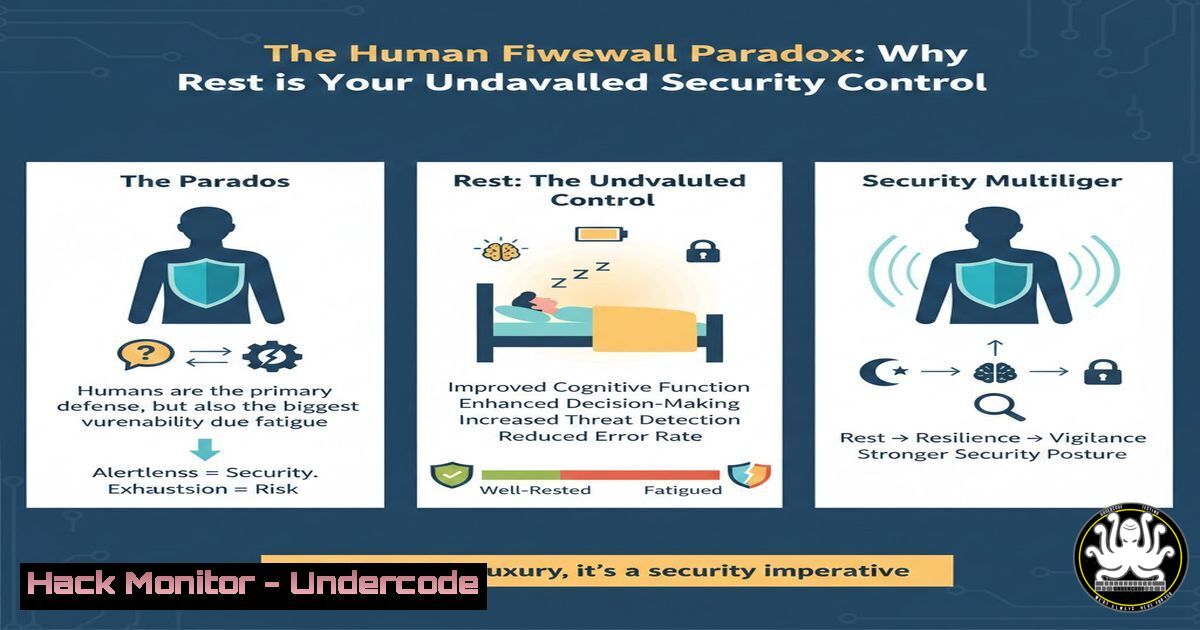
Introduction:
In the high-stakes world of cybersecurity, we spend billions hardening networks, patching zero-days, and deploying advanced EDR solutions. Yet, the most sophisticated firewall—the human mind—is often left vulnerable to the most critical exploit of all: burnout. Just as a system becomes unstable under excessive load, a security professional suffering from chronic fatigue and cognitive overload creates a fertile ground for social engineering and operational error. This article dissects the intersection of human performance and security architecture, transforming the concept of “rest” from a soft skill into a critical control for maintaining a resilient security posture.
Learning Objectives:
- Analyze the neurosecurity link between cognitive fatigue and susceptibility to phishing/social engineering.
- Implement personal and team-based “downtime protocols” to maintain operational security (OpSec) integrity.
- Utilize monitoring techniques to identify indicators of burnout before they become security incidents.
You Should Know:
1. The “Denial-of-Service” Attack on the Human Mind
In cybersecurity, a Denial-of-Service (DoS) attack floods a system with traffic until it crashes. The modern work environment does the same to security analysts. Constant alerts, SIEM dashboards, and the pressure to perform create a state of continuous partial attention. This is the equivalent of a slow, persistent drain on your cognitive RAM. When the system (your brain) is maxed out, it bypasses standard security protocols (critical thinking) to process the load. The “false alarm” your nervous system sounds when you try to rest is actually a system misconfiguration—a failure to recognize safety. To remediate this, we must implement scheduled downtime just as rigorously as we implement patch Tuesdays.
Step‑by‑step guide to implementing a “Security Analyst Sanity Check” (Linux/macOS):
This script checks for high system load, which we can use as a metaphor for personal cognitive load. While you can’t run `top` on your brain, you can use these commands to audit your digital environment to reduce friction and create space for rest.
!/bin/bash
 Analyst Environment Audit Script

echo "=== Audit: Digital Friction Points ==="

<ol>
<li>Check for excessive background processes (like unnecessary notifications)
echo "Checking for distracting processes (Slack, Teams, Email clients)..."
ps aux | grep -E 'Slack|Teams|Outlook|Thunderbird' | grep -v grep
Recommendation: Close clients not critical for the current task.</p></li>
<li><p>Check Disk Space (Low disk space causes system stress, analogous to mental clutter)
echo "Checking available disk space on root volume..."
df -h / | awk 'NR==2 {print "Available: " $4 " on /"}'
Recommendation: Clean up old logs and temporary files to free up space.
Command: sudo journalctl --vacuum-time=3d (clears logs older than 3 days)</p></li>
<li><p>Check for high system load average (the "burnout" indicator)
echo "Checking system load averages (1, 5, 15 minutes)..."
uptime | awk -F'load average:' '{ print $2 }'
Recommendation: If load average is > number of CPU cores, investigate runaway processes.</p></li>
<li><p>Check for open network connections (the "always-on" syndrome)
echo "Checking for established network connections..."
ss -tunap | grep ESTAB | wc -l | xargs echo "Number of active connections:"
Recommendation: Close unused terminals and VPN connections to remote labs.
Windows equivalent (PowerShell):
 Check for running communication apps
Get-Process -Name "Slack", "Teams", "Outlook" -ErrorAction SilentlyContinue | Select-Object ProcessName, CPU, WorkingSet

Check disk space on C:\
Get-PSDrive -Name C | Select-Object Used, Free

Check system load via CPU usage averages (requires multiple samples)
Get-Counter '\Processor(_Total)\% Processor Time' -SampleInterval 1 -MaxSamples 5

Check active network connections
Get-NetTCPConnection | Where-Object {$_.State -eq "Established"} | Measure-Object
- Writing Secure Code vs. Writing a Secure Self
Nadja El Fertasi’s post highlights the internal dialogue as the culprit. In application security, we preach “shifting left”—finding bugs earlier in the development lifecycle. The same applies to human sustainability. The “bug” is the belief that your worth is tied to output. If we don’t shift this mindset left, the vulnerability of burnout makes us susceptible to the oldest exploit in the book: social engineering. A tired analyst is more likely to click a malicious link because their pattern-matching (a key AI function of the brain) is degraded. We must harden our own configuration files (our beliefs) to allow for safe mode (rest).
Step‑by‑step guide to creating a “Nervous System Air Gap” (Physical/Tactical):
This isn’t about code, but about creating physical and digital isolation to prevent spillage from work stress into personal life.
1. Create a Physical Air Gap: When your workday ends, physically disconnect your laptop from the network and place it in a different room. This is the analog of an “air-gapped” network.
2. Configure a “Do Not Disturb” Profile: On your smartphone, create a work-specific focus mode that silences all work apps (Email, Slack, Teams) after hours. This is your host-based firewall for notifications.
3. Implement “Immutable Backups”: Just as we create immutable backups to protect against ransomware, create immutable blocks of time for yourself. Schedule 15 minutes of “stillness” in your calendar with the same urgency as a security incident response meeting. Set the status to “In a meeting” and protect this time with the same ferocity you would protect your crown jewels.
- Training the AI of the Self: The Fine-Tuning Process
Large Language Models (LLMs) require fine-tuning to produce accurate, safe outputs. Without it, they hallucinate. The human brain, without the fine-tuning of rest, also begins to hallucinate—perceiving threats where there are none, or missing real threats entirely. Nadja’s Rule 4 is about fine-tuning your neural network. You are training a new model of yourself that recognizes stillness as a valid and productive state. This is not laziness; this is model optimization. By proving to your nervous system that you are safe when you aren’t producing, you are essentially patching the “anxiety overflow” vulnerability.
Step‑by‑step guide to a “Personal Model Fine-Tuning Session”:
This exercise uses mindfulness to retrain your threat detection mechanisms.
1. Acknowledge the Alert: When you sit still and feel the urge to “do” something, verbally acknowledge it. Say to yourself, “Alert detected: False positive. No immediate action required.”
2. Conduct a Log Analysis: What triggered the alert? Is it a deadline? An email from a demanding client? A notification on your phone? Identify the source of the trigger.
3. Implement a Rule Update: Write down the trigger and consciously update your internal ruleset. Replace “I must respond immediately” with “I will respond during my next scheduled work block.”
4. Verify the Fix: After 5 minutes of stillness, check in with your physical state. Is your heart rate lower? Are your shoulders less tense? This is your confirmation that the patch was successful.
What Undercode Say:
- Rest is a Security Control, Not a Luxury: Treating rest as an optional extra creates a systemic vulnerability. A well-rested team is a critical component of a defense-in-depth strategy, particularly against sophisticated social engineering attacks.
- The Internal Dialogue is the Attack Surface: The guilt and shame associated with not working are the initial access vectors for burnout. By reframing rest as operational maintenance, we effectively patch that psychological vulnerability, ensuring our human firewall remains intact and functional.
Prediction:
As AI automates more technical tasks, the “human element” will shift from technical execution to high-level strategic oversight and creative problem-solving. This evolution will force a convergence of neuroscience and cybersecurity. We will see the emergence of “neurosecurity officers” whose job is to monitor the cognitive load of critical staff and “Human Firewall” training programs that utilize biometric data (like heart rate variability) to predict and prevent analyst burnout, treating human fatigue as the critical exploit it truly is.
▶️ Related Video (84% Match):
🎯Let’s Practice For Free:
IT/Security Reporter URL:
Reported By: Nadja Elfertasi – Hackers Feeds
Extra Hub: Undercode MoN
Basic Verification: Pass ✅


