
Listen to this Post
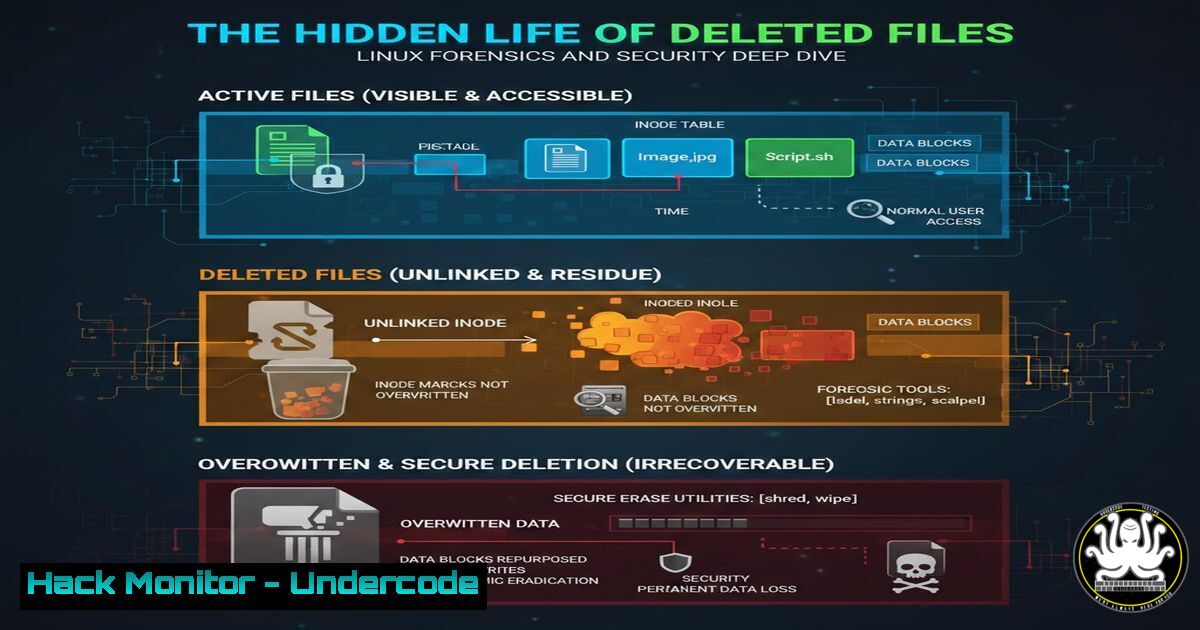
Introduction:
When you execute the simple `rm` command in Linux, you initiate a process far more nuanced than mere erasure. This action unveils the fundamental architecture of filesystems, where data persistence becomes a critical concern for both system administration and cybersecurity. Understanding this mechanism is essential for secure data handling, digital forensics, and preventing sensitive information leakage.
Learning Objectives:
- Decode the role of inodes and data blocks in the Linux filesystem structure.
- Master the technical process of file deletion and its security implications.
- Learn practical methods for both recovering and securely erasing data.
You Should Know:
- Inodes and Data Blocks: The Foundation of Linux Filesystems
The Linux filesystem (like ext4) separates a file’s metadata from its actual data. The filename is merely a human-readable label pointing to an inode. The inode is a data structure storing metadata (permissions, timestamps, pointer count) and pointers to the actual data blocks on the disk.
Step‑by‑step guide:
View a file’s inode number: Use the `-i` flag with ls.
ls -li important_document.txt
The first number in the output is the inode number.
Examine inode details (ext4): The `debugfs` tool can inspect inodes directly (requires root).
sudo debugfs /dev/sda1
debugfs: stat <inode_number>
debugfs: quit
This command reveals the metadata and block pointers for that inode, showing the map to the physical data.
- The Illusion of Deletion: What `rm` Really Does
The `rm` command doesn’t scrub data blocks. It decreases the “link count” in the inode. If the count hits zero, the inode is marked as free and its pointers to data blocks are removed. The data blocks themselves remain untouched until the operating system overwrites them with new data.
Step‑by‑step guide:
Create and delete a test file:
echo "Sensitive Data: API_KEY=12345" > test_secret.txt
rm test_secret.txt
Verify data persistence with grep: You can often scour the raw disk device for the string content.
sudo grep -a 'API_KEY' /dev/sda1
This searches the raw partition, potentially revealing your “deleted” data in unallocated space, proving it was not erased.
3. Recovering the Unlinked: File Restoration Techniques
Because data persists, recovery is possible if the blocks haven’t been overwritten. Tools like `testdisk` and `extundelete` scan for inodes marked free or scour the disk for known file signatures.
Step‑by‑step guide using `testdisk`:
Install and run `testdisk` on the target partition.
sudo apt-get install testdisk  Debian/Ubuntu
sudo testdisk /dev/sda1
In the interactive menu, select
 Filesystem Utils</code>.
 Choose the partition and select <code>[bash]</code>. It will list inodes marked for deletion.
 Navigate and select files to recover, writing them to a different filesystem to avoid overwriting the very data you're trying to save.

<h2 style="color: yellow;">4. Secure Deletion: Ensuring Data is Truly Gone</h2>

For cybersecurity, especially with sensitive data, you must actively overwrite the data blocks. The `shred` and `wipe` commands are designed for this.

<h2 style="color: yellow;">Step‑by‑step guide using `shred`:</h2>

Overwrite a file before deletion: The `shred` command overwrites data multiple times.
[bash]
shred -v -n 3 -z confidential.pdf
`-v`: Verbose output.
`-n 3`: Perform 3 overwrite passes.
-z: Final pass overwrites with zeros to hide shredding.
For entire drives/partitions: Use `shred` on the block device.
sudo shred -v /dev/sdb1
WARNING: This will destroy all data on `/dev/sdb1` irrevocably.
5. Modern Complications: SSDs, TRIM, and Encryption
Traditional recovery assumptions break with Solid State Drives (SSDs) and encryption.
SSDs & TRIM: Modern OSes send a `TRIM` command to inform the SSD which blocks are free. The SSD's controller may then actually erase those blocks for wear-leveling, making recovery nearly impossible. This is a double-edged sword: better for privacy, worse for forensics.
Full Disk Encryption (FDE): With LUKS (Linux) or BitLocker (Windows), deleting a file only discards the encryption key slice for that data. The encrypted blocks remain but are cryptographically inaccessible, providing strong security.
Step‑by‑step guide (Check TRIM status in Linux):
Check if your filesystem supports TRIM (discard).
sudo systemctl status fstrim.timer
Manually issue TRIM for all mounted filesystems that support it.
sudo fstrim -av
What Undercode Say:
- Deletion is an Abstraction, Not an Erasure. The core takeaway is that `rm` is a logical operation, not a physical one. The immediate threat is data remnant leakage, where "deleted" sensitive files on sold, discarded, or compromised hardware can be forensically recovered.
- Your Security Posture Dictates Your Deletion Method. The choice between simple `rm` and `shred` is a direct reflection of your threat model. Handling PII, intellectual property, or credentials mandates secure deletion protocols. In the age of cloud ephemeral storage and SSDs, understanding the interplay of TRIM and encryption is non-negotiable for robust data lifecycle management.
This process underscores a fundamental axiom in cybersecurity: data is sticky. The assumption that logical removal equates to physical security is a dangerous vulnerability. For attackers, unallocated disk space is a treasure trove for forensic recovery. For defenders, it's a liability that must be actively managed through policies mandating encryption-at-rest and secure erasure tools for high-sensitivity data. The evolution towards immutable infrastructure and automated, encrypted ephemeral storage is, in part, a response to this persistent challenge.
Prediction:
The convergence of ubiquitous encryption, the widespread adoption of SSDs with aggressive TRIM, and the shift to cloud-native, ephemeral workloads will render traditional file recovery techniques obsolete for modern, properly configured systems. However, this will simultaneously elevate the importance of hardware-level attacks and firmware vulnerabilities as data persistence vectors. Future forensic and data recovery focus will pivot towards memory analysis, cloud provider logging/artifact recovery, and exploiting configuration lapses in these newer technologies, while regulations will increasingly mandate verifiable secure deletion as part of data sovereignty laws.
▶️ Related Video (82% Match):
🎯Let’s Practice For Free:
IT/Security Reporter URL:
Reported By: Dixit Rathi - Hackers Feeds
Extra Hub: Undercode MoN
Basic Verification: Pass ✅


