
Listen to this Post
Introduction:
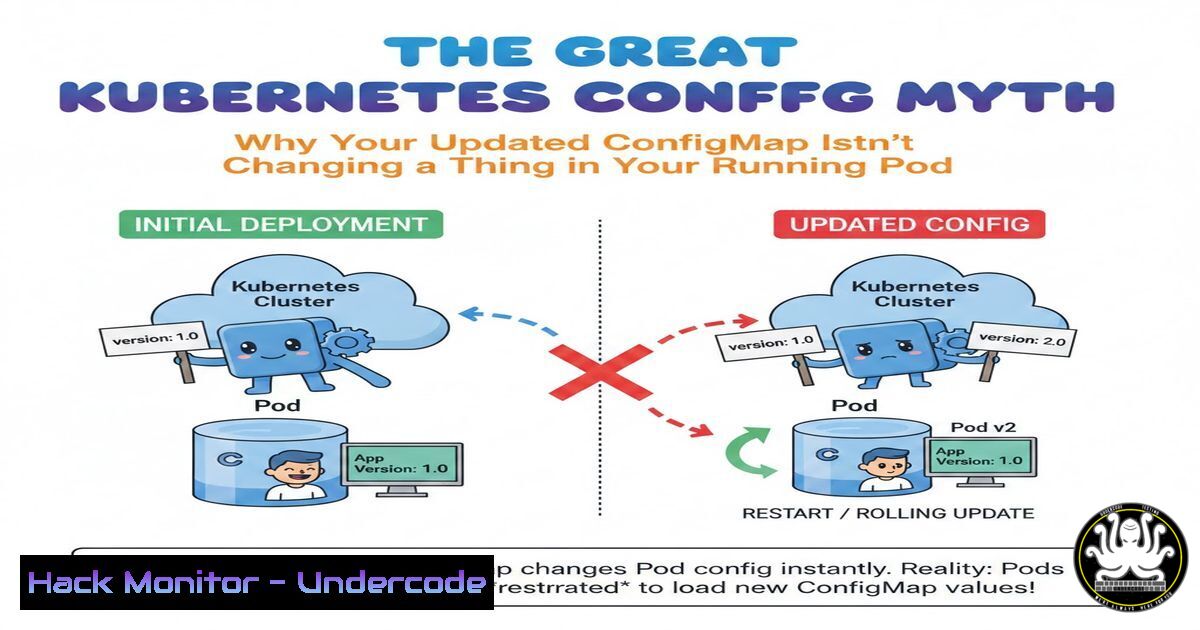
In the fast-paced world of cloud-native infrastructure, a dangerous assumption often lurks in the minds of engineers: that updating a Kubernetes ConfigMap instantly refreshes the application consuming it. This misunderstanding stems from conflating Kubernetes’ ability to manage resource state with an application’s internal runtime logic. While `kubectl` will confirm your configuration has changed, your running processes may remain blissfully unaware, leading to frustrating debugging sessions, broken feature flags, and unexpected production behavior. Understanding the distinction between control plane updates and application runtime reloading is critical for maintaining truly dynamic systems.
Learning Objectives:
- Understand the difference between Kubernetes resource updates and in-pod application updates.
- Identify the three primary methods of configuration injection (Env vars, Volumes, Init-time reads) and their limitations.
- Implement practical strategies for propagating configuration changes to running applications.
- Utilize rolling updates and checksum annotations to enforce configuration sync.
- Deploy a hot-reload pattern to enable dynamic config changes without pod restarts.
- The Three Pillars of Configuration Injection: Why Your App Doesn’t See the Change
The core of the myth lies in how configuration is delivered to the pod. Kubernetes does its job perfectly: it updates the ConfigMap object in the etcd database. However, how that data reaches your application process determines whether it ever sees the new values. You must first diagnose your injection method to understand the behavior.
- Environment Variables (The Static Wall): If your Pod spec defines `env` or `envFrom` pulling from a ConfigMap, those variables are injected only at container startup. The `env` command inside the container shows a snapshot from boot time. The process tree inherits these variables, and unless the parent process (PID 1) is specifically coded to watch for OS signals or re-read
/proc/self/environ, it will never know the ConfigMap changed. - Verification Command:
Exec into your pod
kubectl exec -it <pod-name> -- /bin/sh
Check the environment variable
echo $YOUR_CONFIG_KEY
It will still show the old value, even after kubectl edit configmap
-
Mounted Volumes (The Unread File): When you mount a ConfigMap as a volume, Kubernetes updates the files in the pod’s filesystem eventually (though there can be a delay due to kubelet sync period). However, updating the file on disk does not automatically notify the application to read it. Many legacy applications or naive microservices read their `application.properties` or `config.json` once during initialization and cache it in memory forever.
-
Verification Command:
Check the file content inside the pod
kubectl exec -it <pod-name> -- cat /path/to/mount/config/file
The file content will reflect the new ConfigMap value.
But your application's API response or behavior will still show the old value.
-
Init-Containers and Build-Time (The Fossil): If configuration is fetched or generated during a build stage or within an initContainer and written to a shared volume, the application container is running with static, ancient data.
- The Forced Sync: Triggering a Rolling Restart with Checksum Annotations
Since environment variables require a restart, the most reliable way to apply config changes is to treat them like a new version of your application. You must force the Pods to restart. The best practice is to use a pod template annotation that changes whenever your ConfigMap changes.
Step-by-step guide:
1. Calculate a Checksum of your ConfigMap data.
2. Annotate your Deployment template with that checksum.
- When the ConfigMap changes, the checksum changes, causing the Deployment’s pod template spec to differ from the current ReplicaSet’s spec. This triggers a rolling update.
Linux/macOS Command to generate and apply:
 Generate a checksum of your configmap
kubectl get configmap my-config -o yaml | sha256sum | awk '{print $1}'

Annotate your deployment (example using kubectl patch)
kubectl patch deployment my-app -p "{\"spec\":{\"template\":{\"metadata\":{\"annotations\":{\"checksum/config\":\"$(kubectl get configmap my-config -o yaml | sha256sum | awk '{print $1}')\"}}}}}"
Tooling Alternative (Reloader):
For a more automated approach, deploy the Stakater Reloader controller. It watches ConfigMaps and Secrets and automatically performs a rolling upgrade on Deployments, StatefulSets, and DaemonSets that are annotated to depend on them.
 Annotate your deployment to tell Reloader to watch this configmap
metadata:
annotations:
reloader.stakater.com/match: "true"
 Or specifically:
configmap.reloader.stakater.com/reload: "my-config"
- Implementing Hot Reload Logic: Making Your App Listen for Changes
If you cannot afford pod restarts (zero-downtime requirements are strict), your application must be coded to handle dynamic configuration. This involves two parts: detecting the file change and reloading the internal state.
Step-by-step guide (Using Python and Watchdog):
Assuming your ConfigMap is mounted as a volume, you can implement a file watcher.
Code Snippet (Python):
import time
from watchdog.observers import Observer
from watchdog.events import FileSystemEventHandler
import json
import os

class ConfigHandler(FileSystemEventHandler):
def <strong>init</strong>(self, callback):
self.callback = callback
self.last_loaded = self.load_config()

def load_config(self):
with open('/etc/config/app-config.json', 'r') as f:
config = json.load(f)
print(f"Loaded config: {config}")
return config

def on_modified(self, event):
if not event.is_directory and event.src_path == '/etc/config/app-config.json':
print("Config file modified, reloading...")
new_config = self.load_config()
self.callback(new_config)

def update_app_logic(new_config):
 Update your global variables, feature flags, or re-initialize clients
global FEATURE_FLAG
FEATURE_FLAG = new_config.get('feature_x', False)
print(f"Feature flag updated to: {FEATURE_FLAG}")

if <strong>name</strong> == "<strong>main</strong>":
event_handler = ConfigHandler(callback=update_app_logic)
observer = Observer()
observer.schedule(event_handler, path='/etc/config', recursive=False)
observer.start()
try:
while True:
time.sleep(1)
except KeyboardInterrupt:
observer.stop()
observer.join()
Why this matters: This pattern moves the responsibility from Kubernetes to the application, aligning with the platform engineering reality that Kubernetes manages resources, not application runtime logic.
4. Handling Sidecars and Proxies: Reloading Without Downtime
Tools like Envoy, Nginx, or HAProxy often run as sidecars and need to reload configuration when it changes. Simply killing the process causes traffic drops. You need to trigger a graceful reload.
Step-by-step guide (Nginx Sidecar):
If you mount a ConfigMap containing `nginx.conf` into an Nginx sidecar container, you can send the correct signal to reload without dropping connections.
Container Command:
Instead of running `nginx -g ‘daemon off;’` directly, you might need a controller process or a script that watches the file.
 Inside the sidecar container, you could use a simple inotify loop:
while inotifywait -e modify /etc/nginx/nginx.conf; do
echo "Reloading Nginx..."
nginx -s reload
done
Verification Command:
 Check the Nginx worker processes before and after the change
kubectl exec -it <pod-name> -c nginx-sidecar -- ps aux | grep nginx
 After the reload, old workers will gracefully shut down, new ones take over.
- Windows Container Considerations: The Registry and File System Differences
For Windows workloads in Kubernetes, the behavior differs slightly. Environment variable injection works the same (requires restart), but mounted ConfigMaps are projected as files with different encoding considerations (CRLF vs LF) which can break applications expecting Unix-style line endings.
Step-by-step guide for Windows:
If your Windows app reads a `.ini` or `.conf` file from a mounted volume, you must ensure the application polls for changes, as Windows file locking and notification mechanisms differ.
PowerShell Script for Hot Reload (Inside Windows Container):
$watcher = New-Object System.IO.FileSystemWatcher
$watcher.Path = "C:\config"
$watcher.Filter = "app-settings.ini"
$watcher.EnableRaisingEvents = $true

$action = {
$path = $Event.SourceEventArgs.FullPath
$changeType = $Event.SourceEventArgs.ChangeType
Write-Host "File $path was $changeType - reloading application config"
 Invoke application specific reload function
Invoke-Expression -Command "C:\app\reload-script.ps1"
}
Register-ObjectEvent $watcher "Changed" -Action $action

Keep script running
while ($true) { Start-Sleep -seconds 2 }
This ensures Windows containers can also react to Kubernetes ConfigMap volume updates.
What Undercode Say:
- Kubernetes is not a configuration management agent: It maintains the desired state of its API objects, not the internal state of processes running inside containers. Assuming otherwise leads to brittle systems.
- Design for reload or restart: Configuration changes are a form of deployment. You must explicitly decide between building restart-capable apps (simpler) or implementing hot-reload logic (more complex, but dynamic). There is no magic.
- Treat configuration as code in CI/CD: Use tools like Reloader or checksum annotations in your CI/CD pipelines to ensure that a change to a ConfigMap automatically triggers the necessary pod restarts, preventing configuration drift between running pods and the desired state.
Prediction:
As platform engineering matures, the industry will see a rise in “operator” patterns specifically designed to manage application lifecycle events based on configuration changes. We will move away from the “ConfigMap updated == App updated” fallacy toward standardized sidecar proxies that handle configuration reloading and distribution for legacy applications, bridging the gap between Kubernetes’ declarative API and the imperative needs of running software. The future will involve more sophisticated controllers that can query application health endpoints post-config-change to validate successful reloads before marking the configuration as “fully applied.”
▶️ Related Video (74% Match):
🎯Let’s Practice For Free:
IT/Security Reporter URL:
Reported By: Rajesh Deshpande – Hackers Feeds
Extra Hub: Undercode MoN
Basic Verification: Pass ✅


