Listen to this Post
Introduction:
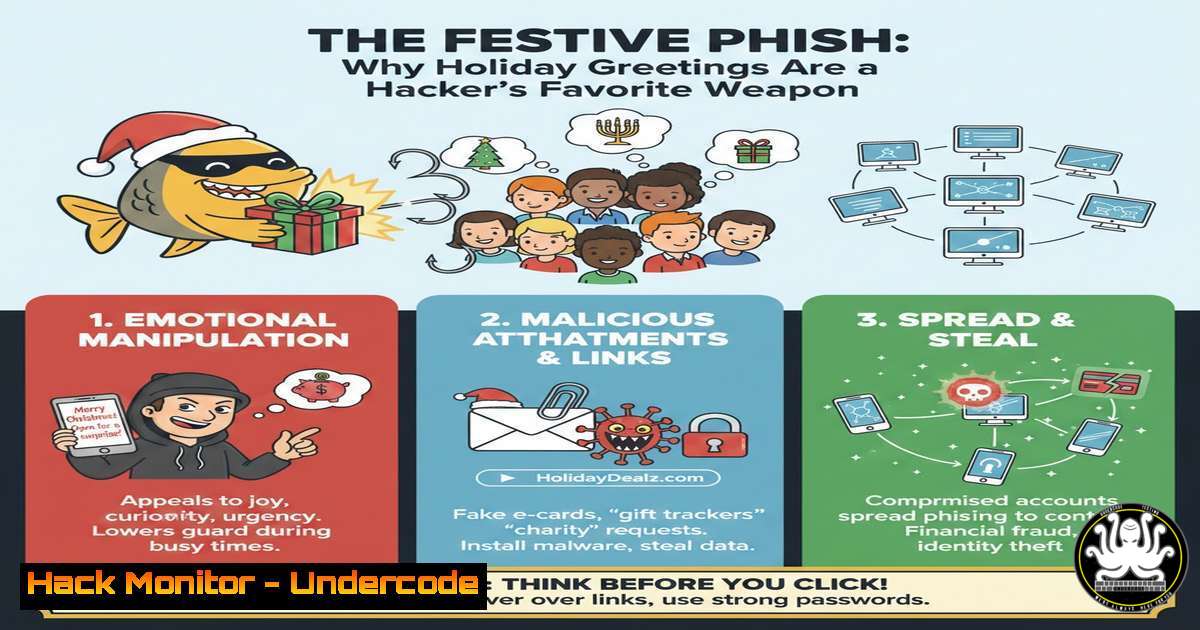
The holiday season brings a surge of goodwill—and a parallel spike in cyberattacks. Threat actors expertly weaponize seasonal themes, embedding malware in e‑cards, hijacking shipping notifications, and crafting phishing lures disguised as festive greetings from colleagues. This article deconstructs the anatomy of these attacks and provides actionable, technical defenses for security professionals.
Learning Objectives:
- Identify the technical hallmarks of holiday‑themed phishing and malware campaigns.
- Implement endpoint and network monitoring to detect seasonal social engineering attacks.
- Harden email security configurations and user environments against pretexting.
You Should Know:
1. Deconstructing the Festive Phishing Email
While the source LinkedIn post is benign, it exemplifies the perfect lure: a trusted name (a CEO) and a seasonal hook. A malicious actor could clone this profile, send connection requests, and then deliver a “holiday e‑card” laden with malware.
Step‑by‑step guide explaining what this does and how to use it.
Step 1: Header Analysis. Use `python3` with the `email` library to inspect raw headers for spoofing.
import email
raw_msg = open('phish.eml').read()
msg = email.message_from_string(raw_msg)
print("From:", msg.get('From'))
print("Return-Path:", msg.get('Return-Path'))
print("Received-SPF:", msg.get('Received-SPF'))
Step 2: Link & Attachment Sandboxing. Never click directly. For URLs, use `curl` from an isolated Linux VM:
curl -I -L --max-redirs 5 "http://suspicious-holiday-offer.tk"
For attachments, use `file` and `strings` commands:
file merry_christmas.exe
strings merry_christmas.exe | grep -i -E 'http|https|.dll|CreateProcess'
2. Endpoint Hardening for the Holiday Period
Assume a user has clicked. Immediate containment is critical. Implement Application Control via Windows GPO or Linux mandatory access control.
Step‑by‑step guide explaining what this does and how to use it.
Step 1: Windows – Create a Software Restriction Policy.
Open gpedit.msc. Navigate to Computer Configuration > Windows Settings > Security Settings > Software Restriction Policies. Create a new path rule to block execution from `%TEMP%` and `%DOWNLOAD%` for non‑standard extensions.
Step 2: Linux – Implement a SYSTEMD‑based Execution Monitor. Create a service to audit process execution from user home directories.
 /etc/systemd/system/exec-watch.service
[bash]
Description=Process Execution Auditor
[bash]
ExecStart=/bin/bash -c 'auditctl -a always,exit -S execve -F path=/home/ -F uid>=1000 -k user_exec_monitor'
3. Network Monitoring for C2 Beaconing
Holiday malware will call home. Detect anomalous outbound traffic to newly registered domains (NRDs) or non‑standard ports.
Step‑by‑step guide explaining what this does and how to use it.
Step 1: Deploy a YARA Rule on Network Traffic. Use Suricata with a custom rule for holiday‑themed DNS queries.
alert dns $HOME_NET any -> any any (msg:"SUSPICIOUS Holiday Phish DNS Query"; dns.query; content:"christmas"; content:"gift"; content:"card"; distance:0; within:50; classtype:trojan-activity; sid:1000001; rev:1;)
Step 2: Use Zeek (Bro) to Log All HTTP User-Agents. Search for anomalies in http.log.
cat http.log | zeek-cut uri user_agent | grep -v -E "Mozilla|Chrome|Edge"
4. Cloud Email Security Configuration
Harden your O365 or Google Workspace environment. Enable advanced phishing protections and impersonation rules.
Step‑by‑step guide explaining what this does and how to use it.
Step 1: O365 – Set up Anti‑Phishing Policies.
In the Microsoft 365 Defender portal, go to Email & Collaboration > Policies & Rules > Threat policies > Anti‑phishing. Create a policy with:
– Impersonation protection: Add key executives’ names (e.g., “Catalina Lissett H.”).
– Mailbox intelligence: Enable.
– Action: Quarantine message.
Step 2: DMARC/DKIM/SPF Enforcement.
Ensure your DMARC policy (p=reject) is in place. Verify with dig:
dig TXT "_dmarc.yourdomain.com"
5. User Awareness: Simulating a Holiday Phishing Test
Train users with realistic simulations. Craft a campaign using a framework like GoPhish.
Step‑by‑step guide explaining what this does and how to use it.
Step 1: Build the Landing Page & Email Template. Clone a generic holiday greeting page. In GoPhish, create an email with the subject “Merry Christmas from the CEO!” linking to your fake page.
Step 2: Launch the Campaign & Monitor. Send to a test group. Use the GoPhish dashboard to track opens, clicks, and submitted data. Follow up with immediate, constructive training for those who click.
What Undercode Say:
- The Human Firewall is Seasonal. Human vigilance dips during holidays, making automated technical controls (application whitelisting, network egress filtering) non‑negotiable.
- Context is the New Exploit. Attackers no longer rely solely on technical flaws; they exploit social context and trust. Security awareness must evolve to address these socio‑technical attacks.
Prediction:
The convergence of generative AI and these social engineering tactics will lead to hyper‑personalized, multi‑modal holiday attacks in the near future. We will see AI‑generated voice clone “holiday voicemails” directing targets to malicious sites, and real‑time video deepfakes used in live chat support scams. Defenses will require AI‑powered anomaly detection in user behavior and communication patterns, moving beyond signature‑based detection to a continuous, contextual trust‑and‑verify model.
▶️ Related Video (86% Match):
🎯Let’s Practice For Free:
IT/Security Reporter URL:
Reported By: Catalina Lissett – Hackers Feeds
Extra Hub: Undercode MoN
Basic Verification: Pass ✅


