Listen to this Post
Introduction:
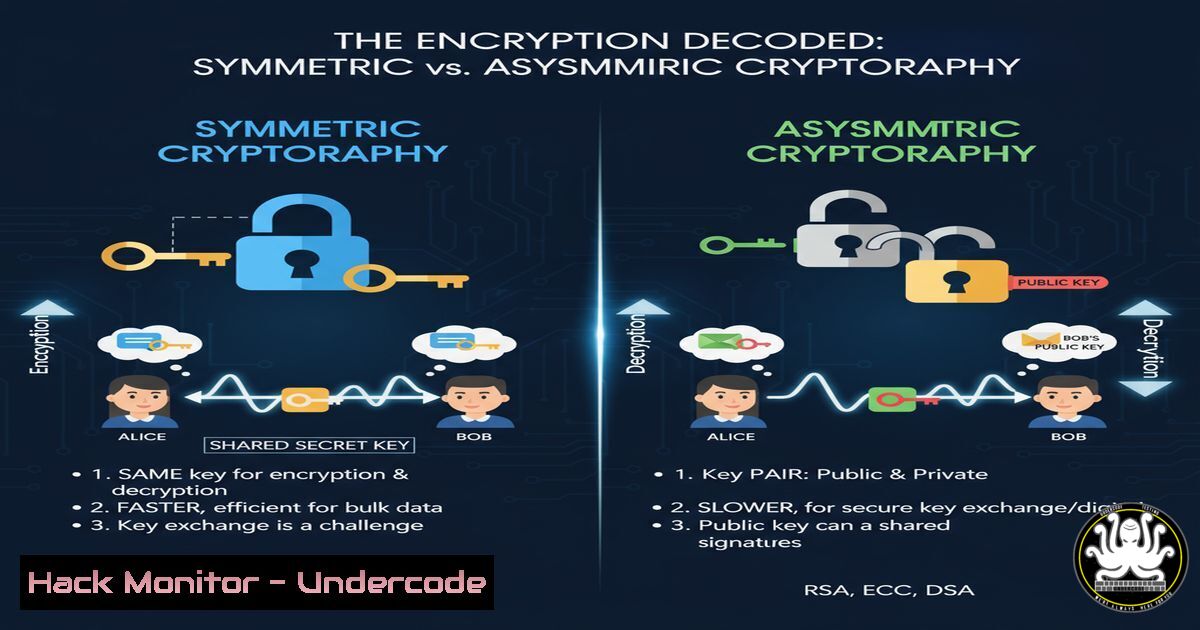
In the digital realm, encryption acts as the unbreachable vault protecting our most sensitive data. Understanding the fundamental dichotomy between symmetric and asymmetric encryption is not just academic; it is critical for implementing robust security controls, from securing web traffic to protecting digital currencies.
Learning Objectives:
- Differentiate between symmetric and asymmetric encryption algorithms and their use cases.
- Execute core cryptographic commands for key generation, encryption, and decryption.
- Implement a hybrid encryption model to secure data in transit and at rest.
You Should Know:
- Symmetric Encryption with OpenSSL: The Workhorse of Data Confidentiality
Symmetric encryption, using a single shared key, is ideal for bulk data encryption due to its speed and efficiency. The Advanced Encryption Standard (AES) is the global benchmark.
Verified Commands & Code Snippets:
 Generate a random 256-bit symmetric key
openssl rand -hex 32 > symmetric.key

Encrypt a file (secret.txt) using AES-256 in GCM mode
openssl enc -aes-256-gcm -in secret.txt -out secret.enc -pass file:symmetric.key

Decrypt the file
openssl enc -d -aes-256-gcm -in secret.enc -out secret_decrypted.txt -pass file:symmetric.key
Step-by-step guide:
The `openssl rand` command generates a cryptographically strong random key, which is stored in symmetric.key. The `enc` command with `-aes-256-gcm` specifies the encryption algorithm. The `-in` and `-out` parameters define the input and output files. The `-pass file:` option tells OpenSSL to use the key from the specified file. Decryption uses the same key and algorithm with the `-d` (decrypt) flag.
- Asymmetric Key Pair Generation: The Foundation of Public Key Cryptography
Asymmetric cryptography uses a mathematically linked public-private key pair. The private key is kept secret, while the public key can be distributed widely.
Verified Commands & Code Snippets:
 Generate a 2048-bit RSA private key
openssl genrsa -out private_key.pem 2048

Extract the public key from the private key
openssl rsa -in private_key.pem -pubout -out public_key.pem

Inspect the details of a private key (will not show the key itself on modern systems)
openssl rsa -in private_key.pem -noout -text
Step-by-step guide:
`openssl genrsa` creates the private key. The `-out` flag specifies the output file. The `rsa -pubout` command extracts the corresponding public key from the generated private key. Always secure the `private_key.pem` with strict file permissions (e.g., chmod 600 private_key.pem).
3. Asymmetric Encryption and Decryption in Practice
Use a recipient’s public key to encrypt data that only their private key can decrypt.
Verified Commands & Code Snippets:
 Encrypt a file (message.txt) using a recipient's public key
openssl pkeyutl -encrypt -in message.txt -out message.enc -pubin -inkey public_key.pem

Decrypt the file using the corresponding private key
openssl pkeyutl -decrypt -in message.enc -out message_decrypted.txt -inkey private_key.pem
Step-by-step guide:
The `pkeyutl` command is used for public key algorithms. The `-encrypt` operation requires the `-pubin` flag to indicate that the provided `-inkey` is a public key. Decryption uses the `-decrypt` operation and the private key. This is typically used for small amounts of data, like encrypting a symmetric key.
- The Hybrid Approach: Securing a Symmetric Key with Asymmetric Encryption
This is the model that secures HTTPS. A randomly generated symmetric “session” key is used to encrypt the data, and that session key itself is encrypted with the recipient’s public key for secure delivery.
Verified Commands & Code Snippets:
 Sender: Encrypt the data with a symmetric key (from step 1)
openssl enc -aes-256-cbc -in large_file.pdf -out large_file.enc -pass file:symmetric.key

Sender: Encrypt the symmetric key with the recipient's public key
openssl pkeyutl -encrypt -in symmetric.key -out symmetric.key.enc -pubin -inkey public_key.pem

Recipient: Decrypt the symmetric key with their private key
openssl pkeyutl -decrypt -in symmetric.key.enc -out symmetric.key -inkey private_key.pem

Recipient: Decrypt the data with the decrypted symmetric key
openssl enc -d -aes-256-cbc -in large_file.enc -out large_file_decrypted.pdf -pass file:symmetric.key
Step-by-step guide:
This multi-step process combines the previous commands. The sender performs the first two steps, sending both the encrypted data (large_file.enc) and the encrypted symmetric key (symmetric.key.enc). The recipient first decrypts the symmetric key with their private key, then uses that key to decrypt the actual data.
5. Creating and Verifying Digital Signatures
Digital signatures provide integrity, authenticity, and non-repudiation. The sender signs a hash of the data with their private key, and the recipient verifies it with the sender’s public key.
Verified Commands & Code Snippets:
 Create a SHA-256 hash of a file and sign it with your private key
openssl dgst -sha256 -sign private_key.pem -out signature.bin document.pdf

Verify the signature using the signer's public key
openssl dgst -sha256 -verify public_key.pem -signature signature.bin document.pdf
Step-by-step guide:
The `dgst` command handles message digests. The `-sign` operation generates a unique signature for the file `document.pdf` using the specified private key. The `-verify` operation uses the corresponding public key to check if the signature is valid for the given file. A successful verification confirms the file has not been tampered with and was signed by the holder of the private key.
- Windows PowerShell: Working with Certificates and Data Protection
Windows provides robust cryptographic services via PowerShell.
Verified Commands & Code Snippets:
 Create a self-signed certificate for testing
New-SelfSignedCertificate -CertStoreLocation Cert:\CurrentUser\My -DnsName "www.mysite.com" -KeyUsage DigitalSignature, KeyEncipherment -Type DocumentEncryptionCert

Encrypt a text file using a certificate's public key
Protect-CmsMessage -To "CN=www.mysite.com" -Path .\plain.txt -OutFile encrypted.cms

Decrypt the file using the associated private key (must be in user's certificate store)
Unprotect-CmsMessage -Path encrypted.cms -OutFile decrypted.txt
Step-by-step guide:
`New-SelfSignedCertificate` creates a test certificate in the user’s personal store. `Protect-CmsMessage` is a cmdlet that performs asymmetric encryption (it uses the certificate’s public key) and is the PowerShell equivalent of the hybrid approach. `Unprotect-CmsMessage` uses the private key associated with the certificate to decrypt the message.
7. Hardening SSH with Asymmetric Keys
SSH is a prime example of asymmetric cryptography for authentication.
Verified Commands & Code Snippets:
 Generate a new ED25519 key pair for SSH (more secure than RSA)
ssh-keygen -t ed25519 -f ~/.ssh/id_ed25519 -C "[email protected]"

Copy the public key to a remote server for password-less login
ssh-copy-id -i ~/.ssh/id_ed25519.pub user@remote_server

Connect to the server using the private key
ssh -i ~/.ssh/id_ed25519 user@remote_server
Step-by-step guide:
`ssh-keygen` creates a new key pair. The `-t` flag specifies the type (ed25519). The private key (id_ed25519) remains on your machine, and the public key (id_ed25519.pub) is copied to the server. When you connect, the server challenges you to prove you own the private key. The `ssh-copy-id` utility automates the secure transfer of the public key.
What Undercode Say:
- Hybrid is King. The pure performance of symmetric encryption for data is irreplaceable, but the key distribution problem is solved by the secure, asymmetric handshake. This hybrid model is the bedrock of modern secure communication.
- Algorithm Choice is Critical. Using deprecated algorithms like RSA-1024 or DES can render your encryption useless against modern attacks. Always use current, vetted standards like AES-256-GCM and RSA-2048/ECDSA.
The evolution of cryptography is a constant arms race against computational advances, particularly from quantum computing. While current asymmetric algorithms like RSA are secure, their reliance on mathematical problems that quantum computers could solve poses a significant long-term threat. The industry’s pivot towards Post-Quantum Cryptography (PQC) standards is not premature but a necessary proactive defense. Organizations must begin crypto-agility initiatives now to ensure their encrypted data remains secure in the future.
Prediction:
The convergence of AI and cryptography will create a new frontier for both defense and offense. AI-driven cryptanalysis could potentially weaken existing algorithms by discovering novel vulnerabilities or optimizing brute-force attacks. Conversely, AI will be used to strengthen cryptographic systems through the generation of more robust random number generators and the automated management of complex key lifecycles. The organizations that integrate AI-powered cryptographic monitoring and agility into their security posture will be best positioned to defend against the next generation of threats.
🎯Let’s Practice For Free:
IT/Security Reporter URL:
Reported By: Cyveer Symmetric – Hackers Feeds
Extra Hub: Undercode MoN
Basic Verification: Pass ✅


