Listen to this Post
Introduction:
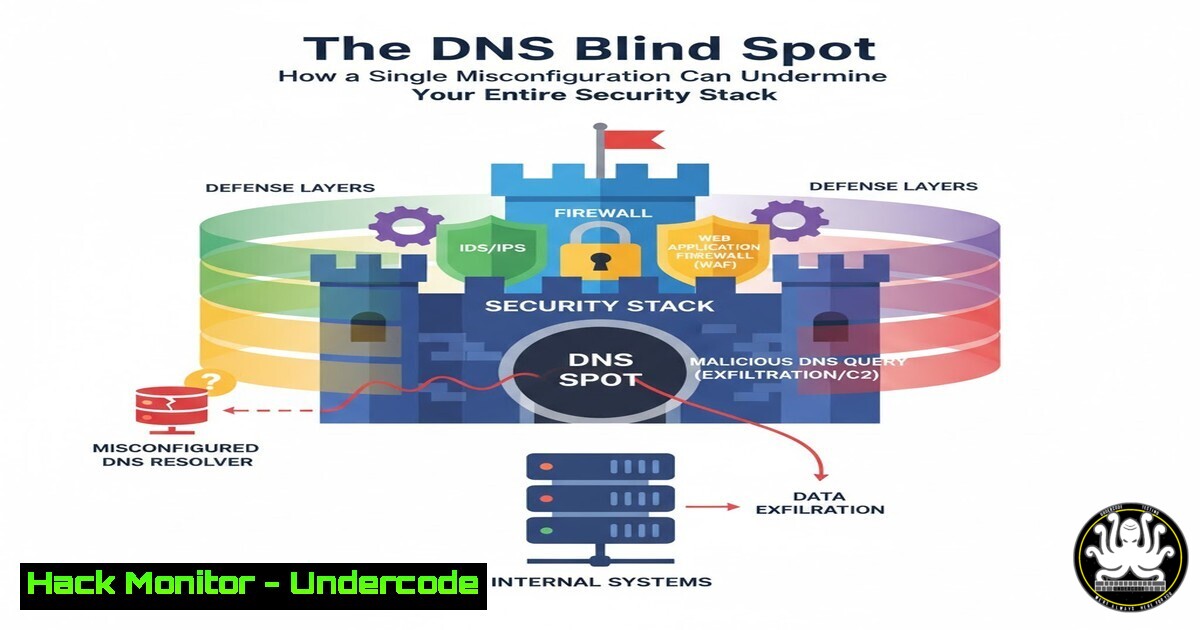
A critical vulnerability in an organization’s Domain Name System (DNS) infrastructure can render all other cybersecurity investments, from next-generation firewalls to advanced endpoint protection, completely ineffective. As highlighted by recent allegations against a major security vendor, mismanaged DNS records and servers create a foundational weakness, exposing organizations to credential theft, data breaches, and compliance failures.
Learning Objectives:
- Understand the critical role of DNS in enterprise security and the risks associated with DNS tampering.
- Learn to audit and secure key DNS records to prevent subdomain takeovers and phishing attacks.
- Implement continuous monitoring and hardening techniques for DNS to meet compliance standards like CMMC and FedRAMP.
You Should Know:
1. Auditing Your DNS SOA Records
The Start of Authority (SOA) record contains critical administrative information about a zone. An outdated or misconfigured SOA can indicate poor DNS hygiene.
 Linux (dig)
dig SOA yourdomain.com

Windows (nslookup)
nslookup -type=SOA yourdomain.com
Step-by-step guide:
Using the `dig` command on Linux or `nslookup` on Windows, you can query the SOA record for your domain. The output will show the primary name server, the responsible party’s email address, and serial number. A high serial number indicates recent updates, while an old one may suggest neglect. The email contact is often a target for social engineering attacks against your domain registrar.
2. Verifying DNSSEC Validation
DNSSEC adds a layer of cryptographic authentication to DNS responses, preventing cache poisoning and redirection attacks.
 Check if DNSSEC is validated for a domain
dig DS yourdomain.com +short
dig yourdomain.com +dnssec

On a resolving server, test validation
dig bad.dnssectest @8.8.8.8
Step-by-step guide:
The first command checks for the existence of Delegation Signer (DS) records, which are the foundation of DNSSEC. The second command queries with the `+dnssec` flag to see if authentic data is being returned. The third command tests a known bad signature; a properly configured validating resolver should return a `SERVFAIL` status, proving DNSSEC is active and protecting you.
3. Enumerating Critical NS and MX Records
Name Server (NS) and Mail Exchange (MX) records are prime targets for hijacking, leading to full domain or email compromise.
 Enumerate all NS records
dig NS yourdomain.com +short

Enumerate all MX records
dig MX yourdomain.com +short

Check for inconsistencies (using 8.8.8.8 for public view)
dig @8.8.8.8 NS yourdomain.com
Step-by-step guide:
Run these commands from both inside and outside your network. Compare the results. Any discrepancy could indicate a split-horizon DNS setup or, more worryingly, a cache poisoning attack. Ensure all your NS records point to authoritative servers you control and that your MX records correctly point to your approved email security providers.
4. Detecting Zone Transfer Vulnerabilities
A misconfigured DNS server may allow unauthorized zone transfers, leaking your entire internal network map.
 Attempt a zone transfer (AXFR)
dig @ns1.yourdomain.com yourdomain.com AXFR
Step-by-step guide:
This command requests a full copy of the DNS zone from the specified name server. If this command returns a list of all your hosts and their IP addresses, your DNS server is critically misconfigured. This should only be allowed for your secondary, slave DNS servers. A successful unauthorized transfer provides an attacker with a blueprint of your network.
5. Hardening DNS with SPF, DKIM, and DMARC
These records prevent email spoofing and are essential for compliance. Their absence or misconfiguration is a major red flag.
 Check Sender Policy Framework (SPF)
dig TXT yourdomain.com | grep spf

Check DMARC policy
dig TXT _dmarc.yourdomain.com

Check for DKIM selector (common example)
dig TXT selector._domainkey.yourdomain.com
Step-by-step guide:
Query the TXT records for your domain to verify your SPF, DMARC, and DKIM records exist and are correctly formatted. SPF should list all IPs authorized to send email for your domain. DMARC tells receiving servers what to do with emails that fail SPF or DKIM (e.g., `p=quarantine` or p=reject). Missing these records makes phishing attacks trivial.
6. Scripting a Comprehensive DNS Audit
Automate the auditing process to run continuously and catch misconfigurations early.
!/bin/bash
DOMAIN="yourdomain.com"
echo "[] Auditing DNS for: $DOMAIN"
echo "[+] SOA Record:"
dig SOA $DOMAIN +short
echo "[+] NS Records:"
dig NS $DOMAIN +short
echo "[+] Checking for open AXFR:"
for ns in $(dig NS $DOMAIN +short); do dig @$ns $DOMAIN AXFR +short | head -n 1 && echo "VULNERABLE: $ns"; done
echo "[+] Checking DMARC:"
dig TXT _dmarc.$DOMAIN +short
Step-by-step guide:
Save this script as `dns_audit.sh` and run `chmod +x dns_audit.sh` to make it executable. Replace `yourdomain.com` with your target domain. This script provides a baseline audit, checking the core records discussed. For production use, expand it to log results, send alerts on changes, and integrate it into a CI/CD pipeline for infrastructure-as-code deployments.
7. Cloud Provider DNS Security Checks
In AWS Route 53, Azure DNS, or Google Cloud DNS, leverage built-in security features and check configurations via CLI.
 AWS CLI - Get hosted zone info
aws route53 get-hosted-zone --id YOUR_ZONE_ID

Check DNS Query Logging status (critical for forensics)
aws route53 list-query-logging-configs

Azure CLI - List DNS zones
az network dns zone list
Step-by-step guide:
Using the AWS CLI, you can programmatically check the configuration of your hosted zones. Ensure query logging is enabled to a CloudWatch Logs group or an S3 bucket; this is vital for investigating incidents. In Azure, use the corresponding CLI commands to list all zones and review their resource records for any public exposure of internal assets.
What Undercode Say:
- Compliance is Not Security: Achieving a compliance checkbox like FedRAMP or CMMC does not equate to being secure. The alleged Palo Alto case demonstrates that foundational DNS security can be overlooked even by leading security vendors, creating a massive attack surface.
- The Shared Responsibility Model is a Shared Blind Spot: In cloud environments, you are responsible for securing your DNS data and records, even if the cloud provider manages the underlying server infrastructure. Assuming the platform is entirely secure is a catastrophic error.
The core issue is a systemic failure to treat DNS as a primary security control layer. It’s often delegated to network teams separate from security operations, creating a visibility gap. The fact that such a critical flaw could allegedly persist in a major security vendor’s public-facing portal for over a year suggests a profound disconnect between marketing claims and engineering reality. This isn’t just about one company; it’s an industry-wide wake-up call to re-evaluate the most basic building blocks of internet trust.
Prediction:
The continued neglect of foundational internet assets like DNS will lead to a paradigm shift in cyber insurance and regulatory enforcement. We predict a surge in claims and lawsuits directly targeting CISOs and boards for “failure to implement basic security hygiene,” moving beyond blaming advanced threat actors. This will force a massive re-investment in core protocol security, making DNS auditing and DNSSEC adoption as standard as running a firewall by 2026. Vendors with exposed vulnerabilities will face not just reputational damage but also significant financial liability, reshaping product development lifecycles to prioritize fundamental security over feature velocity.
🎯Let’s Practice For Free:
IT/Security Reporter URL:
Reported By: Andy Jenkinson – Hackers Feeds
Extra Hub: Undercode MoN
Basic Verification: Pass ✅


