Listen to this Post
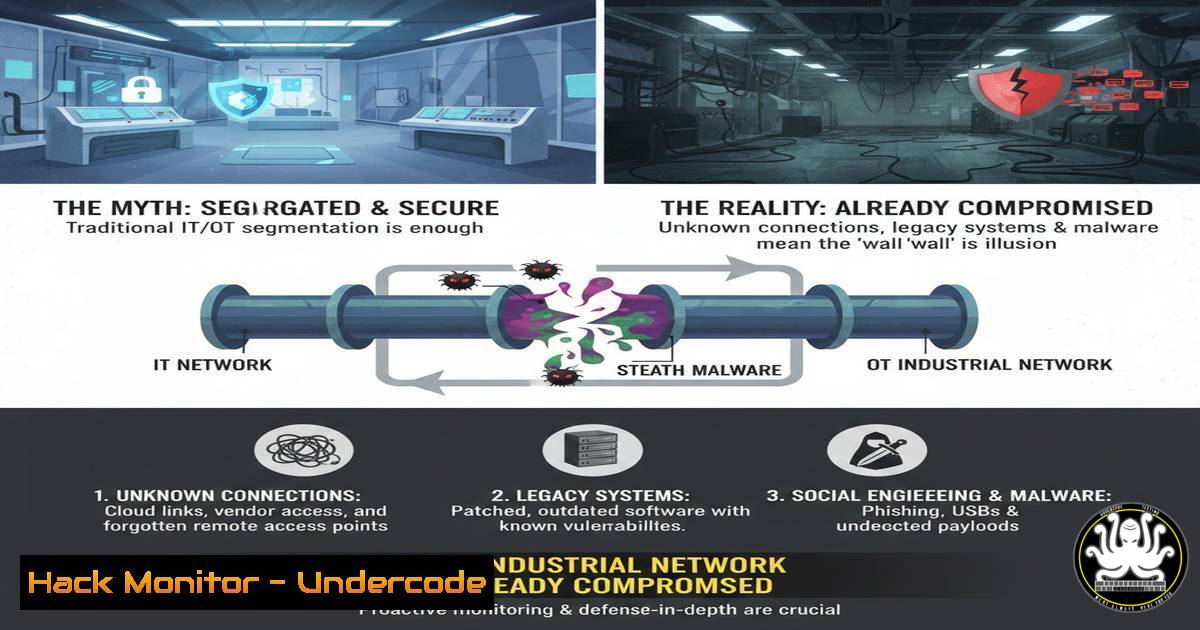
Introduction:
The lines between Operational Technology (OT) and Information Technology (IT) are blurring at an alarming rate. A pervasive secret within industrial environments is that the very IT vulnerabilities plaguing corporate networks are being systematically imported into critical infrastructure systems. This convergence means that attackers armed with decades of experience exploiting Windows systems can now turn power plants, railways, and water treatment facilities into their playgrounds.
Learning Objectives:
- Understand the prevalence and risk of Windows-based assets in OT/ICS environments.
- Learn how to assess and harden these interconnected systems using proven IT security principles.
- Develop a strategy for segmenting and protecting OT networks from IT-born threats.
You Should Know:
- The OT Threat Landscape is Now a Windows Problem
The modern OT network is no longer a walled garden of proprietary systems. It is increasingly composed of commercial, off-the-shelf IT equipment. File servers, data historians, domain controllers, and engineering workstations are predominantly Windows-based. Even Human-Machine Interfaces (HMIs) and Programmable Logic Controller (PLC) engineering software often run on Windows. This creates a massive attack surface where known IT vulnerabilities can be directly weaponized against critical industrial processes. An attacker doesn’t need to learn a new OT-specific exploit; they can simply reuse their existing arsenal of Windows attack tools.
Step-by-Step Guide: Inventorying Windows Assets in an OT Network
The first step to managing risk is knowing what you have.
1. Passive Network Monitoring: Deploy a network monitoring tool like Security Onion or Wireshark on a mirrored/SPAN port on an OT network switch. Avoid active scanning initially to prevent disrupting sensitive equipment.
2. Analyze for Windows Traffic: Filter for key Windows protocols to identify hosts:
SMB/CIFS (Port 445): Used for file and printer sharing.
RDP (Port 3389): Used for remote desktop access.
NetBIOS (Port 137): Used for name resolution.
LLMNR (Link-Local Multicast Name Resolution): Often used in Windows environments.
3. OS Fingerprinting: Use the observed network packets to fingerprint the operating system. Tools like Security Onion’s Squert or Kibana can often deduce the OS from packet signatures (e.g., TTL values, TCP window sizes).
4. Document and Categorize: Create a asset inventory listing each Windows system, its IP address, observed function (e.g., “Historian Server,” “Engineering Workstation”), and criticality to the industrial process.
2. Vulnerability Assessment Without Disruption
Active vulnerability scanning with tools like Nessus or OpenVAS can crash fragile OT devices. Therefore, a passive and agent-based approach is required. The goal is to determine the patch level and known vulnerabilities of Windows systems without causing a plant shutdown.
Step-by-Step Guide: Passive Patch Management Assessment
- Deploy Lightweight Agents: On Windows systems during scheduled maintenance windows, deploy scripts or lightweight agents that can collect system information locally.
- Query Patch Level: Use the following Windows Command Prompt or PowerShell commands to gather crucial data. Run these from a central management server or locally.
List all installed Hotfixes:
Get-Hotfix | Select-Object -Property HotFixID, Description, InstalledOn
Check System Info (including OS version and install date):
systeminfo | findstr /B /C:"OS Name" /C:"OS Version" /C:"Original Install Date"
3. Export and Correlate Data: Export the results to a CSV file and cross-reference the `HotFixID` (e.g., KB5005565) with public vulnerability databases like the National Vulnerability Database (NVD). This will reveal which known vulnerabilities are unpatched on your OT Windows hosts.
4. Prioritize Patching: Work with OT engineers to schedule the deployment of critical security patches, prioritizing systems that are both vulnerable and critical to safe operations.
3. Implementing Micro-Segmentation in the OT Network
Flat OT networks allow an attacker who breaches one system to move laterally to all others. Micro-segmentation involves creating strict, granular firewall policies to control traffic between assets, even within the same subnet. This is a foundational IT security practice that is vital for OT.
Step-by-Step Guide: Designing a Micro-Segmentation Strategy
- Map Communication Flows: Document all required communications. For example, an HMI may need to talk to a PLC on TCP port 44818 (Allen-Bradley), but it does not need to talk to the data historian.
- Define Zones and Conduits: Group devices by function (e.g., “Control Zone,” “Historian Zone,” “DMZ”). Define the allowed traffic flows (conduits) between these zones.
- Configure Industrial Firewalls: Implement next-generation firewalls or industrial demilitarized zone (IDMZ) appliances at the boundaries between zones. Use Layer 7 application awareness to block non-industrial protocols.
- Create Host-Based Firewall Rules: On the Windows systems themselves, use the Windows Defender Firewall with Advanced Security to create inbound and outbound rules that mirror your network segmentation policy. For example, restrict RDP to only come from a specific jump server.
Example PowerShell command to enable a firewall rule for a specific IP:New-NetFirewallRule -DisplayName "Allow HMI to PLC" -Direction Inbound -Protocol TCP -LocalPort 44818 -RemoteAddress 10.10.10.50 -Action Allow
4. Hardening Windows-Based OT Assets
A default Windows installation is not secure for an OT environment. Hardening involves systematically disabling unnecessary services, features, and accounts to reduce the attack surface.
Step-by-Step Guide: Basic Windows Hardening for OT
- Disable Unnecessary Services: Use `services.msc` to identify and disable services like “Print Spooler,” “Windows Remote Management (WinRM)” (if not needed), and “Server” (if file sharing is not required).
- Apply Application Whitelisting: Implement a solution like Windows AppLocker or a third-party application control tool. Create policies that only allow the execution of pre-approved applications (e.g., the HMI software, engineering suite) and block all others, including common malware vectors like PowerShell scripts and .vbs files.
- Configure Local Security Policy: Use `secpol.msc` to enforce password policies, disable the default ‘Administrator’ account, and configure audit policies to log successful and failed login attempts.
- Remove Non-Essential Software: Uninstall web browsers, email clients, and Java runtime environments unless they are explicitly required for the system’s industrial function.
5. Building an OT-Specific Incident Response Plan
The consequence of an incident in OT is not just data loss; it is physical damage and potential loss of life. Your incident response plan must reflect this fundamental difference.
Step-by-Step Guide: Key Elements of an OT IR Plan
- Pre-Define Decision Authorities: Clearly document who has the authority to shut down a process or entire production line. This is often a plant manager or senior OT engineer, not the CISO.
- Establish Safe Operational Modes: Work with engineers to define what “safe mode” looks like for different processes. During an incident, the priority is to bring the process to a safe state, not to preserve forensic evidence on a compromised server.
- Maintain Air-Gapped Backups: Ensure critical system images (e.g., for HMIs, engineering workstations) are regularly backed up and stored on media that is not connected to the network. This allows for rapid restoration without risk of reinfection.
- Conduct Tabletop Exercises: Regularly run through simulated cyber-attack scenarios with a combined team of IT security personnel and OT engineers. This builds the muscle memory and cross-functional understanding needed during a real crisis.
What Undercode Say:
- The attack path into OT is now paved with IT vulnerabilities. Focusing solely on obscure PLC exploits while ignoring the Windows server in the control room is a catastrophic strategic error.
- The most effective way to secure OT in the short term is to aggressively apply adapted IT security hygiene: patch management, strict segmentation, and system hardening. The skills gap is not in understanding OT, but in applying IT security principles safely within OT constraints.
The paradigm has permanently shifted. The notion of OT security as a separate, esoteric discipline is obsolete. The greatest immediate risk to critical infrastructure comes from the known, weaponized IT vulnerabilities that attackers can effortlessly deploy against unhardened Windows systems in industrial networks. While the operational constraints of OT are real and must be respected, they cannot be used as an excuse for inaction. The foundational practices of IT security—asset management, vulnerability management, and network segmentation—are now the foundational practices of OT security. The community must stop treating this as a secret and start treating it as a call to action.
Prediction:
The next five years will see a dramatic increase in ransomware and state-level attacks that successfully cripple critical infrastructure by targeting the IT components within OT networks. Attack groups will continue to refine “living-off-the-land” techniques, using legitimate Windows administration tools already present in these environments to move laterally and disrupt operations, making detection incredibly difficult. The convergence of IT and OT will force a reciprocal convergence of their security teams, leading to the emergence of a new hybrid “ICS Cybersecurity Engineer” role as the standard for protecting industrial automation.
🎯Let’s Practice For Free:
IT/Security Reporter URL:
Reported By: Mikeholcomb A – Hackers Feeds
Extra Hub: Undercode MoN
Basic Verification: Pass ✅


