Listen to this Post
Introduction:
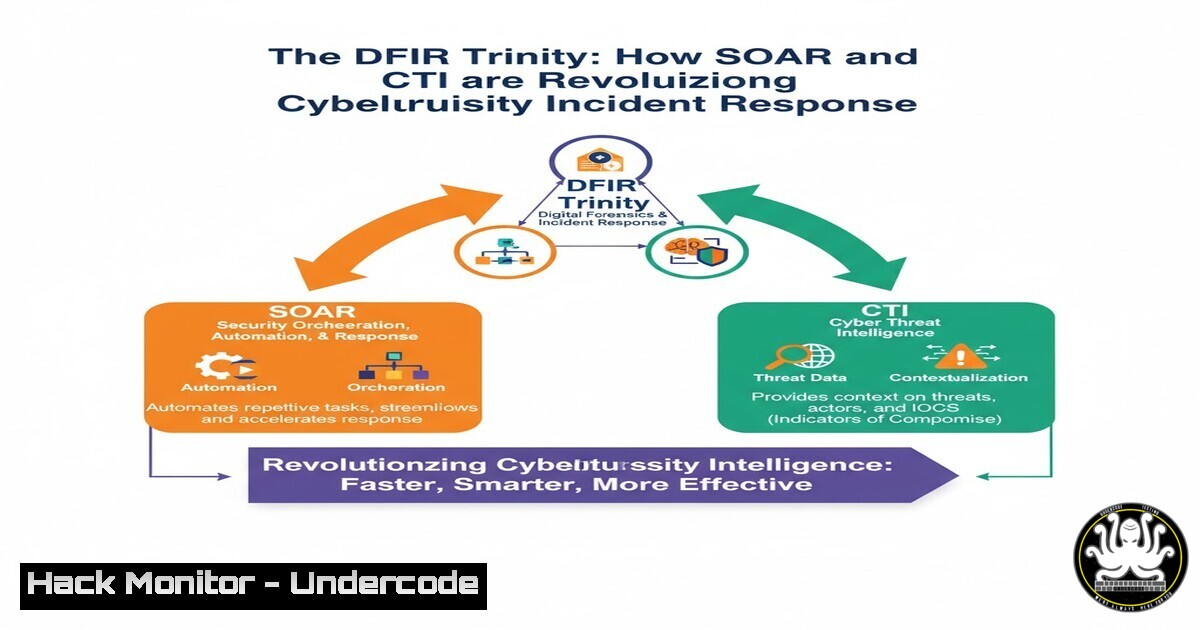
The modern cybersecurity landscape is a battleground of speed and scale, where manual incident response processes are no longer sufficient. The convergence of Digital Forensics and Incident Response (DFIR), Cyber Threat Intelligence (CTI), and Security Orchestration, Automation, and Response (SOAR) has created a powerful trinity that enables organizations to move from a reactive to a proactive and predictive security posture. This integrated approach is transforming how security teams detect, investigate, and neutralize threats.
Learning Objectives:
- Understand the core components and synergistic relationship between DFIR, SOAR, and CTI.
- Learn to implement practical automation scripts and commands to enhance your security operations.
- Develop a strategy for integrating threat intelligence into automated response playbooks.
You Should Know:
1. Orchestrating Initial Triage with SOAR Playbooks
A SOAR platform’s primary strength is executing consistent, automated playbooks the moment an alert is generated. This initial triage can gather a wealth of data before a human analyst even engages, dramatically reducing Mean Time to Detect (MTTD) and Mean Time to Respond (MTTR). For example, an alert from an Endpoint Detection and Response (EDR) tool regarding a suspicious process can trigger a playbook that automatically collects relevant forensic artifacts from the affected system.
Linux Command Example:
 Automate initial data collection on a Linux endpoint
echo "Collecting process and network information..."
ps aux --sort=-%mem | head -20 > /tmp/suspicious_processes.txt
netstat -tunlp > /tmp/network_connections.txt
lsof -i -P -n | grep LISTEN > /tmp/listening_ports.txt
ss -tulw > /tmp/socket_stats.txt
cat /etc/passwd | grep -v "nologin" > /tmp/user_accounts.txt
Step-by-step guide:
- The SOAR platform receives an alert and executes a remote script on the target Linux host via SSH.
- The `ps aux` command lists all running processes, sorted by memory usage, to identify potential resource abuse.
3. `netstat -tunlp` and `ss -tulw` provide a comprehensive view of all network connections and listening ports, helping to identify unauthorized services or connections.
4. `lsof -i` lists all open network files, which can reveal processes with active network communication. - The `grep -v “nologin”` filter on `/etc/passwd` extracts only user accounts with a valid login shell, highlighting potential backdoor accounts.
- All outputs are saved to temporary files, which the SOAR platform then retrieves and parses for the analyst.
2. Integrating Live Threat Intelligence (CTI) into Analysis
Raw data from an endpoint is useful, but its true meaning is unlocked with context from Cyber Threat Intelligence. SOAR platforms can be configured to automatically query internal and external threat intelligence platforms (TIPs) to check indicators of compromise (IoCs) like IP addresses, domain names, and file hashes. This tells the analyst not just what happened, but why it’s significant and who might be behind it.
Python Script Example for TI Lookup:
import requests
import hashlib

def check_virustotal(file_path, api_key):
 Calculate file hash
with open(file_path, "rb") as f:
file_hash = hashlib.sha256(f.read()).hexdigest()

Query VirusTotal API
url = f"https://www.virustotal.com/api/v3/files/{file_hash}"
headers = {"x-apikey": api_key}

response = requests.get(url, headers=headers)
if response.status_code == 200:
result = response.json()
stats = result['data']['attributes']['last_analysis_stats']
print(f"VirusTotal Detections: {stats['malicious']}/{sum(stats.values())}")
 SOAR logic can branch based on malicious count, e.g., if malicious > 5, then auto-containinate
else:
print("Error querying VirusTotal")

Example usage
 check_virustotal("/tmp/suspicious_file.exe", "YOUR_VT_API_KEY")
Step-by-step guide:
- This Python function is designed to be called from a SOAR playbook.
- It takes a file path and a VirusTotal API key as input.
- It calculates the SHA-256 hash of the file, a unique fingerprint used for identification.
- It constructs an API request to the VirusTotal v3 API, including the API key in the header for authentication.
- Upon receiving the response, it parses the JSON output to extract the “last_analysis_stats,” which shows how many security vendors flagged the file as malicious.
- The SOAR platform can use this intelligence score to automatically escalate the incident or trigger a containment workflow if the malicious count exceeds a defined threshold.
3. Automating Forensic Artifact Acquisition on Windows
For a deep DFIR analysis, acquiring volatile and non-volatile forensic artifacts is crucial. SOAR can automate the execution of trusted command-line forensic tools to capture this data from Windows systems consistently, ensuring a standardized evidence collection process.
Windows Command Example (using built-in tools & Sysinternals):
REM Capture process, network, and persistence data
tasklist /v > C:\Evidence\process_list.txt
netstat -ano > C:\Evidence\netstat_connections.txt
wmic process get name,processid,parentprocessid,commandline > C:\Evidence\wmic_processes.txt
reg export HKLM\Software\Microsoft\Windows\CurrentVersion\Run C:\Evidence\Run_registry_entries.reg
systeminfo > C:\Evidence\system_info.txt
REM Using Sysinternals PsList (download separately)
PsList -t -x > C:\Evidence\pslist_detailed.txt
Step-by-step guide:
- The SOAR agent executes a batch script on the target Windows endpoint.
2. `tasklist /v` provides a verbose list of currently executing processes.
3. `netstat -ano` shows all active network connections and the Process ID (PID) that owns them, which can be cross-referenced with the tasklist. - The `wmic process` command is a powerful tool that captures the process command line, which is critical for seeing the full execution path and arguments of a suspicious process.
5. `reg export` backs up specific registry keys known for persistence mechanisms, such as the Run key.
6. `systeminfo` provides critical system configuration data.
- Tools like `PsList` from Sysinternals offer even more detailed process information. These tools must be pre-deployed to the environment.
4. Leveraging Sigma Rules for Automated Threat Hunting
Sigma is a generic, open-source signature language for describing log queries that can be converted into queries for any SIEM, EDR, or data analytics platform. SOAR can execute compiled Sigma rules against a central log repository to proactively hunt for threats that may have evaded initial detection.
Example Sigma Rule (YAML) for Suspicious Service Creation:
title: Suspicious Service Creation via Command Line
id: af3f635c-2925-4c50-8eb4-8c1c2b62e71a
status: experimental
description: Detects creation of a service using suspicious commands often used by attackers for persistence.
references:
- https://attack.mitre.org/techniques/T1543/003/
author: Yoann Bertrand
date: 2023/10/26
logsource:
category: process_creation
product: windows
detection:
selection:
CommandLine|contains:
- 'sc create'
- 'New-Service'
Image|endswith:
- 'cmd.exe'
- 'powershell.exe'
- 'pwsh.exe'
filter:
CommandLine|contains:
- 'svchost'
- 'TrustedInstaller'
condition: selection and not filter
falsepositives:
- Legitimate system administration
level: medium
Step-by-step guide:
- A security engineer writes a Sigma rule like the one above, which targets the creation of Windows services via command-line utilities—a common persistence technique.
- This rule is then converted into a query compatible with the organization’s SIEM (e.g., Splunk SPL, Elasticsearch Query DSL) using the Sigma converter (
sigmac). - The SOAR platform is configured to periodically execute this converted query as part of a scheduled “Threat Hunting” playbook.
- If the query returns results, the SOAR platform creates a new incident and automatically enriches it with the involved hostnames, usernames, and command lines.
- This allows analysts to discover stealthy attacks that did not trigger a high-fidelity alert initially.
5. Automating Containment and Mitigation Actions
Once a threat is confirmed with high confidence, speed of containment is critical. SOAR can execute automated actions to isolate a host, disable a user account, or block a malicious IP address at the firewall, preventing further damage while the investigation continues.
Example API Call to EDR for Host Isolation:
 Example using curl to call a CrowdStrike API for host containment
API_BEARER_TOKEN="your_falcon_oauth2_token_here"
HOST_DEVICE_ID="the_target_device_id"

curl -X POST "https://api.crowdstrike.com/devices/entities/devices-actions/v2?action_name=contain" \
-H "Authorization: Bearer ${API_BEARER_TOKEN}" \
-H "Content-Type: application/json" \
-d '{
"ids": [
"'${HOST_DEVICE_ID}'"
]
}'
Step-by-step guide:
- After an analyst confirms a host is compromised or the SOAR playbook reaches a high-confidence verdict automatically, the containment workflow is triggered.
- The playbook retrieves the unique device identifier for the compromised host from the EDR platform.
- It then uses `curl` to send a POST request to the EDR’s API endpoint responsible for host containment actions.
- The request includes the bearer token for authentication (securely stored in the SOAR platform’s credential vault) and the device ID in the JSON payload.
- The EDR platform receives the command and immediately isolates the host from the network, blocking all ingress and egress traffic except for management channels, thus containing the threat.
6. Cloud Security Automation: Hardening S3 Buckets
Misconfigured cloud storage, like publicly accessible Amazon S3 buckets, is a leading cause of data breaches. SOAR can be used to run periodic compliance checks and automatically remediate insecure configurations.
AWS CLI Command Example:
 Check and remediate a public S3 bucket
BUCKET_NAME="my-sensitive-data-bucket"

Check if bucket is public
aws s3api get-bucket-policy-status --bucket $BUCKET_NAME

Apply a bucket policy that denies non-authorized and non-SSL requests
aws s3api put-bucket-policy --bucket $BUCKET_NAME --policy '{
"Version": "2012-10-17",
"Statement": [
{
"Sid": "ForceSSLOnly",
"Effect": "Deny",
"Principal": "",
"Action": "s3:",
"Resource": ["arn:aws:s3:::'$BUCKET_NAME'", "arn:aws:s3:::'$BUCKET_NAME'/"],
"Condition": {
"Bool": {"aws:SecureTransport": "false"}
}
}
]
}'
Step-by-step guide:
- A SOAR playbook is scheduled to run daily, iterating through all S3 buckets in an AWS account.
- It uses the `aws s3api get-bucket-policy-status` command to check the public access status of each bucket.
- If a bucket housing sensitive data is found to be public or lacking an encryption policy, the playbook proceeds to the remediation step.
- The `put-bucket-policy` command applies a new policy. The example policy above denies all requests that do not use SSL (SecureTransport), ensuring data is encrypted in transit.
- The playbook can then send a notification to the cloud security team detailing the misconfiguration that was fixed.
What Undercode Say:
- The integration of DFIR, CTI, and SOAR is no longer a luxury but a necessity for operational resilience. It represents a shift from human-led, process-driven response to a machine-led, intelligence-driven one.
- The true power lies not in the individual tools, but in the seamless workflow connecting them. Automation of mundane tasks frees expert analysts to focus on complex threat solving and strategic improvement.
The paradigm is clear: manual processes are a liability in the face of automated threats. The DFIR-SOAR-CTI trinity creates a force multiplier for security teams, enabling them to operate at the speed and scale of their adversaries. By systematically automating initial data collection, enriching it with real-time intelligence, and executing pre-approved containment actions, organizations can significantly close the window of exposure. This is not about replacing human expertise but rather augmenting it, allowing skilled analysts to apply their critical thinking to the most complex aspects of an incident rather than being bogged down by repetitive tasks. The future of effective cybersecurity operations is undeniably automated, intelligent, and integrated.
Prediction:
The continued evolution of AI will deeply embed itself into this trinity. We will see the rise of AI-driven SOAR platforms that can autonomously correlate weak signals across disparate data sources to identify sophisticated, multi-stage attacks that would escape human notice. Predictive CTI, powered by machine learning, will forecast an attacker’s next move based on observed tactics, allowing organizations to pre-emptively harden defenses. Furthermore, the line between detection and response will blur with the adoption of “Offensive SOAR,” where systems will not only defend but also launch automated, authorized countermeasures against attacker infrastructure, fundamentally changing the cyber battlefield.
🎯Let’s Practice For Free:
IT/Security Reporter URL:
Reported By: Yoann Bertrand – Hackers Feeds
Extra Hub: Undercode MoN
Basic Verification: Pass ✅


