Listen to this Post
Introduction:
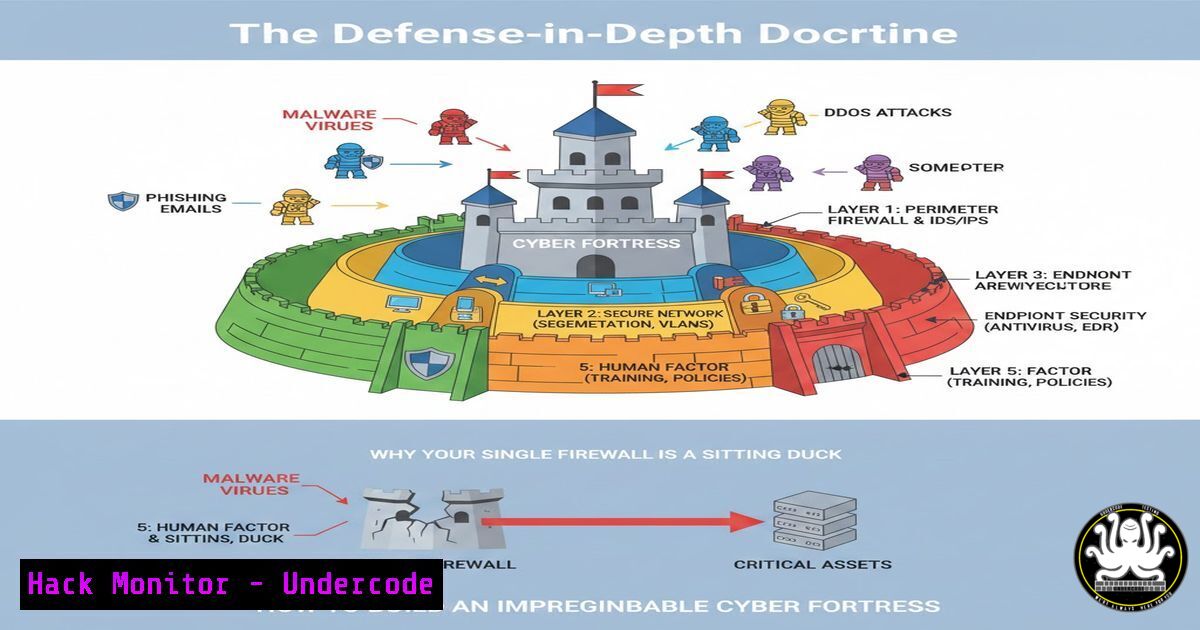
In the modern threat landscape, relying on a singular security solution is akin to defending a castle with only a moat. Sophisticated adversaries employ multi-vector attacks, ensuring that if one defense fails, others stand ready. This article delves into the critical concept of defense-in-depth, transforming the listed security layers from a theoretical framework into a practical, actionable architecture. We will move beyond buzzwords to configure, deploy, and integrate these layers, creating a resilient security posture that can detect, deflect, and respond to advanced threats.
Learning Objectives:
- Understand the operational function and configuration of core defense-in-depth layers.
- Learn to implement basic hardening commands and monitoring for IAM, Network, and Endpoint security.
- Develop a methodology for integrating disparate security tools (like EDR and SIEM) to achieve correlated visibility and automated response.
You Should Know:
- Identity & Access Management (IAM): The Foundation of Zero Trust
IAM is not just a policy; it’s the enforceable gatekeeper of your digital realm. A breach of credentials often bypasses perimeter defenses entirely.
Step‑by‑step guide explaining what this does and how to use it.
Concept: Implement Least Privilege Access and robust authentication.
Actionable Steps:
Linux (Using `sudo` and `adduser`):
Create a user with restricted shell: `sudo adduser –shell /bin/rbash john.doe`
Configure `sudo` privileges meticulously in `/etc/sudoers` using visudo. Example: `john.doe ALL=(ALL) /usr/bin/apt update, /usr/bin/systemctl restart apache2`
Windows (Using PowerShell and Net Commands):
Create a restricted local user: `New-LocalUser “TempUser” -Password (ConvertTo-SecureString “P@ssw0rd!” -AsPlainText -Force) -Description “Temporary contractor account”`
Add to a group with specific privileges: `Add-LocalGroupMember -Group “Remote Desktop Users” -Member “TempUser”`
Universal: Enforce Multi-Factor Authentication (MFA) everywhere possible, especially for administrative and cloud console access.
- Network Perimeter & Internal Segmentation: Beyond the Basic Firewall
Firewalls filter traffic, but proper segmentation limits lateral movement. Think of it as having bulkheads in a ship.
Step‑by‑step guide explaining what this does and how to use it.
Concept: Use firewalls to create zones (e.g., DMZ, Internal, Database) and control traffic between them.
Actionable Steps:
Linux (`iptables` example for a web server):
 Default deny policy
sudo iptables -P INPUT DROP
sudo iptables -P FORWARD DROP
 Allow established connections
sudo iptables -A INPUT -m state --state ESTABLISHED,RELATED -j ACCEPT
 Allow HTTP/HTTPS from anywhere
sudo iptables -A INPUT -p tcp --dport 80 -j ACCEPT
sudo iptables -A INPUT -p tcp --dport 443 -j ACCEPT
 Allow SSH only from a management IP range
sudo iptables -A INPUT -p tcp -s 10.0.1.0/24 --dport 22 -j ACCEPT
Windows (Advanced Security Firewall via PowerShell):
 Create a rule to allow inbound web traffic only from a specific subnet
New-NetFirewallRule -DisplayName "Allow Web from Internal" -Direction Inbound -Protocol TCP -LocalPort 80 -RemoteAddress 192.168.1.0/24 -Action Allow
- Endpoint & Network Detection (EDR/NDR): Your Cyber Neighborhood Watch
These tools don’t just block; they watch for anomalous behavior, like a process making unusual network connections.
Step‑by‑step guide explaining what this does and how to use it.
Concept: Deploy agents (EDR) and use network taps/SPAN ports (NDR) to collect data. The power is in the queries.
Actionable Steps:
Simulating a Query (Generic SIEM/EDR Logic): Detect a potential ransomware precursor.
Query Logic: `Find processes where (process_name == “cmd.exe” OR process_name == “powershell.exe”) AND (command_line CONTAINS “vssadmin delete shadows” OR command_line CONTAINS “bcdedit” OR command_line CONTAINS “wbadmin”)`
Action: This query, run in tools like Splunk, Elastic, or a commercial EDR, should trigger a CRITICAL alert for immediate investigation.
- Security Information & Event Management (SIEM): The Central Nervous System
A SIEM aggregates logs from all other layers (Firewalls, EDR, IDS, Cloud). Without correlation, alerts are just noise.
Step‑by‑step guide explaining what this does and how to use it.
Concept: Forward critical logs to a central platform and build correlation rules.
Actionable Steps:
Configuring a Linux host (rsyslog) to forward logs:
Edit `/etc/rsyslog.conf`: `. @:514`
Restart: `sudo systemctl restart rsyslog`
Example Correlation Rule: Alert if a single user account fails to authenticate on 10 different servers within 5 minutes. This indicates a potential brute-force or lateral movement attempt.
- Cloud Security Posture Management (CSPM): The Default is Insecure
Cloud providers operate on a Shared Responsibility Model. They secure the cloud, you secure what’s in the cloud.
Step‑by‑step guide explaining what this does and how to use it.
Concept: Continuously hunt for misconfigurations: public storage buckets, open security groups, unencrypted databases.
Actionable Steps (AWS CLI examples):
Find Public S3 Buckets: `aws s3api list-buckets –query “Buckets[].Name”` then check each bucket’s ACL.
Find Unencrypted RDS Instances: aws rds describe-db-instances --query "DBInstances[?StorageEncrypted==false].DBInstanceIdentifier"
Remediation: Automate the correction of these findings using AWS Config rules or third-party CSPM tools.
- Data Loss Prevention (DLP) & Backup: The Last Line of Defense
When prevention fails, containment and recovery are paramount. DLP stops exfiltration; backups enable restoration.
Step‑by‑step guide explaining what this does and how to use it.
Concept: Implement policies to detect sensitive data movement and maintain immutable, tested backups.
Actionable Steps:
Linux (`clamonacc` for on-access scanning):
Install ClamAV: `sudo apt install clamav clamav-daemon`
Start on-access scanning: `sudo clamonacc -z –move=/home/virus_quarantine`
Backup Strategy (The 3-2-1 Rule):
Command (Linux `cron` for local backup): `0 2 tar -czf /backup/server-$(date +%Y%m%d).tar.gz /home /etc /var/www 2>/var/log/backup.log`
Rule: Maintain 3 copies of data, on 2 different media, with 1 copy offsite/immutable (e.g., cloud storage with object lock).
What Undercode Say:
- Depth Defeats the Attacker’s Advantage: A layered defense forces an adversary to win multiple times consecutively without being detected. Each layer increases their cost, time, and risk of exposure.
- Integration is Force Multiplication: An IDS alert fed into a SIEM that automatically triggers an EDR process isolation and a firewall block on the offending IP is a security orchestration dream. Strive for integrated tooling over isolated point solutions.
Analysis: The post correctly identifies the components but treats them as a checklist. True defense-in-depth requires understanding the interactions between these layers. For instance, a Security Awareness failure (a phishing click) is mitigated by EDR blocking the payload, while the IAM layer prevents the compromised user account from accessing sensitive file shares, and the DLP tool monitors for data exfiltration attempts from that endpoint. Configuration is key; a misconfigured firewall or an over-privileged service account can collapse the entire model. The future lies in automated security orchestration (SOAR) that weaves these layers into a self-healing fabric.
Prediction:
The future of defense-in-depth will be defined by intelligent, integrated platforms over best-of-breed单品. AI will not replace layers but will act as the “conductor” of the security orchestra, predicting attack paths by analyzing configurations across IAM, network, and cloud layers, and prescribing automated hardening steps. The concept of “identity” will become the primary perimeter, with continuous authentication and behavior analytics (UEBA) embedded into every layer, making the security posture dynamic and adaptive rather than static and reactive. The rise of software supply chain attacks will add a new, critical layer: secure code development and dependency management.
▶️ Related Video (70% Match):
🎯Let’s Practice For Free:
IT/Security Reporter URL:
Reported By: Agnesdiemkwap Cybersecurity – Hackers Feeds
Extra Hub: Undercode MoN
Basic Verification: Pass ✅


