Listen to this Post
Introduction:
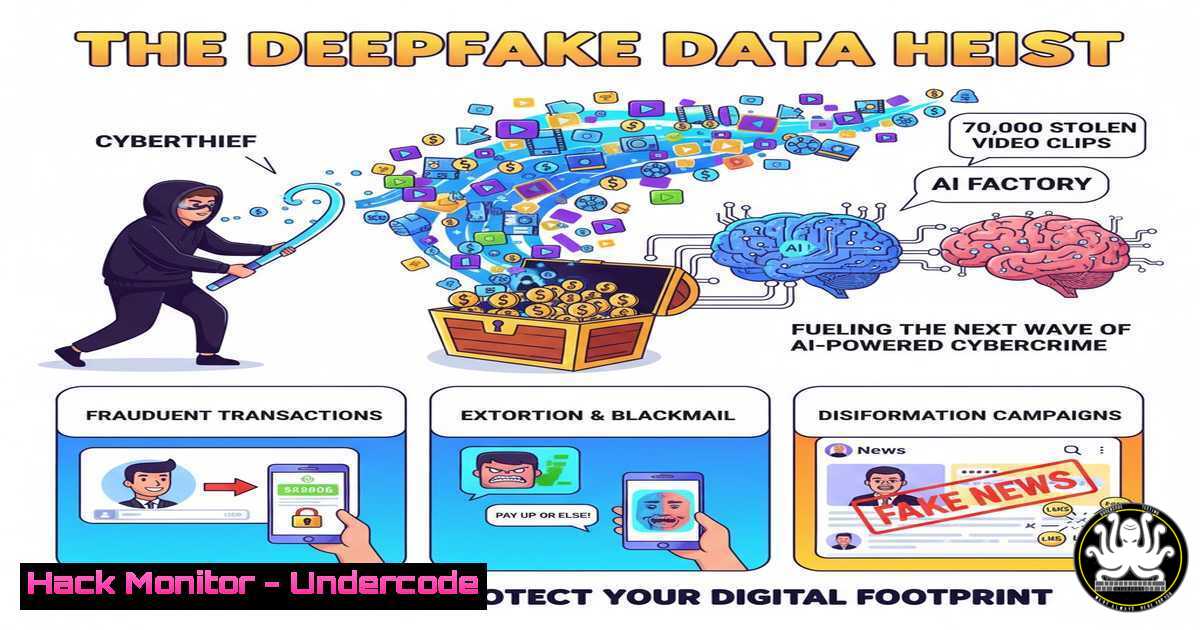
A massive dataset of 70,000 video clips, featuring 100 individuals recorded over a month, has been stolen and is circulating on the dark web. This isn’t just a privacy breach; it’s a weaponized data haul designed to train highly sophisticated deepfake models. This incident marks a pivotal shift, where AI-powered social engineering attacks are becoming scalable, personalized, and incredibly difficult to detect.
Learning Objectives:
- Understand the technical pipeline from stolen video data to a functional deepfake model.
- Learn immediate mitigation strategies to detect deepfake authentication attempts and secure digital identities.
- Master advanced command-line and API tools for media forensics and cloud security hardening.
You Should Know:
- The Attacker’s Blueprint: Building a Deepfake Model from Stolen Data
The stolen 70,000-clip dataset provides the raw fuel for a deepfake pipeline. Attackers use this data to train a model that can map the facial expressions and vocal patterns of any of the 100 individuals. The process involves face extraction, model training using frameworks like DeepFaceLab, and finally, video synthesis.
 Example of a face extraction command using DeepFaceLab (Attacker Perspective)
python deepfacelab/extract.py --input-dir /mnt/stolen_videos/ --output-dir /mnt/faceset/ --detector s3fd

This command:
 1. Scans the `stolen_videos` directory for video files.
 2. Uses the S3FD detector to identify and extract faces from every frame.
 3. Outputs the cropped face images to the `faceset` directory for training.
Step-by-step guide:
Data Acquisition: The attacker organizes the stolen video clips into a single directory.
Face Extraction: The `extract.py` script is run, processing each video to create a dataset of thousands of face images for each target individual. This is the most computationally intensive part of the process.
Model Training: The attacker executes a training script (e.g., train.py --model SAE), where the AI learns to reconstruct the faces and later superimpose them onto a source actor.
Video Conversion: Finally, the trained model is used to generate the deepfake video, mapping the target’s face onto any desired source video.
- The First Line of Defense: Detecting Deepfakes with Forensic Analysis
Organizations must deploy tools to analyze media files for digital tampering. Python libraries like `forensically` can detect inconsistencies in lighting, blurring, and digital fingerprints that are hallmarks of AI-generated content.
 Python script snippet for basic deepfake detection using the forensically-api
import requests

api_key = "YOUR_FORENSICALLY_API_KEY"
file_path = "suspicious_video.mp4"

url = "https://api.forensically.ai/v1/analyze"
files = {'file': open(file_path, 'rb')}
headers = {'Authorization': f'Bearer {api_key}'}

response = requests.post(url, files=files, headers=headers)
analysis_result = response.json()

Check for deepfake indicators
if analysis_result['deepfake_score'] > 0.85:
print("ALERT: High probability of AI-generated manipulation.")
print(f"Detected Artifacts: {analysis_result['detected_artifacts']}")
Step-by-step guide:
Acquire an API Key: Sign up for a service like Forensically.ai or Microsoft Video Authenticator to get an API key.
Integrate the Check: Implement the API call into your user authentication workflow, especially for high-value transactions or privileged access requests.
Automate the Response: Configure your security system to flag or block access requests that include media files failing the forensic analysis.
- Hardening Your Cloud Identity Perimeter: Conditional Access is Non-Negotiable
The primary use of these deepfakes will be to bypass video-based identity verification. Defending against this requires moving beyond simple video checks to a robust, context-aware access policy.
 Azure CLI command to create a Conditional Access policy requiring a trusted location
az rest --method POST --uri https://graph.microsoft.com/v1.0/policies/conditionalAccessPolicies --body '{
"displayName": "Require Trusted Location for HR App",
"state": "enabled",
"conditions": {
"applications": {
"includeApplications": ["your-hr-app-id"]
},
"users": {
"includeUsers": ["all"]
},
"locations": {
"includeLocations": ["All"],
"excludeLocations": ["AllTrusted"]
}
},
"grantControls": {
"operator": "OR",
"builtInControls": ["block"]
}
}'
Step-by-step guide:
Identify Critical Apps: Use the Azure portal to find the Application ID for your most sensitive applications (e.g., HR systems, financial dashboards).
Define Trusted Locations: In Azure Active Directory, define the IP ranges of your corporate offices and VPNs as “Trusted Locations.”
Create the Policy: Execute the CLI command or use the GUI to create a policy that blocks access to the critical app unless the user is connecting from a trusted network.
- Exploiting the Exploit: Using MITRE ATT&CK to Model the Attack
To defend effectively, you must think like an attacker. The MITRE ATT&CK framework provides a model for this deepfake-based intrusion.
 Using the MITRE ATT&CK Navigator to map the threat (Conceptual)
 This is not a single command but a methodology.

<ol>
<li>Reconnaissance (TA0043): Gathering video clips of the target.</li>
<li>Resource Development (TA0042): Training the deepfake model on stolen data.</li>
<li>Initial Access (TA0001): Using the deepfake in a video call or verification portal.</li>
<li>Privilege Escalation (TA0004): Gaining access to sensitive systems.

A relevant Mitigation (M1036 - Account Use Policies) can be enforced via Windows Security Policy:
secedit /export /cfg C:\sec_policy.cfg
Then, edit the file to include: "SeInteractiveLogonRight = S-1-5-32-544"
This ensures only Administrators can log interactively, limiting attack surface.
secedit /configure /db C:\windows\security\local.sdb /cfg C:\sec_policy.cfg /areas USER_RIGHTS
Step-by-step guide:
Map the TTPs: Document the attack using MITRE techniques: `Spearphishing via Service (T1566.002)` for initial data theft, `Impersonation (T1564.010)` for the deepfake, and Use of Alternate Authentication Material (T1550).
Identify Mitigations: For each technique, identify a corresponding mitigation. For Impersonation, this is `M1037 – Filter Network Traffic` and M1018 - User Account Management.
Implement Controls: Translate these mitigations into concrete technical controls, like the Windows User Rights assignment shown above.
5. Windows Defender Hardening: Blocking Unauthorized Camera Access
Preventing malicious applications from secretly recording video is a critical first step. PowerShell can be used to audit and configure camera privacy settings at scale.
 PowerShell script to disable camera access for all users via Group Policy
Get-CimInstance -Class Win32_DeviceGuard -Namespace root\Microsoft\Windows\DeviceGuard | Set-CimInstance -Arguments @{UsermodeCodeIntegrityPolicyFlags=1}

Check and disable camera access for a specific application
$app = Get-AppxPackage -Name Microsoft.WindowsCamera
$cameraAccess = Get-WindowsCapability -Online -Name "CameraRegistration"
if ($cameraAccess.State -eq "Installed") {
Disable-WindowsOptionalFeature -Online -FeatureName "CameraRegistration" -NoRestart
Write-Host "Camera registration has been disabled."
}

More direct method via Registry (use with caution):
Set-ItemProperty -Path "HKLM:\SOFTWARE\Microsoft\Windows\CurrentVersion\CapabilityAccessManager\ConsentStore\webcam" -Name "Value" -Value "Deny"
Step-by-step guide:
Audit Current State: Run `Get-AppxPackage | Where-Object {$_.Name -like “camera”}` to see camera-related applications.
Deploy via Group Policy: For an enterprise, the most effective method is to create a Group Policy Object (GPO) that sets the `Let apps access the camera` policy to Disabled.
Scripted Deployment: For non-domain joined machines, use the PowerShell script as part of a standard deployment package to proactively disable camera access, reducing the risk of initial video data theft.
6. Linux Server Lockdown: Isolating AI Training Workloads
If your organization works with AI, securing the training environments is paramount to prevent them from being used maliciously or having models stolen. Linux containerization and mandatory access control are key.
 Using Firejail to sandbox a Python process, restricting its network and filesystem access
sudo firejail --noprofile --net=none --private /usr/bin/python3 train_model.py

Using AppArmor to create a custom profile for a deepfake detection script
sudo aa-genprof /usr/local/bin/deepfake_detector.py
 After running the generator and performing the training operations, enforce the profile:
sudo aa-enforce /usr/local/bin/deepfake_detector.py

Hardening a Docker container for AI workload
docker run --rm -it --security-opt=no-new-privileges:true --cap-drop=ALL --user 1000:1000 -v /secured/data:/data:ro pytorch/pytorch python train.py
Step-by-step guide:
Assess the Need: Identify processes that handle sensitive data or AI models.
Apply Sandboxing: For ad-hoc tasks, use `firejail` to run the process with no network access and a private, temporary filesystem.
Enforce with AppArmor: For persistent services, use AppArmor to generate a mandatory access control profile that whitelists the exact files and permissions the process needs.
Containerize Securely: When using Docker, drop all Linux capabilities, run as a non-root user, and mount data volumes as read-only (ro) to prevent model exfiltration or poisoning.
- API Security for AI Models: Preventing Unauthorized Model Training
The deepfake models themselves are often served via APIs. Protecting these endpoints from unauthorized use is critical to prevent the proliferation of such attacks.
 Using curl to test an API endpoint for rate limiting and authentication
 This simulates an attacker trying to brute-force the service.

Test without API Key (Should fail)
curl -X POST https://api.example.com/v1/deepfake/generate -H "Content-Type: application/json" -d '{"source_video": "data..."}'

Test with incorrect API Key (Should fail)
curl -X POST https://api.example.com/v1/deepfake/generate -H "Authorization: Bearer wrong_key" -H "Content-Type: application/json" -d '{"source_video": "data..."}'

Test rate limiting (Rapid successive calls)
for i in {1..100}; do
curl -s -o /dev/null -w "%{http_code}\n" -X POST https://api.example.com/v1/deepfake/generate -H "Authorization: Bearer $VALID_KEY" &
done
wait
Step-by-step guide:
Implement Strong Auth: Ensure every API endpoint requires a valid, scoped API key or OAuth2 token. Use a service like AWS API Gateway or Auth0.
Enforce Rate Limits: Configure your API gateway to limit requests per key/IP address to a reasonable number, preventing automated training or generation attempts.
Monitor for Anomalies: Use the above `curl` tests to proactively audit your own API’s security posture. Look for 429 (Too Many Requests) and 401 (Unauthorized) responses. Implement a Web Application Firewall (WAF) to block suspicious patterns.
What Undercode Say:
- The Barrier to Entry Has Crashed: This data heist is not a targeted attack but the creation of a cybercrime commodity. It democratizes high-level impersonation, allowing non-technical criminals to rent or purchase access to pre-trained deepfake models of specific individuals.
- The Death of Video-Only Verification: Any security process that relies solely on a video feed for identity confirmation is now fundamentally broken. Multi-factor authentication (MFA) must evolve to include hardware tokens and behavioral biometrics that are significantly harder to spoof.
The 70,000-clip dataset represents a scalable business model for cybercriminals. The initial investment in stealing and processing the data pays dividends by enabling countless future attacks against all 100 individuals and their organizations. Defenders can no longer treat deepfakes as a theoretical, high-end threat. They are now a standardized tool in the adversary’s kit. The focus must shift from purely detecting the deepfake to building security architectures that assume digital media can be forged, thereby rendering the forgery useless through layered, context-aware security controls. The integrity of digital identity is under direct assault, and our defenses must become more adaptive and resilient than the attacks themselves.
Prediction:
The proliferation of weaponized training sets will lead to a “Deepfake-as-a-Service” (DaaS) underground economy within 18 months. This will result in a surge of Business Email Compromise (BEC) attacks with real-time video confirmation, multi-million dollar synthetic identity fraud, and the first major political incident fueled by a convincingly fake video of a public figure, causing significant market and social instability. Defensive AI will become a non-negotiable layer in enterprise security stacks, leading to an arms race between generative and discriminative AI models, ultimately reshaping the landscape of digital trust.
🎯Let’s Practice For Free:
IT/Security Reporter URL:
Reported By: Darlenenewman 70000 – Hackers Feeds
Extra Hub: Undercode MoN
Basic Verification: Pass ✅


