Listen to this Post
Introduction:
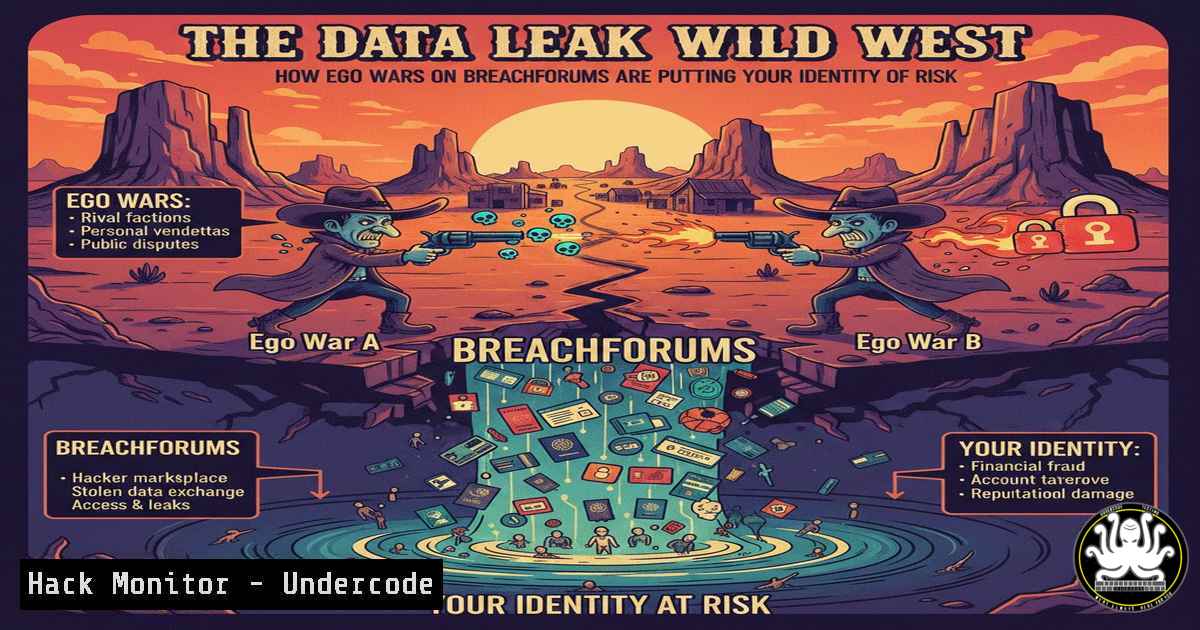
The digital underground is experiencing a chaotic surge in publicly traded data leaks, driven more by clout-chasing and personal vendettas than principled activism. This toxic ecosystem on platforms like BreachForums transforms sensitive personal data into ammunition for ego wars, ultimately leaving ordinary citizens to pay the price for compromised credentials and exposed identities. Understanding this landscape is no longer just for threat analysts; it’s a critical component of personal and organizational cyber hygiene.
Learning Objectives:
- Understand the dynamics of modern data leak marketplaces and the motivations of threat actors within them.
- Learn practical techniques to investigate if your data has been exposed in a public leak.
- Implement defensive measures to mitigate the damage from credential exposure and identity theft.
You Should Know:
- Navigating the “Fange Numérique”: Mapping the Data Leak Ecosystem
The post references the “digital scum” (fange numérique)—actors who distribute leaks for notoriety. These individuals operate on clear, dark web, and semi-public forums like the mentioned BreachForums (BF). The “flood of leaks” consists of databases from corporate breaches, credential stuffing lists (combinations of emails and passwords), and sensitive documents dumped for harassment or profit.
Step-by-step guide explaining what this does and how to use it:
Objective: Proactively monitor for your personal or corporate email exposure.
Tool: Have I Been Pwned (HIBP) – A free, reputable service aggregating data from thousands of breaches.
Steps:
- Navigate to `https://haveibeenpwned.com/`.
- Enter your email address in the search bar.
- Review the results. HIBP will list breaches where your email was found and the types of data compromised (e.g., passwords, phone numbers).
- For Advanced Monitoring (CLI): Use the HIBP API with `curl` for scripting checks.
Check an email address via the HIBP API
curl -s -H "hibp-api-key: YOUR_API_KEY" https://haveibeenpwned.com/api/v3/breachedaccount/[email protected]
(Note: Requires a paid API key for programmatic access. Free tier is limited.)
2. Triage and Verify Leak Credibility
Not all leaks are created equal. As the post hints, some are “questionable in terms of reliability.” Threat actors may seed false data, repackage old leaks as new, or embed malware. Verifying a leak’s legitimacy is crucial before acting on it.
Step-by-step guide explaining what this does and how to use it:
Objective: Assess a claimed data leak file for basic credibility and safety.
Tools: VirusTotal, Hash Calculators (`sha256sum`, `md5deep`).
Steps:
- Do Not Download Directly: Isolate the file in a virtual machine or sandboxed environment if you must inspect it.
- Check for Malware: Upload the file’s hash (or the file itself) to `https://www.virustotal.com`. This scans it with dozens of antivirus engines.
Generate a SHA256 hash of a file on Linux/Mac
sha256sum suspect_database.zip

On Windows PowerShell
Get-FileHash -Algorithm SHA256 .\suspect_database.zip
-
Correlate Hashes: Search the generated hash online. If it matches hashes from known, old breaches, it’s likely a repackaged leak.
-
From Leaked Credentials to Account Takeover: The Attacker’s Playbook
Leaked credentials are often used in credential stuffing attacks—automated attempts to log into various services (banks, social media, corporate VPNs) using the stolen username/password pairs.
Step-by-step guide explaining what this does and how to use it:
Objective: Understand and defend against credential stuffing.
Defensive Technique: Implement and enforce password hygiene.
Steps for System Admins & Individuals:
- Deploy Breached Password Protection: Services like Azure AD Password Protection and similar tools can check new passwords against known breach corpuses.
- Mandate Multi-Factor Authentication (MFA): This is the single most effective barrier against credential stuffing.
- Use a Password Manager: Generate and store unique, complex passwords for every account. This nullifies the risk of password reuse.
- Monitor Login Attempts: For critical servers, monitor logs for failed login bursts.
Check for SSH failed login attempts on Linux (last 1000 lines of auth.log) grep "Failed password" /var/log/auth.log | tail -n 1000 | awk '{print $9, $11}' | sort | uniq -c | sort -nr -
OSINT on Yourself: Building a Digital Shadow Report
The post states “ordinary citizens will bear the cost.” Proactive self-directed Open-Source INTelligence (OSINT) helps you understand your exposure.
Step-by-step guide explaining what this does and how to use it:
Objective: Create a personal digital footprint report.
Tools: Google Dorks, social media audits, domain lookups.
Steps:
1. Google Search Operators: Find exposed information.
"your.name"@domain.com
intitle:"your name" filetype:pdf
site:pastebin.com "your.email"
2. Check for Exposed Documents: Search for your name with document extensions.
3. Review Social Privacy Settings: Audit every social platform. Assume default settings are not private.
4. Domain & Subdomain Discovery (for personal domains):
 Using amass for passive enumeration
amass enum -passive -d yourpersonaldomain.com
5. Hardening Your Online Presence Post-Leak
When you discover your data in a leak, a systematic response is required.
Step-by-step guide explaining what this does and how to use it:
Objective: Execute a post-breach personal security protocol.
Action Plan:
- Immediate Password Reset: Change the password on the breached service AND on any other service where you used the same or a similar password.
- Enable MFA: If not already active, enable it immediately using an authenticator app (e.g., Google Authenticator, Authy) NOT SMS.
- Contact Financial Institutions: If financial data was exposed, alert your bank and credit card companies. Consider placing a fraud alert with credit bureaus (Equifax, Experian, TransUnion).
- Be Wary of Phishing: Expect highly targeted phishing emails (spear phishing) referencing the leaked data to gain further trust.
What Undercode Say:
- The Human Factor is the Ultimate Vulnerability: The most sophisticated technical leaks are weaponized through human psychology—exploiting fear, curiosity, and the desire for notoriety. Security awareness training must evolve to cover the socio-technical aspects of the leak ecosystem.
- Defense is Asymmetric but Not Hopeless: While attackers need only one success, defenders must be perfect. However, implementing core hygiene (unique passwords, MFA, proactive monitoring) raises the cost for attackers astronomically, making you a less attractive target compared to the unprotected majority.
The analysis from the original post highlights a critical inflection point: data leaks are transitioning from a commodity in criminal economies to a currency in social status wars among threat actors. This “ego-hacking” is arguably more dangerous than pure profit motives, as it leads to unpredictable, public, and reckless disclosures with no regard for collateral damage. The call to action for ANSSI and CNIL is clear, but the first line of defense is now fundamentally personal. Organizations must pivot security training to address this new reality where an employee’s personal data leak can be the initial foothold for a corporate breach.
Prediction:
The “ego war” trend will intensify, leading to more gratuitous, massive, and public data dumps. This will force regulatory bodies like the CNIL to expand GDPR enforcement to include not just the breached organization but also the malicious disseminators, pursuing international legal action. Simultaneously, we will see the rapid adoption of AI-driven personal security assistants that continuously scour leak databases and clear/dark web forums for an individual’s data, providing real-time alerts and automated remediation steps (like initiating password resets). The line between personal and corporate cybersecurity will blur into obscurity, making individual digital hygiene a non-negotiable component of any enterprise security framework.
▶️ Related Video (76% Match):
🎯Let’s Practice For Free:
IT/Security Reporter URL:
Reported By: Jmetayer Dataleak – Hackers Feeds
Extra Hub: Undercode MoN
Basic Verification: Pass ✅


