Listen to this Post
Introduction
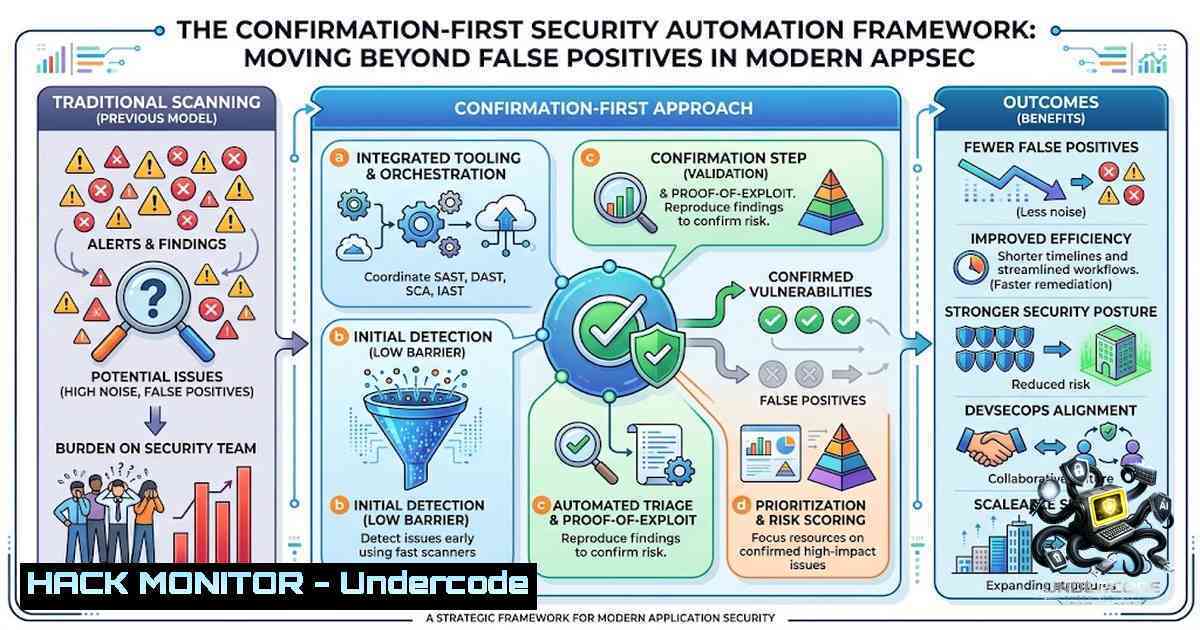
In the current threat landscape, security professionals are drowning in a sea of “maybe.” Vulnerability detection tools generate thousands of potential findings, but the critical bottleneck is no longer discovery—it’s validation. As Spencer O’Brien, a corporate security intel operator, astutely observes: “on a live target, the hard part isn’t generating things to try—it’s confirming what’s actually real. A CTF hands you a flag, a clean yes/no. A live application hands you a wall of ‘maybe,’ and most of a tester’s time gets eaten chasing false positives.” This reality has given rise to a new paradigm in security automation: confirmation-first frameworks that prioritize independent verification and reproducible evidence over sheer volume of findings.
Learning Objectives
- Understand the architectural principles behind confirmation-first security automation frameworks and why verification trumps discovery
- Master practical implementation techniques using Bash, PowerShell, and specialized security tools for automated vulnerability confirmation
- Learn to integrate rate limiting, scope enforcement, and evidence collection into security testing workflows
- Develop skills to build custom automation pipelines that reduce false positives by 40-60% and increase true positive rates
You Should Know
1. The Confirmation-First Philosophy: Why Verification Beats Discovery
The fundamental insight driving modern security automation is that the valuable engineering isn’t the part that generates attacks—it’s the part that tells you the truth about which ones matter. Traditional security workflows assume every report is real until a human proves otherwise. This approach is no longer sustainable. Security teams now face over 100 newly disclosed vulnerabilities per day, with backlogs exceeding 100,000 items. AI-generated vulnerability reports and issue tickets that are frequently invalid have further amplified triage efforts.
The confirmation-first approach inverts this model. As ProjectDiscovery’s Triage platform articulates: “Assume every report is noise. Prove the ones that are real.” Every finding is treated as unproven until it can be reproduced in a sandbox and confirmed with evidence. This philosophy extends to bug bounty workflows where “a confirmed verdict means automated evidence was collected—it does not mean the finding is ready to submit. Every finding must still be reviewed by a human.”
Step-by-Step Guide: Building a Confirmation-First Workflow
- Establish Scope Boundaries: Before any automated action, validate the target host against program scope rules. Out-of-scope targets should be blocked at the code level.
-
Implement Multi-Technique Verification: Use a different technique than the original detection method to independently confirm or deny a signal. This reduces false positives through independent corroboration.
3. Define Conservative Verdict Rules:
- Confirmed: Strong, vulnerability-specific evidence collected (e.g., canary domain in Location header, marker reflected in body)
- Unconfirmed: Target responded normally and proof condition clearly failed
- Inconclusive: Proof is ambiguous or incomplete
- Failed: Verification job crashed or was blocked by scope violation
- Collect Structured Evidence: Store HTTP request/response pairs, resolved IPs, and screenshot paths in structured format for auditability.
2. Linux Bash Automation for Security Testing
Bash scripting remains the backbone of security automation on Linux platforms. Modern penetration testing suites like Zeko Tool demonstrate how Bash can unify disparate security tools into cohesive workflows, automating network mapping, web fuzzing, and payload generation. These scripts automatically detect the correct package manager (apt, dnf, or yum) for tool installation, ensuring cross-platform compatibility across Kali, Ubuntu, Debian, CentOS, and RHEL.
Step-by-Step Guide: Creating a Bash Automation Framework
1. Set Up the Automation Environment:
!/bin/bash
 Security automation framework - confirmation-first approach
WORK_DIR="/opt/security-automation"
RESULTS_DIR="$WORK_DIR/results/$(date +%Y%m%d_%H%M%S)"
mkdir -p "$RESULTS_DIR"
LOG_FILE="$RESULTS_DIR/automation.log"
exec > >(tee -a "$LOG_FILE") 2>&1
2. Implement Scope Enforcement:
 Scope validation function
validate_scope() {
local target=$1
 Read allowed domains from scope file
while IFS= read -r allowed; do
if [[ "$target" == "$allowed" ]]; then
return 0  In scope
fi
done < "$WORK_DIR/scope.txt"
echo "ERROR: Target $target out of scope" | tee -a "$LOG_FILE"
return 1  Out of scope
}
3. Build Verification Pipeline:
 Multi-technique verification
verify_finding() {
local finding_type=$1
local target=$2

case $finding_type in
"open-redirect")
 Inject canary domain and check Location header
curl -s -I "http://$target?redirect=dragonflai-verify.invalid" \
| grep -i "location:.dragonflai-verify.invalid" && echo "CONFIRMED"
;;
"reflected-xss")
 Inject harmless marker and check reflection
curl -s "http://$target?q=<dragonflai-xss-probe-7f3a9b>" \
| grep -q "dragonflai-xss-probe-7f3a9b" && echo "CONFIRMED"
;;
)
echo "INCONCLUSIVE: No verification strategy available"
;;
esac
}
4. Integrate Rate Limiting:
 Adaptive rate limiting with exponential backoff
rate_limit() {
local delay=1
local max_delay=60
local attempts=0

while [ $attempts -lt 5 ]; do
if [ $attempts -gt 0 ]; then
sleep $((delay  (2  (attempts - 1))))
fi
 Execute request here
if [ $? -eq 0 ]; then
return 0
fi
((attempts++))
done
return 1
}
3. Windows PowerShell for Security Automation and Hardening
PowerShell provides equivalent automation capabilities for Windows environments, particularly for security hardening and Active Directory auditing. PowerShell can directly automate local security policies, services, audit settings, and system configurations via script, enforcing hundreds of CIS controls across enterprise environments.
Step-by-Step Guide: PowerShell Security Automation
1. Audit Active Directory Security:
 Active Directory security audit
Import-Module ActiveDirectory
$domainControllers = Get-ADDomainController -Filter
$vulnerableAccounts = Get-ADUser -Filter {Enabled -eq $true -and PasswordNeverExpires -eq $true}
$vulnerableAccounts | Export-Csv "AD_Vulnerable_Accounts.csv" -1oTypeInformation
2. Enforce CIS Benchmarks:
 Disable legacy SMBv1 protocol
Disable-WindowsOptionalFeature -Online -FeatureName SMB1Protocol -1oRestart

Disable guest account
Set-LocalUser -1ame "Guest" -Enabled $false

Enforce password complexity
secedit /export /cfg C:\secpol.cfg
(Get-Content C:\secpol.cfg).Replace("PasswordComplexity = 0", "PasswordComplexity = 1") |
Set-Content C:\secpol.cfg
secedit /configure /db C:\windows\security\local.sdb /cfg C:\secpol.cfg /areas SECURITYPOLICY
3. Enable Comprehensive Audit Logging:
 Enable audit logging for logon events
auditpol /set /subcategory:"Logon" /success:enable /failure:enable
auditpol /set /subcategory:"Account Logon" /success:enable /failure:enable
auditpol /set /subcategory:"Object Access" /success:enable /failure:enable
4. Build Security Hardening Toolkit:
 Comprehensive security validation
$scripts = @(
"Enable or Disable Windows Firewall.ps1",
"Set UAC Settings.ps1",
"Configure Audit Policy.ps1"
)
foreach ($script in $scripts) {
& ".\scripts\$script"
}
 Validate hardening status
powershell -ExecutionPolicy Bypass -File "scripts\validate_security_hardening.ps1"
4. API Security Testing Automation
APIs represent a critical attack surface where traditional security scanners often fail. According to Salt Security’s Q1 2025 State of API Security Report, the vast majority of API attacks came from authenticated sources, meaning attackers bypass login screens and exploit authorization flaws. Modern API security frameworks like Hadrian are purpose-built for authorization testing, using role-based testing and YAML-driven templates to automatically find broken object-level authorization (BOLA), broken function-level authorization (BFLA), and broken authentication.
Step-by-Step Guide: Automated API Security Testing
1. Install and Configure Hadrian:
 Install from source
go install github.com/praetorian-inc/hadrian/cmd/hadrian@latest

Define roles with permissions
cat > roles.yaml << EOF
roles:
- name: admin
credentials: "admin:password123"
permissions: ["read", "write", "delete"]
- name: user
credentials: "user:password123"
permissions: ["read"]
- name: guest
credentials: "guest:password123"
permissions: []
EOF
2. Run Authorization Testing:
 Test API endpoints for BOLA vulnerabilities
hadrian test --roles roles.yaml --target https://api.target.com --output json > results.json

Cross-test every role combination against every endpoint
hadrian test --roles roles.yaml --target https://api.target.com --mutate --verify
3. Integrate CI/CD Pipeline:
 GitHub Actions workflow for API security testing
name: API Security Scan
on: [push, pull_request]
jobs:
security-scan:
runs-on: ubuntu-latest
steps:
- uses: actions/checkout@v3
- name: Run Hadrian Security Tests
run: |
hadrian test --roles roles.yaml --target ${{ secrets.API_TARGET }} --output sarif > results.sarif
- name: Upload SARIF Results
uses: github/codeql-action/upload-sarif@v2
with:
sarif_file: results.sarif
5. Cloud Infrastructure Hardening Automation
Cloud security automation requires a shift from manual configuration to Infrastructure as Code (IaC) with embedded security controls. Automated security hardening scripts and Terraform modules implementing CIS benchmarks and security best practices are essential for AWS, GCP, and Azure environments.
Step-by-Step Guide: Cloud Security Automation
1. AWS Security Hardening with Terraform:
 AWS Security Group with strict controls
resource "aws_security_group" "web_sg" {
name = "web-security-group"
description = "Hardened web security group"

Only allow HTTPS from trusted sources
ingress {
from_port = 443
to_port = 443
protocol = "tcp"
cidr_blocks = ["10.0.0.0/8", "172.16.0.0/12"]
}

Block all other inbound traffic
egress {
from_port = 0
to_port = 0
protocol = "-1"
cidr_blocks = ["0.0.0.0/0"]
}
}

Enable CloudTrail for comprehensive audit logging
resource "aws_cloudtrail" "audit_trail" {
name = "security-audit-trail"
s3_bucket_name = aws_s3_bucket.audit_bucket.id
include_global_service_events = true
is_multi_region_trail = true
enable_log_file_validation = true
}
2. GCP Hardening Automation:
 Google Cloud Platform hardening toolkit
 Audit live environment and identify security debt
gcloud auth configure-docker
gcloud container clusters get-credentials production-cluster --zone us-central1-a

Apply CIS GCP benchmarks
gcloud compute firewall-rules update default-allow-http --disabled
gcloud compute firewall-rules update default-allow-https --source-ranges="10.0.0.0/8,172.16.0.0/12"
3. Azure Security Automation:
 Azure security posture management
Connect-AzAccount
 Enable Azure Security Center
Set-AzSecurityPricing -1ame "VirtualMachines" -PricingTier "Standard"
 Configure just-in-time VM access
Set-AzJitNetworkAccessPolicy -ResourceGroupName "Production" -VMName "web-server-"
6. Advanced Automation: AI-Orchestrated Security Testing
The frontier of security automation involves LLM-agent orchestration for offensive security at scale. Systems like VulnHunter deploy orchestrated fleets of agents that read source code, hypothesize vulnerabilities, write and run Proof-of-Concept (PoC) exploits to confirm them, eliminate false positives, and file coordinated-disclosure reports—with a human in the loop on every aggressive action. The AXE (Agentic eXploit Engine) framework demonstrates that even single-agent configurations with grey-box metadata achieve 1.75× performance gains over black-box baselines.
Step-by-Step Guide: Building an AI-Assisted Security Pipeline
1. Define Vulnerability Pattern Tiers:
 Knowledge base of vulnerability patterns
patterns:
injection:
- "SQL injection"
- "Command injection"
- "LDAP injection"
authorization:
- "BOLA"
- "BFLA"
- "IDOR"
exposure:
- "Sensitive data exposure"
- "Information disclosure"
2. Implement the Find-Prove-Report Loop:
- Scan: Agents read source for ranked vulnerability patterns, tagged by language and component
- Triage: A separate agent adversarially challenges each candidate to kill false positives
- Exploit: The exploiter writes a standalone PoC and runs it against the real target
- Report: Findings are routed to the correct disclosure channel from a template library
- Track: Deduplicate against prior submissions; evidence is hashed and timestamped
3. Enforce Human-in-the-Loop Controls:
 Safety gate for AI-driven automation
class SafetyGate:
def <strong>init</strong>(self):
self.aggressive_actions = ["exploit", "modify", "delete"]

def require_approval(self, action, target):
if action in self.aggressive_actions:
print(f"ACTION REQUIRES APPROVAL: {action} on {target}")
response = input("Approve? (y/n): ")
return response.lower() == 'y'
return True
What Undercode Say:
- Confirmation-first automation is the new security paradigm: The most valuable engineering in security automation isn’t generating attacks—it’s telling the truth about which ones matter. This shift from discovery-centric to verification-centric workflows represents a fundamental evolution in security operations.
-
False positive reduction is the primary ROI driver: Security automation that can reduce false positives by 40-60% while increasing true positive rates above 10% delivers measurable operational efficiency. Organizations implementing validation-driven methodologies have achieved average reductions of 93% in false positives.
-
Human oversight remains non-1egotiable: Even with advanced automation, “every finding must still be reviewed by a human”. The goal is to augment human judgment, not replace it—humans encode judgment while automation provides throughput.
-
Multi-technique verification is the gold standard: Independent confirmation using a different technique than the original detection method is essential for eliminating false positives. A bare non-5xx HTTP response is never sufficient to return confirmed—every confirmed verdict requires finding-specific evidence.
Prediction:
-
+1 The confirmation-first automation paradigm will become the industry standard within 24-36 months, with major security vendors integrating verification pipelines directly into their detection engines. Organizations that fail to adopt verification-first approaches will face overwhelming alert fatigue and missed critical vulnerabilities.
-
+1 AI-orchestrated security automation will mature to handle 70-80% of vulnerability triage workflows by 2028, with human analysts focusing exclusively on complex, multi-step attack chains and business logic flaws that require contextual understanding.
-
-1 The democratization of AI-powered security automation will lower the barrier to entry for malicious actors, enabling automated attack generation at scale. This will necessitate defensive automation that operates at machine speed to maintain parity.
-
+1 The integration of confirmation-first principles into CI/CD pipelines will shift security left significantly, with automated verification becoming a standard gate in the software development lifecycle—catching vulnerabilities before they reach production.
-
-1 Security teams that treat automation as a replacement for human expertise rather than a force multiplier will struggle with the complexity of modern attack surfaces. The most effective organizations will maintain a “human in the loop on every aggressive action”, using automation to handle throughput while preserving human judgment for critical decisions.
▶️ Related Video (84% Match):
https://www.youtube.com/watch?v=8AjikOUQX1w
🎯Let’s Practice For Free:
🎓 Live Courses & Certifications:
Join Undercode Academy for Verified Certifications
🚀 Request a Custom Project:
Secure, high-velocity infrastructure and disruptive technological engineering. Contact our engineering team for high-tier development and proprietary systems:
[email protected]
💎 Smart Architecture | 🛡️ Secure by Design | ⭐ Trusted by Thousands
IT/Security Reporter URL:
Reported By: Spencer O%E2%80%99brien – Hackers Feeds
Extra Hub: Undercode MoN
Basic Verification: Pass ✅


