
Listen to this Post
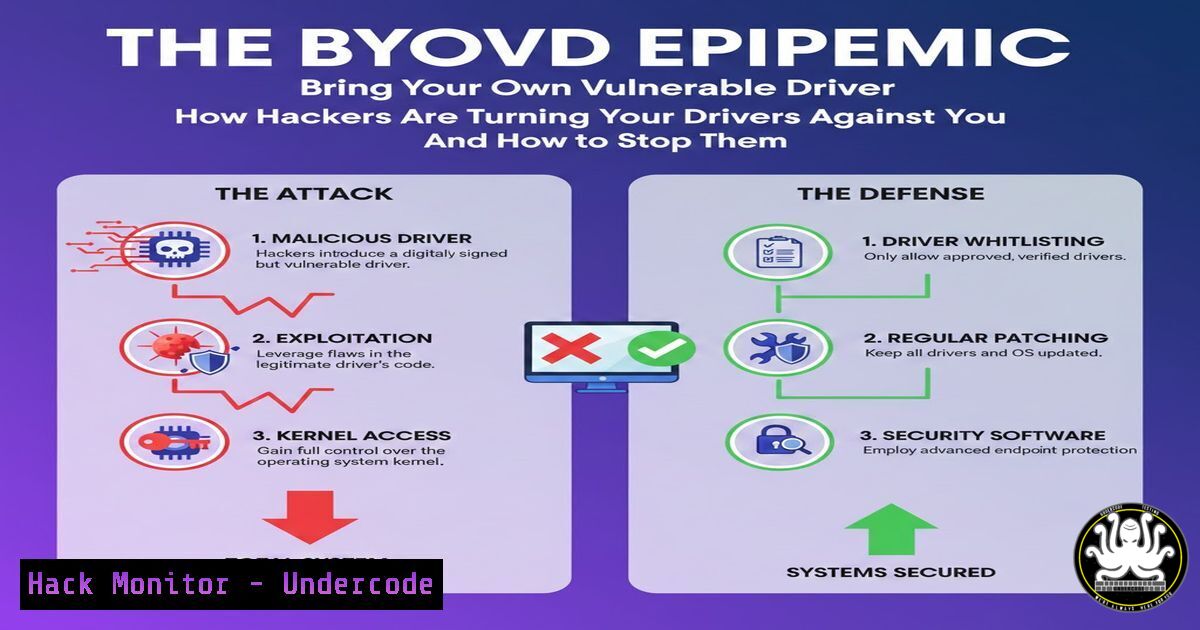
Introduction:
Bring Your Own Vulnerable Driver (BYOVD) has emerged as a critical defense evasion technique in the modern cyber threat landscape. By exploiting signed but vulnerable kernel-mode drivers, threat actors gain unfettered access to system resources, allowing them to disable Endpoint Detection and Response (EDR) tools and antivirus software. This technique, prominently featured in recent ransomware campaigns, represents a direct assault on the foundational security layers of Windows operating systems, moving the battlefield from user space into the kernel itself.
Learning Objectives:
- Understand the mechanics of the BYOVD attack chain and its role in ransomware operations.
- Learn to deploy defensive strategies using blocklisting, memory scanning, and system hardening.
- Gain practical skills in hunting and mitigating vulnerable driver threats on Windows endpoints.
You Should Know:
1. The Anatomy of a BYOVD Attack
A BYOVD attack exploits the high privileges of the Windows kernel. Legitimate, digitally signed drivers from reputable software vendors sometimes contain vulnerabilities that allow unauthorized write access to kernel memory. Attackers, after gaining initial access, bring and load these compromised drivers. Once loaded, the driver acts as a bridge, enabling the attacker to execute malicious code with kernel privileges, often to terminate security processes, alter call tables, or directly manipulate memory.
Step-by-step guide:
- Initial Access: The attacker gains a foothold via phishing, exploit, or compromised credentials.
- Driver Delivery: A known vulnerable driver (e.g.,
RTCore64.sys,gdrv.sys) is dropped onto the disk. It is often bundled with the malware payload. - Driver Installation: The attacker uses standard Windows utilities to install the driver:
sc create VulnerableDriver binPath= C:\Windows\Temp\malicious.sys type= kernel start= demand
sc start VulnerableDriver
- Payload Execution: A companion user-mode executable communicates with the installed driver, sending crafted IOCTL (Input/Output Control) codes to exploit the driver’s vulnerability and execute privileged operations, such as killing an EDR process.
- Persistence & Execution: With defenses disabled, the main payload (e.g., ransomware) is deployed unimpeded.
-
Building Your First Line of Defense: Driver Blocklisting
The most straightforward mitigation is to prevent known bad drivers from loading. Microsoft provides mechanisms to block specific drivers based on their hash or certificate.
Step-by-step guide (Using Windows Defender Application Control – WDAC):
1. Create a Deny Policy: Build a WDAC policy that specifically blocks the vulnerable drivers listed in resources like LOLDrivers.io.
2. Generate a Policy XML: Use PowerShell to create a base policy and add rule options to deny specific drivers. You can reference driver hashes from the LOLDrivers database.
New-CIPolicy -Level FilePublisher -FilePath 'C:\DriverScan\' -UserPEs -Deny -PolicyName 'BlockVulnerableDrivers' -o 'C:\Policy\blocked_drivers.xml'
3. Deploy the Policy: Convert the XML to a binary `.cip` file and deploy it via Group Policy or MDM.
ConvertFrom-CIPolicy 'C:\Policy\blocked_drivers.xml' 'C:\Policy\blocked_drivers.cip'
4. Test Rigorously: Deploy in audit mode first to ensure critical system functions are not disrupted.
3. Hunting for Malicious Driver Loads with Sysmon
Sysmon (System Monitor) is an invaluable tool for detecting the loading of suspicious drivers. By monitoring `DriverLoad` events (Event ID 6), you can hunt for known bad signatures.
Step-by-step guide:
- Install & Configure Sysmon: Use a configuration that emphasizes driver load logging.
Sysmon.exe -accepteula -i sysmonconfig-export.xml
- Craft a Detection Rule: In your Sysmon configuration XML, ensure `DriverLoad` events are captured. Create a rule that alerts on drivers with a known bad signature or from untrusted paths.
<RuleGroup name="" groupRelation="or">
<DriverLoad onmatch="include">
<Signature condition="contains">MaliciousVendor</Signature>
<ImageLoaded condition="contains">\Temp\</ImageLoaded>
</DriverLoad>
</RuleGroup>
- Centralize & Analyze Logs: Forward Sysmon Event ID 6 logs to a SIEM. Build dashboards and alerts correlated with the LOLDrivers.io dataset or internal blocklists.
4. Deploying Kernel-Mode Memory Scanning with AMSI
While traditional scanning focuses on disk, memory scanning is crucial. The Antimalware Scan Interface (AMSI) can be extended, and EDRs perform kernel memory scanning to look for signs of driver-based exploitation.
Step-by-step guide (Conceptual for Analysts):
- Understand the Indicators: Look for indirect signs in your EDR console:
Unexpected kernel-mode driver loads from user writable directories (C:\Users\,C:\Windows\Temp\).
Processes with high privilege making unusual direct kernel object manipulation attempts.
EDR agents unexpectedly terminating or losing heartbeats.
- Write Custom Detection Logic: Use your EDR’s query language to hunt for these patterns. Example query (pseudo):
event.type: DRIVER_LOAD and driver.path: /Temp/ and not signer: Microsoft Windows
- Integrate Threat Intelligence: Automatically cross-reference loaded driver hashes and signers against the updated LOLDrivers.io API or a local copy of the database.
-
Hardening the Kernel: Vulnerable Driver Blocklist (Windows 10/11)
Microsoft maintains a dynamic, OS-enforced list of known vulnerable drivers. This is a critical, low-overhead protection that must be enabled.
Step-by-step guide:
- Verify Support: This feature requires Windows 10 2004 or later, or Windows 11.
2. Enable via Group Policy:
Navigate to `Computer Configuration > Administrative Templates > System > Kernel DMA Protection` (or `Device Guard` on older builds).
Enable “Turn On Virtualization Based Security” and select “Enabled with UEFI lock” for maximum hardening.
Ensure “Credential Guard” and “Hypervisor Enforced Code Integrity” are also enabled to leverage the feature fully.
3. Enable via Registry:
reg add "HKEY_LOCAL_MACHINE\SYSTEM\CurrentControlSet\Control\CI" /v "VulnerableDriverBlocklistEnable" /t REG_DWORD /d 1 /f
4. Validate: Use the Microsoft Security Compliance Toolkit to benchmark your system’s secure configuration.
6. Proactive Monitoring: Auditing Driver Load Events
Native Windows auditing can provide a foundational log source for driver activity, especially in environments without Sysmon.
Step-by-step guide:
- Enable Audit Policy: Via Group Policy (
gpedit.mscor GPMC), navigate toComputer Configuration > Windows Settings > Security Settings > Advanced Audit Policy Configuration > System Audit Policies > Detailed Tracking. Enable “Audit Kernel Object” for both Success and Failure. - Monitor Event Logs: Look in `Event Viewer > Windows Logs > Security` for Event ID 4688 (Process Creation) and, more importantly, Event ID 4697 (A service was installed in the system). Filter for services of type
kernel. - Build a Detection Query: In Log Analytics or your SIEM, create a rule to alert on kernel driver installs from non-standard accounts or paths.
SecurityEvent | where EventID == 4697 | where ServiceType has "kernel" | where ImagePath has @"Temp"
What Undercode Say:
- The Kernel is the New Battleground: BYOVD signifies a strategic shift by adversaries. Perimeter and user-space defenses are insufficient; security programs must now explicitly include kernel integrity monitoring and hardening.
- Threat Intelligence is Non-Negotiable: Defensive tools like LOLDrivers.io exemplify the power of communal, open-source threat intelligence. Maintaining a real-time feed of known vulnerable drivers is a baseline requirement for any mature SOC.
The analysis is clear: BYOVD is not an obscure technique but a mainstream tool for sophisticated attackers, particularly ransomware operators. Its success lies in exploiting the inherent trust placed in signed code. Defenders must counter by adopting a zero-trust stance even towards the kernel, implementing layered defenses that combine static blocklists, behavioral monitoring for suspicious driver activity, and aggressive kernel hardening policies. The gap between attacker adoption of this technique and widespread enterprise deployment of driver control measures represents a critical vulnerability.
Prediction:
BYOVD will continue to evolve, driving three key trends. First, we will see a rise in “living-off-the-signed-land” attacks, where attackers weaponize vulnerabilities in drivers from a broader array of legitimate hardware vendors. Second, defensive tools will increasingly move towards hypervisor-protected code integrity (HVCI) and memory-only detection, forcing a cat-and-mouse game in kernel memory. Finally, expect regulatory and compliance frameworks (like NIST CSF, ISO 27001) to introduce explicit controls for driver integrity management and kernel-level threat detection, making these advanced defenses a standard compliance requirement rather than an optional advanced control.
▶️ Related Video (76% Match):
🎯Let’s Practice For Free:
IT/Security Reporter URL:
Reported By: Shehabsalem Youve – Hackers Feeds
Extra Hub: Undercode MoN
Basic Verification: Pass ✅


