Listen to this Post
Introduction:
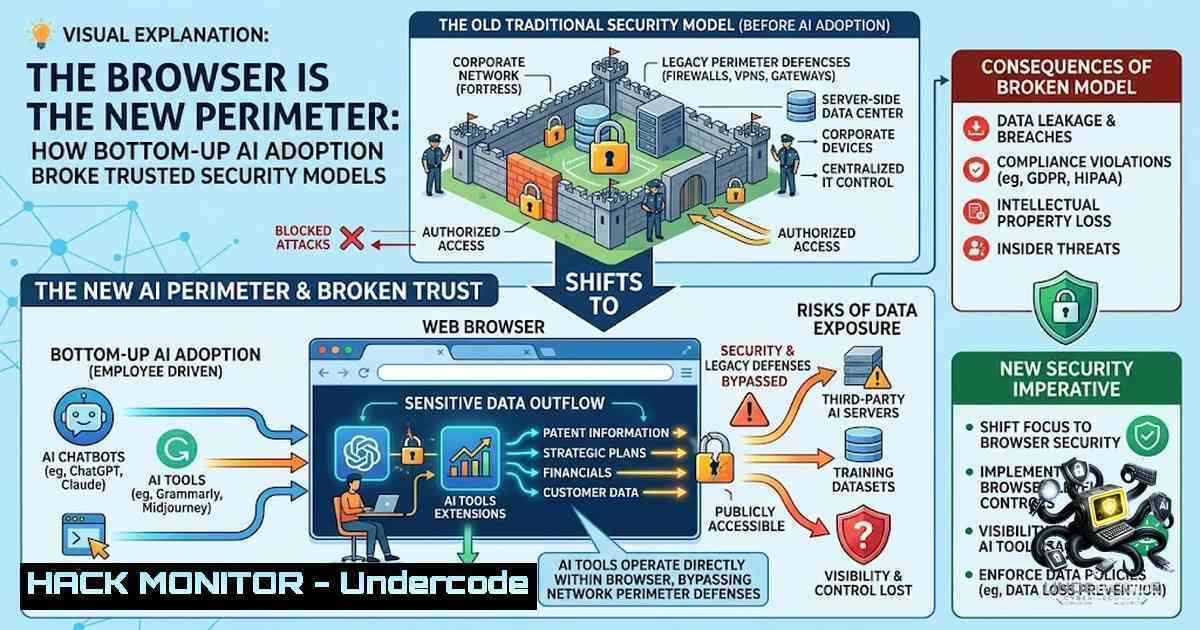
For decades, enterprise technology followed a predictable rhythm: IT assessed, procurement approved, and security deployed. Generative AI shattered that cycle in a matter of months. Workers became AI users with nothing more than a browser tab—no procurement ticket, no security review, and zero visibility into what data was leaving the organization. As Matthew Smith, EMEA Field CTO at Island, explained during his Cyber Conversations discussion with Katie Soper, this bottom-up adoption wave has fundamentally altered the governance landscape, forcing security teams to rethink where control actually resides. The endpoint—and more specifically, the browser—has become the last line of defense against a shadow AI epidemic that traditional network proxies and DLP tools were never designed to see.
Learning Objectives:
- Understand how generative AI has bypassed traditional IT procurement and security review processes, creating a “shadow AI” governance crisis.
- Identify the critical data leakage vectors introduced by unsanctioned AI tools, including proprietary code exposure and PII leakage.
- Learn how browser-1ative security and endpoint-level governance can provide real-time visibility and control over AI usage without blocking innovation.
- Master practical commands and configurations for monitoring, auditing, and restricting AI interactions across Windows, Linux, and enterprise environments.
You Should Know:
- The Shadow AI Explosion: Adoption Outran Governance by 18 Months
The post’s core argument—that AI tools arrived before policies—is validated by a wave of 2025–2026 industry research. According to the Purple Book survey, security leaders consistently cite sensitive data exposure as their primary shadow AI concern. IBM’s 2025 Cost of a Data Breach Report found that AI-associated breaches cost organizations more than $650,000 per incident, with shadow AI involvement pushing that figure to an average of $670,000. The problem is structural: enterprise AI adoption has dramatically outpaced enterprise AI governance, with employees embedding AI assistants into daily workflows while security teams remain blind.
Step‑by‑step guide to detecting shadow AI in your environment:
Linux — Detect unauthorized AI API traffic using network monitoring:
 Monitor outbound traffic to known AI API endpoints (OpenAI, Anthropic, etc.)
sudo tcpdump -i any -1 'dst net 104.18.0.0/16 or dst net 34.120.0.0/16' -v

Log all HTTPS requests to AI domains via proxy logs
grep -E "(openai|anthropic|claude|gemini|chatgpt)" /var/log/nginx/access.log

Use auditd to track clipboard activity (potential data paste into AI tools)
sudo auditctl -a always,exit -S write -F dir=/tmp -k clipboard_monitor
Windows — Identify AI tool usage via PowerShell and Event Logs:
 Query DNS logs for AI tool domains
Get-WinEvent -LogName "Microsoft-Windows-DNS-Client/Operational" |
Where-Object { $_.Message -match "openai|anthropic|claude|gemini" }

Check for installed AI browser extensions
Get-ChildItem -Path "$env:LOCALAPPDATA\Google\Chrome\User Data\Default\Extensions" -Recurse |
Where-Object { $_.Name -match "chatgpt|claude|grammarly" }

Monitor process creation for known AI desktop apps
Get-WinEvent -FilterHashtable @{LogName='Security'; ID=4688} |
Where-Object { $_.Message -match "ChatGPT|Claude|Copilot" }
- The Five AI Entry Points No Traditional Tool Covers
Island’s research identifies five critical AI entry points that legacy security stacks miss: the browser, desktop applications, browser extensions, API-based integrations, and native OS-level AI features. Governance tools operating at the network or endpoint layer alone cannot see AI usage that lives at the application layer—within browsers, desktop apps, and extensions. This visibility gap is why the browser has become the frontline for enterprise security.
Step‑by‑step guide to auditing AI entry points:
Browser Extension Audit (Chrome/Edge):
// Chrome DevTools Console - List all extensions with AI capabilities
chrome.management.getAll().then(extensions => {
extensions.filter(ext =>
ext.name.toLowerCase().includes('ai') ||
ext.name.toLowerCase().includes('chat') ||
ext.name.toLowerCase().includes('assistant')
).forEach(ext => console.log(ext.name, ext.id, ext.enabled));
});
Linux — Monitor AI desktop app installations:
 Find all installed AI-related packages
dpkg -l | grep -E "ai|chatgpt|claude|ollama|llama"

Check for Snap/Flatpak AI apps
snap list | grep -E "ai|chatgpt"
flatpak list | grep -E "ai|chatgpt"
Windows — Detect AI API keys in environment variables or config files:
 Search for exposed API keys in common locations
Get-ChildItem -Path C:\ -Recurse -Include .env,.json,.config -ErrorAction SilentlyContinue |
Select-String -Pattern "sk-[A-Za-z0-9]{48}|AIza[0-9A-Za-z-_]{35}"

Check for AI SDKs in project dependencies
Get-ChildItem -Path . -Recurse -Include package.json,requirements.txt,pom.xml |
Select-String -Pattern "openai|anthropic|langchain|transformers"
3. Endpoint Governance: The Missing Control Plane
Matthew Smith’s key insight is that governance must live where the data lives—on the endpoint. Organizations that embed AI governance into the workspace itself reduce data exposure without restricting AI adoption. This means moving beyond network-level blocking to real-time policy enforcement that can see what’s being typed, pasted, or uploaded into an AI tool.
Step‑by‑step guide to implementing endpoint AI governance:
Linux — Restrict clipboard paste into AI tools using AppArmor or SELinux:
 AppArmor profile to restrict browser clipboard access
sudo aa-complain /etc/apparmor.d/usr.bin.firefox
 Then add custom rules to /etc/apparmor.d/local/usr.bin.firefox:
 deny /dev/input/ rw,
 deny /tmp/.X11-unix/ rw,

Use xclip to monitor clipboard content
while true; do
xclip -o -selection clipboard 2>/dev/null |
grep -E "(password|secret|confidential|proprietary)" &&
logger "ALERT: Sensitive data copied to clipboard"
sleep 2
done
Windows — Implement DLP rules for AI applications via Group Policy:
 Create AppLocker rules to block specific AI apps
New-AppLockerPolicy -RuleType Exe -User Everyone -Action Deny -Path "C:\Program Files\ChatGPT"
New-AppLockerPolicy -RuleType Exe -User Everyone -Action Deny -Path "%USERPROFILE%\AppData\Local\Claude"

Enable Clipboard History audit
Set-ItemProperty -Path "HKLM:\SOFTWARE\Policies\Microsoft\Windows\System" -1ame "EnableClipboardHistory" -Value 1

Monitor clipboard via PowerShell
Add-Type -AssemblyName System.Windows.Forms
[System.Windows.Forms.Clipboard]::GetText() |
Out-File -FilePath "C:\Logs\clipboard_audit.log" -Append
4. Browser-1ative Security: The New Perimeter
The browser has become the primary workspace for modern knowledge workers—and the primary vector for data exfiltration via AI tools. Island’s approach unifies visibility across browser and endpoint AI usage with dashboards and audit logs that give security teams a real-time, organization-wide picture of AI activity. This includes governing how users work with AI from the browser, the network, and the endpoint in a single policy layer.
Step‑by‑step guide to hardening browser AI interactions:
Chrome/Edge Enterprise Policy (Windows Registry):
[HKEY_LOCAL_MACHINE\SOFTWARE\Policies\Google\Chrome\ExtensionInstallBlocklist]
"1"="" ; Block all extensions by default

[HKEY_LOCAL_MACHINE\SOFTWARE\Policies\Google\Chrome\ExtensionInstallAllowlist]
"1"="kbfnbcaeplbcioakkpcpgfkobkghlhen" ; Allow only approved AI extensions

[HKEY_LOCAL_MACHINE\SOFTWARE\Policies\Google\Chrome\URLBlocklist]
"1"=".openai.com/"
"2"=".anthropic.com/"
"3"=".chatgpt.com/"
Firefox Enterprise Policy (policies.json):
{
"policies": {
"ExtensionSettings": {
"": {
"installation_mode": "blocked"
},
"[email protected]": {
"installation_mode": "allowed"
}
},
"WebsiteFilter": {
"Block": [".openai.com/", ".anthropic.com/"]
}
}
}
Linux — Browser network monitoring with mitmproxy:
 Install mitmproxy
sudo apt install mitmproxy

Run transparent proxy to intercept AI API calls
mitmproxy --mode transparent --showhost --set block_global=false

Filter for AI domains in real-time
mitmproxy -s "filter '~d openai.com or ~d anthropic.com'"
5. Enabling Safe AI Adoption Without Blocking Innovation
The fundamental tension is between security and productivity. Blocking AI outright is no longer viable—workers will find workarounds. Instead, security teams must focus on enablement, not restriction. This means creating sanctioned AI channels with clear governance, risk-differentiated controls that apply stricter policies to high-risk sessions, and continuous monitoring that doesn’t disrupt workflows.
Step‑by‑step guide to building a sanctioned AI program:
Linux — Deploy a local AI gateway with Ollama and access controls:
 Install Ollama for local AI
curl -fsSL https://ollama.com/install.sh | sh

Pull a model for internal use
ollama pull llama3.2

Create a systemd service to log all interactions
sudo tee /etc/systemd/system/ollama-gateway.service <<EOF
[bash]
ExecStart=/usr/bin/ollama serve
StandardOutput=append:/var/log/ollama/access.log
StandardError=append:/var/log/ollama/error.log
EOF

Monitor local AI usage
tail -f /var/log/ollama/access.log | grep -E "prompt|response"
Windows — Implement Azure OpenAI with audit logging:
 Deploy Azure OpenAI with diagnostic settings
az cognitiveservices account create --1ame "secure-ai-gateway" `
--resource-group "security-rg" `
--kind "OpenAI" `
--sku "S0" `
--location "eastus"

Enable diagnostic logs for all API calls
az monitor diagnostic-settings create --resource "secure-ai-gateway" `
--logs "[{""category"":""Audit"",""enabled"":true}]" `
--workspace "security-workspace"

Query audit logs for sensitive data patterns
az monitor log-analytics query --workspace "security-workspace" `
--analytics-query "AuditLogs | where OperationName == 'OpenAI.Chat' | where Properties contains 'password'"
6. API Security: The Invisible AI Integration Layer
Beyond browser-based AI, organizations face a growing threat from API-based AI integrations. Developers connect internal systems to AI APIs via keys and tokens, often without security review. Poorly architected AI systems expand an organization’s attack surface through model APIs, training data pipelines, and inference endpoints that traditional security frameworks were never designed to address.
Step‑by‑step guide to securing AI API integrations:
Linux — Audit for exposed AI API keys in code repositories:
 Use truffleHog to scan for AI API keys
docker run -it --rm trufflesecurity/trufflehog:latest filesystem . --json |
jq 'select(.rawDetector | contains("OpenAI") or contains("Anthropic"))'

 Scan git history for exposed keys
git log -p | grep -E "sk-[A-Za-z0-9]{48}|AIza[0-9A-Za-z\-_]{35}"
Windows — Implement API gateway rate limiting for AI endpoints:
 Deploy Azure API Management with rate limiting
az apim api create --resource-group "security-rg" `
--service-1ame "ai-gateway" `
--api-id "openai-proxy" `
--path "ai" `
--display-1ame "OpenAI Proxy"

 Apply rate limit policy (500 requests per minute)
az apim api policy show --resource-group "security-rg" `
--service-1ame "ai-gateway" `
--api-id "openai-proxy" `
--format rawxml
 Add policy:
 <rate-limit calls="500" renewal-period="60" />
7. Compliance and Regulatory Pressure
The regulatory landscape is tightening. The EU AI Act introduces penalties up to 7% of global annual revenue for unmanaged AI. Organizations without visibility into shadow AI usage face not only breach costs but also significant regulatory fines. This makes AI governance not just a security imperative but a compliance necessity.
Step‑by‑step guide to AI compliance auditing:
Linux — Generate AI usage reports for compliance:
 Aggregate AI domain access from proxy logs
cat /var/log/squid/access.log |
awk '{print $7}' |
grep -E "(openai|anthropic|claude|gemini)" |
sort | uniq -c | sort -1r

Create CSV report for auditors
echo "timestamp,user,domain,data_classification" > ai_compliance_report.csv
grep -E "(openai|anthropic)" /var/log/squid/access.log |
awk '{print $1 "," $3 "," $7 ",sensitive"}' >> ai_compliance_report.csv
Windows — PowerShell compliance script:
 Generate AI usage report from Event Logs
$aiDomains = @("openai.com", "anthropic.com", "chatgpt.com", "gemini.google.com")
$events = Get-WinEvent -LogName "Microsoft-Windows-DNS-Client/Operational" -MaxEvents 10000
$results = foreach ($domain in $aiDomains) {
$events | Where-Object { $_.Message -match $domain } |
Select-Object TimeCreated, Message
}
$results | Export-Csv -Path "C:\Reports\AI_Usage_Audit.csv" -1oTypeInformation
What Undercode Say:
- Visibility is the new perimeter. You cannot secure what you cannot see. Traditional network monitoring fails because AI usage happens at the application layer—within browsers, extensions, and desktop apps. Security teams must gain real-time visibility into what data is being pasted, uploaded, or sent to AI tools.
- Governance must move to the endpoint. Policies that live only at the network level are bypassed by browser-based AI. Effective governance requires enforcement at the point of interaction, where policy can see and act on data in real time. This means embedding controls directly into the browser and endpoint, not relying on proxy-based blocking.
Analysis: The bottom-up AI adoption wave represents a fundamental shift in enterprise IT power dynamics. For the first time, workers have become the primary technology decision-makers, choosing tools based on productivity rather than security reviews. This creates an unsustainable tension: security teams cannot block AI without crippling productivity, but they cannot allow unfettered access without risking catastrophic data leakage. The solution lies not in stronger blocks but in smarter governance—controls that work at the browser and endpoint level, providing visibility without friction. Organizations that treat AI governance as a security problem to be solved with network tools will fail; those that treat it as a workspace transformation to be enabled with intelligent controls will thrive. The browser is the new perimeter, and the endpoint is the new control plane.
Prediction:
- +1 By 2027, browser-1ative security platforms will become the primary AI governance layer for Fortune 500 enterprises, replacing legacy DLP and network proxies.
- +1 The market for AI governance and endpoint security will grow to over $15 billion by 2028, driven by regulatory pressure and breach costs.
- -1 Organizations that fail to implement endpoint-level AI governance within the next 18 months will experience at least one major data breach directly attributable to shadow AI.
- -1 The EU AI Act’s 7% penalty provision will result in at least two major fines exceeding €500 million for unmanaged AI usage by 2027.
- +1 Security teams will shift from “blockers” to “enablers,” with AI governance becoming a core competency rather than a specialized function.
- -1 The average cost of a shadow AI data breach will exceed $1 million by 2026, according to IBM’s projected trends.
- +1 Open-source AI governance frameworks will emerge as the standard for mid-market enterprises, democratizing access to enterprise-grade controls.
- -1 Legacy endpoint protection vendors that fail to integrate AI governance capabilities will lose market share to browser-1ative and workspace-first platforms.
- +1 AI usage policies will become as common as acceptable use policies, with mandatory annual training for all employees.
- -1 The window for proactive AI governance is closing—by Q4 2026, most enterprises will have already experienced at least one shadow AI incident, making reactive measures the new normal.
▶️ Related Video (74% Match):
🎯Let’s Practice For Free:
🎓 Live Courses & Certifications:
Join Undercode Academy for Verified Certifications
🚀 Request a Custom Project:
Secure, high-velocity infrastructure and disruptive technological engineering. Contact our engineering team for high-tier development and proprietary systems:
[email protected]
💎 Smart Architecture | 🛡️ Secure by Design | ⭐ Trusted by Thousands
IT/Security Reporter URL:
Reported By: Adarshkesari Every – Hackers Feeds
Extra Hub: Undercode MoN
Basic Verification: Pass ✅


