Listen to this Post
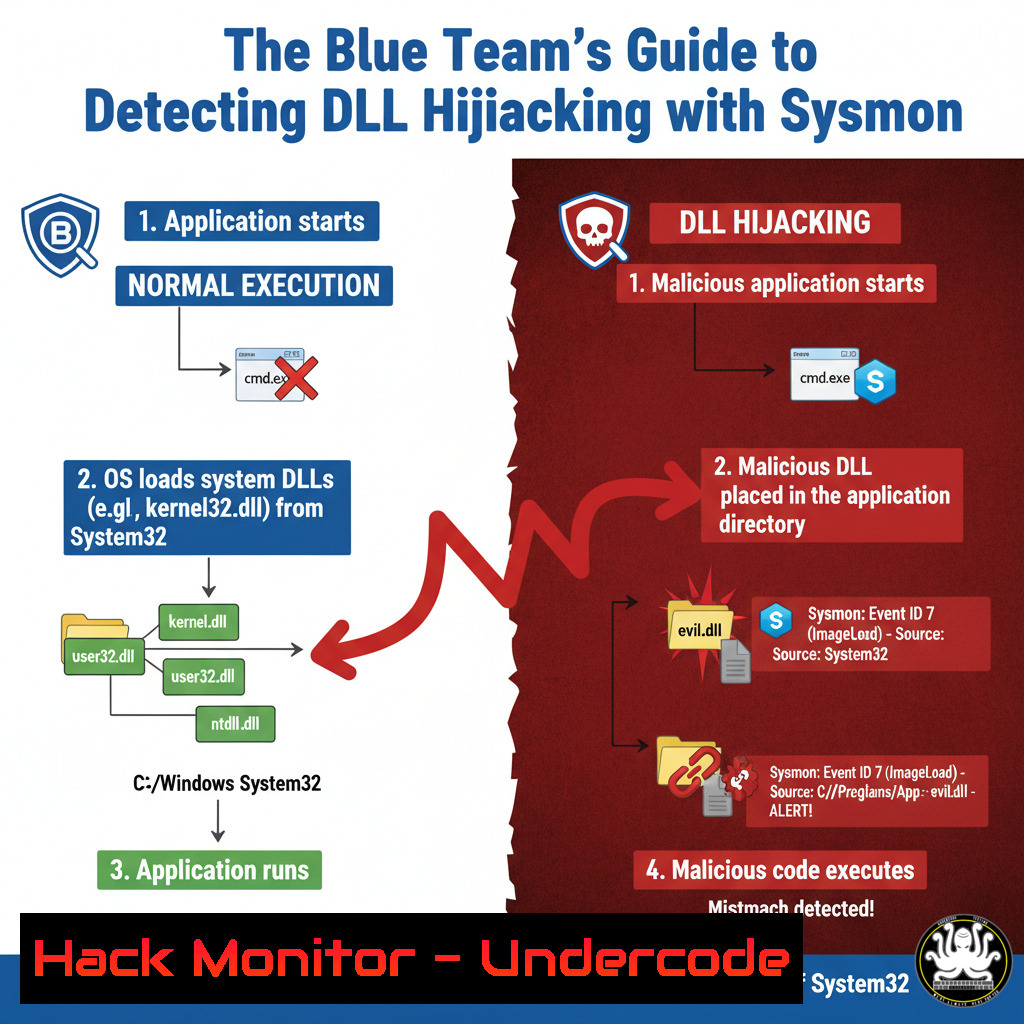
Introduction:
DLL hijacking remains a pervasive technique in the attacker’s arsenal, exploiting the Windows operating system’s search order to load malicious code. By leveraging Sysmon’s detailed telemetry, specifically Event ID 7, security teams can move beyond basic EDR alerts and build robust detections for this stealthy attack vector. This guide provides the technical depth needed to operationalize these detections, transforming raw logs into actionable security intelligence.
Learning Objectives:
- Understand the mechanics of DLL hijacking and the critical role of Sysmon Event ID 7.
- Learn to configure Sysmon for maximum visibility into module loading behavior.
- Develop and implement detection rules based on key Indicators of Compromise (IOCs).
You Should Know:
1. Configuring Sysmon for Full Module Load Logging
By default, Sysmon may not log all module loads. Capturing Event ID 7 for every process is crucial for effective detection.
Verified Command/Configuration:
<!-- Add this rule to your Sysmon configuration file (e.g., sysmonconfig.xml) within the <EventFiltering> section -->
<RuleGroup name="" groupRelation="or">
<ImageLoad onmatch="exclude">
<Image condition="is">C:\Windows\System32\sysmon.exe</Image>
</ImageLoad>
</RuleGroup>
Step-by-Step Guide:
This configuration tells Sysmon to log every DLL load (ImageLoad) for all processes except for Sysmon itself. The exclusion for `sysmon.exe` prevents excessive noise from the monitoring tool. To apply this configuration, save the XML snippet to a file and install or reconfigure Sysmon using the command: Sysmon.exe -c your_config.xml. This provides the foundational telemetry needed for all subsequent detections.
2. Detecting Executables in Writable Folders
A primary IOC is an executable running from a user-writable directory like `C:\Users\Public` or C:\Temp, which is atypical for legitimate system software.
Verified Command (Splunk SPL):
index=windows EventID=7
| search ImageLoaded IN ("\Users\", "\Temp\", "\Windows\Temp\")
| stats values(ImageLoaded) as Loaded_DLLs by ProcessId, Image
| where like(Image, "%\Users\%") OR like(Image, "%\Temp\%")
| table Image, Loaded_DLLs
Step-by-Step Guide:
This Splunk query first filters for Sysmon Event ID 7. It then searches for DLLs (ImageLoaded) that were loaded from user or temporary directories. The `stats` command aggregates all DLLs loaded by each unique process (Image). The critical `where` clause filters the results to show only processes that themselves are running from a user-writable or temporary directory, a strong signal of a hijacking attempt.
3. Identifying DLLs Loaded from Unexpected Locations
Malware often places a malicious DLL in the same directory as a legitimate executable. Detecting when a system process loads a DLL from its own application directory instead of `System32` is key.
Verified Command (Sigma Rule – YAML):
title: DLL Load from Application Directory by System Process
logsource:
product: windows
service: sysmon
detection:
selection:
EventID: 7
Image|endswith:
- '\services.exe'
- '\svchost.exe'
- '\lsass.exe'
ImageLoaded|contains:
- '\Microsoft Office\'
- '\Adobe\'
- '\Notepad++\'
condition: selection
falsepositives:
- Legitimate software updates
level: high
Step-by-Step Guide:
This Sigma rule detects a critical anomaly: a core Windows process (like services.exe) loading a DLL from an application directory (like \Microsoft Office\). This is highly suspicious because these system processes should only load DLLs from trusted system paths. Deploy this rule in your SIEM by converting it to the native query language (e.g., Splunk, Elasticsearch). Tune the `Image` and `ImageLoaded` paths based on your environment.
- Hunting for Unsigned DLLs Loaded by Signed Processes
Legitimate, signed Windows executables should typically load other signed DLLs. The presence of an unsigned DLL is a major red flag.
Verified Command (PowerShell for Offline Analysis):
 Get Sysmon Event ID 7 logs from the last 24 hours
$Events = Get-WinEvent -FilterHashtable @{LogName='Microsoft-Windows-Sysmon/Operational'; ID=7; StartTime=(Get-Date).AddHours(-24)}
 Create a collection for results
$Results = @()
foreach ($Event in $Events) {
$Xml = [bash]$Event.ToXml()
 Check if the loading process is signed but the loaded DLL is not
if ( ($Xml.Event.EventData.Data[bash].'text' -eq "Signed") -and ($Xml.Event.EventData.Data[bash].'text' -eq "Not signed") ) {
$Results += New-Object PSObject -Property @{
Process = $Xml.Event.EventData.Data[bash].'text'
DLL = $Xml.Event.EventData.Data[bash].'text'
ProcessSignature = $Xml.Event.EventData.Data[bash].'text'
DLLSignature = $Xml.Event.EventData.Data[bash].'text'
}
}
}
$Results | Format-Table -AutoSize
Step-by-Step Guide:
This PowerShell script parses the Sysmon event log. It iterates through each Event ID 7 and uses the event’s XML data to check the `Signature` and `SignatureStatus` fields. It filters for events where the loading process is “Signed” but the loaded DLL is “Not signed”. This discrepancy is a powerful IOC. Run this script on endpoints where you suspect compromise or integrate the logic into a real-time SIEM alert.
5. Building a Comprehensive Detection Analytic
Combining multiple IOCs creates a high-fidelity detection with fewer false positives.
Verified Command (Elasticsearch Query – Lucene):
{
"query": {
"bool": {
"must": [
{ "match": { "event.code": "7" } }
],
"filter": [
{
"bool": {
"should": [
{ "wildcard": { "process.working_directory": "\\Users\\" } },
{ "wildcard": { "file.path": "\\Temp\\" } }
]
}
},
{ "match": { "dll.code_signature.status": "NOT_SIGNED" } }
]
}
}
}
Step-by-Step Guide:
This Elasticsearch query is a composite detection. It triggers an alert for a Sysmon Event ID 7 where: 1) The process is running from a user directory OR the DLL is loaded from a Temp directory, AND 2) The loaded DLL is unsigned. This multi-factor approach significantly increases confidence in the alert. Implement this query in your Elastic Stack’s detection rules engine (e.g., Elastic Security) for continuous monitoring.
6. Mitigating the Attack Vector with Audit Policies
While detection is critical, mitigation through application control strengthens your defense.
Verified Command (Windows Command Line):
 Enable Windows Defender Application Control (WDAC) in Audit Mode
powershell -Command "Set-RuleOption -FilePath C:\Windows\System32\CodeIntegrity\SiPolicy.p7b -Option 3"
 Reboot to apply
shutdown /r /t 0
Step-by-Step Guide:
This command uses PowerShell to configure a WDAC policy in audit mode. This does not block anything initially but logs what would be blocked. This allows you to test the policy’s impact before enforcement. The policy can be configured to only allow executables and DLLs from specified, trusted locations (like C:\Windows\System32), directly preventing DLL hijacking. After testing, change the rule option to enforce the policy.
What Undercode Say:
- Visibility is Paramount: The battle against techniques like DLL hijacking is won or lost based on endpoint visibility. Standard EDR telemetry is often insufficient; a properly configured Sysmon is non-negotiable for a mature security program.
- Context is King: Individually, IOCs like an unsigned DLL can be noisy. The true power lies in correlating multiple weak signals—process path, DLL path, and signature status—to create a high-fidelity, actionable alert that reduces analyst fatigue.
The analysis presented in the source post correctly identifies the core IOCs, but the operationalization gap is where most teams fail. Simply knowing what to look for is different from having the parsed, correlated, and alerted telemetry flowing into your SOC. The technical depth required to tune Sysmon, write effective queries, and manage potential false positives (e.g., from software installers) is substantial. This moves beyond a simple checklist and into the realm of true detection engineering. Furthermore, while Sysmon is powerful, it’s a single source of truth. Integrating these detections with process execution logs (Event ID 4688) and network connections can provide the full attack chain context needed for rapid response.
Prediction:
The effectiveness of DLL hijacking will ensure its continued use by adversaries of all levels. However, the future of this technique lies in “living-off-the-land” (LOL) advancements. We predict a rise in hijacking DLLs used by legitimate, signed third-party software (e.g., security tools, management agents, and graphic drivers) to blend in with normal activity more effectively. Detection will consequently shift from simple path and signature analysis towards behavioral analytics and machine learning models that baseline normal DLL load sequences for specific applications, flagging deviations even when all components are seemingly legitimate and signed. The defensive focus will expand from just the operating system to the entire software supply chain installed on the endpoint.
🎯Let’s Practice For Free:
IT/Security Reporter URL:
Reported By: Patrick Bareiss – Hackers Feeds
Extra Hub: Undercode MoN
Basic Verification: Pass ✅


