Listen to this Post
Introduction:
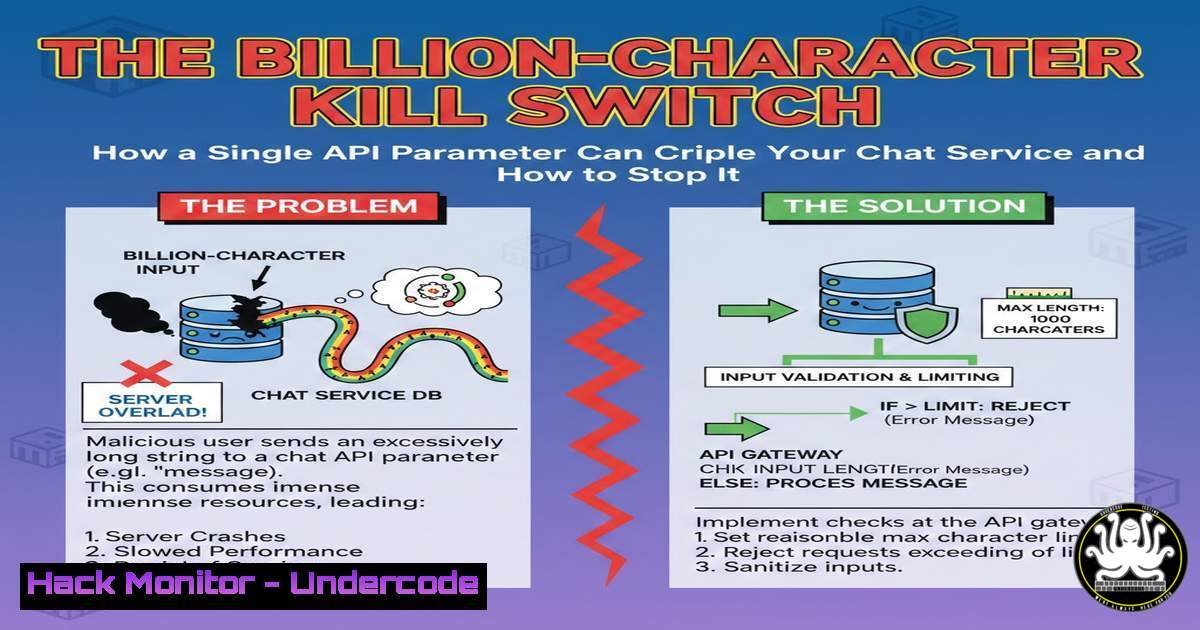
A recent bug bounty disclosure reveals a critical yet overlooked attack vector: denial-of-service via excessive input in API parameters. By submitting a chat name containing millions of characters, an attacker can exhaust server resources, rendering the service inaccessible. This incident underscores the perpetual threat of insufficient input validation and resource limitation in modern web applications.
Learning Objectives:
- Understand the mechanics of resource exhaustion attacks through parameter pollution.
- Learn to test and identify endpoints vulnerable to excessive input payloads.
- Implement robust server-side validation and hardening techniques to mitigate such threats.
You Should Know:
1. Anatomy of the Billion-Character DoS Attack
This attack exploits a simple `PUT` API endpoint designed to update a resource, such as a chat name. The vulnerability lies in the server’s failure to validate the length and size of the incoming JSON payload before processing it.
Step-by-step guide explaining what this does and how to use it.
1. Reconnaissance: Identify an endpoint that modifies data (e.g., PUT /api/chat/{id}).
2. Craft the Malicious Request: Using a tool like `curl` or Burp Suite Repeater, send a request with a JSON body containing an extremely long string for a parameter.
 Linux/macOS curl example
curl -X PUT 'https://example.com/api/chat/12345' \
-H 'Content-Type: application/json' \
-d '{"chat":"'$(python3 -c 'print("A"10000000)')'"}'
This command generates a string of 10 million “A” characters and sends it as the `chat` value.
3. Observe Impact: The server may attempt to allocate memory for this string, consume excessive CPU to parse it, or crash entirely, causing a DoS for other users.
2. Beyond the Chat: Identifying Vulnerable Endpoints
This vulnerability pattern is not unique to chat applications. Any endpoint accepting data (POST, PUT, PATCH) is potentially at risk if it handles strings, arrays, or nested objects without strict limits.
Step-by-step guide explaining what this does and how to use it.
1. Map the API: Use tools like `gobuster` or `ffuf` to discover endpoints.
 Directory/Endpoint brute-forcing
ffuf -w /path/to/wordlist.txt -u https://example.com/api/FUZZ -mc 200,201,400
2. Analyze for State-Changing Actions: Focus on endpoints that update or create data.
3. Fuzz Parameters: Systematically test each parameter with oversized payloads. Use Burp Suite’s Intruder with a payload generator or a custom Python script.
 Simple Python fuzzing script
import requests
import json

url = "https://example.com/api/profile/update"
for size in [1000, 10000, 100000, 1000000]:
payload = {"bio": "X"  size}
response = requests.post(url, json=payload)
print(f"Size: {size}, Status: {response.status_code}, Time: {response.elapsed.total_seconds()}s")
if response.elapsed.total_seconds() > 5:  Significant delay
print(f"Potential vulnerability at payload size {size}")
3. Server-Side Armoring: Input Validation & Rate Limiting
The primary defense is to enforce strict limits before data is processed by your application logic.
Step-by-step guide explaining what this does and how to use it.
1. Application Framework Validation (Node.js/Express example):
const express = require('express');
const app = express();
app.use(express.json({ limit: '10kb' })); // Global JSON payload limit

// Route-specific validation with express-validator
const { body } = require('express-validator');
app.put('/api/chat/:id', [
body('chat').isString().isLength({ max: 200 }) // Enforce max length
], (req, res) => {
// Controller logic only runs if validation passes
});
2. Web Server Configuration (Nginx): Add client body size limits.
 In nginx.conf or site configuration
http {
client_max_body_size 10k;  Limits entire request body
}
3. Implement Rate Limiting: Use middleware like `express-rate-limit` or Nginx’s `ngx_http_limit_req_module` to restrict the number of requests from a single IP, making automated attacks harder.
4. Advanced Mitigation: Web Application Firewall (WAF) Rules
A WAF can provide an additional layer of defense by inspecting and blocking malicious payloads before they reach your application.
Step-by-step guide explaining what this does and how to use it.
1. Deploy a WAF: Use cloud-native solutions (AWS WAF, Cloudflare) or open-source options (ModSecurity).
2. Create a Rule for Excessive Size: Block requests where the argument/value length exceeds a sane threshold.
 ModSecurity Rule (Simplified Example)
SecRule ARGS "@gt 1000" "id:1001,deny,status:400,msg:'Argument value too large'"
3. Test the Rule: Ensure it blocks the billion-character attack while allowing legitimate traffic.
5. Hardening Cloud and Container Environments
In cloud-native deployments, resource limits are crucial to prevent a single compromised pod or instance from bringing down the entire system.
Step-by-step guide explaining what this does and how to use it.
1. Kubernetes Resource Limits: Define limits for memory and CPU in your pod specifications.
 pod.yaml snippet
resources:
limits:
memory: "128Mi"
cpu: "500m"
2. Cloud Load Balancer Timeouts: Configure your load balancer (e.g., AWS ALB, GCP Cloud Load Balancing) to drop connections that exceed a specified request processing time, stopping long-running attacks from occupying connections.
3. Auto-Scaling Policies: Configure auto-scaling based on healthy hosts rather than just CPU, so a DoS-induced CPU spike doesn’t lead to scaling out compromised instances.
What Undercode Say:
- The Simplicity is the Threat: The most dangerous vulnerabilities often stem from basic oversights, not complex logic flaws. Input validation remains the most critical, yet frequently neglected, security control.
- Defense in Depth is Non-Negotiable: Relying solely on client-side validation or framework defaults is insufficient. A multi-layered strategy combining application logic, server configuration, and network-level controls (WAF, Rate Limiting) is essential to create resilient systems.
This incident is a stark reminder that in the race to deploy features, fundamental security hygiene can be forgotten. The vulnerability did not require advanced exploitation skills; it merely required a tester to ask, “What happens if I send too much data?” The future of such attacks points towards automation, where bots systematically probe every API endpoint for this and similar weaknesses, making proactive hardening not just best practice, but a business imperative.
Prediction:
As APIs continue to become the primary backbone of digital interaction, automated “billion-character” and resource exhaustion attacks will see a significant rise. Attack tools will increasingly incorporate sophisticated fuzzing for payload size and nested depth, moving beyond simple strings to complex JSON and GraphQL structures. The mitigation will shift left, with API gateway providers and development frameworks baking in strict, sensible defaults for payload size and computation time, making the secure configuration the path of least resistance for developers.
▶️ Related Video (70% Match):
🎯Let’s Practice For Free:
IT/Security Reporter URL:
Reported By: Shivangmauryaa Bounty – Hackers Feeds
Extra Hub: Undercode MoN
Basic Verification: Pass ✅


