Listen to this Post
Introduction:
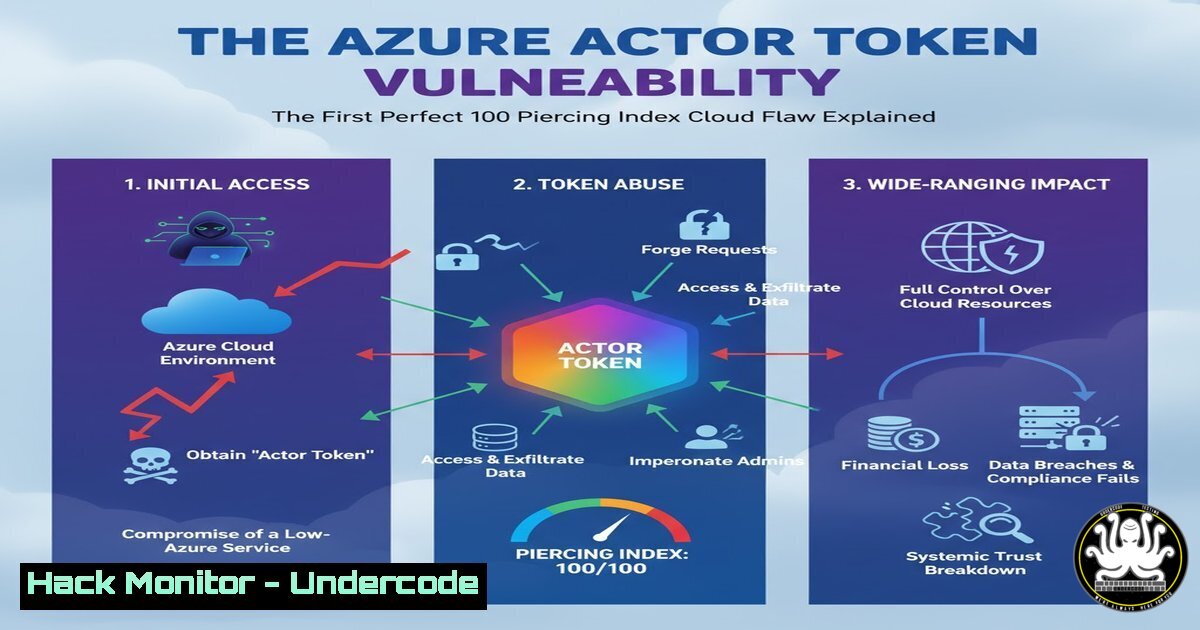
A recently disclosed vulnerability in Microsoft Azure, dubbed the “Actor Token” flaw, has achieved a historic and alarming distinction: the first public cloud vulnerability to score a perfect 10.0 on the Piercing Index. This metric, developed by security researchers, evaluates the severity of cloud vulnerabilities based on their stealth, impact, and scope. The Actor Token vulnerability represents a critical failure in Azure’s Identity and Access Management (IAM) stack, allowing for widespread privilege escalation and tenant takeover.
Learning Objectives:
- Understand the core mechanics of the Actor Token vulnerability and its impact on Azure IAM.
- Learn the essential commands and techniques to audit your Azure environment for signs of exploitation.
- Implement hardening measures and monitoring strategies to mitigate this and similar identity-based threats.
You Should Know:
1. Understanding the Piercing Index
The Piercing Index is a framework for rating cloud vulnerabilities beyond the traditional CVSS score. It focuses on cloud-specific factors like detection difficulty, access requirements (e.g., no user interaction), and the scope of impact (e.g., cross-tenant access). A 10.0 score indicates a vulnerability that is trivially exploitable, nearly impossible to detect, and can lead to a full compromise of the cloud tenant.
2. Enumerating Azure Service Principals and Permissions
A key step in assessing your exposure is to inventory all service principals and their assigned roles. The following Azure PowerShell and CLI commands are essential for this audit.
PowerShell:
 Connect to Azure AD
Connect-AzureAD

Get all Service Principals
Get-AzureADServicePrincipal | Select-Object DisplayName, AppId, ObjectId

Get a specific service principal's App Roles
$sp = Get-AzureADServicePrincipal -Filter "DisplayName eq 'Your-App-Name'"
Get-AzureADServiceAppRoleAssignment -ObjectId $sp.ObjectId
Azure CLI:
 List all service principals
az ad sp list --all --query "[].{DisplayName:displayName, AppId:appId, ObjectId:objectId}"

List role assignments for a specific subscription
az role assignment list --subscription <subscription-id> --include-inherited
Step-by-step guide: These commands allow you to list all application identities (service principals) in your Azure Active Directory. The PowerShell cmdlets are part of the AzureAD module, which provides deep integration with the directory service. The Azure CLI commands offer a cross-platform method to achieve similar results. Regularly running these audits helps you identify over-privileged service principals that could be exploited via vulnerabilities like Actor Token.
3. Auditing for Suspicious Token Sign-In Activity
Monitoring sign-in logs for anomalous token-based authentication is critical for detecting exploitation attempts.
PowerShell (using MSGraph):
 Install the MSGraph module if not already present
Install-Module Microsoft.Graph

Connect to MSGraph with the required scope
Connect-MgGraph -Scopes "AuditLog.Read.All"

Fetch sign-in logs for service principals (non-user identities)
Get-MgAuditLogSignIn -Filter "appDisplayName ne null" -All | Where-Object {$_.TokenIssuerType -eq "AzureAD"}
Step-by-step guide: This script connects to the Microsoft Graph API, which is the modern, unified gateway to Microsoft 365 and Azure data. The filter `appDisplayName ne null` focuses the query on sign-in attempts made by applications and service principals, rather than human users. By reviewing these logs, particularly for tokens issued by “AzureAD,” you can spot unauthorized application authentications that may indicate an attacker is using a stolen or forged token.
4. Hardening Service Principal Configuration
Reduce your attack surface by ensuring service principals follow the principle of least privilege. Use these commands to inspect and remove unnecessary credentials.
Azure CLI:
 List password-based credentials for a service principal
az ad sp credential list --id <service-principal-object-id>

Remove a password credential
az ad sp credential delete --id <service-principal-object-id> --key-id <key-id>

List federated credentials (e.g., for GitHub Actions)
az ad app federated-credential list --id <application-object-id>
Step-by-step guide: Long-lived password credentials are a significant security risk. These commands allow you to list and delete password-based credentials for a service principal, forcing the use of more secure authentication methods like certificates or federated identity. Federated credentials, used in workflows like GitHub Actions, are more secure as they do not require storing secrets in Azure.
5. Implementing Conditional Access for Service Principals
While traditional Conditional Access policies target users, you can create policies to block legacy authentication or require specific locations for service principals.
PowerShell (MSGraph):
 This is a conceptual example. Creating CA policies via code is complex and often done via the portal.
 However, you can check for risky sign-ins programmatically.

Get risky service principals (requires Azure AD P1/P2)
Get-MgIdentityProtectionRiskyServicePrincipal -All
Step-by-step guide: Directly scripting Conditional Access policies for service principals is not straightforward and is typically managed via the Azure Portal. However, you can leverage the Microsoft Graph API to query Risky Service Principals if you have the appropriate Azure AD tier. This helps identify service identities that have exhibited anomalous behavior, allowing you to manually intervene by revoking their credentials or permissions.
- Leveraging Microsoft Defender for Cloud for IAM Posture
Microsoft Defender for Cloud provides recommendations for hardening your IAM posture, which can help mitigate the underlying weaknesses the Actor Token exploits.
Azure CLI & PowerShell:
 Get security recommendations from Defender for Cloud
az security recommendation list --query "[?contains(impactedField, 'IAM')].{Name:recommendationTypeName, State:state}"
 Using the Az.Security module
Get-AzSecurityRecommendation | Where-Object {$_.ImpactedField -eq "IAM"}
Step-by-step guide: These commands query the security recommendations provided by Microsoft Defender for Cloud, filtering for those related to Identity and Access Management (IAM). Recommendations might include “Service principals should not have owner permissions” or “MFA should be enabled on accounts with owner permissions.” Addressing these recommendations systematically hardens your environment against a wide range of identity-based attacks.
7. Proactive Threat Hunting with KQL
For advanced monitoring, you can use Kusto Query Language (KQL) in Azure Sentinel/Microsoft Defender to hunt for activity matching the Actor Token exploitation pattern.
Kusto Query (for Azure Sentinel/Defender):
SigninLogs
| where AppDisplayName != "" and ResultType == "0"
| where TokenIssuerType has "AzureAD"
| project TimeGenerated, AppDisplayName, IPAddress, Location, ResourceDisplayName, CorrelationId
| sort by TimeGenerated desc
Step-by-step guide: This KQL query searches the SigninLogs table for successful sign-ins (ResultType == "0") performed by applications (AppDisplayName != "") using Azure AD-issued tokens. By analyzing the results, particularly from unexpected IP addresses or locations, a security analyst can identify potentially malicious application sign-ins that warrant further investigation, potentially catching an Actor Token attack in progress.
What Undercode Say:
- The perfect 10.0 Piercing Index score is a watershed moment for cloud security, proving that single vulnerabilities can now lead to total, undetectable tenant compromise.
- Microsoft’s initial downplaying of the flaw exacerbates the “trust deficit” in cloud providers, forcing organizations to adopt a zero-trust stance not just towards users, but towards the cloud infrastructure itself.
The Actor Token vulnerability is not an isolated bug but a symptom of the extreme complexity inherent in modern cloud IAM systems. As Mauricio Ortiz noted, the interoperability of multiple independent teams developing features with a narrow view creates a fertile ground for hidden critical flaws. This event signals a necessary pivot in cloud security strategy. Organizations can no longer blindly trust the provider’s IAM layer. Proactive, continuous auditing of service principals, permissions, and sign-in logs must become a non-negotiable standard operating procedure. The white-hat discovery of this flaw is fortunate, but it serves as a stark warning that state-sponsored actors are undoubtedly hunting for similar “gems” to exploit silently at a global scale.
Prediction:
The discovery of the Actor Token vulnerability will catalyze a two-pronged evolution in cloud security. Offensively, state-sponsored and advanced criminal actors will intensify their focus on finding similar logic flaws in the IAM systems of all major cloud providers, leading to a new class of cloud-native attacks. Defensively, this will force the rapid adoption of automated, code-based security posture management tools and mandate more rigorous, continuous auditing of cloud identities, moving beyond compliance checklists to active threat hunting within IAM telemetry. Cloud providers will be pressured to increase the transparency and speed of their vulnerability communications, as customer trust becomes directly tied to security disclosure practices.
🎯Let’s Practice For Free:
IT/Security Reporter URL:
Reported By: Parisel Azure – Hackers Feeds
Extra Hub: Undercode MoN
Basic Verification: Pass ✅


